> For the complete documentation index, see [llms.txt](https://docs.buildings.ability.abb/collection/llms.txt). Markdown versions of documentation pages are available by appending `.md` to page URLs; this page is available as [Markdown](https://docs.buildings.ability.abb/collection/academy/edge-nodes/edgenodes-in-abb-buildingpro/set-up-control-edge/eliona-modules-for-niagara.md).
# BuildingPro Suites Modules for Niagara
The BuildingPro Suites module was developed to connect Niagara to BuildingPro Suites. This enables interaction and data exchange between Niagara and BuildingPro Suites in both directions.
## Functionality
The module enables the transfer of data from Niagara components to BuildingPro Suites assets. It sends the value of a configurable slot (standard: `out`) and, if available, its status to BuildingPro Suites. Alarms can also be forwarded directly to BuildingPro Suites. Optionally, the module can automatically create and link assets in BuildingPro Suites and assign them the corresponding asset types.
Conversely, the module can receive data from BuildingPro Suites and write it to a configurable slot (standard: `set`) of a Niagara component. Alarm acknowledgments from BuildingPro Suites are supported, so that status updates can be synchronized within the Niagara alarm console.
#### Communication
Communication between Niagara and BuildingPro Suites uses the BuildingPro Suites REST API and WebSockets, which are provided by BuildingPro Suites, with data being transmitted in JSON format. All communication is encrypted via HTTPS.
***
## Quick Start Guide
#### Prerequisites
* Access to an BuildingPro Suites instance (username and password)
* Login data for the BuildingPro Suites API (URL and token with read-write permission)
* Access to a Niagara station (see compatibility)
#### Installation
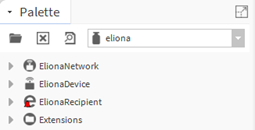
To install the BuildingPro Suites module, copy `eliona-rt.jar` and `eliona-wb.jar` to the `modules` folder of your local Niagara installation or use the **Software Manager** under Platform to install the module. Complete the installation by restarting the Workplace. You can now use components in the BuildingPro Suites palette.
#### Configuration
* Open the **Niagara Workbench** and select the **BuildingPro Suites Palette**.
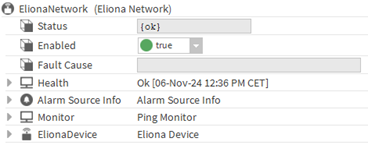
* Create an **BuildingPro Suites Network** with an **BuildingPro Suites Device** by dragging and dropping them from the palette under **Configuration > Drivers** in the station.
* Open the **BuildingPro Suites Device** and configure the BuildingPro Suites API with URL and Token. Specify the BuildingPro Suites Tenant ID you want to connect to.
* After configuration, the device's status should be `OK`. If this is the case, save the station.
#### Display status information in BuildingPro Suites
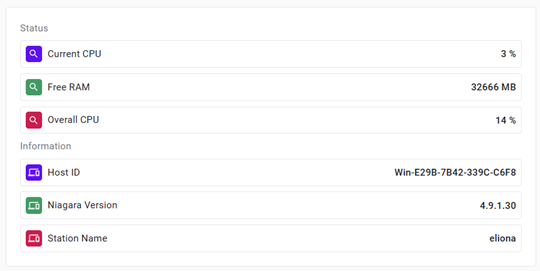
* After configuration, the module creates a **Niagara Station Asset**, which by default automatically retrieves technical information every 5 minutes.
* This asset also monitors the station's status as a live signal: `Active`, if the station is functioning normally, and `Inactive`, if no activity is detected after 10 minutes. This status can be alarmed via **Validity Monitoring**.
#### Send data to BuildingPro Suites
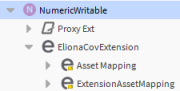
* Select the Niagara data point you want to synchronize with BuildingPro Suites and add an **BuildingPro Suites Extension** (e.g. `ElionaCovExtension`) by dragging and dropping it from the **BuildingPro Suites palette**. Open the extension and activate it.
* As soon as the extension is activated, it automatically creates an asset in Niagara and in BuildingPro Suites. Open the **Asset Mapping** in the extension and click on the **Asset** link. This navigates to the asset created in Niagara.
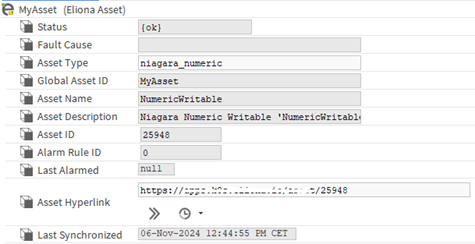
* In the Niagara asset, you will find all information about the asset and the **Asset ID** of the BuildingPro Suites asset that was created. You can use the **Asset Hyperlink** to open the asset in BuildingPro Suites.
* If you open the BuildingPro Suites asset, the current value of the data point is assigned to the **Value** attribute in BuildingPro Suites. From this point on, every change to the data point is sent to this attribute. You can monitor this by checking the **Last Synchronized** timestamp in the Niagara asset view.
#### Receive data from BuildingPro Suites
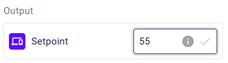
* After you have created and assigned the assets in Niagara and BuildingPro Suites, you can send values from BuildingPro Suites to the Niagara data point. To do this, add a new value to the **Setpoint** attribute.
* The value is sent by default to the `fallback` slot in Niagara using the **Set** action.
#### Send alarms to BuildingPro Suites
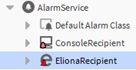
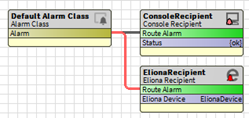
* To synchronize alarms, first route the desired alarm classes. To do this, add the **BuildingPro Suites Recipient** to the **Alarm Service** by dragging and dropping it from the **BuildingPro Suites Palette**.
* Now, link the alarm class to the **Route Alarm** slot.
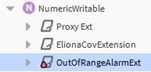
* As soon as the link is established, all alarms for the specified alarm class are sent to BuildingPro Suites. You can test this by dragging an **Niagara Alarm Extension** (e.g. `OutOfRangeAlarmExtension`) from the alarm palette and placing it under the Niagara data point you want to monitor.
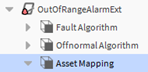
* Configure the extension, and when the first alarm is triggered, the **BuildingPro Suites Recipient** creates an **Asset Mapping** similar to the one mentioned above under the alarm extension. If the asset does not exist, it is automatically created in both Niagara and BuildingPro Suites.
* Now the alarm can also be found in BuildingPro Suites. Acknowledging the alarm can be done either in BuildingPro Suites or Niagara, and the status is synchronized between them.
#### Asset Overview
* All assets that are assigned to BuildingPro Suites can be found in the **Assets** component of the **BuildingPro Suites Device**.
* Here you can monitor all asset information, reassign assets, and, if necessary, re-synchronize all assets or individual assets with BuildingPro Suites.
#### Customizing n:1 Mapping
You can set up more complex relationships between Niagara data points and BuildingPro Suites assets. A common scenario is the assignment of multiple data points to a single asset with different attributes in BuildingPro Suites.
* Select or add another Niagara data point that you want to synchronize with BuildingPro Suites. Then attach an **BuildingPro Suites extension** (e.g. `ElionaCovExtension`) by dragging and dropping it from the **BuildingPro Suites palette**.
* Open the extension and navigate to **Asset Mapping**. Here you can override the standard **Global Asset ID** with an already existing ID. In this way, you direct different asset mappings in Niagara to the same asset in BuildingPro Suites, for example, by using the existing `/BuildingPro Suites/NumericWriteable` as a shared **Global Asset ID**.
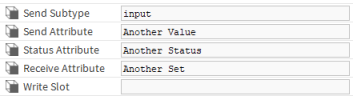
* Configure different attribute names for sending and receiving data between Niagara and BuildingPro Suites. In this case, the standard name `Value` is changed to `Another Value`.
* When you activate the extension, the mapping automatically recognizes the existing asset in Niagara and links with it. If **Enable Upserts** is enabled in **BuildingPro Suites Assets**, all new attributes (e.g. `Another Value`) are automatically created in the corresponding asset type in BuildingPro Suites.
* If you now open the BuildingPro Suites asset, the current values of the two data points are assigned to their respective attributes in BuildingPro Suites. From this point on, all changes to the data points are sent to and received from these attributes.
#### Customizing 1:n Mapping
In this scenario, a single Niagara data point is assigned to multiple BuildingPro Suites assets, optionally with different attributes.
* For an existing Niagara data point, add another **Extension Asset Mapping** to the current **BuildingPro Suites extension** (e.g. `ElionaCovExtension`) by dragging and dropping it from the **BuildingPro Suites palette**.
* In the new Asset Mapping, override the standard **Global Asset ID**. For example, set it to `/BuildingPro Suites/NumericWriteableCopy` instead of `/BuildingPro Suites/NumericWriteable`. As soon as you save the Asset Mapping, the new asset is automatically created in Niagara and in BuildingPro Suites (if **Enable Upserts** is activated). From this point on, all changes to the data point are sent to and received from both assets in BuildingPro Suites.
* For receiving data from BuildingPro Suites, you may want to use a different write slot. For example, you could use the standard `Set` (Fallback) slot and additionally set the `Override` slot. You achieve this by combining the write slot with the asset attribute in the **Asset Mapping**.
* Now you can set an override value in BuildingPro Suites that updates the corresponding data point in Niagara.
***
## Component Overview
#### BuildingPro Suites Network
The **BuildingPro Suites Network** is the root component that groups all **BuildingPro Suites Devices** within a Niagara station.
#### BuildingPro Suites Device
Each **BuildingPro Suites Device** connects an BuildingPro Suites instance and a specific tenant within that instance. This device shares its BuildingPro Suites connection with all subordinate components, such as the **BuildingPro Suites Sender**, **BuildingPro Suites Receiver**, **BuildingPro Suites Assets** container, and **BuildingPro Suites Alarm Acknowledger**. The **BuildingPro Suites Device** is also referenced by the **BuildingPro Suites Recipient**.
#### BuildingPro Suites Sender
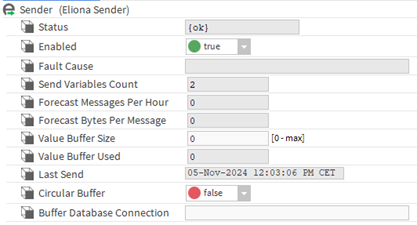
The **BuildingPro Suites Sender** is responsible for transferring values from Niagara data points to BuildingPro Suites. It is a child of the **BuildingPro Suites Device** and uses the assigned BuildingPro Suites instance and tenant. The sender can be configured with a value buffer to handle scenarios where the connection to BuildingPro Suites is temporarily unavailable.
#### BuildingPro Suites Receiver
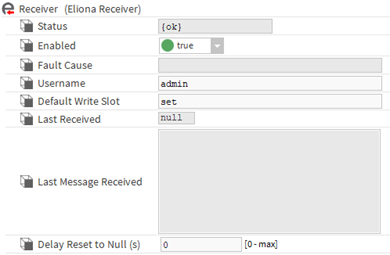
The **BuildingPro Suites Receiver** receives data from BuildingPro Suites and writes it to Niagara data points. It is a child of the **BuildingPro Suites Device** and uses the same BuildingPro Suites instance and tenant. The receiver allows the configuration of the data point's write slot and specifies the Niagara username for the operation.
#### BuildingPro Suites Assets
The **BuildingPro Suites Assets** container groups and synchronizes assets with BuildingPro Suites. It is a child of the **BuildingPro Suites Device** and uses the connected BuildingPro Suites instance and tenant. This container can automatically create or update assets in BuildingPro Suites during synchronization. It also organizes all asset components that correspond to real assets in BuildingPro Suites.
#### BuildingPro Suites Asset
An **BuildingPro Suites Asset** component represents a single asset in BuildingPro Suites. This component is a child of the **BuildingPro Suites Assets** container and contains a unique Global Asset ID. During synchronization, this Global Asset ID and the BuildingPro Suites Tenant (from the parent **BuildingPro Suites Device**) determine the asset ID in BuildingPro Suites, which is then stored in the asset component. Attributes such as asset type, name, and description are also synchronized. If the automatic creation or updating is enabled in the **BuildingPro Suites Assets** container, assets are created or updated in BuildingPro Suites; otherwise, the component references an existing asset based on its ID.
#### BuildingPro Suites Extension
The **BuildingPro Suites Extension** monitors changes to Niagara data point values and triggers the data transfer to BuildingPro Suites via the **BuildingPro Suites Sender**. This extension is attached to a Niagara data point and references an **BuildingPro Suites Device** and uses the connected BuildingPro Suites instance and tenant.
#### BuildingPro Suites Asset Mapping
The **BuildingPro Suites Asset Mapping** creates a link between Niagara data points and attributes of an asset in BuildingPro Suites. It is a child of either an **BuildingPro Suites Extension** or an **Alarm Extension** in Niagara, which are themselves attached to Niagara data points. The mapping defines a Global Asset ID that allows the corresponding **BuildingPro Suites Asset** component to be referenced and created in Niagara. This component, in turn, links with the real asset in BuildingPro Suites by storing the asset ID after synchronization.
#### BuildingPro Suites Alarm Acknowledger
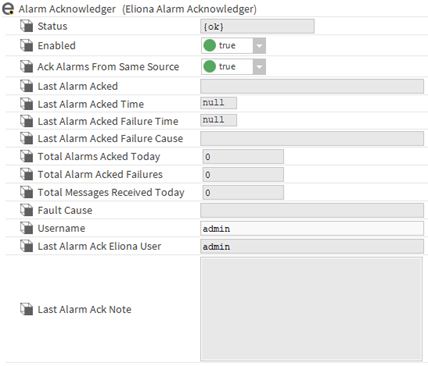
The **BuildingPro Suites Alarm Acknowledger** receives alarm acknowledgments from BuildingPro Suites and acknowledges the corresponding alarms in Niagara. It is a child of the **BuildingPro Suites Device** and uses the connected BuildingPro Suites instance and tenant. The acknowledger allows the configuration of the Niagara username for the acknowledgment operation.
#### BuildingPro Suites Recipient
The **BuildingPro Suites Recipient** forwards alarms from alarm classes in Niagara to BuildingPro Suites. It references an **BuildingPro Suites Device** and uses the connected BuildingPro Suites instance and tenant. The recipient can be configured with an alarm buffer to handle scenarios where the connection to BuildingPro Suites is temporarily unavailable.
#### BuildingPro Suites API Client
The **BuildingPro Suites API Client** enables direct communication with BuildingPro Suites via APIv2 (see [api.eliona.io](https://api.eliona.io)). It is typically used to perform a variety of operations such as reading, creating, updating, and deleting assets, alarms, and configurations in BuildingPro Suites. The client manages the authentication and connection settings and serves as a central interface for all API-driven interactions to ensure a reliable and secure integration between Niagara and BuildingPro Suites.
***
## Component Configuration
#### BuildingPro Suites Network
You can add the **BuildingPro Suites Network** as a child of the **Drivers** container in a Niagara station. This can be done by dragging it from the **BuildingPro Suites Palette** or by opening the **Driver Manager** and clicking the **New** button. Note that only one **BuildingPro Suites Network** is allowed per station.
#### BuildingPro Suites Device
The **BuildingPro Suites Device** can be added as a child of the **BuildingPro Suites Network**. You can add it by dragging it from the **BuildingPro Suites Palette**. Multiple **BuildingPro Suites Devices** can be created to represent different BuildingPro Suites instances or tenants.
| Setting | Description |
| -------------------- | --------------------------------------------------------------- |
| `Enabled` | Activates or deactivates the BuildingPro Suites Device |
| `APIv2 URL` | URL for the connection to the BuildingPro Suites APIv2 instance |
| `APIv2 Token` | Authorization token for access to the BuildingPro Suites APIv2 |
| `Tenant ID` | Tenant ID used for asset mapping and creation |
| `Connection Timeout` | Maximum time in seconds before a connection attempt expires |
**Enabled**
> Activates or deactivates the BuildingPro Suites Device. When activated, all associated components (e.g. Sender, Receiver) are operational.
**APIv2 URL**
> Specifies the URL of the BuildingPro Suites APIv2 instance to which to connect (e.g., `https://my.eliona.io/api/v2`). This should be provided by your BuildingPro Suites administrator.
**APIv2 Token**
> The authorization token required for access to the BuildingPro Suites APIv2. Make sure this token has both read and write permissions as needed. This should be provided by your BuildingPro Suites administrator.
**Tenant ID**
> Defines the BuildingPro Suites Tenant ID that is used for referencing assets. This ID must match the tenant configuration in BuildingPro Suites.
**Connection Timeout**
> Sets the maximum duration in seconds for a connection attempt to BuildingPro Suites. If the network latency is high, consider increasing this timeout. A typical value is around 5 seconds.
#### BuildingPro Suites Sender
The **BuildingPro Suites Sender** is automatically created as a child of the **BuildingPro Suites Device**.
| Field | Description |
| ----------------------------------- | ---------------------------------------------------------------- |
| `Enabled` | Activates or deactivates data transfer |
| `Value Buffer Size` | Sets the maximum size of the message buffer |
| `Circular Buffer` | Determines the buffer behavior when it is full |
| `Buffer Database Connection` | Configures external database connection for buffering |
| `Bulk Sending Interval` | Interval for grouping values for bulk sending |
| `Bulk Sending Limit` | Upper limit for grouping values for bulk sending |
| `Last Send` (Info) | Timestamp of the last successful data transfer |
| `Send Variables Count` (Info) | Number of data points currently being sent to BuildingPro Suites |
| `Forecast Messages Per Hour` (Info) | Estimated number of messages sent per hour |
| `Forecast Bytes Per Message` (Info) | Average size of each message in bytes |
| `Value Buffer Used` (Info) | Current number of messages stored in the buffer |
| `Last Send Count` | Number of values sent in the last bulk operation |
| `Current Send Thread Count` | Current number of simultaneous threads sending values |
| `Update Forecast` (Action) | Manually updates the forecast statistics |
| `Clear Value Buffer` (Action) | Deletes all messages currently stored in the buffer |
**Enabled**
> Activates or deactivates the BuildingPro Suites Sender. When activated, data is transferred to BuildingPro Suites; when deactivated, the transfer stops.
**Value Buffer Size**
> Specifies the maximum number of messages that the buffer can hold. Use **Forecast Messages Per Hour** and **Forecast Bytes Per Message** to estimate the ideal buffer size based on the expected data volume.
**Circular Buffer**
> Determines how the buffer handles new messages when it reaches its capacity:
>
> * **Enabled**: Overwrites the oldest messages with new ones when the buffer is full.
> * **Disabled**: Stops accepting new messages as soon as the buffer is full.
**Buffer Database Connection**
> Allows the use of an external H2 database for buffering. If left blank, an internal memory buffer is used by default.
>
> * **Embedded Buffer Mode**: Uses a database file managed by the driver (e.g. `jdbc:h2:C:/Users/username/Niagara4.9/stations/eliona/shared/values`). In Niagara, only the local shared directory is writable.
> * **Server Buffer Mode**: Connects to a server-managed H2 database (e.g. `jdbc:h2:tcp://localhost/C:/temp/values;user=sa;password=secret`).
#### Bulk Sending Interval
> Defines the time interval (in seconds) in which values are grouped before being sent in a bulk operation. The module collects values based on this interval and the set upper limit before sending them to BuildingPro Suites in parallel threads. If this value is set to `null`, no bulk operation is used.
#### Bulk Sending Limit
> Sets the maximum number of values that can be grouped and sent in a single bulk operation. As soon as either the **Bulk Send Interval** is reached or this limit is exceeded, the collected values are sent. Correctly setting this limit in combination with the interval contributes to efficient data transfer with minimal thread usage.
> **Note:** To optimize performance and avoid excessive parallel threads, the value for `Forecast Messages Per Hour` should be considered. The limit can be calculated using the following formula: `Forecast Messages Per Hour × 2 / 3600 / Interval` (where `×2` serves as a safety factor). By suitably adjusting this limit, you can prevent more than one thread from being used for sending.
**Last Send** (Info)
> Displays the timestamp of the last successful data transfer, useful for monitoring activity.
**Send Variables Count** (Info)
> Displays the current number of unique data points being transferred to BuildingPro Suites.
**Forecast Messages Per Hour** (Info)
> Estimates the number of messages sent per hour based on current activity. This value is updated every 10 seconds.
**Forecast Bytes Per Message** (Info)
> Displays the average size of each message in bytes, updated every 10 seconds.
**Value Buffer Used** (Info)
> Indicates the current number of messages stored in the buffer.
#### Last Send Count (Info)
> Displays the number of values that were sent in the last bulk operation. This helps to monitor the effectiveness of the current configuration for bulk sending.
#### Current Send Thread Count (Info)
> Displays the number of parallel threads currently being used to send values. Ideally, this value should not exceed one thread at a time to ensure optimal resource usage and system stability.
**Update Forecast** (Action)
> Manually updates the forecast statistics. These statistics are updated automatically every 10 seconds.
**Clear Value Buffer** (Action)
> Deletes all messages currently stored in the buffer.
#### BuildingPro Suites Receiver
The **BuildingPro Suites Receiver** is automatically created as a child of the **BuildingPro Suites Device**.
| Field | Description |
| ------------------------------ | ---------------------------------------------------- |
| `Enabled` | Activates or deactivates the Receiver |
| `Username` | Niagara user account that is used to write data |
| `Default Write Slot` | Target slot for writing if no priority is specified |
| `Delay Reset to Null` | Resets the value to null after the specified seconds |
| `Last Received` (Info) | Timestamp of the last received message |
| `Last Message Received` (Info) | Details of the last message received |
**Enabled**
> Activates or deactivates the BuildingPro Suites Receiver. When activated, data received from BuildingPro Suites is written to the specified Niagara data points.
**Username**
> Specifies the Niagara user account that is used to write values to data points. If not specified in the incoming message, this default user is used. The user must have permissions to execute actions or write to slots. Make sure the username is valid and has the necessary permissions.
**Default Write Slot**
> Defines the slot in the target data point to which the received value is written if no priority is specified. This can also be an action slot that triggers the action with the value as an argument.
**Delay Reset to Null**
> Sets the number of seconds after which the written value is reset to `null`. If a value greater than zero is set, the value is reset after the specified delay. This delay is used as a default if no delay is defined in the Asset Mapping.
**Last Received** (Info)
> Displays the timestamp of the last successful data reception from BuildingPro Suites.
**Last Message Received** (Info)
> Displays the last message received from BuildingPro Suites. This is mainly for debugging purposes and is hidden by default.
#### BuildingPro Suites Assets
The **BuildingPro Suites Assets** container is automatically created as a child of the **BuildingPro Suites Device**. It contains all **BuildingPro Suites Asset** components.
| Field | Description |
| ---------------------------- | ----------------------------------------------------------------------------- |
| `Upsert Enabled` | Activates the automatic creation and updating of assets in BuildingPro Suites |
| `Auto Save` | Automatically saves the station after assets have been changed |
| `Default Global Asset ID` | Sets a default pattern for the Global Asset ID |
| `Default Asset Name` | Sets a default pattern for asset names |
| `Default Asset Description` | Sets a default pattern for asset descriptions |
| `Default Send Attribute` | Sets the default attribute for sending data to BuildingPro Suites |
| `Default Status Attribute` | Sets the default status attribute for assets |
| `Default Receive Attribute` | Sets the default attribute for receiving data from BuildingPro Suites |
| `Default Alarm Attribute` | Specifies the default attribute for alarm data |
| `Synchronize` (Action) | Starts the synchronization of assets with BuildingPro Suites, if necessary |
| `Force Synchronize` (Action) | Forces the synchronization of all assets with BuildingPro Suites |
**Upsert Enabled**
> Activates or deactivates the upsert functionality (update or insert) for assets in BuildingPro Suites.
>
> * **Enabled**: Assets are automatically updated during synchronization if they exist, or inserted if they are new.
> * **Disabled**: Assets are only referenced if they exist in BuildingPro Suites; they are not created or updated.
**Auto Save**
> Automatically saves the station when assets are created or changed in the **BuildingPro Suites Assets** container.
**Default Global Asset ID**
> Defines the pattern for the default Global Asset ID, which is used for unique referencing of assets in BuildingPro Suites. Typically mirrors the parent slot path of the asset.
**Default Asset Name**
> Specifies the pattern for the default asset name in BuildingPro Suites, often using the name of the parent element.
**Default Asset Description**
> Sets the pattern for the default asset description, possibly including the type and display name of the parent component.
**Default Send Attribute**
> Sets the default attribute used to send data to BuildingPro Suites. The default is `"value"`.
**Default Status Attribute**
> Defines the default attribute for reporting the asset status. The default is `"value_status"`.
**Default Receive Attribute**
> Sets the default attribute for receiving data from BuildingPro Suites. The default is `"value"`.
**Default Alarm Attribute**
> Specifies the default attribute for alarm data. The default is `"alarm"`.
**Synchronize** (Action)
> Triggers the synchronization of all assets with BuildingPro Suites. If **Upsert** is activated, assets are automatically created or updated. Otherwise, assets are only referenced if they already exist in BuildingPro Suites based on their **Tenant ID** and **Global Asset ID**. Already synchronized assets (for which an **Asset ID** is set) are skipped.
#### **Force Synchronize** (Action)
> Bypasses synchronization checks and forces the sending of all asset data to BuildingPro Suites, regardless of whether the asset has already been synchronized (an **Asset ID** is set). This ensures that the asset is always updated and is particularly useful when a full update is required.
#### BuildingPro Suites Asset
An **BuildingPro Suites Asset** component is automatically created when an **BuildingPro Suites Asset Mapping** component is set up. The **Global Asset ID** serves as a unique identifier.
| Field | Description |
| ---------------------------- | ------------------------------------------------------------------------ |
| `Asset Type` | Defines the type of the asset in BuildingPro Suites |
| `Global Asset ID` (Info) | Unique global identifier for referencing and synchronization |
| `Asset Name` (Info) | Name of the asset in BuildingPro Suites |
| `Asset Description` (Info) | Description of the asset in BuildingPro Suites |
| `Asset ID` (Info) | Referenced Asset ID in BuildingPro Suites |
| `Alarm Rule ID` (Info) | Identifier for the corresponding alarm rule in BuildingPro Suites |
| `Last Alarmed` (Info) | Timestamp of the last triggered alarm |
| `Asset Hyperlink Ord` (Info) | Link to the asset in the BuildingPro Suites frontend for easy navigation |
| `Last Sync` (Info) | Timestamp of the last synchronization with BuildingPro Suites |
| `Synchronize` (Action) | Starts the synchronization with BuildingPro Suites, if necessary |
| `Force Synchronize` (Action) | Forces synchronization with BuildingPro Suites |
**Asset Type**
> Defines the asset type in BuildingPro Suites during synchronization.
**Global Asset ID** (Info)
> Unique identifier that combines the Global Asset ID and the Tenant ID from the **BuildingPro Suites Device**. Used for synchronization.
**Asset Name** (Info)
> Name of the asset in BuildingPro Suites. This is synchronized during updates.
**Asset Description** (Info)
> Description of the asset in BuildingPro Suites, synchronized during updates.
**Asset ID** (Info)
> Reference to the Asset ID in BuildingPro Suites, based on the Tenant ID and the Global Asset ID.
**Alarm Rule ID** (Info)
> Identifier for the corresponding alarm rule in BuildingPro Suites.
**Last Alarmed** (Info)
> Timestamp of the last triggered alarm for the asset.
**Asset Hyperlink Ord** (Info)
> Provides a direct link to the asset in the BuildingPro Suites frontend.
**Last Sync** (Info)
> Shows when the asset was last synchronized with BuildingPro Suites.
**Synchronize** (Action)
> Manually triggers the synchronization of the asset data with BuildingPro Suites. If **Upsert** is activated, assets are automatically created or updated. Otherwise, assets are only referenced if they already exist in BuildingPro Suites based on their **Tenant ID** and **Global Asset ID**. Already synchronized assets (for which an **Asset ID** is set) are skipped.
#### **Force Synchronize** (Action)
> Bypasses synchronization checks and forces the sending of asset data to BuildingPro Suites, regardless of whether the asset has already been synchronized (an **Asset ID** is set). This ensures that the asset is always updated and is particularly useful when a complete update is required.
#### BuildingPro Suites Asset Mapping
An **BuildingPro Suites Asset Mapping** component is created as a child of Niagara data point extensions (either **BuildingPro Suites Extension** or **Alarm Extension**). It is linked with an **BuildingPro Suites Asset** using the Global Asset ID.
| Field | Description |
| -------------------- | ----------------------------------------------------- |
| `Global Asset ID` | Unique identifier for the asset in BuildingPro Suites |
| `Asset Ord` (Info) | Reference to the asset in Niagara |
| `Map Asset` (Action) | Starts the asset mapping |
**Global Asset ID**
> Unique identifier that ensures consistent identification in Niagara and BuildingPro Suites.
**Asset Ord** (Info)
> Reference to the asset within Niagara.
**Map Asset** (Action)
> Starts the mapping process for the asset.
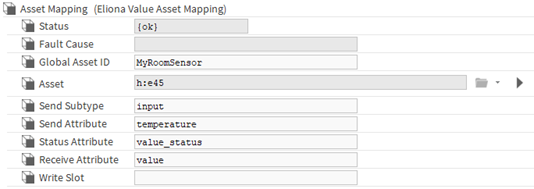
#### BuildingPro Suites Value Asset Mapping
The **BuildingPro Suites Value Asset Mapping** component is automatically created as a child of the **BuildingPro Suites Extension**.
| Field | Description |
| --------------------- | ------------------------------------------------------ |
| `Send Subtype` | Subtype for sending values (e.g., `"input"`) |
| `Send Attribute` | Attribute used when sending data to BuildingPro Suites |
| `Status Attribute` | Attribute that represents the status of the asset |
| `Receive Attribute` | Attribute for receiving data from BuildingPro Suites |
| `Write Slot` | Slot to which received data is written |
| `Delay Reset to Null` | Resets the value to null after the specified seconds |
**Send Subtype**
> Specifies the subtype for value data when sending to BuildingPro Suites. The default is `"input"`.
**Send Attribute**
> Attribute that is used to send data to BuildingPro Suites. To exclude from sending, set the attribute name to blank.
**Status Attribute**
> Attribute that represents the status of the asset in BuildingPro Suites. To exclude from sending, set the attribute name to blank.
**Receive Attribute**
> Attribute for receiving data from BuildingPro Suites. To exclude from receiving, set the attribute name to blank.
**Write Slot**
> Defines the slot in Niagara to which data from BuildingPro Suites is written.
#### **Delay Reset to Null**
> Sets the number of seconds after which the written value is reset to `null`. If a value greater than zero is set, the value is reset after the specified delay.
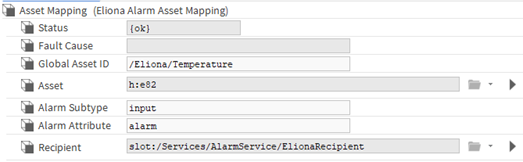
#### BuildingPro Suites Alarm Asset Mapping
The **BuildingPro Suites Alarm Asset Mapping** component is created as a child of the **Alarm Extension** when the first alarm for the parent data point is triggered.
| Field | Description |
| ---------------------- | ------------------------------------------- |
| `Alarm Subtype` | Subtype for alarm data (e.g., `"input"`) |
| `Alarm Attribute` | Attribute used when transferring alarm data |
| `Recipient Ord` (Info) | Reference to the alarm recipient in Niagara |
**Alarm Subtype**
> Subtype for alarm data. The default is `"input"`.
**Alarm Attribute**
> Attribute that is used to transfer alarm data to BuildingPro Suites. To exclude from sending, set the attribute name to blank.
**Recipient Ord** (Info)
> Reference to the alarm recipient in Niagara.
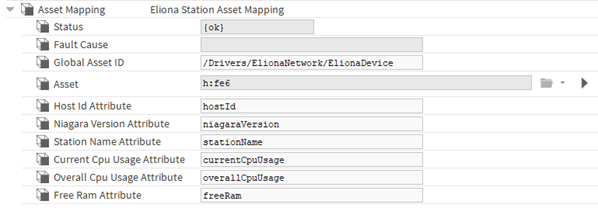
#### BuildingPro Suites Station Asset Mapping
The component **BuildingPro Suites Station Asset Mapping** is created as a child of the **BuildingPro Suites Device** when this is created.
| **Field** | **Description** |
| --------------- | -------------------------------------------------------------- |
| **`Attribute`** | Attribute names that are used when sending the station status. |
**Attribute**
> Define the attribute names that should be used when sending the status to BuildingPro Suites. To exclude certain information from sending, set the attribute name to blank.
#### BuildingPro Suites Alarm Acknowledger
The **BuildingPro Suites Alarm Acknowledger** is automatically created as a child of the **BuildingPro Suites Device**.
| Field | Description |
| --------------------------------------- | ------------------------------------------------------------------------ |
| `Enabled` | Activates or deactivates the Acknowledger |
| `Ack Alarm From Same Source` | Acknowledges all alarms from the same source |
| `Username` | Niagara user account for acknowledgements |
| `Last Alarm Acked` (Info) | Details of the last acknowledged alarm |
| `Last Alarm Acked Time` (Info) | Timestamp of the last successful acknowledgment |
| `Last Alarm Acked Failure Time` (Info) | Timestamp of the last failed acknowledgment attempt |
| `Last Alarm Acked Failure Cause` (Info) | Error message for the last failed acknowledgment attempt |
| `Total Alarms Acked Today` (Info) | Number of alarms acknowledged today |
| `Total Alarms Acked Failures` (Info) | Number of failed acknowledgements today |
| `Total Messages Received Today` (Info) | Number of acknowledgment messages received from BuildingPro Suites today |
| `Last Alarm Ack Note` (Info) | Note associated with the last acknowledgment |
**Enabled**
> Activates or deactivates the Alarm Acknowledger.
**Ack Alarm From Same Source**
> When activated, all alarms originating from the same source are acknowledged.
**Username**
> Specifies the Niagara user account that is used for acknowledging alarms. The user must have the required permissions.
**Last Alarm Acked** (Info)
> Details of the last successfully acknowledged alarm.
**Last Alarm Acked Time** (Info)
> Timestamp of the last successful acknowledgment.
**Last Alarm Acked Failure Time** (Info)
> Timestamp of the last failed acknowledgment attempt.
**Last Alarm Acked Failure Cause** (Info)
> Error message explaining the cause of the last failed acknowledgment attempt.
**Total Alarms Acked Today** (Info)
> Number of alarms acknowledged today.
**Total Alarms Acked Failures** (Info)
> Number of failed acknowledgment attempts today.
**Total Messages Received Today** (Info)
> Number of acknowledgment messages received from BuildingPro Suites today.
**Last Alarm Ack Note** (Info)
> A note associated with the last alarm acknowledgment.
#### BuildingPro Suites Extension
The **BuildingPro Suites Extension** can be added as a child of a Niagara data point by dragging it from the **BuildingPro Suites Palette**. Multiple extensions can be created for a single data point.
| Field | Description |
| ------------------ | ---------------------------------------------- |
| `Enabled` | Activates the extension for data transfer |
| `Last Send` (Info) | Timestamp of the last successful data transfer |
The extension transfers and receives the value of a configurable slot (standard: `out` and `set`) and, if available, its status.
**Enabled**
> Activates or deactivates the extension.
**Last Send** (Info)
> Displays the timestamp of the last successful data transfer.
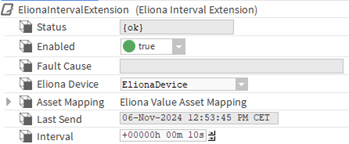
#### BuildingPro Suites Interval Extension
| Field | Description |
| ---------- | ----------------------------------------------- |
| `Interval` | Interval for data transfer (Interval Extension) |
**Interval**
> Defines the interval in which the value of the parent variable is sent to BuildingPro Suites.
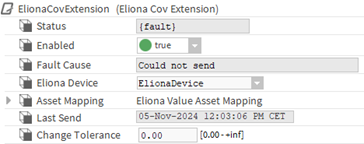
#### BuildingPro Suites COV Extension
| Field | Description |
| ------------------ | ---------------------------------------------------- |
| `Change Tolerance` | Minimum change to trigger a transfer (COV Extension) |
**Change Tolerance**
> Specifies the minimum required change in the value of the parent variable to trigger a data transfer. If set to `0`, every change triggers a transfer.
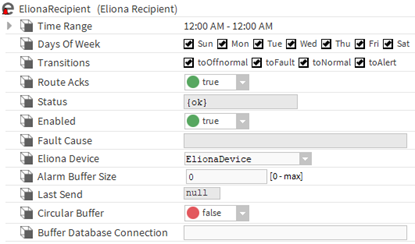
#### BuildingPro Suites Recipient
The **BuildingPro Suites Recipient** can be added as a child of the Niagara **Alarm Service**. It must be connected to an **Alarm Class** to route alarms for that class.
| Field | Description |
| --------------------------------- | ------------------------------------------------------ |
| `Time Range` | Time range in which alarms are forwarded |
| `Days Of Week` | Days of the week on which alarms are forwarded |
| `Transition` | Alarm transitions that are forwarded |
| `Route Acks` | Specifies whether alarm acknowledgements are forwarded |
| `Alarm Buffer Size` | Sets the size of the message buffer |
| `Circular Buffer` | Determines the buffer behavior when full |
| `Buffer Database Connection` | Configures external database connection for buffering |
| `Forecast Alarms Per Hour` (Info) | Estimated number of alarms sent per hour |
| `Forecast Bytes Per Alarm` (Info) | Average size of each alarm message in bytes |
| `Alarm Buffer Used` (Info) | Current number of alarms in the buffer |
| `Last Send` (Info) | Timestamp of the last successful data transfer |
| `Update Forecast` (Action) | Manually updates the forecast statistics |
| `Clear Alarm Buffer` (Action) | Deletes all alarms in the buffer |
**Time Range**
> Defines the time period in which alarms are forwarded to BuildingPro Suites.
**Days Of Week**
> Specifies the days on which alarms are forwarded.
**Transition**
> Determines which alarm transitions (e.g. activation, acknowledgment) are forwarded to BuildingPro Suites.
**Route Acks**
> Specifies whether alarm acknowledgements in Niagara are forwarded to BuildingPro Suites.
**Alarm Buffer Size**
> Specifies the maximum number of alarms that the buffer can hold.
**Circular Buffer**
> Determines how the buffer handles new alarms when it is full:
>
> * **Enabled**: Overwrites the oldest alarms with new ones.
> * **Disabled**: Stops accepting new alarms when it is full.
**Buffer Database Connection**
> Allows the use of an external H2 database for buffering. If left blank, an internal memory buffer is used by default.
>
> * **Embedded Buffer Mode**: Uses a database file that is managed by the driver.
> * **Server Buffer Mode**: Connects to a server-managed H2 database.
**Forecast Alarms Per Hour** (Info)
> Estimates the number of alarms sent per hour, updated every 10 seconds.
**Forecast Bytes Per Alarm** (Info)
> Shows the average size of each alarm message in bytes.
**Alarm Buffer Used** (Info)
> Shows the current number of alarms stored in the buffer.
**Last Send** (Info)
> Timestamp of the last successful data transfer.
**Update Forecast** (Action)
> Manually updates the forecast statistics.
**Clear Alarm Buffer** (Action)
> Deletes all alarms currently stored in the buffer.
#### BuildingPro Suites API Client
The **BuildingPro Suites API Client** can be added by dragging it from the **BuildingPro Suites Palette**. It enables direct communication with an BuildingPro Suites system via APIv2 by sending custom HTTP requests to specific endpoints.
| Field | Description |
| ---------------------- | -------------------------------------------------------------------------------------------- |
| `Enabled` | Activates or deactivates the client |
| `Request When Changed` | Automatically triggers the `Request` action when a property changes |
| `Method` | HTTP method used for the API call (`GET`, `PUT`, `POST`, `DELETE`, `PATCH`) |
| `In` | JSON body that is inserted into the request if needed |
| `Path` | Path of the API endpoint |
| `Url` (Info) | Resulting URL based on the configuration of the **BuildingPro Suites Device** and the `Path` |
| `Response Code` (Info) | HTTP response code after executing a `Request` |
| `Last Request` (Info) | Timestamp of the last request sent |
| `Last Response` (Info) | Timestamp of the last response received |
| `Request` (Action) | Manually starts a new request to BuildingPro Suites |
**Enabled**
> Activates or deactivates the BuildingPro Suites API Client. When deactivated, no requests are sent or received.
**Request When Changed**
> Automatically triggers the `Request` action as soon as a relevant property (e.g. `Method`, `In`, or `Path`) changes.
**Method**
> Defines the HTTP method used for the API call. Available options are: `GET`, `PUT`, `POST`, `DELETE`, `PATCH`.
**In**
> Specifies the JSON body that is inserted into the request. This is used when the HTTP method requires sending a payload (e.g. for `POST`, `PUT`, or `PATCH`).
**Path**
> Defines the path of the API endpoint relative to the base URL of BuildingPro Suites, which is configured in the associated **BuildingPro Suites Device**.
**Url** (Info)
> Displays the full URL, which is composed of the configuration of the **BuildingPro Suites Device** and the specified `Path`.
**Response Code** (Info)
> Displays the HTTP response code of the last request (e.g. `200 OK`, `404 Not Found`, `500 Internal Server Error`).
**Last Request** (Info)
> Saves the timestamp of the last request sent to BuildingPro Suites.
**Last Response** (Info)
> Saves the timestamp of the last response received from BuildingPro Suites.
**Request** (Action)
> Manually starts a request based on the current configuration of the BuildingPro Suites API Client.
***
#### Migration Guide
As of version 5.0, the Niagara module has undergone significant changes in its operating principles. Communication with BuildingPro Suites now uses the BuildingPro Suites APIv2 directly. Previously, communication was established via a TCP tunnel to a separate Niagara app within BuildingPro Suites, which managed asset mapping and asset changes. Configuration in earlier versions involved defining listeners (for the TCP tunnel) and controllers (for asset mapping and attribute settings for values and alarms).
#### Communication Settings
In the new version, instead of an IP address and a port to create a TCP tunnel to the Niagara app connector, you need an APIv2 URL and a token. These credentials should be provided by your BuildingPro Suites administrator. The APIv2 credentials must be configured in the **BuildingPro Suites Device** component within Niagara.
#### Asset Mapping
In earlier versions, asset mapping was defined within the Niagara app in BuildingPro Suites. The controller in the Niagara app settings contained a list of assets that were linked to Niagara data points via their handles (unique IDs of data points within a Niagara station). For each handle (data point), the asset ID and attribute with subtype were specified. In addition, the priority (name of the slot in Niagara) was defined for output attributes that send data back to Niagara.
The new version introduces a different approach for referencing assets and attributes. The **BuildingPro Suites Value Asset Mapping**, defined within an **BuildingPro Suites Extension**, specifies a Global Asset ID. This Global Asset ID, combined with the Tenant ID from the **BuildingPro Suites Device**, uniquely identifies an asset in BuildingPro Suites. For each Global Asset ID, an **BuildingPro Suites Asset** is created under the **BuildingPro Suites Assets** container in Niagara. During asset synchronization, this BuildingPro Suites asset is paired with its corresponding asset in BuildingPro Suites by setting the Asset ID in the **BuildingPro Suites Asset** component.
The new **Asset Mapping** also defines the `Attribute` settings and subtypes that are used when values are sent to or received from BuildingPro Suites. If you need to define a write slot other than the `Default Write Slot` that is set in the **BuildingPro Suites Receiver**, you can use the `Write Slot` setting in the **Asset Mapping** component.
You can assign multiple asset mappings with different attribute names to the same Global Asset ID. This allows you to define a single asset in BuildingPro Suites that represents multiple data points from Niagara, each assigned to a different attribute.
#### Alarm Mapping
In earlier versions, alarm mapping was defined within the Niagara app in BuildingPro Suites. The controller in the Niagara app settings contained a list of alarm rules and the complete slot board of the corresponding alarm extensions. This setup allowed the old version to send alarms and synchronize acknowledgements.
The new version takes a different approach. The **BuildingPro Suites Alarm Asset Mapping**, defined for each **Alarm Extension**, specifies a Global Asset ID. This Global Asset ID, together with the Tenant ID from the **BuildingPro Suites Device**, uniquely identifies the asset in BuildingPro Suites. An alarm rule is then created for this asset in BuildingPro Suites. The asset mapping also defines an attribute name that represents the alarm state: It is set to `0` if no alarm is present and `1` if the parent Niagara data point is in an alarm state.
#### Asset Import and Creation
In earlier versions, an **BuildingPro Suites Service** component was provided. This component could export asset definitions from Niagara for each data point and import them into a controller in the BuildingPro Suites app, which created the assets and asset mappings for the selected controller.
The new version offers a more convenient and flexible way to automatically create assets and mappings. By activating the `Enable Upserts` setting in the **BuildingPro Suites Assets** container, the BuildingPro Suites module checks during synchronization whether an asset with the specified Global Asset ID and Tenant ID exists in BuildingPro Suites. If it does not exist, the asset is created and linked by setting the new Asset ID in the **BuildingPro Suites Asset** component. Note that you must define the asset type in the **BuildingPro Suites Asset** component to create and update the asset in BuildingPro Suites.
---
# Agent Instructions
This documentation is published with GitBook. GitBook is the documentation platform designed so that both humans and AI agents can read, navigate, and reason over technical content effectively. Learn more at gitbook.com.
## Querying This Documentation
If you need additional information that is not directly available in this page, you can query the documentation dynamically by asking a question.
Perform an HTTP GET request on the current page URL with the `ask` query parameter, and the optional `goal` query parameter:
```
GET https://docs.buildings.ability.abb/collection/academy/edge-nodes/edgenodes-in-abb-buildingpro/set-up-control-edge/eliona-modules-for-niagara.md?ask=&goal=
```
`ask` is the immediate question: it should be specific, self-contained, and written in natural language.
`goal` is optional and describes the broader end goal you are ultimately trying to accomplish on behalf of the user. GitBook uses it to tailor the answer towards what is most useful for that goal.
The response will contain a direct answer to the question and relevant excerpts and sources from the documentation.
Use this mechanism when the answer is not explicitly present in the current page, you need clarification or additional context, or you want to retrieve related documentation sections.