> For the complete documentation index, see [llms.txt](https://docs.buildings.ability.abb/collection/llms.txt). Markdown versions of documentation pages are available by appending `.md` to page URLs; this page is available as [Markdown](https://docs.buildings.ability.abb/collection/academy/introduction-to-ontologies/how-eliona-covers-ontologies.md).
# How BuildingPro Suites Covers Ontologies
## Introduction
BuildingPro Suites is a versatile and scalable platform that integrates ontologies such as Brick, Haystack, and RealEstateCore to enable efficient and user-friendly management of smart buildings. With its powerful features and an intuitive user interface, BuildingPro Suites supports the structuring, integration, and management of building data in a way that promotes both flexibility and efficiency. This documentation provides a comprehensive overview of BuildingPro Suites's structure and functions, including the use of tag systems, the creation of custom classes (asset templates), the geographical and functional nesting of assets, as well as advanced asset functions and data integration methods. By combining practical solutions with innovative technologies, BuildingPro Suites ensures that smart buildings can be managed optimally and continuously developed.
***
## BuildingPro Suites's Structure
BuildingPro Suites is a flexible and scalable platform that uses various building blocks from ontologies like Brick, Haystack, and RealEstateCore. Here is a general and clear overview of how BuildingPro Suites is structured:
### [Tag System](/collection/mandatory-base/platform-core/workspace-and-identity/tags.md)
BuildingPro Suites uses a tag system similar to Haystack. Tags can be assigned to easily identify and organize data points, devices, and assets. These tags can be used in many ways:
* **Rules for alarms and escalations:** Tags can be used to define rules for alarms and escalations.
* **Access rights:** Tags determine which users have which rights to which assets. User roles can also be assigned tags to regulate access.
### Custom Classes (Asset Templates)
BuildingPro Suites offers the possibility to create custom classes (Asset Templates) and give them attributes. The templates can represent anything from rooms and buildings to specific types of sensors or abstract concepts. Users can create their own templates (classes) and define which attributes they have and even create new attributes that are calculated from others.
### Instances ([Assets](/collection/mandatory-base/assets.md))
The created templates are implemented in concrete instances (assets). For example:
* **Room 001**
* **Heat Sensor 001**
These instances can also be assigned tags, which can then be used for various purposes.
### [Nesting of Assets](/collection/mandatory-base/assets/structuring-assets.md)
Assets can be nested geographically and/or functionally by dragging and dropping them into one another. For example:
* **Sensor Temp 001** can be nested in **Room 001**.
* **Room 001** can be nested in **Building A**.
### Extended Asset Functions
Similar to Brick, assets in BuildingPro Suites can have various points:
* [Attachments](/collection/mandatory-base/assets/attach-documents-to-assets.md)
* [Links](/collection/mandatory-base/assets/add-links-to-an-asset.md)
* [Ratings](/collection/mandatory-base/assets/ratings.md)
* [Location on the map](/collection/platform/map-and-floor/map.md)
* [BIM](/collection/platform/bim.md)
* [Digital Twin](/collection/platform/photoreal-twin.md)
* [Tracker](/collection/platform/live-cockpit/widgets/custom-widgets/modules/tracking.md)
* [Rules](/collection/platform/alarms-rules-and-escalations/rules.md)
* [Attributes and asset characteristics (inherited from the asset template)](/collection/mandatory-base/assets/attribute-functions.md)
### Data Integration and [Drag-and-Drop Formats](/collection/mandatory-base/platform-core/connect-hub/data-processing-function-formats/configure-a-format.md)
BuildingPro Suites enables the quick creation of formats via drag-and-drop that integrate incoming data into an asset. These formats can be used to integrate data into the asset attributes, such as a temperature measurement, when connecting to MQTT, webhooks, RESTful, Kafka, UPD, UA, Modbus, and legacy systems.
### [App Store](/collection/mandatory-base/platform-core/connect-hub/edge-app-marketplace-for-plug-ins-and-extentions/apps.md) and Scalability
BuildingPro Suites offers an app store where apps can be created efficiently that also support other connections to the platform. All data is stored in a PostgreSQL database, which ensures high scalability and efficiency. BuildingPro Suites is a web application.
### Interoperability and [Bulk Import](/collection/platform/platform-core/bulk-import.md)
Interoperability can be provided by an app as an interface. But there is also the option of bulk import, where data can be imported in JSON format. An API connection also enables the integration of data into the platform.
### [Ticketing System](/collection/platform/service-desk.md)
BuildingPro Suites has a ticketing system in which tags can be used and assets can be assigned.
### Use of [AKS](/collection/preface/glossary.md)
In the geo-information (GAI) of an asset, AKS can be used to convey deep information at a glance in a string.
***
## BuildingPro Suites and the Use of Ontologies
### Brick
#### **Components of Brick in BuildingPro Suites:**
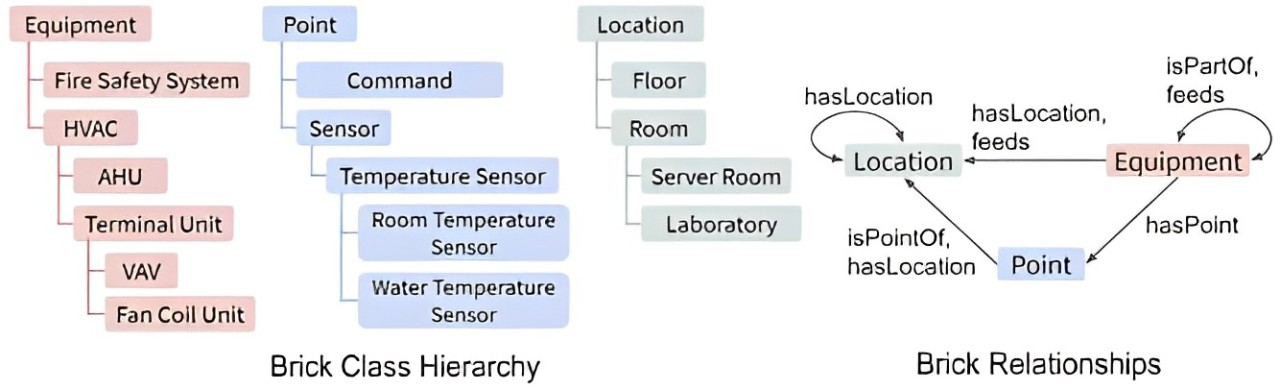
* **Points:** BuildingPro Suites integrates the concept of "Points" from Brick to organize various data points and measured values. These points can represent sensor values, statuses of devices, or other relevant information.
* **Nesting of Assets:** BuildingPro Suites enables the geographical and functional nesting of assets, similar to how Brick structures rooms, zones, and buildings.
* **Asset Attributes:** The attributes of the assets in BuildingPro Suites are inspired by the detailed and specific attributes that Brick defines for various building objects.
#### **Advantages of using Brick:**
* **Structured data organization:** The clear structure of Brick facilitates the organization and management of building data.
* **Easy navigation and visualization:** The nesting of assets enables intuitive navigation and visualization of the building structure and its components.
* **Expandability:** The use of points and attributes allows for flexible expansion and adaptation to specific requirements.
Brick
BuildingPro Suites from a Brick perspective
***
### Haystack
#### **Components of Haystack in BuildingPro Suites:**
* **Tag system:** BuildingPro Suites adopts the tagging system from Haystack, which makes it possible to assign tags to easily identify and organize data points, devices, and assets.
* **Flexibility in data acquisition:** BuildingPro Suites uses the flexibility of Haystack to integrate and process incoming data quickly and efficiently.
* **Rule-based automation:** By using tags, rules for alarms and escalations can be defined in BuildingPro Suites, which enables an automated response to certain events.
#### **Advantages of using Haystack:**
* **Simplicity and flexibility:** The tagging system facilitates the identification and organization of data without complex hierarchies.
* **Efficient data integration:** The flexible structure of Haystack enables the quick integration and processing of data from various sources.
* **Automation:** Rule-based automation improves the responsiveness and efficiency of building management.
* **Managing user rights:** Tags can be used to control users' access rights to various assets.
***
### RealEstateCore
#### **Components of RealEstateCore in BuildingPro Suites:**
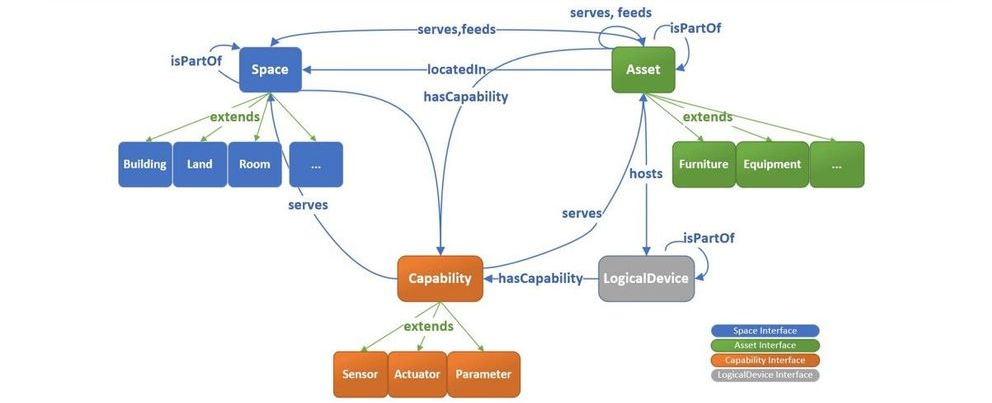
* **Classes and Instances:** BuildingPro Suites uses the concept of classes and instances from RealEstateCore to create specific asset templates that can then be implemented in concrete instances.
* **Users (Agents):** Similar to how RealEstateCore uses the concept of agents to define different users and their roles, BuildingPro Suites offers a flexible system for managing user roles and access rights.
* **Interoperability:** BuildingPro Suites uses the interoperability standards of RealEstateCore to facilitate communication and integration between different systems.
#### **Advantages of using RealEstateCore:**
* **Standardization:** The standardized terminology ensures consistency and clarity in data management.
* **Interoperability:** The use of interoperability standards facilitates integration and communication between different systems and platforms.
* **Flexibility and adaptability:** The ability to define and nest custom classes and instances enables a high degree of adaptability to specific requirements and use cases.
* **User management:** The management of users and their access rights is supported by a flexible and efficient system based on the concept of agents in RealEstateCore.
RealEstateCore
BuildingPro Suites from a RealEstateCore perspective
***
## Problem Solving with BuildingPro Suites
BuildingPro Suites uses ontologies like Brick, Haystack, and RealEstateCore to address specific challenges in the smart building context. At the same time, BuildingPro Suites overcomes the weaknesses of ontologies by offering a flexible and user-friendly platform.
### Knowledge Management
**Problem:** Extensive and complex data sets in smart buildings are difficult to organize and search. **Solution with BuildingPro Suites:**
* **Tag system:** By using a flexible tag system that allows data points, devices, and assets to be identified and organized, BuildingPro Suites improves the management and searchability of data.
* **Clear structuring:** BuildingPro Suites enables the creation of custom classes (asset templates) and their instances, which leads to a clear and consistent data organization.
* **Geographical and structural nesting:** The nesting of assets facilitates organization and searchability.
### Data Integration
**Problem:** Data in smart buildings comes from various sources and systems that are often not compatible with each other. **Solution with BuildingPro Suites:**
* **Common language:** BuildingPro Suites uses standardized terms and structures that enable seamless integration of data from various sources.
* **Flexible formats:** The quick creation of formats via drag-and-drop for the integration of data via MQTT, webhooks, RESTful, Kafka, UPD, UA, Modbus, and legacy systems facilitates data integration.
### Interoperability
**Problem:** Different systems and devices in smart buildings often cannot communicate effectively with each other. **Solution with BuildingPro Suites:**
* **Standardized relationships:** By using ontology standards, BuildingPro Suites promotes interoperability between different systems and devices.
* **Flexibility:** The ability to define and nest custom classes and instances enables effective communication and collaboration between different systems.
### Semantic Web Services
**Problem:** The integration and use of web services in smart buildings is often complicated and inflexible. **Solution with BuildingPro Suites:**
* **Semantic annotation:** BuildingPro Suites enables the semantic annotation of web services, which facilitates the searching, accessing, and integrating of web services.
* **App store:** BuildingPro Suites's app store supports the creation and integration of apps that use various web services and other connections.
### Adaptability and Flexibility
**Problem:** Systems in smart buildings must be able to adapt to changing requirements and technological advances. **Solution with BuildingPro Suites:**
* **Expandability:** The ability to integrate new classes and relationships into the existing framework enables a high degree of adaptability.
* **Drag-and-drop functionality:** The simple customization and expansion of data formats and integrations supports continuous innovation and adaptation.
***
## Solutions for the Weaknesses of Ontologies
### Complexity
**Weakness:** The creation and maintenance of ontologies is complex and requires extensive knowledge. **Solution with BuildingPro Suites:**
* **User-friendliness:** BuildingPro Suites offers an intuitive user interface and drag-and-drop functions that simplify the creation and maintenance of data structures.
* **Automation:** The platform automates many of the complex processes associated with managing ontologies.
### Cost
**Weakness:** The development and implementation of ontologies are associated with high costs. **Solution with BuildingPro Suites:**
* **Cost-efficiency:** BuildingPro Suites reduces costs through user-friendly tools and templates that reduce the need for specialized experts and expensive software tools.
* **Scalability:** The use of a scalable PostgreSQL database ensures cost-efficiency with growing data volumes.
### Inflexibility
**Weakness:** Ontologies are often rigid and difficult to change. **Solution with BuildingPro Suites:**
* **Flexibility:** BuildingPro Suites allows for quick adjustments and extensions of classes and relationships, making changes easy to implement.
* **Dynamic adaptation:** The platform supports continuous adaptation to new requirements and technological advances.
### Acceptance
**Weakness:** Ontologies are often considered too theoretical and impractical. **Solution with BuildingPro Suites:**
* **Practical application:** BuildingPro Suites offers practical solutions through intuitive user interfaces and application-oriented functions.
* **Communication of advantages:** The clear presentation and simple use promote the acceptance of the platform.
### Maintenance and Updates
**Weakness:** The continuous maintenance and updating of ontologies is challenging. **Solution with BuildingPro Suites:**
* **Simple maintenance:** BuildingPro Suites automates many maintenance processes and offers simple tools for updating data structures.
* **Regular updates:** The platform supports regular updates and adjustments to changing requirements.
### Compatibility and Standardization
**Weakness:** Differences in terminology and structure between different ontologies and systems. **Solution with BuildingPro Suites:**
* **Standardized terminology:** BuildingPro Suites uses standardized terms and structures to improve compatibility.
* **Interoperability standards:** The platform promotes integration and communication between different systems through the use of interoperability standards.
### Scalability
**Weakness:** Difficulties in scaling to very large data volumes and complex systems. **Solution with BuildingPro Suites:**
* **Scalable architecture:** The use of a scalable PostgreSQL database enables the efficient management of large amounts of data.
* **Powerful query functions:** BuildingPro Suites offers powerful tools for querying and processing data, even with large and complex systems.
***
## Conclusion
BuildingPro Suites uses ontologies like Brick, Haystack, and RealEstateCore to address specific challenges in the smart building context while overcoming their weaknesses. By combining flexible tag systems, the ability to create custom classes and instances, the nesting of assets, advanced asset functions, efficient data integration, and automated processes, BuildingPro Suites offers a scalable, user-friendly, and adaptable platform. This facilitates the organization, integration, and management of data in intelligent buildings and supports continuous innovation and adaptation.
---
# Agent Instructions
This documentation is published with GitBook. GitBook is the documentation platform designed so that both humans and AI agents can read, navigate, and reason over technical content effectively. Learn more at gitbook.com.
## Querying This Documentation
If you need additional information that is not directly available in this page, you can query the documentation by asking a question.
Perform an HTTP GET request on the following URL with the `ask` and `goal` query parameters:
```
GET https://docs.buildings.ability.abb/collection/academy/introduction-to-ontologies/how-eliona-covers-ontologies.md?ask=&goal=
```
`ask` is the immediate question: it should be specific, self-contained, and written in natural language.
`goal` is what the user is ultimately trying to achieve, the reason they need the answer. Sharing it helps GitBook give you a better, more relevant answer. A goal is most helpful when it describes the outcome the user wants rather than restating the question. For example, with `ask=how do I create an API token`, a goal like `automate deployments from our CI pipeline` lets GitBook tailor the answer to that use case.
The response will contain a direct answer to the question and relevant excerpts and sources from the documentation.
Use this mechanism when the answer is not explicitly present in the current page, you need clarification or additional context, or you want to retrieve related documentation sections.
.png?alt=media&token=fc9e9707-53c3-4b74-9b63-08c8d7966ca9)
.png?alt=media&token=996ee414-3a37-4355-9610-3122783c038c)