> For the complete documentation index, see [llms.txt](https://docs.buildings.ability.abb/collection/llms.txt). Markdown versions of documentation pages are available by appending `.md` to page URLs; this page is available as [Markdown](https://docs.buildings.ability.abb/collection/english-v14/academy/eliona-marketplace-apps-installieren-und-konfigurieren.md).
# Eliona Marketplace - install and configure apps
The *Eliona* Marketplace is the central point of contact for extending platform functionality through apps. This documentation explains the essential steps for using the Marketplace, from app installation to configuration and debugging.
***
## What is the *Eliona* Marketplace?
The *Eliona* Marketplace contains official apps provided or reviewed by Eliona. These apps enable:
* Integration of expert systems
* Automatic asset creation
* Two-way data and alarm synchronization
* Extensions such as SSO, escalations, notifications, etc.
***
## Basics of the *Eliona*apps
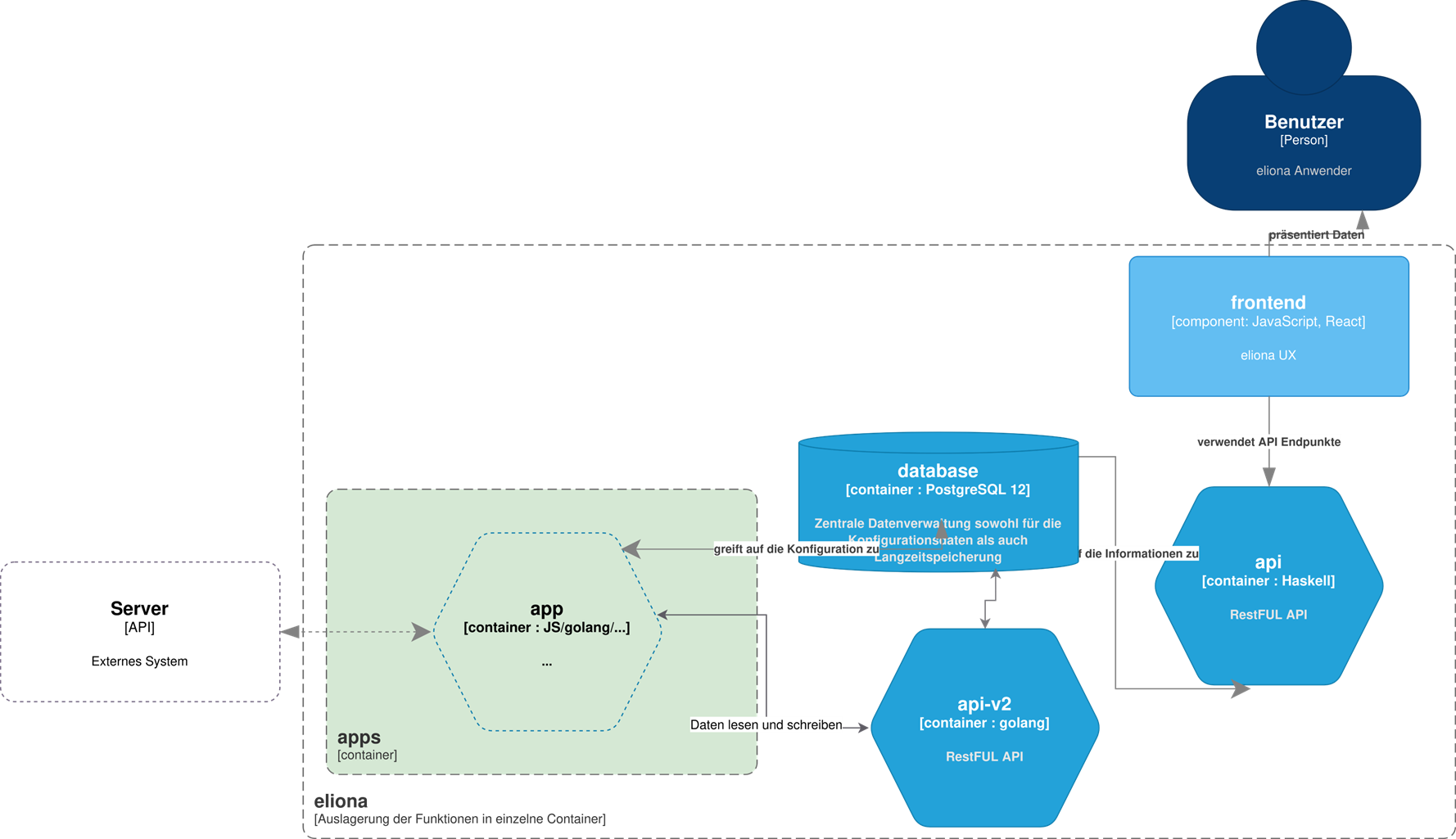
The *Eliona*apps are based on a **microservice architecture**, in which each app runs as an independent container. This architecture enables a modular, scalable and fault-tolerant system environment – both when integrating new functions and in daily operation.
### Characteristics of the microservice architecture
* **Modularity**\
→ Each app can be deployed and maintained independently
* **Fault tolerance**\
→ Errors in one app do not affect other apps or the system
* **Scalability**\
→ Multiple app instances possible; ideal for large or distributed systems
***
### Implementation by Eliona or customers
Apps can:
* by the *Eliona*team developed and deployed
* independently by customers with the help of the *Eliona App SDK* be implemented
### Role of apps in *Eliona*
Apps make it possible to *Eliona* connect with other systems – such as building technology, sensors, or specialist applications like access control or energy management systems. This connection ensures that data is automatically exchanged between the systems – in both directions. This keeps information in *Eliona* and in the connected system always up to date.
A major advantage: once an app is set up, it automatically recognizes new devices or objects and creates them directly in *Eliona* as so-called assets – with no manual intervention at all. Alarms from external systems can also be integrated via apps. These are displayed in *Eliona* displayed there, can be acknowledged and processed further.
In addition to data transfer, many apps offer additional functions, for example:
* **Login with existing user accounts (SSO)**
* **Notifications and escalations via email, chat or SMS**
* **Booking of resources such as rooms or workstations**
This is how apps *Eliona* the central platform for the digital operation of buildings – connected, automated and flexibly extendable.
***
### Comparison of connection options in *Eliona*
*Eliona* offers various ways to connect external systems – depending on complexity, objective and technical requirements. The main options are **Apps**, **Connectors** and the **Script Engine**.
#### Apps
Apps offer the most comprehensive integration. They connect *Eliona* not only with other systems, but also automatically create matching assets and keep them synchronized. They enable deep integrations – including alarm handling, user login or booking functions. Many apps are already available in the *Eliona* Marketplace and can be installed and configured with little effort. However, developing new apps takes time and technical know-how.
**Advantages:**\
– Comprehensive, stable connection\
– Automatic asset creation\
– Additional functions such as SSO, escalations or dashboards
**Note:**\
– Developing new apps is more time-consuming and is usually done by Eliona or trained partners
#### Connectors
Connectors are universal interfaces (e.g. MQTT, Webhook, RESTful, Kafka, OPC UA) specifically intended for data exchange. They must be individually configured and technically implemented. They transfer data, but do not provide additional functions or automatic asset creation.
**Advantages:**\
– Flexible and quick to use for new systems\
– Supports many common protocols
**Note:**\
– Configuration and processing must be implemented manually\
– No automatic synchronization or logic included
#### Script Engine
The Script Engine allows simple integrations via SQL or Python scripts. It can be used to fetch, process or forward data from other sources. It is especially suitable for light, individual customizations.
**Advantages:**\
– Quick implementation of simple integrations\
– Direct access to data and logic
**Note:**\
– Limited for complex requirements\
– Maintenance and upkeep are up to the user
#### Commonality
Regardless of the chosen path, all connections can be developed and operated by the *Eliona*team as well as by customers or partners themselves – depending on technical expertise and project requirements.
***
### Examples of *Eliona*apps
*Eliona* offers a wide range of apps that enable specific functions or integrations. These apps can be installed via the *Marketplace* and take on central tasks in integration, visualization and automation within the platform.
#### Integrations in building management systems (BMS)
Apps for connecting existing building management systems enable seamless integration and centralized control:
* *Niagara Framework*
* *ABB Building Edge (OpenBOS)*
#### Booking systems
For managing and booking rooms or resources:
* *Microsoft Exchange*
#### Single Sign-On (SSO)
For central login with existing user accounts:
* *SAML*-based systems such as *Microsoft Azure*
#### Expert systems
These apps connect *Eliona* with specialized systems and IoT platforms:
* *MyStrom*, *Thingdust*, *Glutz*, *Signify*
* *Xovis* (People Counter), *Kontakt.io*, *Kentix*, *Zevvy*
* *ABB free\@home*, *Loriot.io*, *Roomz*, *GP Joule*, *V-Zug*
* *Hailo*, *CoffeeCloud*
#### Location monitoring
Apps for locating and tracking the movement of people or objects:
* *Localino*
* *Kontakt.io*
#### Escalation and notification systems
For forwarding alarms and notifications to external channels:
* *SMS*, *Google Chat*, *Slack*
#### Advanced analytics and automation apps
These apps add to *Eliona* with AI-supported or correlation-based functions:
* **Correlation App** – Detects relationships and interactions between system data
* **Forecast App** – Uses historical data to forecast future values
* **Reinforcement Learning App** – Optimizes processes through self-learning algorithms based on feedback
***
### Example of an app: *myStrom*
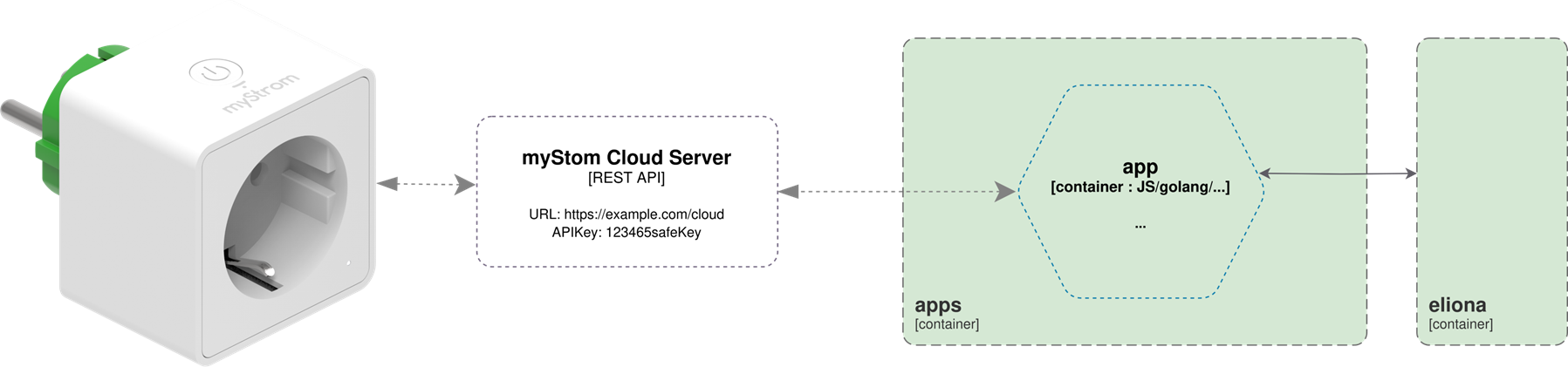
The *myStrom app* is a typical example of a simple but fully integrated *Eliona*app. It shows how an external device – in this case a smart plug – can be *Eliona* connected.
The connection works as follows:
1. The *myStrom*smart plug sends its data (e.g. energy consumption, switching status) over the internet.
2. The *myStrom app* in *Eliona* receives this data via an interface and processes it further.
3. Within *Eliona* matching *Assets* are automatically created that visualize the data and enable actions.
4. The user can monitor the socket from *Eliona* or even switch it – depending on the configuration.
This app is lightweight, uses simple REST API communication and exemplifies how the integration of external IoT devices into *Eliona* can be implemented – without time-consuming manual steps.
---
# Agent Instructions
This documentation is published with GitBook. GitBook is the documentation platform designed so that both humans and AI agents can read, navigate, and reason over technical content effectively. Learn more at gitbook.com.
## Querying This Documentation
If you need additional information that is not directly available in this page, you can query the documentation dynamically by asking a question.
Perform an HTTP GET request on the current page URL with the `ask` query parameter, and the optional `goal` query parameter:
```
GET https://docs.buildings.ability.abb/collection/english-v14/academy/eliona-marketplace-apps-installieren-und-konfigurieren.md?ask=&goal=
```
`ask` is the immediate question: it should be specific, self-contained, and written in natural language.
`goal` is optional and describes the broader end goal you are ultimately trying to accomplish on behalf of the user. GitBook uses it to tailor the answer towards what is most useful for that goal.
The response will contain a direct answer to the question and relevant excerpts and sources from the documentation.
Use this mechanism when the answer is not explicitly present in the current page, you need clarification or additional context, or you want to retrieve related documentation sections.