# Glutz

Glutz is a manufacturer of door and security systems headquartered in Switzerland. It is characterized by innovative technologies. The product range includes a wide variety of door fittings, electronic access systems, locking systems, and security solutions for private and commercial applications.

## Installation

The Glutz app is installed via the App Store in Eliona.

## Assets

The Glutz app automatically creates all necessary asset templates and Glutz access points ([CAC](https://docs.buildings.ability.abb/collection/english-v14/apps/apps/broken-reference)), which are accessible via the configured endpoints. The following asset templates are created:

* **Glutz Device**: An access point (door lock) whose parameters can be read and which can be opened

The following attributes are defined:

<table><thead><tr><th width="240">Name</th><th>Description</th></tr></thead><tbody><tr><td><code>battery_level</code></td><td>Battery level</td></tr><tr><td><code>openings</code></td><td>Openings</td></tr><tr><td><code>building</code></td><td>Buildings</td></tr><tr><td><code>room</code></td><td>Room</td></tr><tr><td><code>access_point</code></td><td>Access</td></tr><tr><td><code>operating_mode</code></td><td>Operating mode</td></tr><tr><td><code>firmware</code></td><td>Firmware</td></tr><tr><td><code>open</code> (writable)</td><td>Open from Eliona<br><code>1</code> = Open access point, time adjustable in configuration</td></tr><tr><td><code>openable</code></td><td>State of the access point<br><code>0</code> = Closed<br><code>1</code> = Open<br><code>2</code> = Error</td></tr></tbody></table>

## Dashboards

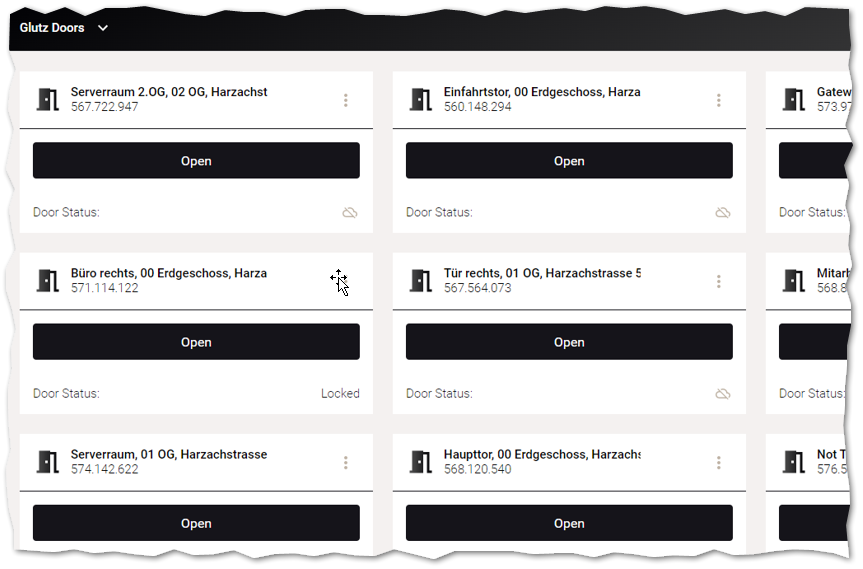
The Glutz app provides a dashboard with all automatically created access points. This can be accessed via the Eliona frontend `Copy Dashboard > Glutz` to be automatically created and then customized as desired.

<figure><img src="https://content.gitbook.com/content/Nyvwhz1kEMXcHf4HLuZ8/blobs/5vxODMEE4ksWrfPdtb1A/FD96DAD2-B2A8-47BC-8FF7-12044E982675.png" alt=""><figcaption></figcaption></figure>

## Configuration

{% hint style="info" %}
More information on configuring apps can be found [↗ here](https://doc.eliona.io/collection/dokumentation/einstellungen/apps).
{% endhint %}

### General

The Glutz app is configured by defining one or more Glutz server endpoints. Each endpoint requires the following data:

<table><thead><tr><th width="279">Attribute</th><th>Description</th></tr></thead><tbody><tr><td><code>username</code></td><td>Username for login</td></tr><tr><td><code>password</code></td><td>Password for login</td></tr><tr><td><code>url</code></td><td>URL for the Glutz endpoint</td></tr><tr><td><code>enable</code></td><td>Flag to enable or disable the endpoint</td></tr><tr><td><code>requestTimeout</code></td><td>Timeout in seconds for the server</td></tr><tr><td><code>refreshInterval</code></td><td>Interval in seconds for collecting data from the endpoint</td></tr><tr><td><code>defaultOpenableDuration</code></td><td>Interval in seconds for how long an access point can be opened. This option can be overridden per access point with the Glutz property <code>Eliona/Openable Duration [s]</code> .</td></tr><tr><td><code>projIds</code></td><td>List of project IDs for which access point assets are created automatically (<a href="broken-reference">CAC</a>)</td></tr></tbody></table>

The configuration is done using a corresponding JSON structure. The following JSON structure can be used as an example to define an endpoint.

```json
{
  "username": "Username",
  "password": "Password",
  "url": "https://example.com/glutz",
  "enable": true,
  "requestTimeout": 120,
  "refreshInterval": 60,
  "defaultOpenableDuration": 10,
  "projIds": ["1"]
}
```

Endpoints can be created in Eliona using this structure under `Apps > Glutz > Setting` . To do this, the endpoint `/configs` with the method `PUT` must be selected.

### Time to open

Via the asset attribute `open` an access point can be opened in Eliona. To do this, the door lock is set for a certain time to the state that allows the access point to be opened. This default time can generally be set in the endpoint configuration `defaultOpenableDuration` .

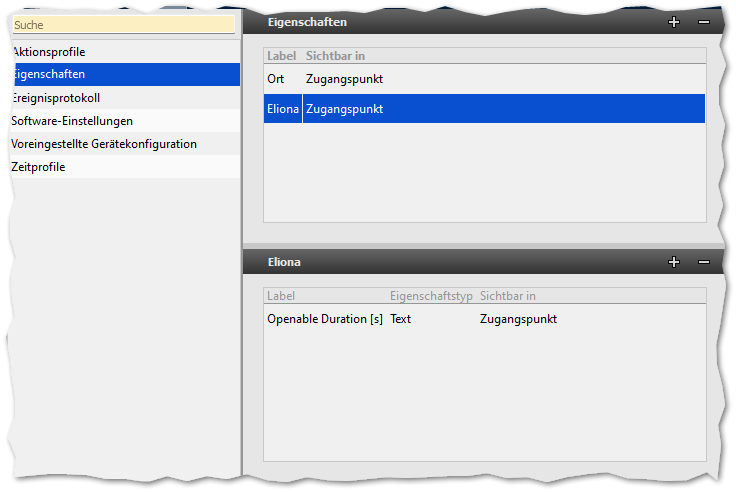
For access points, this time can be overridden. To do this, the property `Eliona/Openable Duration [s]` must be created for access points in the Glutz configuration.&#x20;

<figure><img src="https://content.gitbook.com/content/Nyvwhz1kEMXcHf4HLuZ8/blobs/lxqEGxAloOHfxdgtbKtj/image.png" alt=""><figcaption></figcaption></figure>

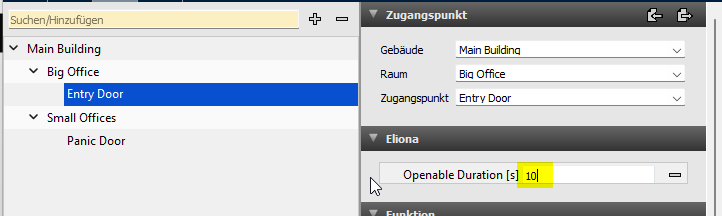
If this property is set for an access point, it overrides the default time.

<figure><img src="https://content.gitbook.com/content/Nyvwhz1kEMXcHf4HLuZ8/blobs/EXdqYzp7Mu8GWxj6A6ww/image.png" alt=""><figcaption></figcaption></figure>