> For the complete documentation index, see [llms.txt](https://docs.buildings.ability.abb/collection/llms.txt). Markdown versions of documentation pages are available by appending `.md` to page URLs; this page is available as [Markdown](https://docs.buildings.ability.abb/collection/english-v14/apps/apps/spread-sheet.md).

# Spread Sheet

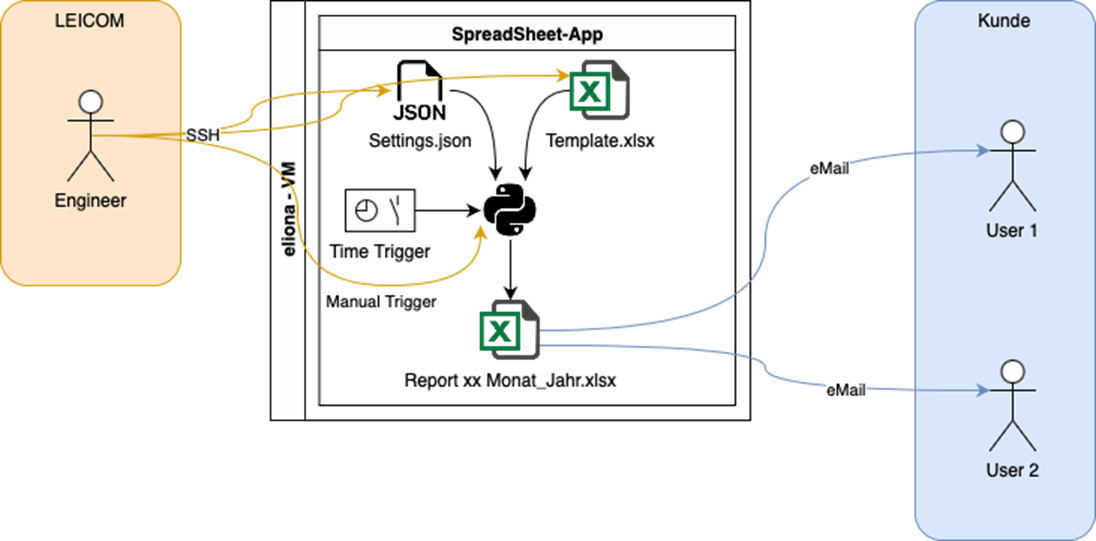
## Basic concept

<figure><img src="https://content.gitbook.com/content/Nyvwhz1kEMXcHf4HLuZ8/blobs/6e61oZJNWYhxsqgNAkha/FAA14394-DDFC-42F7-894C-20AD19D299F1.png" alt=""><figcaption></figcaption></figure>

## Configuration

The configuration defines which Eliona instance the connection should be made to and which reports are created with which template.

### Eliona instance

```json
{"eliona_handler": {
"host": "experimental.eliona.io",
"api": "https://experimental.eliona.io/api/v2", "project_id": 1,
"api_key": "slidfglsadbföabg$$äasfnasilbg"}
}

```

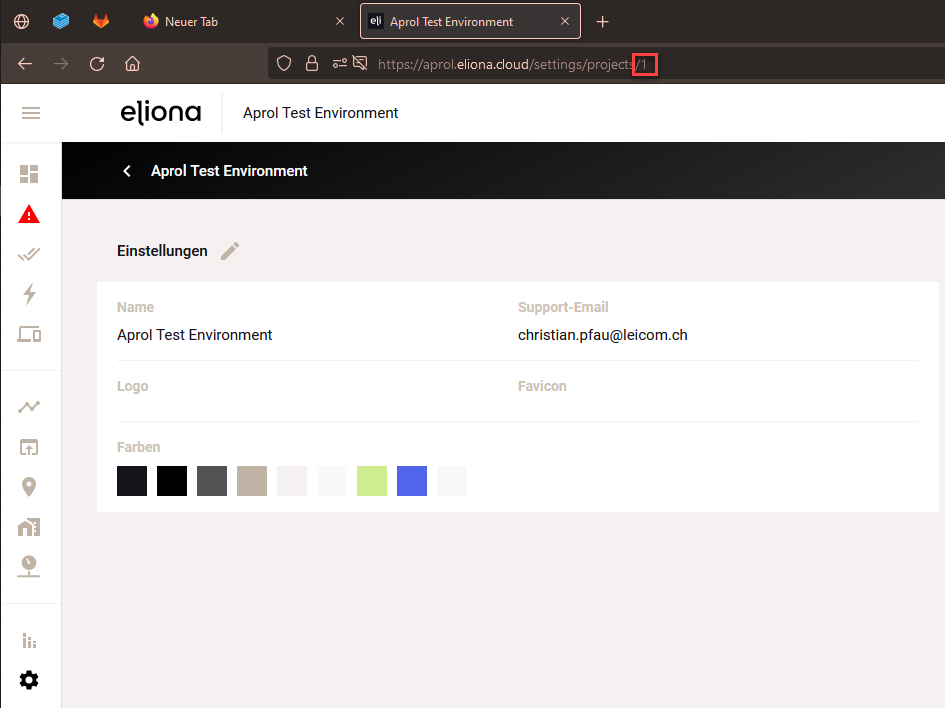
<table><thead><tr><th>Configuration</th><th>Description</th><th width="195">Example</th><th>Note</th></tr></thead><tbody><tr><td><code>host</code></td><td>Address of the Eliona instance without HTTPS.</td><td>develop.eliona.cloud</td><td><p>Optional. Ideally as</p><p>.env variable</p></td></tr><tr><td><code>api</code></td><td>Address of the API used. In this case it is always /api/v2. Here with HTTPS.</td><td><p>https://develop.eliona.cloud</p><p>/api/v2</p></td><td><p>Optional. Ideally as</p><p>.env variable</p></td></tr><tr><td><code>project_id</code></td><td>Project number on the used Eliona instance. (You get this when you edit the project in the settings and look at the address bar.)</td><td><img src="https://content.gitbook.com/content/Nyvwhz1kEMXcHf4HLuZ8/blobs/5kaiWj71nBYK7JDLKCyn/ABB54F71-2DD6-4D9A-AEF6-885EBF157354.png" alt="" data-size="original"></td><td>Required</td></tr><tr><td><code>api_key</code></td><td>Key of the API for the connection to the Eliona instance</td><td>...</td><td><p>Optional. Ideally as</p><p>.env variable</p></td></tr><tr><td><code>dbTimeZone</code></td><td>Time zone of the database.</td><td>Europe/Zurich</td><td><p>Optional. Ideally as</p><p>.env variable</p></td></tr></tbody></table>

### Reports

The configuration of the reports is located within a list. So it can contain one or more reports. Each report needs at least these configurations.

```json
"reportConfig": [
{
"name": "Monthly Report Level 1", "schedule": "monthly",
"type": "DataEntry",
"templateFile": "./storage/reports/templates/Template_Report_Level_1.xlsx", "sheet": "Sheet1",
"separator":";",
"firstRow": "0", "fromTemplate": true,
"reportPath": "Report_Level1.xlsx", "tempPath": ""
},
{
"name": "Monthly Report Level 2", "schedule": "monthly",
"type": "DataEntry",
"templateFile": "./storage/reports/templates/Template_Report_Level_2.xlsx", "sheet": "Sheet1",
"separator":";",
"firstRow": "0", "fromTemplate": true,
"reportPath": "Report_Level2.xlsx",
"tempPath": ""
}
]
```

<table><thead><tr><th width="220.33333333333326">Configuration</th><th>Description</th><th>Example</th></tr></thead><tbody><tr><td><code>name</code></td><td>Name of the report definition</td><td>"Monthly Report Level 1"</td></tr><tr><td><code>schedule</code></td><td>Call frequency</td><td><p>= yearly (annual report is sent in January)</p><p>= monthly (monthly report is sent every month)</p></td></tr><tr><td><code>type</code></td><td>Report type definition. This determines which type is used for reporting.</td><td><p>= "DataListSequential" (list one below the other)</p><p>= "DataListParallel" (list in parallel)</p><p>= "DataEntry" (individual entries in the cell)</p></td></tr><tr><td><code>templateFile</code></td><td>Path specification for the template file</td><td>./templates/syn_001.xlsx</td></tr><tr><td><code>sheet</code></td><td>Worksheet name when using Excel tables</td><td>Table1, Sheet1</td></tr><tr><td><code>fileType</code></td><td>Set the file format to be used for saving and reading the data</td><td>csv, xls, xlsx</td></tr><tr><td><code>separator</code></td><td>Separator to be used when reading and saving CSV files.</td><td>";" // "," // " "</td></tr><tr><td><code>firstRow</code></td><td>First row to be used when reading the template configuration and saving the data when fromTemplate is active.</td><td></td></tr><tr><td><code>fromTemplate</code></td><td>Indicates whether the file should be created anew or taken from the template. A .csv file should not be used to append the data. With an XLSX file, the formatting can be retained with this option. (Formulas, cell formatting, etc. are preserved)</td><td><p>true / false</p><p>Please pay attention to the spelling</p></td></tr><tr><td><code>reportPath</code></td><td>Storage path including the report name</td><td>./report_XY_001.xlsx</td></tr></tbody></table>

### Templates

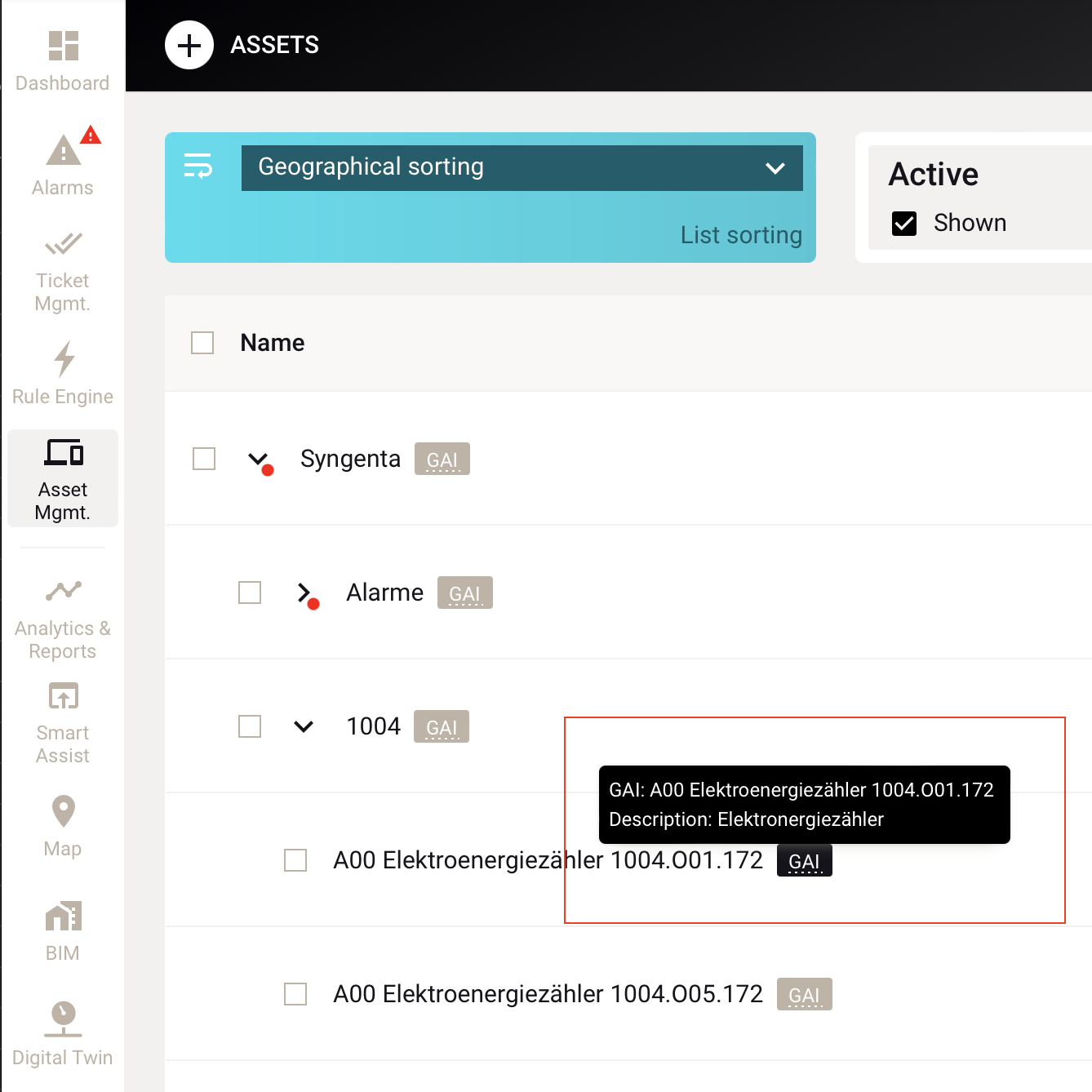
The templates should be stored in Excel format and must contain the configuration of the assets. The linking to the assets / attributes in Eliona looks like this:

`{"assetGai":"H01 district heating energy meter IWB", "attribute":"Energy", "raster":"MONTH", "mode":"sum"}`

The required information is entered here in JSON format.

| key           | Value example                                                                                                                                                        | Note                                                                                                                                                                                                   |
| ------------- | -------------------------------------------------------------------------------------------------------------------------------------------------------------------- | ------------------------------------------------------------------------------------------------------------------------------------------------------------------------------------------------------ |
| `"assetGai"`  | <img src="https://content.gitbook.com/content/Nyvwhz1kEMXcHf4HLuZ8/blobs/eX2YFmqIVi6z4H5qXBA4/2EEAC032-4A8C-44FA-A333-C2558667A18C.png" alt="" data-size="original"> | GAI of the used asset.                                                                                                                                                                                 |
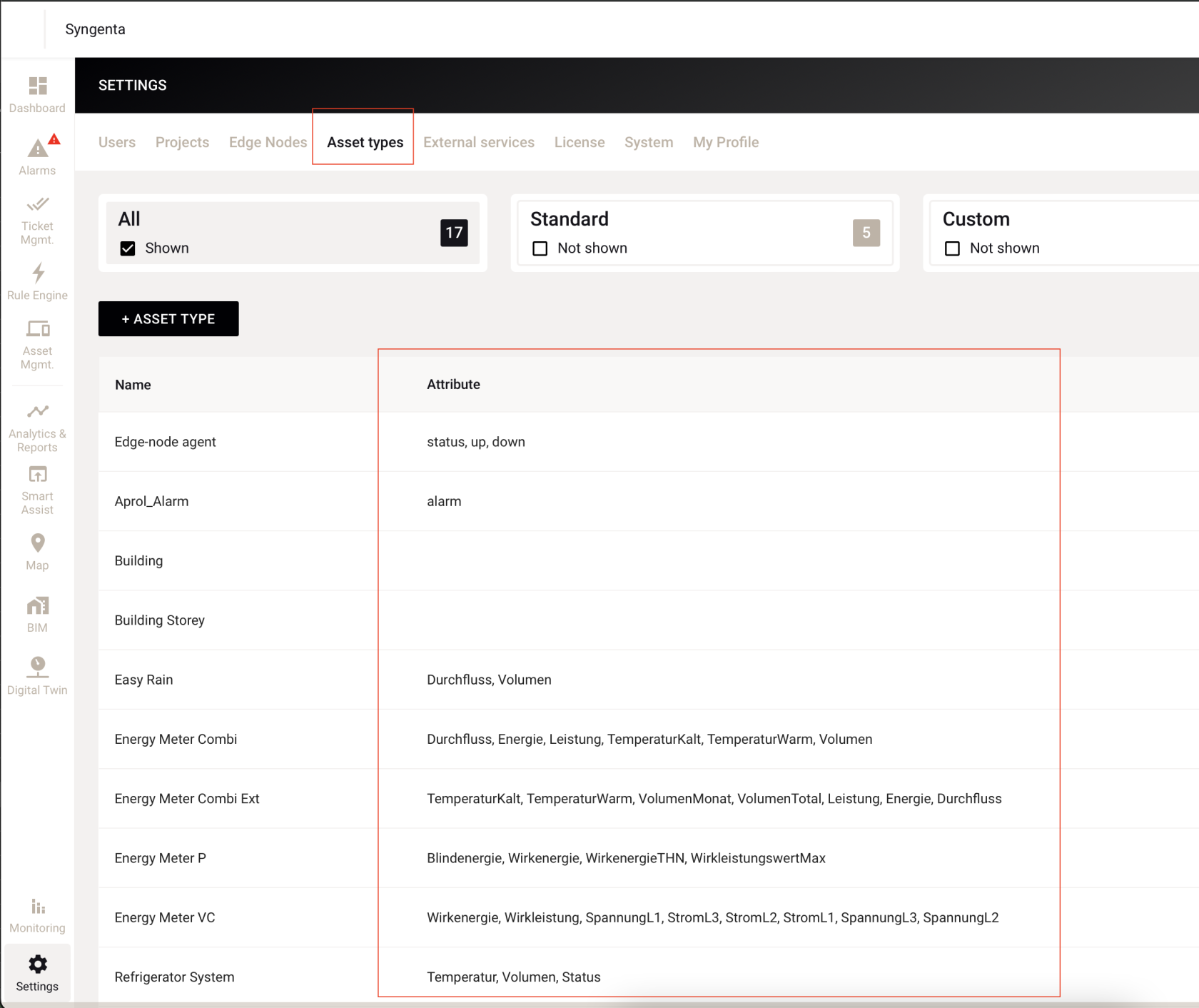
| `"attribute"` | <img src="https://content.gitbook.com/content/Nyvwhz1kEMXcHf4HLuZ8/blobs/4vSUyLvxOKRX85AFhkld/C97CC656-A912-4266-AE19-F3AB988D9EB8.png" alt="" data-size="original"> | The attributes of the asset type to be read are entered here                                                                                                                                           |
| `"raster"`    | <p>M1 , M5, M10, M15 H1, H2, H4, H8, H12 DAY</p><p>WEEK MONTH YEAR</p>                                                                                               | Depending on the report to be created, the raster must be entered here. For a monthly report, the raster MONTH must be used.                                                                           |
| `"mode"`      | <p>last first sum</p><p>average</p>                                                                                                                                  | <p>The mode that is to be read from the raster.</p><p>For attributes that have an average calculation, "average" must be used.</p><p>Attributes with a sum or cumulative summation must use "sum".</p> |

### Calculations

Calculations are carried out in Excel. All Excel functions can be used here. Referencing values from your own table as well as using values from Eliona is possible. When using values from Eliona, simply use the JSON part for referencing.

*Example: Here a cell content is subtracted from an Eliona asset attribute.*

`= ({"assetGai":"K01 network energy meter 1005", "attribute":"Energy", "raster":"MONTH", "mode":"sum"} - J6)`

ATTENTION: Entering such a formula is prevented by Excel. To do this, the cell format must be adjusted. After entering the formula, the cell type can be set back. It is recommended to choose the number format.
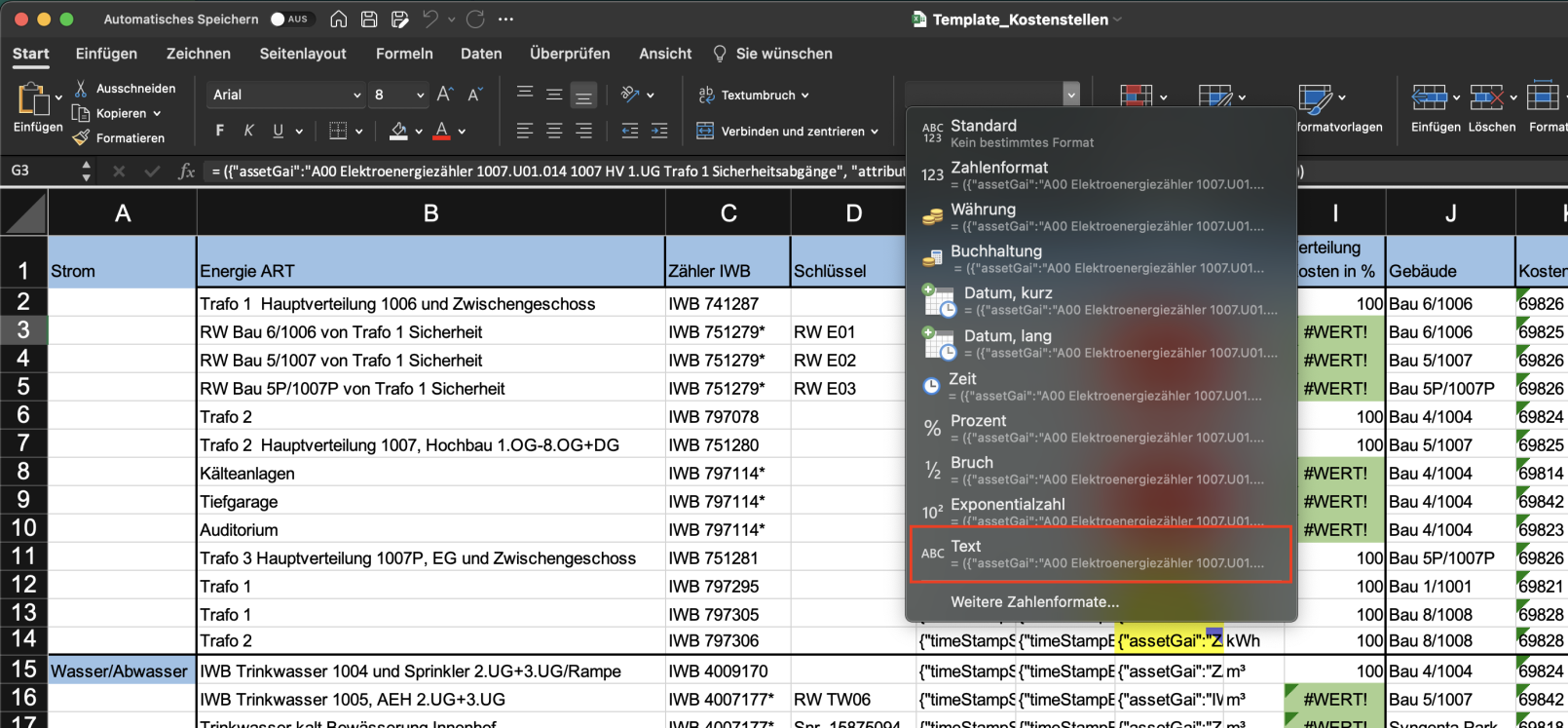
<figure><img src="https://content.gitbook.com/content/Nyvwhz1kEMXcHf4HLuZ8/blobs/zHGMq2tX3GecpHl3M3e3/64AC74F6-C113-40E9-BC56-B64F010C561A.png" alt=""><figcaption></figcaption></figure>

### DataListSequential (list one below the other)

Has not been used so far. It was only intended for one project in the quotation phase

### DataListParallel (list in parallel)

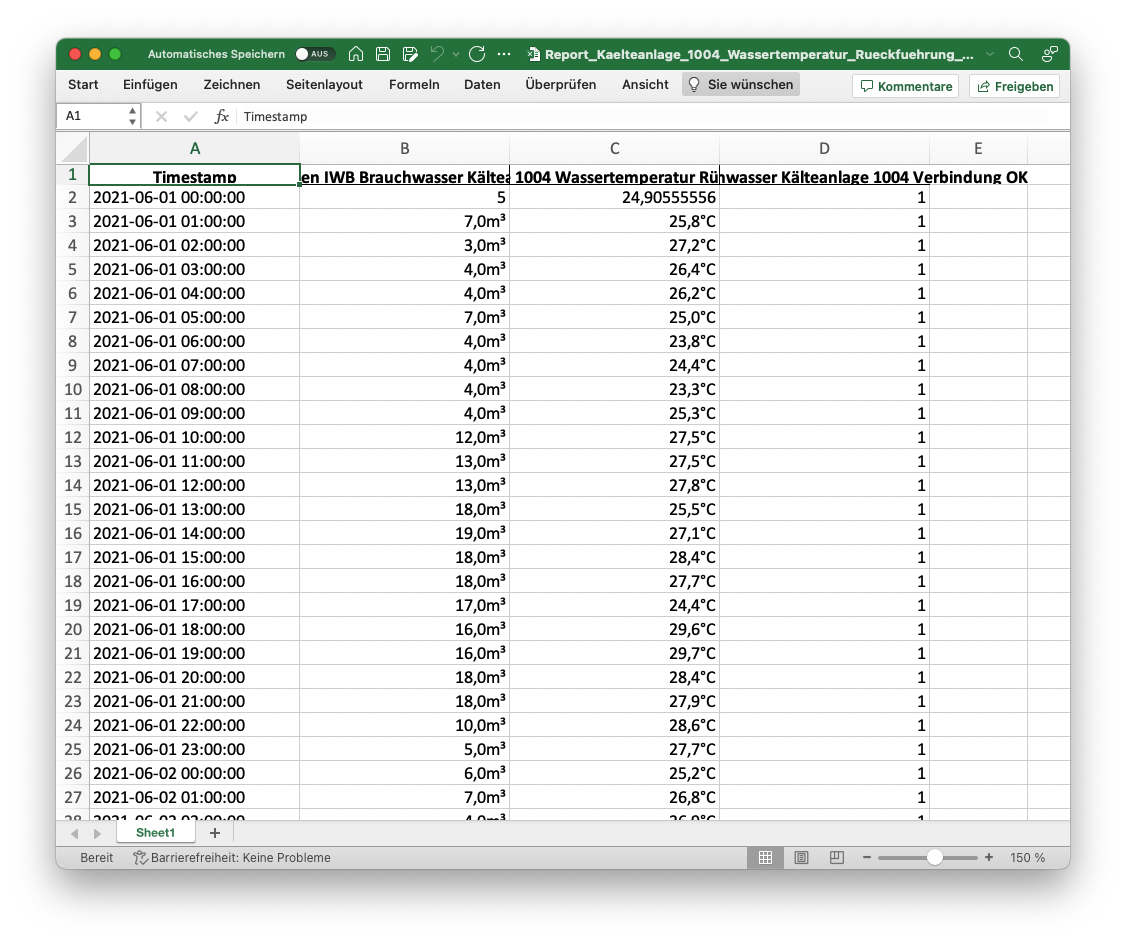
*Example table*

<figure><img src="https://content.gitbook.com/content/Nyvwhz1kEMXcHf4HLuZ8/blobs/9ltjpc6xeVd7Eg2yMAPu/image.png" alt=""><figcaption></figcaption></figure>

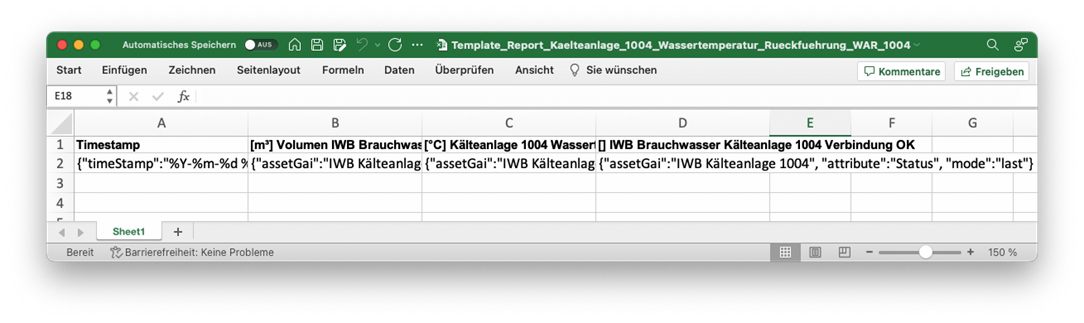
*Example template*

<figure><img src="https://content.gitbook.com/content/Nyvwhz1kEMXcHf4HLuZ8/blobs/ZR6SSEtDthzuuuBkupX5/image.png" alt=""><figcaption></figcaption></figure>

*Example template*

| ***Timestamp***                                                      | ***\[m³] Volume IWB domestic water cooling system 1004***                  | ***\[°C] Cooling system 1004 water temperature return WAR***                        | ***\[] IWB domestic water cooling system 1004 connection OK***              |
| -------------------------------------------------------------------- | -------------------------------------------------------------------------- | ----------------------------------------------------------------------------------- | --------------------------------------------------------------------------- |
| <p>{"timeStamp":"%Y-%m-</p><p>%d %H:%M:%S",</p><p>"raster":"H1"}</p> | {"assetGai":"IWB cooling system 1004", "attribute":"Volume", "mode":"sum"} | {"assetGai":"IWB cooling system 1004", "attribute":"Temperature", "mode":"average"} | {"assetGai":"IWB cooling system 1004", "attribute":"Status", "mode":"last"} |

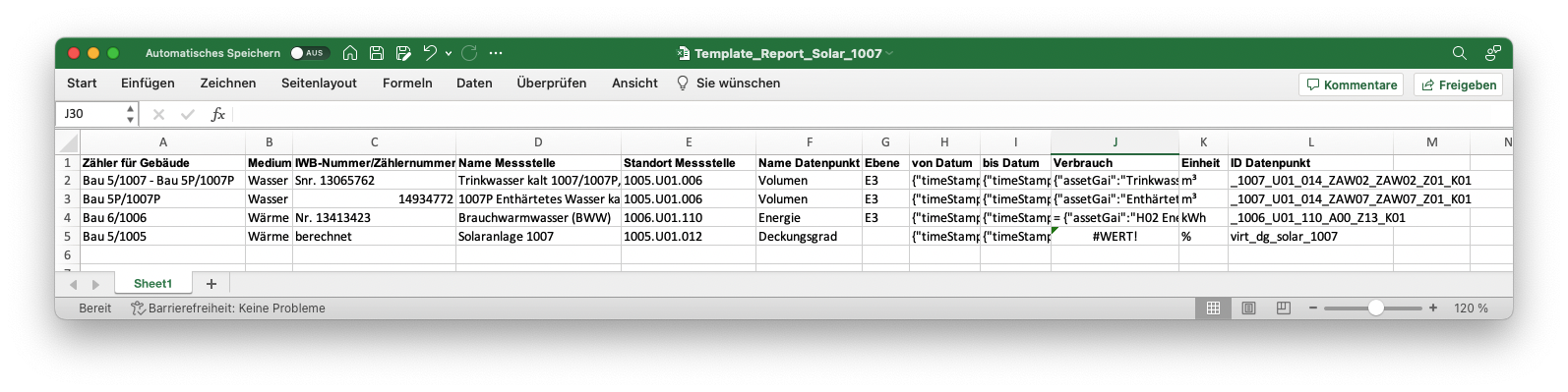
### DataEntry (individual entries in the cell)

*Example table:*
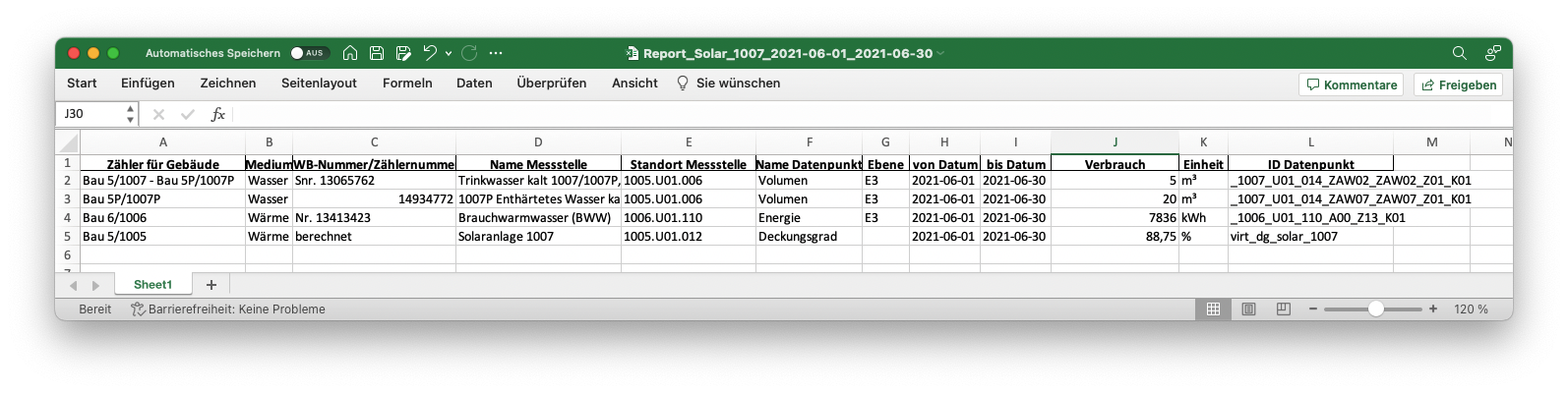
<figure><img src="https://content.gitbook.com/content/Nyvwhz1kEMXcHf4HLuZ8/blobs/xICzpLHe68qKQpNTD0Kw/AFB385AF-99DD-45B4-9B77-223142B13C9B.png" alt=""><figcaption></figcaption></figure>

*Example template:*

<figure><img src="https://content.gitbook.com/content/Nyvwhz1kEMXcHf4HLuZ8/blobs/f0YG0VZAQT09X84vIYlY/E770ABF6-A576-4587-A90C-EF6864F013A0.png" alt=""><figcaption></figcaption></figure>

| from date                     | to date                     | Consumption                                                                                                                                 |
| ----------------------------- | --------------------------- | ------------------------------------------------------------------------------------------------------------------------------------------- |
| {"timeStampStart":"%Y-%m-%d"} | {"timeStampEnd":"%Y-%m-%d"} | <p>{"assetGai":"Cold drinking water WRO 1007P UG-8.OG</p><p>Fresh water station", "attribute":"Volume", "raster":"MONTH", "mode":"sum"}</p> |

| {"timeStampStart":"%Y-%m-%d"} | {"timeStampEnd":"%Y-%m-%d"} | {"assetGai":"Softened water gastro supply fresh water", "attribute":"Volume", "raster":"MONTH", "mode":"sum"} |
| ----------------------------- | --------------------------- | ------------------------------------------------------------------------------------------------------------- |
| {"timeStampStart":"%Y-%m-%d"} | {"timeStampEnd":"%Y-%m-%d"} | = {"assetGai":"H02 energy meter BWW 1005", "attribute":"Energy", "raster":"MONTH", "mode":"sum"} \* 1000      |
| {"timeStampStart":"%Y-%m-%d"} | {"timeStampEnd":"%Y-%m-%d"} | = (1 - ((J4) / ((J2+J3)\*64 + 68000)))\*100                                                                   |

### Manual creation of a report

For manual creation of a report, the Docker container can be opened and App.py can be called with arguments. There is help that can be called with -h.

```json
(env311) spreadsheet-report-app % python ./src/spreadsheet-reportapp/
spreadsheet_report_app.py -h
usage: spreadsheet_report_app.py [-h] [-d DATE] [-c CONFIG] [-u USER] [-r REPORT] [-o OUTPUT]
options:
-h, --help show this help message and exit
-d DATE, --date DATE Date in the format: dd.mm.yyyy
-c CONFIG, --config CONFIG
Path to the used configuration file. For example:
"./config/config.json"
-u USER, --user USER User name requested. Name can be read from config.json file.
-r REPORT, --report REPORT
Report name requested. Name can be read from config.json file.
-o OUTPUT, --output OUTPUT
Export file path. If empty, it will be stored under "./temp/file_name"
(env311) spreadsheet-report-app %
```

<table><thead><tr><th>Argument</th><th width="359.3333333333333">Description</th><th>Example</th></tr></thead><tbody><tr><td>-h, --help</td><td>Help text output</td><td>python sp...app.py -h</td></tr><tr><td>-d, --date</td><td><p>Input of the desired report date in the format "dd.mm.yyyy". For monthly reports, month and year are important.</p><p>For annual reports, the year is important.</p></td><td>python sp...app.py -d "01.01.2021"</td></tr><tr><td>-c, --config</td><td>Path to the settings file. This is needed to load the reportings and user settings. If this remains empty, the standard directory will be used.</td><td>python sp...app.py -c "./config/config.json"</td></tr><tr><td>-u, --user</td><td><p>Either select user or report configuration. Which ones are available depends on the existing configuration. In the case of the user, all reports of the user are created. In the case of a report, the individual report is created.</p><p>One of them must be set.</p></td><td>python sp...app.py -u</td></tr><tr><td>-r, --report</td><td>python sp...app.py -r</td><td></td></tr><tr><td>-o, --output</td><td><p>Output path for the created reports. If this parameter remains empty, the directory "</p><p>./tmp_reports/manual_created/" is used.</p></td><td>python sp...app.py -h "./tmp_files/export/"</td></tr></tbody></table>


---

# Agent Instructions
This documentation is published with GitBook. GitBook is the documentation platform designed so that both humans and AI agents can read, navigate, and reason over technical content effectively. Learn more at gitbook.com.

## Querying This Documentation
If you need additional information that is not directly available in this page, you can query the documentation dynamically by asking a question.

Perform an HTTP GET request on the current page URL with the `ask` query parameter, and the optional `goal` query parameter:

```
GET https://docs.buildings.ability.abb/collection/english-v14/apps/apps/spread-sheet.md?ask=<question>&goal=<endgoal>
```

`ask` is the immediate question: it should be specific, self-contained, and written in natural language.
`goal` is optional and describes the broader end goal you are ultimately trying to accomplish on behalf of the user. GitBook uses it to tailor the answer towards what is most useful for that goal.

The response will contain a direct answer to the question and relevant excerpts and sources from the documentation.

Use this mechanism when the answer is not explicitly present in the current page, you need clarification or additional context, or you want to retrieve related documentation sections.