> For the complete documentation index, see [llms.txt](https://docs.buildings.ability.abb/collection/llms.txt). Markdown versions of documentation pages are available by appending `.md` to page URLs; this page is available as [Markdown](https://docs.buildings.ability.abb/collection/english-v14/connectivity-as-a-service/gerate-mit-abb-buildingpro-verbinden.md).
# Connect devices with ABB BuildingPro
## About this chapter
This chapter describes how to connect external devices to ABB BuildingPro and display data from these devices in ABB BuildingPro.
## Procedure
### Overview
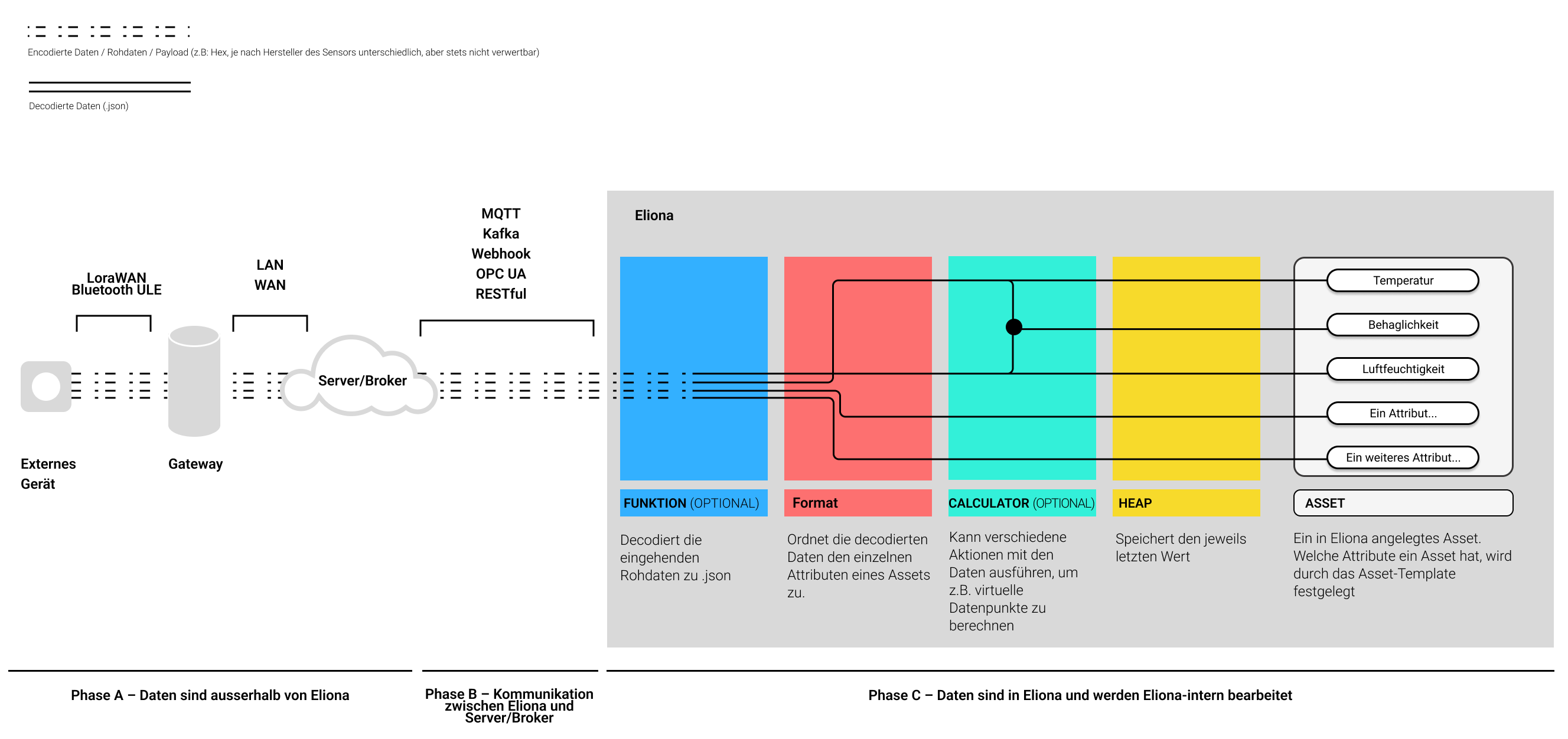
The first step is to establish a communication connection between ABB BuildingPro and the devices to be connected. In Fig. 1, this is phase "B".
In the second step, the incoming raw data usually has to be decoded. This is because external devices send their transmitted data (payload) encoded or in some other unusable format.
In the third step, finally, the decoded data values are assigned via formats to the individual [↗ attributes](#asset-templates) of an asset.
The last two steps take place in phase C.
### Details
Fig. 1 shows schematically the data flow from an external device to ABB BuildingPro.
Fig. 1 – Data flow from external devices to ABB BuildingPro
#### Phase A
Phase A takes place entirely outside ABB BuildingPro. In phase A, raw data from individual devices is sent to a server or broker. An example of such a server is [↗ TTN \[External link\]](https://www.thethingsnetwork.org/)
The details, e.g. which transmission format is used, vary greatly depending on the manufacturer and device. Phase A is not part of ABB BuildingPro and is not explained in detail in this documentation. Consult the documentation for the external devices or server to learn more about this topic.
{% hint style="info" %}
For the further steps in this document, it is assumed that you have access to correctly configured external devices and/or access to a server.
{% endhint %}
#### Phase B
In phase B, the actual connection of Eliona and the device data takes place. In this phase, a data connection is established between Eliona and the external devices.
Eliona accepts the following interfaces:
* [↗ MQTT](/collection/english-v14/connectivity-as-a-service/gerate-mit-abb-buildingpro-verbinden/gerate-per-mqtt-verbinden.md)
* [↗ Webhook](/collection/english-v14/connectivity-as-a-service/gerate-mit-abb-buildingpro-verbinden/gerate-per-webhook-verbinden.md)
* [↗ RESTful](/collection/english-v14/connectivity-as-a-service/gerate-mit-abb-buildingpro-verbinden/gerate-per-restful-verbinden.md)
* [↗ Kafka](/collection/english-v14/connectivity-as-a-service/gerate-mit-abb-buildingpro-verbinden/...mit-kafka.md)
* [↗ OPC UA](/collection/english-v14/connectivity-as-a-service/gerate-mit-abb-buildingpro-verbinden/gerate-per-opc-ua-verbinden.md)
Click on a link to jump directly to the guide that describes how to establish a data connection via the corresponding interface.
#### Phase C
In phase C, the data is processed and made usable within Eliona.
* The data sent by the external devices and received in Eliona is, in most cases, not directly readable. Depending on the manufacturer, this raw data is encoded or is in a format that cannot be used any further. Therefore, this raw data is **↗** **Features** decoded and converted into a human-readable .json format.
* The decoded data is assigned to the individual attributes of an asset via **↗ formats** of an asset.
## Requirements
To connect external devices, the following requirements must be met:
#### Correctly configured external devices and servers
The devices to be connected must be correctly configured and must send data properly.
Servers and brokers must be correctly configured.
#### Existing access credentials for servers, brokers and other services
The access credentials for servers and brokers must be known.
#### Asset Templates
It is assumed that you have created correct asset templates. The asset template must have the necessary asset attributes
#### Assets
Assets must be created based on the asset template.
---
# Agent Instructions
This documentation is published with GitBook. GitBook is the documentation platform designed so that both humans and AI agents can read, navigate, and reason over technical content effectively. Learn more at gitbook.com.
## Querying This Documentation
If you need additional information that is not directly available in this page, you can query the documentation dynamically by asking a question.
Perform an HTTP GET request on the current page URL with the `ask` query parameter, and the optional `goal` query parameter:
```
GET https://docs.buildings.ability.abb/collection/english-v14/connectivity-as-a-service/gerate-mit-abb-buildingpro-verbinden.md?ask=&goal=
```
`ask` is the immediate question: it should be specific, self-contained, and written in natural language.
`goal` is optional and describes the broader end goal you are ultimately trying to accomplish on behalf of the user. GitBook uses it to tailor the answer towards what is most useful for that goal.
The response will contain a direct answer to the question and relevant excerpts and sources from the documentation.
Use this mechanism when the answer is not explicitly present in the current page, you need clarification or additional context, or you want to retrieve related documentation sections.