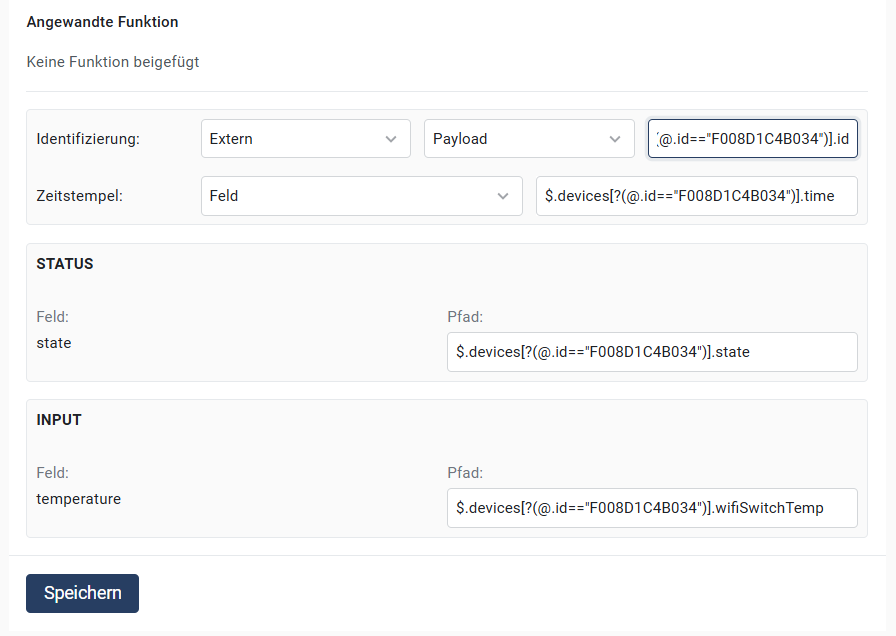
Example for when you want a specific device.
Example for when you want a specific device.
 ***
## Using MQTT wildcards to create a GAI/related ID
### **MQTT topic structure in the example:**
{% @mermaid/diagram content="graph TD A(building\_01) --> B(building\_01/floor\_01) A --> C(building\_01/floor\_02) B --> D(building\_01/floor\_01/room\_01) B --> E(building\_01/floor\_01/room\_02) C --> F(building\_01/floor\_02/room\_01) C --> G(building\_01/floor\_02/room\_02) " %}
### **MQTT wildcards**
MQTT supports two wildcard types that can be used in topics:
1. **`+` (single-level wildcard)**
* Represents "all values at this topic level".
* Example:\nThe topic `building_01/+/room_01` matches the following topics:
* `building_01/floor_01/room_01`
* `building_01/floor_02/room_01`
2. **`#` (multi-level wildcard)**
* Represents "all values from this level and below".
* Can **only be used at the end** of a topic.
* Example:\nThe topic `building_01/#` matches the following topics:
* `building_01/floor_01`
* `building_01/floor_01/room_01`
* `building_01/floor_02/room_02`
***
### **How MQTT wildcards work**
* **`+`-wildcard:**\
Each `+`-wildcard replaces exactly one part of the topic. If there are multiple `+`-wildcards in a topic, you can access them in Eliona by numbers (`1`, `2`, etc.)\nExample: In the topic `building_01/+/+`, represents:
* `1`: the first part replaced by `+` it.
* `2`: the second part replaced by `+` it.
* **`#`-wildcard:**\
Captures all values and levels from the position where it stands. Anything in the topic that takes the place of `#` can be referenced directly in Eliona via `#` .
***
### **Examples of using MQTT wildcards**
#### **Example 1: Using `#` to capture rooms**
**Subscription topic:**\
`building_01/#`
**Received message:**\
`building_01/floor_01/room_01`
**Configuration in Eliona:**
* **Identifier**: `#`
**Result:**\
The topic `floor_01/room_01` is used as the GAI/related ID.
***
### **Example 2: Using `+` to identify a level**
**Subscription topic:**\
`building_01/+/room_01`
**Received message:**\
`building_01/floor_02/room_01`
**Configuration in Eliona:**
* **Identifier**: `1`
**Result:**\
The value `floor_02` (the level replaced by the first `+` is used as the GAI/related ID.
***
### **Example 3: Combination of `+` and `#` to capture multiple levels**
**Subscription topic:**\
`building_01/+/+/#`
**Received message:**\
`building_01/floor_01/room_02/sensor_01`
**Configuration in Eliona:**
* **Identifier**:
* `1` → `floor_01` (first `+`-wildcard)
* `2` → `room_02` (second `+`-wildcard)
* `#` → `sensor_01` (all values that `#` replace)
**Result:**\
The values `floor_01`, `room_02` and `sensor_01` can be used individually as GAI/related ID.
***
## **Important notes**
1. **MQTT wildcards only work with the topic mode:**\
Select **"Topic"** in identification, as shown in the following image:
***
## Using MQTT wildcards to create a GAI/related ID
### **MQTT topic structure in the example:**
{% @mermaid/diagram content="graph TD A(building\_01) --> B(building\_01/floor\_01) A --> C(building\_01/floor\_02) B --> D(building\_01/floor\_01/room\_01) B --> E(building\_01/floor\_01/room\_02) C --> F(building\_01/floor\_02/room\_01) C --> G(building\_01/floor\_02/room\_02) " %}
### **MQTT wildcards**
MQTT supports two wildcard types that can be used in topics:
1. **`+` (single-level wildcard)**
* Represents "all values at this topic level".
* Example:\nThe topic `building_01/+/room_01` matches the following topics:
* `building_01/floor_01/room_01`
* `building_01/floor_02/room_01`
2. **`#` (multi-level wildcard)**
* Represents "all values from this level and below".
* Can **only be used at the end** of a topic.
* Example:\nThe topic `building_01/#` matches the following topics:
* `building_01/floor_01`
* `building_01/floor_01/room_01`
* `building_01/floor_02/room_02`
***
### **How MQTT wildcards work**
* **`+`-wildcard:**\
Each `+`-wildcard replaces exactly one part of the topic. If there are multiple `+`-wildcards in a topic, you can access them in Eliona by numbers (`1`, `2`, etc.)\nExample: In the topic `building_01/+/+`, represents:
* `1`: the first part replaced by `+` it.
* `2`: the second part replaced by `+` it.
* **`#`-wildcard:**\
Captures all values and levels from the position where it stands. Anything in the topic that takes the place of `#` can be referenced directly in Eliona via `#` .
***
### **Examples of using MQTT wildcards**
#### **Example 1: Using `#` to capture rooms**
**Subscription topic:**\
`building_01/#`
**Received message:**\
`building_01/floor_01/room_01`
**Configuration in Eliona:**
* **Identifier**: `#`
**Result:**\
The topic `floor_01/room_01` is used as the GAI/related ID.
***
### **Example 2: Using `+` to identify a level**
**Subscription topic:**\
`building_01/+/room_01`
**Received message:**\
`building_01/floor_02/room_01`
**Configuration in Eliona:**
* **Identifier**: `1`
**Result:**\
The value `floor_02` (the level replaced by the first `+` is used as the GAI/related ID.
***
### **Example 3: Combination of `+` and `#` to capture multiple levels**
**Subscription topic:**\
`building_01/+/+/#`
**Received message:**\
`building_01/floor_01/room_02/sensor_01`
**Configuration in Eliona:**
* **Identifier**:
* `1` → `floor_01` (first `+`-wildcard)
* `2` → `room_02` (second `+`-wildcard)
* `#` → `sensor_01` (all values that `#` replace)
**Result:**\
The values `floor_01`, `room_02` and `sensor_01` can be used individually as GAI/related ID.
***
## **Important notes**
1. **MQTT wildcards only work with the topic mode:**\
Select **"Topic"** in identification, as shown in the following image:
