

Asset status: active / inactive / unmonitored assets
Overview
Assets can have 3 statuses:
Active
Inactive
Not monitored
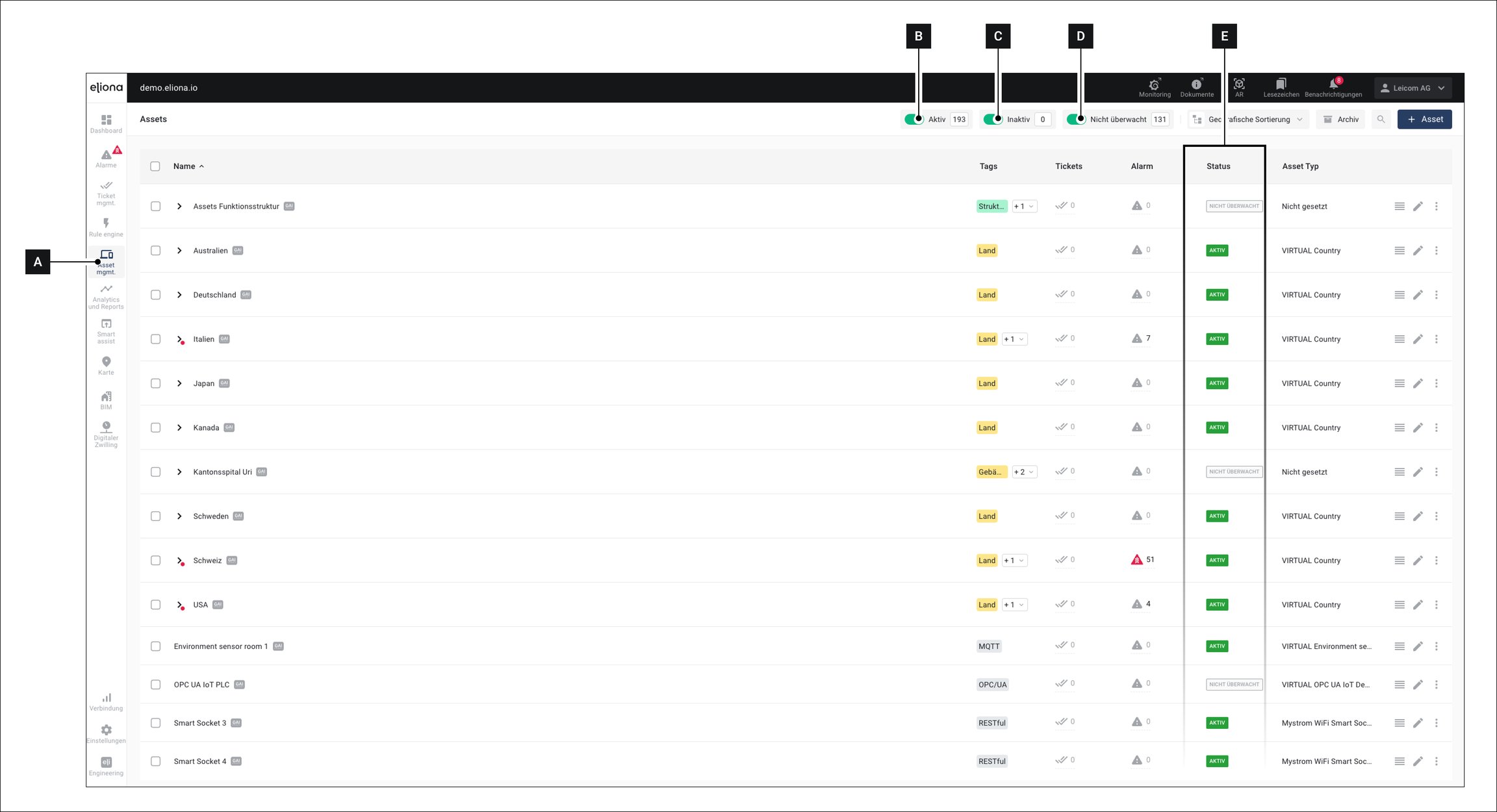
The current status of the asset is shown in the asset menu in the column Status [E] displayed.
Explanation
The status indicates whether an asset has received data within a previously defined time period.
Active
The asset has received data within the specified time period
Inactive
The asset has not received any data within the specified time period.
Not monitored
The function is disabled for the asset
Filter assets by status
Using the switches [B], [C] and [D] you can filter the assets in the asset menu by status
Configure function
For individual assets
You can configure this function for each individual asset in the -> Asset details
For asset templates
When creating -> Asset templates you can define a default value for this option.
All assets created based on this asset template will then adopt the template's default value.
Minimum time interval
The minimum time interval in which the status of an asset in column [E] is updated is 5 minutes. If you have set a shorter value in the asset details or the asset template, the asset will in fact be switched to Inactive after this time. However, this is not visible in the column [E] the displayed value in this column is updated every 5 minutes.
Last updated
Was this helpful?