> For the complete documentation index, see [llms.txt](https://docs.buildings.ability.abb/collection/llms.txt). Markdown versions of documentation pages are available by appending `.md` to page URLs; this page is available as [Markdown](https://docs.buildings.ability.abb/collection/english-v14/documentation/assets/bewertungen.md).

# Evaluations

Asset ratings are a valuable tool for continuously monitoring and documenting the quality and condition of individual assets. They enable users to share their experiences and observations, which helps improve the utilization efficiency of the assets. By collecting feedback in the form of star ratings and comments, trends can be identified, common issues spotted, and measures for optimization taken. These ratings not only provide transparent insight into the performance and reliability of the assets, but also promote the continuous improvement of asset management throughout the entire system.

***

<figure><img src="https://content.gitbook.com/content/Nyvwhz1kEMXcHf4HLuZ8/blobs/v9F2Ze7Gw1HEJJHCezFY/Bewertungen.png" alt=""><figcaption></figcaption></figure>

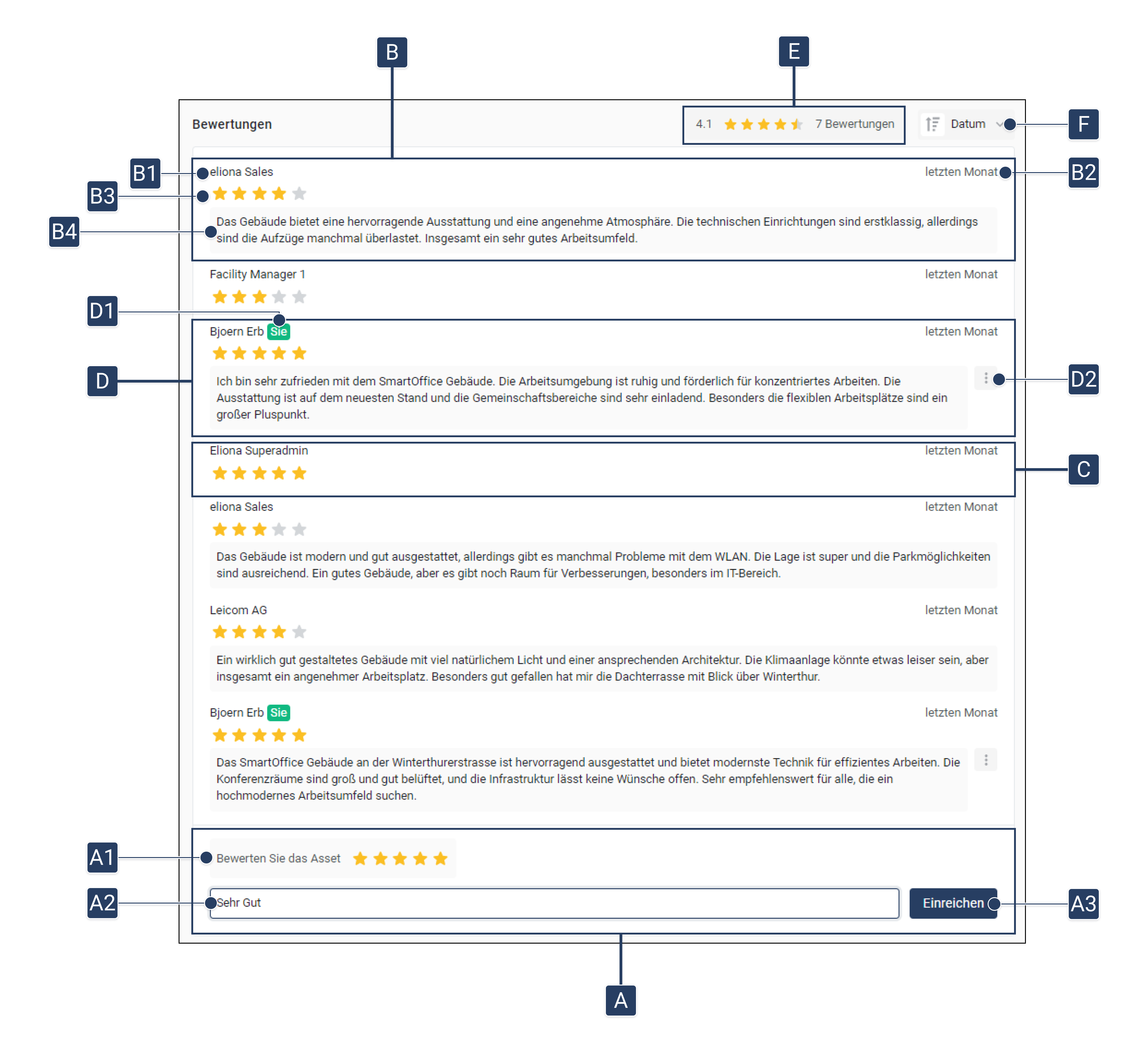
<table><thead><tr><th width="97"></th><th></th><th></th></tr></thead><tbody><tr><td><strong>[A]</strong></td><td>Rate asset</td><td>Here you can give a rating for the asset.</td></tr><tr><td><strong>[A1]</strong></td><td>Star rating</td><td>Choose how many stars you want to give the asset.</td></tr><tr><td><strong>[A2]</strong></td><td>Add comment</td><td>Optional: Add a comment to your rating.</td></tr><tr><td><strong>[A3]</strong></td><td>Submit rating</td><td>Submit your rating.</td></tr><tr><td><strong>[B]</strong></td><td>Ratings with comment</td><td>See other users' ratings, including their comments.</td></tr><tr><td><strong>[B1]</strong></td><td>Name of sender</td><td>The name of the person who wrote the rating.</td></tr><tr><td><strong>[B2]</strong></td><td>Time of rating</td><td>Indicates when the rating was written.</td></tr><tr><td><strong>[B3]</strong></td><td>Stars awarded</td><td>The number of stars that were awarded in the rating.</td></tr><tr><td><strong>[B4]</strong></td><td>Comment</td><td>The comment associated with the star rating.</td></tr><tr><td><strong>[C]</strong></td><td>Rating without comment</td><td>A star rating without an additional comment.</td></tr><tr><td><strong>[D]</strong></td><td>Your own rating</td><td>Here you can see your own rating.</td></tr><tr><td><strong>[D1]</strong></td><td>Marking your rating</td><td>Your ratings are marked with a green "You".</td></tr><tr><td><strong>[D2]</strong></td><td>Options for your own rating</td><td>You can later <strong>edit</strong> or <strong>delete</strong>.</td></tr><tr><td><strong>[E]</strong></td><td>Overall asset rating</td><td>Shows the asset's average star rating, both numerically and in star form, as well as the number of ratings submitted.</td></tr><tr><td><strong>[F]</strong></td><td>Sort ratings</td><td>Sort the ratings by date, stars, or author.</td></tr></tbody></table>

## Write rating

In the asset details, there is the option to write ratings for each asset.

1. Go to the [-> asset details](/collection/english-v14/documentation/assets/asset-details.md) .
2. Scroll down to the ratings on the right-hand side.\
   ▷ You see **"Rate the asset"** and a text field. **\[A]**
3. Select in **\[A1]**, how many **stars** you want to give the asset.
4. Optional: Add a **Comment** comment **\[A2]** to your rating in
5. Click on **"Submit" \[A3]**

   ▷ Your rating was submitted successfully.


---

# Agent Instructions
This documentation is published with GitBook. GitBook is the documentation platform designed so that both humans and AI agents can read, navigate, and reason over technical content effectively. Learn more at gitbook.com.

## Querying This Documentation
If you need additional information that is not directly available in this page, you can query the documentation dynamically by asking a question.

Perform an HTTP GET request on the current page URL with the `ask` query parameter, and the optional `goal` query parameter:

```
GET https://docs.buildings.ability.abb/collection/english-v14/documentation/assets/bewertungen.md?ask=<question>&goal=<endgoal>
```

`ask` is the immediate question: it should be specific, self-contained, and written in natural language.
`goal` is optional and describes the broader end goal you are ultimately trying to accomplish on behalf of the user. GitBook uses it to tailor the answer towards what is most useful for that goal.

The response will contain a direct answer to the question and relevant excerpts and sources from the documentation.

Use this mechanism when the answer is not explicitly present in the current page, you need clarification or additional context, or you want to retrieve related documentation sections.