> For the complete documentation index, see [llms.txt](https://docs.buildings.ability.abb/collection/llms.txt). Markdown versions of documentation pages are available by appending `.md` to page URLs; this page is available as [Markdown](https://docs.buildings.ability.abb/collection/english-v14/documentation/einstellungen/system.md).

# System

## System

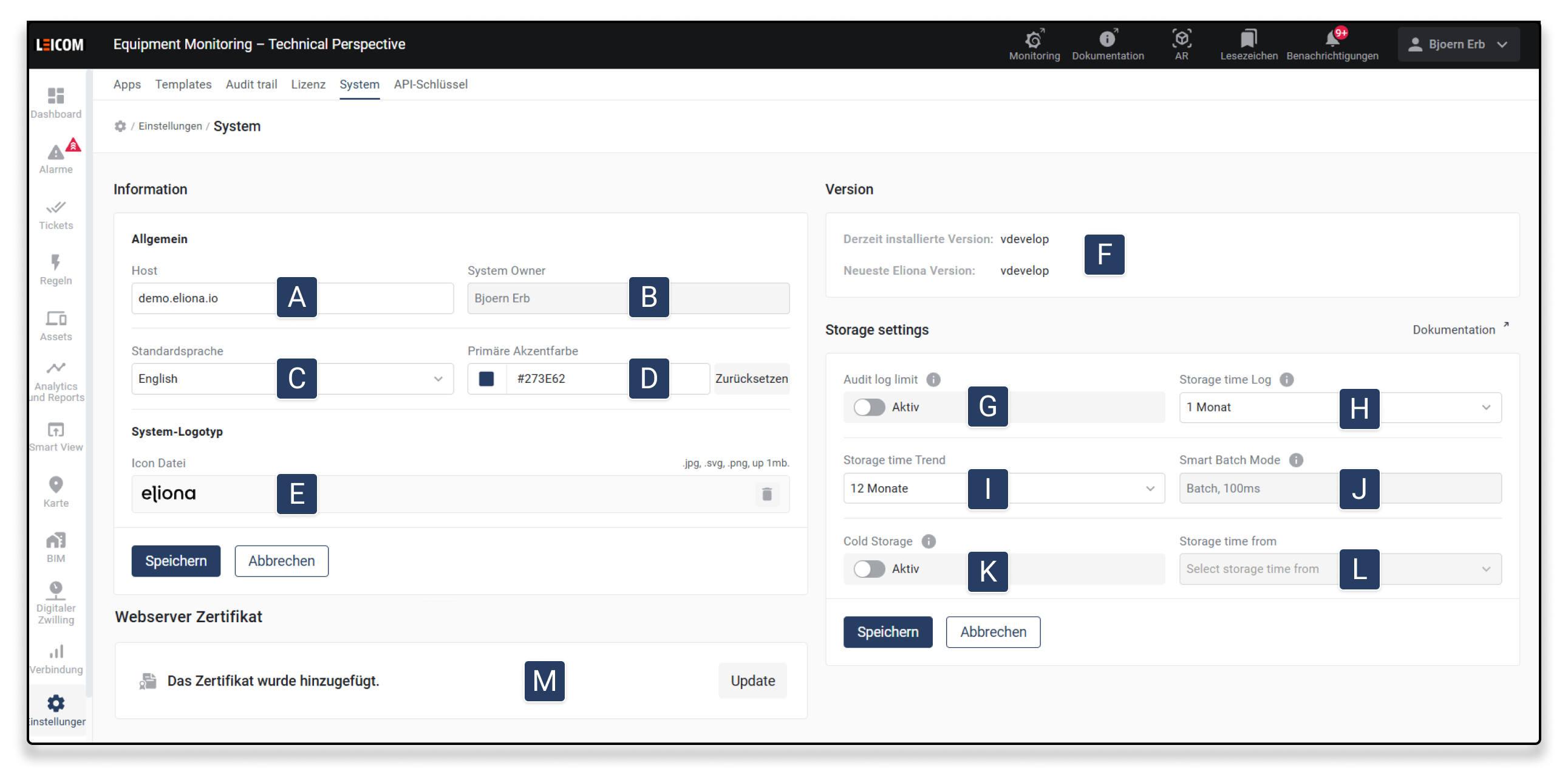
<div data-full-width="true"><figure><img src="https://content.gitbook.com/content/Nyvwhz1kEMXcHf4HLuZ8/blobs/aQSHB9zh52CUKST0zqp2/System.png" alt=""><figcaption></figcaption></figure></div>

<table data-header-hidden data-full-width="true"><thead><tr><th width="60"></th><th width="178"></th><th></th></tr></thead><tbody><tr><td><strong>[A]</strong></td><td>Host</td><td>Specify the hostname.</td></tr><tr><td><strong>[B]</strong></td><td>System Owner</td><td>System administrator with unrestricted rights. Required for system notifications.</td></tr><tr><td><strong>[C]</strong></td><td>Default language</td><td>Defines the display language of Eliona (German, English, Italian, French).</td></tr><tr><td><strong>[D]</strong></td><td>Primary color</td><td>Defines the main color of the system controls.</td></tr><tr><td><strong>[E]</strong></td><td>System logo</td><td>Allows uploading a custom logo for the system.</td></tr><tr><td><strong>[F]</strong></td><td>Version</td><td>Shows the currently installed and the latest available version of Eliona.</td></tr><tr><td><strong>[G]</strong></td><td>Audit Log Limit</td><td>If disabled, audit logs are stored indefinitely. If enabled, storage is carried out according to "Storage Time Log".</td></tr><tr><td><strong>[H]</strong></td><td>Storage Time Log</td><td>Specifies how long logs remain stored before they are automatically deleted.</td></tr><tr><td><strong>[I]</strong></td><td>Storage Time Trend</td><td>Defines how long trend data is stored.</td></tr><tr><td><strong>[J]</strong></td><td>Smart Batch Mode</td><td><p>Control of data processing:</p><ul><li><strong>Plain:</strong> Data is inserted individually immediately.</li><li><strong>Batch:</strong> Data is collected for a configured time and then stored as a single query.</li><li><strong>Smart Batch:</strong> Similar to Batch, but only the last value is stored for frequently changing data.</li></ul></td></tr><tr><td><strong>[K]</strong></td><td>Cold Storage</td><td>Indicates when trend data is transferred to a more space-efficient format to reduce storage space.</td></tr><tr><td><strong>[L]</strong></td><td>Storage Time From</td><td>If <strong>Cold Storage</strong> is enabled, the period after which the data is transferred to cold storage can be defined here.</td></tr><tr><td><strong>[M]</strong></td><td>Web server certificate</td><td>Shows the current status of the stored certificate. Using the button <strong>Update</strong> new certificate files (.crt / .key) can be uploaded. After replacement, the Eliona instance is automatically restarted and is accessible again via a secure HTTPS connection.</td></tr></tbody></table>

{% hint style="info" %}
To receive system notifications, a *System Owner* (system administrator) must be entered. System notifications provide information about communication problems, API parameters, and other system-critical information.
{% endhint %}

{% hint style="info" %}
To set the retention period of the data to **indefinite** please contact our team.
{% endhint %}


---

# Agent Instructions
This documentation is published with GitBook. GitBook is the documentation platform designed so that both humans and AI agents can read, navigate, and reason over technical content effectively. Learn more at gitbook.com.

## Querying This Documentation
If you need additional information that is not directly available in this page, you can query the documentation by asking a question.

Perform an HTTP GET request on the following URL with the `ask` and `goal` query parameters:

```
GET https://docs.buildings.ability.abb/collection/english-v14/documentation/einstellungen/system.md?ask=<question>&goal=<user_goal>
```

`ask` is the immediate question: it should be specific, self-contained, and written in natural language.
`goal` is what the user is ultimately trying to achieve, the reason they need the answer. Sharing it helps GitBook give you a better, more relevant answer. A goal is most helpful when it describes the outcome the user wants rather than restating the question. For example, with `ask=how do I create an API token`, a goal like `automate deployments from our CI pipeline` lets GitBook tailor the answer to that use case.

The response will contain a direct answer to the question and relevant excerpts and sources from the documentation.

Use this mechanism when the answer is not explicitly present in the current page, you need clarification or additional context, or you want to retrieve related documentation sections.
