

Deploy a Smart View
Explanation
In order for building users to view the Smart View, you must deploy the Smart View.
A Smart View is deployed by opening a link to the Smart View in a web browser.
The end device must have a screen and access to the internet. If the end device has a touchscreen, the audience can interact with the presented content.
Procedure
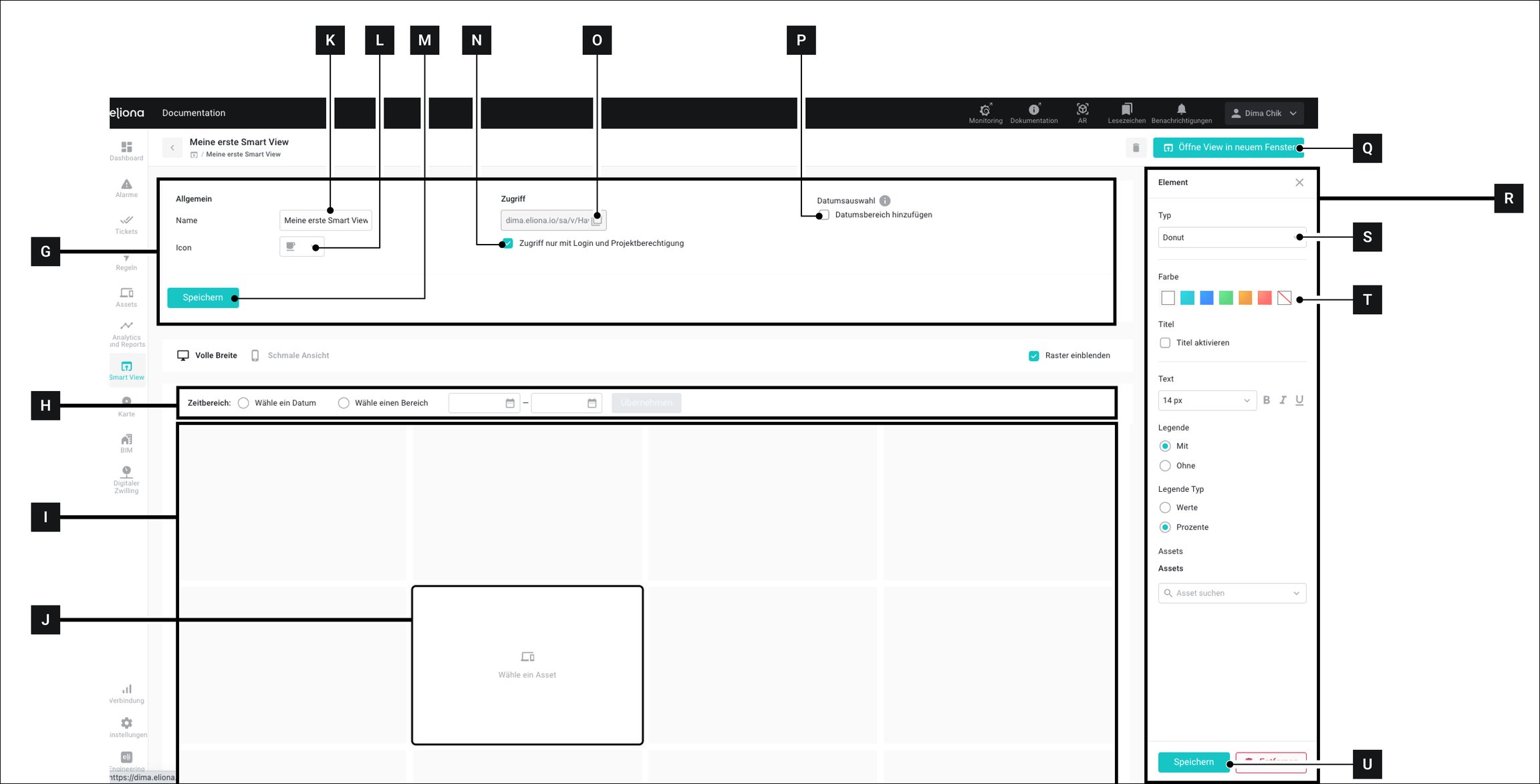
Proceed as follows:
Open the menu -> Configure Smart View on
Click on [O] ▷ The Smart View URL is copied to the clipboard
Open the copied URL in a web browser ▷ The deployed Smart View is displayed
Restrict access
You can restrict access to a deployed Smart View.
In this case, valid login credentials must be entered before a deployed Smart View can be viewed.
Enable the option [N]
Update Smart View
If you make changes to a Smart View, those changes are not automatically applied to the Smart View displayed in the web browser.
You have 2 options for updating the deployed Smart View.
Manually
Reload the Smart View in the browser.
By ↗ Slider group
As a workaround, you can emulate automatic updating of the Smart View. To do this, add the same Smart View twice to a slider group. Every time you switch between the two views, the latest version of the view is loaded.
Last updated
Was this helpful?