> For the complete documentation index, see [llms.txt](https://docs.buildings.ability.abb/collection/llms.txt). Markdown versions of documentation pages are available by appending `.md` to page URLs; this page is available as [Markdown](https://docs.buildings.ability.abb/collection/english-v14/documentation/wayfinding.md).
# Wayfinding
## **Overview**
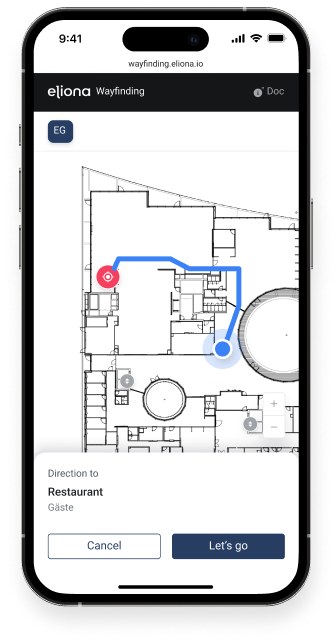
Wayfinding is an innovative system that makes it possible to configure routes across floors in complex buildings. It was developed to help both customers and employees find the fastest way to their destination without getting lost or having to rely on assistance. Wayfinding ensures that people can move through a building safely and efficiently by providing visual and interactive cues that simplify navigation.
{% hint style="info" %}
Building users benefit from Wayfinding by reaching their destination easily without getting lost or needing additional support.
[-> Learn more about the terminology used in this document.](/collection/english-v14/preface/glossar.md)
{% endhint %}
***
**Scan the QR code and simply try it out for yourself. You can find instructions here:**
{% content-ref url="/pages/ebe450b375b6b07abea647175304b20f9cd5f2b8" %}
[How “Wayfinding” works](/collection/english-v14/academy/wie-wayfinding-funktioniert.md)
{% endcontent-ref %}
Fig. 1 – QR code on the wall, which can now be scanned to open the Wayfinding view on the mobile device.
Fig. 2 – Wayfinding on a smartphone
### With Wayfinding, you can:
* **Create and configure buildings and floors:** Add buildings and their associated floors and customize them by inserting important points such as start/destination locations, paths, elevators, and stairs. [-> Configure a Wayfinding floor](/collection/english-v14/documentation/wayfinding/ein-wayfinding-stockwerk-konfigurieren.md)
* **Connect floors to each other:** Link floors via stairs and elevators, which can be grouped to enable routes across floors. [-> Edit an existing building](/collection/english-v14/documentation/wayfinding/ein-bestehendes-gebaude-bearbeiten.md)
* **Generate QR codes for navigation:** Create QR codes for starting points that users can scan to go directly to the Wayfinding view and start their route to the destination. [-> Generate QR code](/collection/english-v14/documentation/wayfinding/qr-code-generieren.md)
* **Custom route planning and navigation:** Users can enter their destination via a search bar and are then guided step by step to the destination, with the option to choose between different route options (e.g. stairs or elevator). [-> Wayfinding in use](/collection/english-v14/documentation/wayfinding/wayfinding-in-der-nuzung.md)
## This is how we implement Wayfinding:
We have developed a solution that allows you to simply upload an image, such as a floor plan. On this image, you can then draw paths, stairs, and destinations. The system automatically calculates the fastest route for the user, who then only has to select the desired route by simply clicking. This greatly simplifies the creation and use of Wayfinding and ensures that users reach their destination quickly and effortlessly.
### **Use cases:**
* **Hospitals:** Patients and visitors can easily find their way to their next appointment.
* **Office buildings:** New employees and guests quickly find their way to meeting rooms or departments.
* **Shopping centers:** Customers are effectively guided to the desired stores or services.
***
**Wayfinding offers an intuitive, user-friendly solution**, to make navigation in complex buildings easier and save time. Thanks to our user-friendly implementation, you can set up the system effortlessly, and it provides users with optimal orientation in any environment.
---
# Agent Instructions
This documentation is published with GitBook. GitBook is the documentation platform designed so that both humans and AI agents can read, navigate, and reason over technical content effectively. Learn more at gitbook.com.
## Querying This Documentation
If you need additional information that is not directly available in this page, you can query the documentation dynamically by asking a question.
Perform an HTTP GET request on the current page URL with the `ask` query parameter, and the optional `goal` query parameter:
```
GET https://docs.buildings.ability.abb/collection/english-v14/documentation/wayfinding.md?ask=&goal=
```
`ask` is the immediate question: it should be specific, self-contained, and written in natural language.
`goal` is optional and describes the broader end goal you are ultimately trying to accomplish on behalf of the user. GitBook uses it to tailor the answer towards what is most useful for that goal.
The response will contain a direct answer to the question and relevant excerpts and sources from the documentation.
Use this mechanism when the answer is not explicitly present in the current page, you need clarification or additional context, or you want to retrieve related documentation sections.
.png)