

Edit an existing building
What are elevator and stair groups?
Elevator and stair groups are used to connect the floors of a building with each other. When stairs or elevators on different floors are grouped together, this works like a staircase or an elevator shaft. This allows users to move between floors within the building.
The difference between elevator and stair groups lies in accessibility: Elevators are accessible and also allow people with limited mobility to move easily between floors. In the wayfinding system, users can choose the option whether they want to use the accessible route, that is, the elevator, or the stairs.
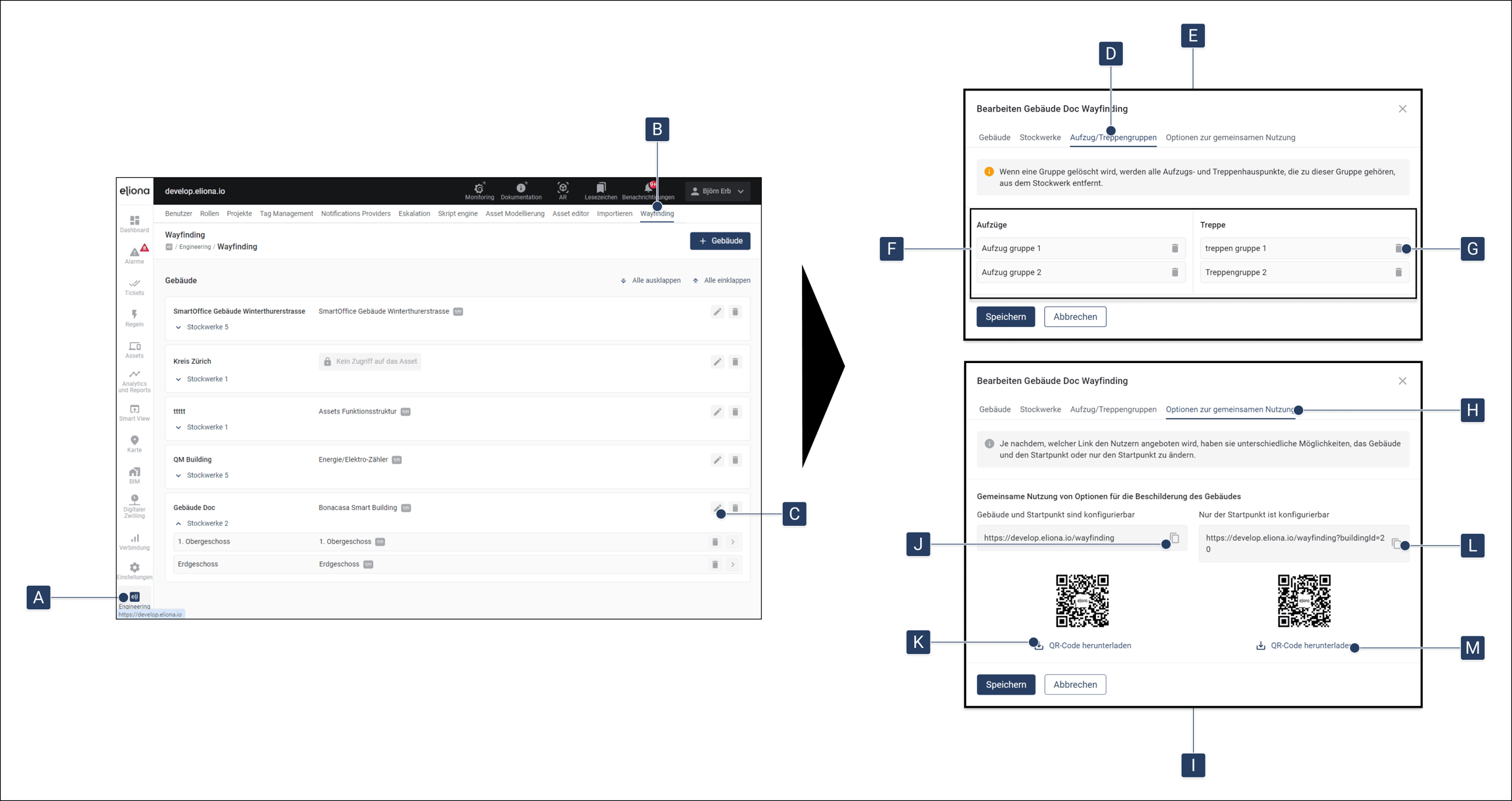
Edit a wayfinding building
Open the menu item Engineering [A]
▷ The "Engineering" workspace opens.
Click on Wayfinding [B]
▷ The "Wayfinding" workspace opens.
Select the desired building and click on [C]
▷ The window "Edit" opens
◈ Here you can rename the building, choose another asset, and manage the floors. These are the same settings as in -> Create a new wayfinding building with floors.
Click the tab "Elevator/Stair groups" [D]
▷ The "Elevator/Stair groups" section opens [E].
◈ Here you can view and manage your elevator and stair groups. -> Create stair groups
Here you can view your elevator groups and your stair groups. [F] How these are created can be found under -> Create stair groups
To remove a group, click the trash can icon [G]
▷ The group is removed. Note: When deleting a group, all associated elevator and stair points are also removed from the floor.
Switch to the "Sharing options" tab [H]
▷ The "Sharing options" section opens [I]
Click the copy icon [J]
▷ The link is copied, allowing you to freely choose the building and the starting point.
Click the copy icon [K]
▷ The link is copied, which makes it possible to freely choose the starting point within this building
Click on "Download QR code" [L]
▷ The QR code is downloaded, which leads to the view where you can freely choose both the building and the starting point.
Click on "Download QR code" [M]
▷ The QR code is downloaded, which leads to the view where the starting point within this building can be freely chosen.
Last updated
Was this helpful?