> For the complete documentation index, see [llms.txt](https://docs.buildings.ability.abb/collection/llms.txt). Markdown versions of documentation pages are available by appending `.md` to page URLs; this page is available as [Markdown](https://docs.buildings.ability.abb/collection/english-v14/documentation/weitere-funktionen/attribut-funktionen/filter.md).
# Filter
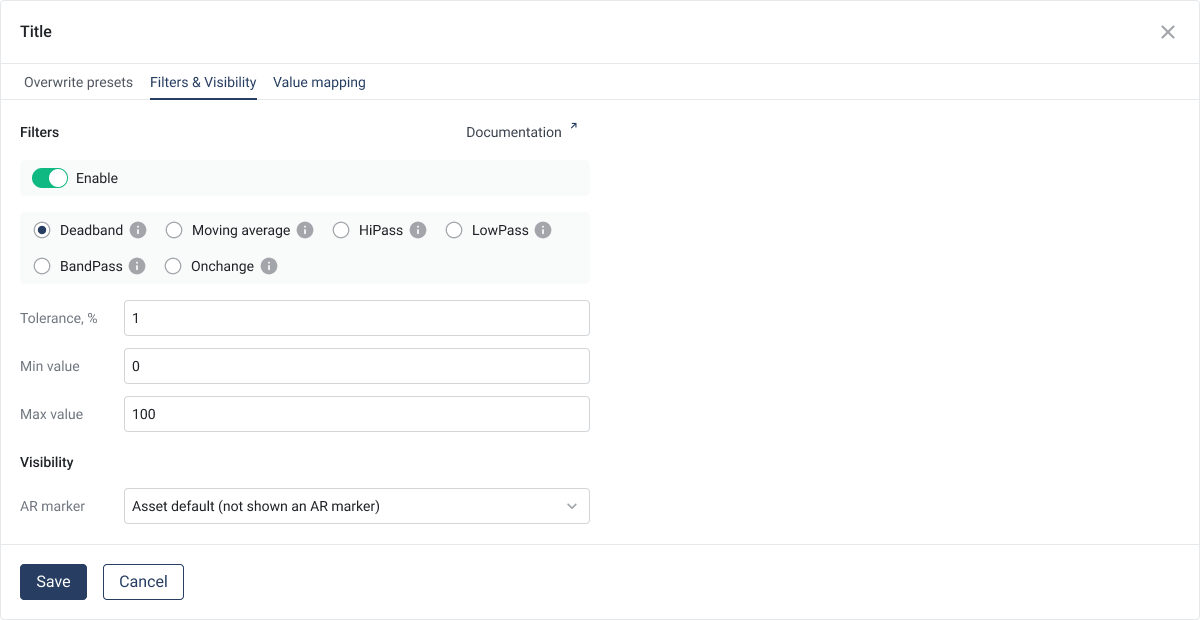
The filter service offers a comprehensive selection of filters that can be applied to incoming data. These filters are designed to increase the quality and relevance of the stored data by allowing only significant changes and important information through. Data is only stored in the database once it has passed through the filter, which means the filter is applied to the value only after calculation.
This ensures that only relevant data points are captured, increasing the efficiency of data processing and storage.
{% hint style="info" %}
Filters are applied to the value AFTER calculation!
{% endhint %}
## Supported filter types
## **1. Deadband filter (Deadband)**
The **Deadband filter** stores only values when the value after calculation differs significantly from the previous one. The change is defined by the following formula:
**Formula:**
$$
\text{Epsilon} = \frac{\text{Toleranz}}{2} \cdot \left(\frac{\text{Max} - \text{Min}}{100}\right)
$$
A new value is only saved if the absolute difference from the previous value is greater than or equal to **Epsilon** is:
$$
∣Neuer Wert−Vorheriger Wert∣ ≥ \text{Epsilon}
$$
**Example:**
* **Tolerance:** 5 %
* **Maximum value:** 100 °C
* **Minimum value:** 0 °C
* **Epsilon:**
$$
\text{Epsilon} = \frac{5}{2} \cdot \left(\frac{100 - 0}{100}\right) = 2.5
$$
* **Incoming values:** 20 °C → 21.5 °C → 23 °C → 24.4 °C → 26 °C
* **Result:**
* 20 °C is saved (first value).
* 21.5 °C is not saved because the change |21.5 - 20| = 1.5 **< 2.5** is not sufficient.
* 23 °C is saved because |23 - 20| = 3 **≥ 2.5**
* 24.4 °C is not saved because |24.4 - 23| = 1.4 **< 2.5**
* 26 °C is saved because |26 - 23| = 3.0 **≥ 2.5**
***
## **2. Moving average filter (Moving Average)**
The **Moving average filters** does not store the original values, but rather the average of a defined number of consecutive values (window siz**ss**e).
**How it works:**
* The filter collects values within a defined window.
* Once the window size is reached, the average of the values is calculated and stored.
* The window is then shifted by one value, and the process repeats.
**Example:**
* **Window size:** 3 values
* **Incoming values:** 12 V → 15 V → 18 V → 21 V → 24 V
**Calculations:**
Average of the first 3 values (12 V, 15 V, 18 V):
$$
\frac{15 + 18 + 21}{3} = 18 , \text{V}
$$
Average of the next 3 values (18 V, 21 V, 24 V):
$$
\frac{18 + 21 + 24}{3} = 21 , \text{V}
$$
**Stored values:** 15 V, 18 V, 21 V.
***
## **3. High-pass filter**
The high-pass filter stores only values that are **strictly higher** than a defined limit. This is ideal for monitoring threshold exceedances.
**Example:**
* **Limit:** 50 kW
* **Incoming values:** 45 kW → 52 kW → 48 kW → 55 kW
* **Stored values:** 52 kW, 55 kW
***
## **4. Low-pass filter**
The low-pass filter stores only values that are **strictly lower** than a defined limit. This filter is useful for analyzing low values or complying with upper limits.
**Example:**
* **Limit:** 30 ppm
* **Incoming values:** 25 ppm → 35 ppm → 20 ppm → 30 ppm
* **Stored values:** 25 ppm, 20 ppm
***
## **5. Band-pass filter**
The band-pass filter stores only values that are **within a defined range** (band). The band is determined by a high and a low limit.
**Example:**
* **Band:** 10 to 20 V
* **Incoming values:** 9 V → 15 V → 25 V → 18 V
* **Stored values:** 15 V, 18 V
***
## **6. OnChange filter**
The OnChange filter stores values only when they are **not equal to the previous value** This excludes redundant values, and only changes are recorded.
**Example:**
* **Incoming values:** 100 l/h → 100 l/h → 105 l/h → 105 l/h → 110 l/h
* **Stored values:** 100 l/h, 105 l/h, 110 l/h
---
# Agent Instructions
This documentation is published with GitBook. GitBook is the documentation platform designed so that both humans and AI agents can read, navigate, and reason over technical content effectively. Learn more at gitbook.com.
## Querying This Documentation
If you need additional information that is not directly available in this page, you can query the documentation by asking a question.
Perform an HTTP GET request on the following URL with the `ask` and `goal` query parameters:
```
GET https://docs.buildings.ability.abb/collection/english-v14/documentation/weitere-funktionen/attribut-funktionen/filter.md?ask=&goal=
```
`ask` is the immediate question: it should be specific, self-contained, and written in natural language.
`goal` is what the user is ultimately trying to achieve, the reason they need the answer. Sharing it helps GitBook give you a better, more relevant answer. A goal is most helpful when it describes the outcome the user wants rather than restating the question. For example, with `ask=how do I create an API token`, a goal like `automate deployments from our CI pipeline` lets GitBook tailor the answer to that use case.
The response will contain a direct answer to the question and relevant excerpts and sources from the documentation.
Use this mechanism when the answer is not explicitly present in the current page, you need clarification or additional context, or you want to retrieve related documentation sections.