

📈Device simulator
The Device Simulator in Eliona allows you to simulate data streams to test dashboards, rules, and other features before real devices are connected. It is ideal for validating configurations, prototyping new features, and analyzing different scenarios. It also supports training and troubleshooting by replicating realistic operating states – all without physical hardware.
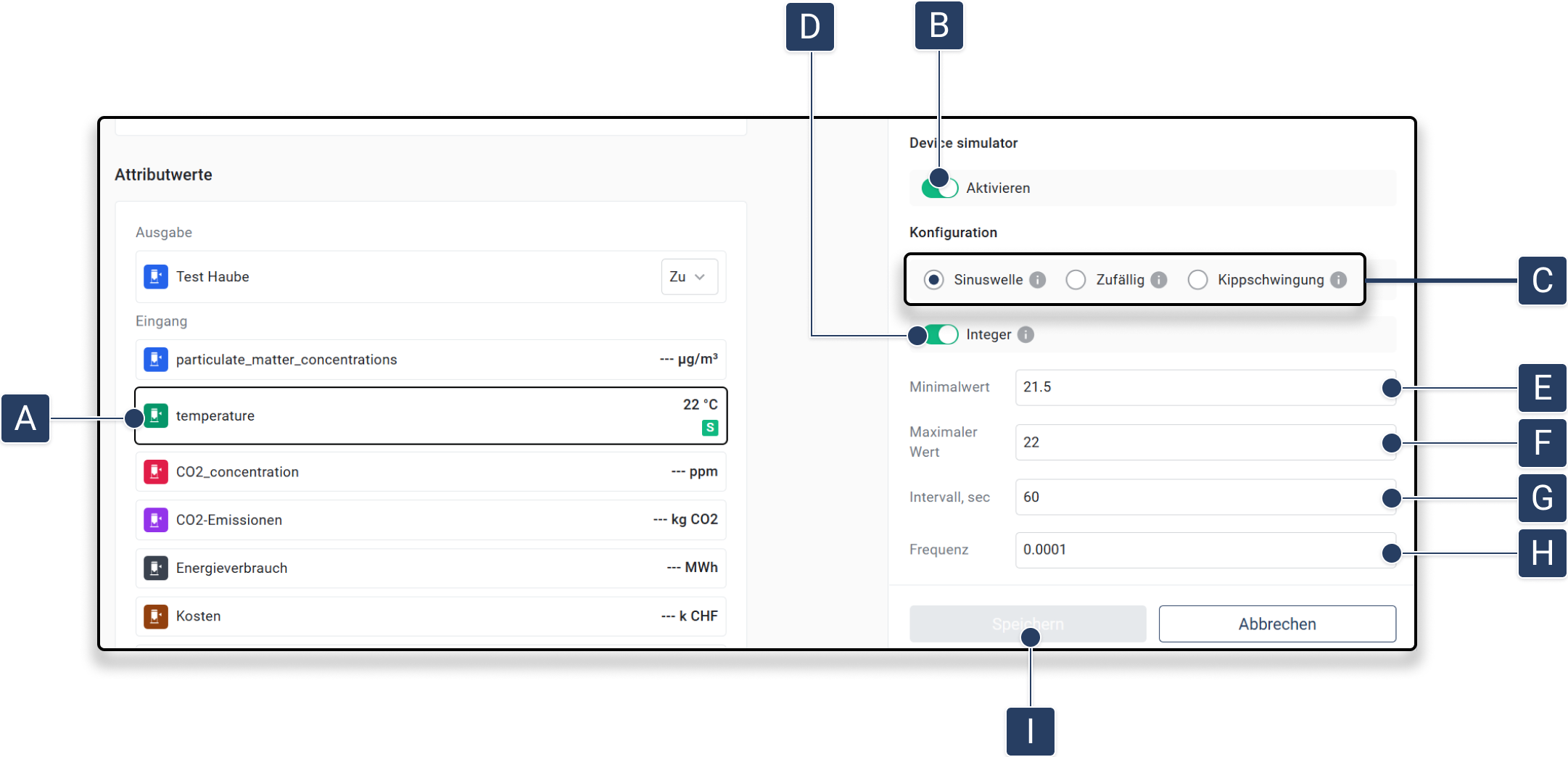
Device Simulator Configure
Navigate to the desired attribute of an asset: Open an asset and select an attribute from the list of attribute values by clicking on the attribute [A].
Enable simulator: Switch on the device simulator with the Enable [B] in.
Select simulation type: Select the desired type of simulation [C]:
▷ Sine wave: Smooth, cyclical data.
▷ Random: Unpredictable values.
▷ Sawtooth wave: Linear rise followed by abrupt drop. These options can be found under Configuration .
Integer: Specifies whether the generated value should be an integer or a float [D].
Define parameters: Set the simulation parameters:
▷ Minimum value: The lowest generated value [E].
▷ Maximum value: The highest generated value [F].
▷ Interval (seconds): Interval in seconds for data generation. (sampling rate) (How often should new data be generated?) [G].
▷ Frequency (Hz): Frequency in Hz for wave functions. (How often should the function reach the original value per second?) (typically less than 1) (Must not be higher than 1/(2*interval_seconds) to avoid aliasing/Nyquist frequency) [H].
Save settings: Click on Save, to apply the configuration [I]. ▷ The simulation is activated with the selected parameters.
Simulated attributes are marked with a  Marked.
Additional management options
For advanced configurations and API-based generators, the Device Simulator App can be used. -> Device Simulator App Documentation
Last updated
Was this helpful?