

Asset tracking
Through the “Asset Tracking” widget, you can track the Localino trackers of a floor directly in the dashboard.
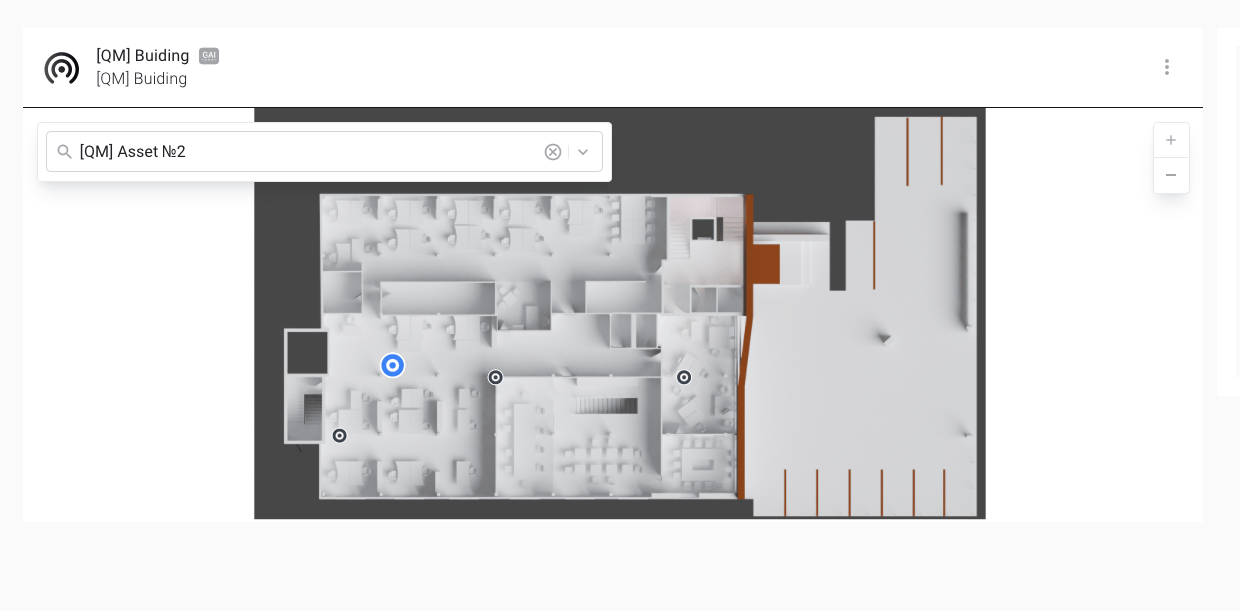
Operation

[A1]
Select floor
Choose which floor is displayed in the widget.
[A2]
Selected tracker
The selected tracker is shown in blue
[A3]
Tracker
Existing trackers are shown in black
[A4]
More options
Open more options
[A5]
Zoom in
Enlarge the floor display
[G]
Zoom out
Reduce the floor display
Configure widget

Make sure you are in the “Dashboard” menu.
Click on «Add widget».
Click on “View”.
Click on “Asset Tracking”. ▷ The window [A] appears
Optional: Select a [A1] the primary asset
Select in [A2] the floor that should be displayed in the widget.
Select in [A3] how much space the widget should take up on the dashboard.
Click on [A4] ▷ The widget appears on the dashboard.
Last updated
Was this helpful?