> For the complete documentation index, see [llms.txt](https://docs.buildings.ability.abb/collection/llms.txt). Markdown versions of documentation pages are available by appending `.md` to page URLs; this page is available as [Markdown](https://docs.buildings.ability.abb/collection/english-v14/new-features/changelog-aktuelle-version-v14.2.5.md).

# Changelog – Current version: v14.2.16

## Changelog \[v14.2.16]

This release adds two features: a clearer attribute list in the asset details and repeated alarm escalations. In addition, there are bug fixes in the interface and several services.

### Revised attribute display in asset details

The attribute display has been redesigned so that you can keep track even with many attributes. By default, it only shows enabled attributes with a value. Using the search bar and the filters **Category** and **Type** you can specifically find the attributes you need. You can show additional attributes if needed.

[-> Search and filter attribute values](/collection/english-v14/documentation/assets/asset-details.md#attributwerte-suchen-und-filtern)

### Escalate unacknowledged alarms again

For each combination of user and escalation channel, you can define a repetition interval and a maximum number of additional repeats. Alternatively, unlimited repetition is possible. Further repetitions end when the alarm is acknowledged, no longer pending, or the configured number is reached.

{% content-ref url="/pages/8afa5ecaa175fc5ab1662effe421485678be239b" %}
[Configure repeated escalations](/collection/english-v14/documentation/alarme-regeln-und-eskalationen/eskalationen/wiederholte-eskalationen-konfigurieren.md)
{% endcontent-ref %}

<details>

<summary>Full changelog [v14.2.16]</summary>

```
# Changelog

All notable changes to this project will be documented in this file.

## [v14.2.16] - 2026-10-12

### Added 🚀

Asset Details -> Attribute list -> Mark/Hide unconnected Attributes (STORY-882) [@rt]
Escalation -> Added possibility for repeated alarm escalation (FEAT-2529) [@rt]

### Fixed 🐞

General -> general translation fixed (BUG-546) [@rt]
Analytics -> Translate attribute name in analytic tooltip (BUG-324) [@rt]
SmartView -> SmartView analytics height scaling (BUG-600) [@rt]
Digital Twin -> Fixed attribute translations (BUG-546) [@rt]
Asset Management -> Fixed asset tree expansion on mobile devices (BUG-541) [@rt]
```

**More bug fixes**

* **Alarm list:** The display of the acknowledged alarm state was corrected.
* **BIM:** A crash of the interface with inconsistent IFC files was fixed.
* **Reporter:** Date formats take the language into account. In addition, a proxy dependency was updated for security reasons.
* **Tickets and tasks:** The assignee and the creator of the parent ticket are also allowed to accept, complete, or cancel a task. Disallowed API calls return HTTP 403 instead of a successful response without a status change. [-> Permissions for tickets and tasks](/collection/english-v14/documentation/tickets/rechte-fuer-tickets-und-tasks.md)
* **API v2:** The dashboard model supports asset relationships. In the database, the permission resource `api.tickets` was added for the ticket endpoints.
* **Google Chat:** The Kubernetes operator now correctly provides the PGP key during deployment again.

</details>

## Changelog \[v14.2.14 – v14.2.15]

These versions improve daily work with tickets and tasks: the table view and export can be used more specifically, working times are recorded and adjusted more reliably, and overdue entry detection has been corrected. Revised forms, detail views, and translations make operation easier.

More information can be found at [-> Tickets](/collection/english-v14/documentation/tickets.md).

<details>

<summary>Full changelog [v14.2.12 – v14.2.15]</summary>

The release overview summarizes the changes for v14.2.12 to v14.2.15.

```
## [v14.2.12 - v14.2.15] - 2026-08-20

### Fixed 🐞

- Improve ticket table column configuration, including configurable nested task columns [@dd]
- Improve ticket exports with due date ranges, overwritten time, task creation dates, and ticket descriptions [@dd]
- Fix task creation loading to prevent premature permission-denied states [@dd]
- Validate manually adjusted time and distinguish ticket and task adjustment dialogs [@dd]
- Fix ticket time-spent updates and hide the time-spent field when creating tasks [@dd]
- Fix overdue detection for completed or canceled tickets and compare whole calendar days [@dd]
- Improve ticket form labels, placeholders, optional-field hints, and reference number validation [@dd]
- Show only preferred tags in the ticket overview [@dd]
- Improve ticket and task detail layout, navigation, actions, and worklog timestamp updates [@dd]
- Fix and update German, French, Italian, and English ticket translations [@dd]
```

</details>

## 20260708 – Changelog \[v14.2.13]

With this version, the **Service Desk** has been extensively expanded. Tickets and tasks can now be planned more precisely, working times recorded more transparently, and managed more clearly. New notifications help keep track of deadlines and completed work. At the same time, the views and workflows have been revised so that important information can be found more quickly and recurring tasks can be completed more efficiently.

### **Due dates and automatic notifications**

For tickets and tasks, a fixed due date or a period can now be defined. Overdue entries are clearly marked in the overview so that urgent tasks are immediately visible. Completed or canceled tickets and tasks are no longer shown as overdue.

In addition, new notifications are available. The responsible user can be informed when a ticket or task is overdue. The ticket owner can also receive a message once all associated tasks have been completed. Which notifications are sent can be defined centrally in the ticket and task settings.

{% content-ref url="/pages/605ee169b4ffa284e55d63371e192f83932649e0" %}
[Ticket and task settings](/collection/english-v14/documentation/tickets/ticket-einstellungen.md)
{% endcontent-ref %}

### **Automatically total and adjust working times**

The working times recorded for individual tasks are now automatically added to the total time of the ticket. This makes it immediately clear how much time was spent in total on a work order.

If the calculated time does not match the billable or actually reported effort, the total time can be adjusted manually. Users with administrative rights continue to see both the calculated and the adjusted value. For users with read-only access, only the adjusted time is shown.

{% content-ref url="/pages/26b140bfee636c82b984a19b89d6c3fb547279de" %}
[ticket details](/collection/english-v14/documentation/tickets/ticket-details.md)
{% endcontent-ref %}

### **Clearer ticket management and expanded export**

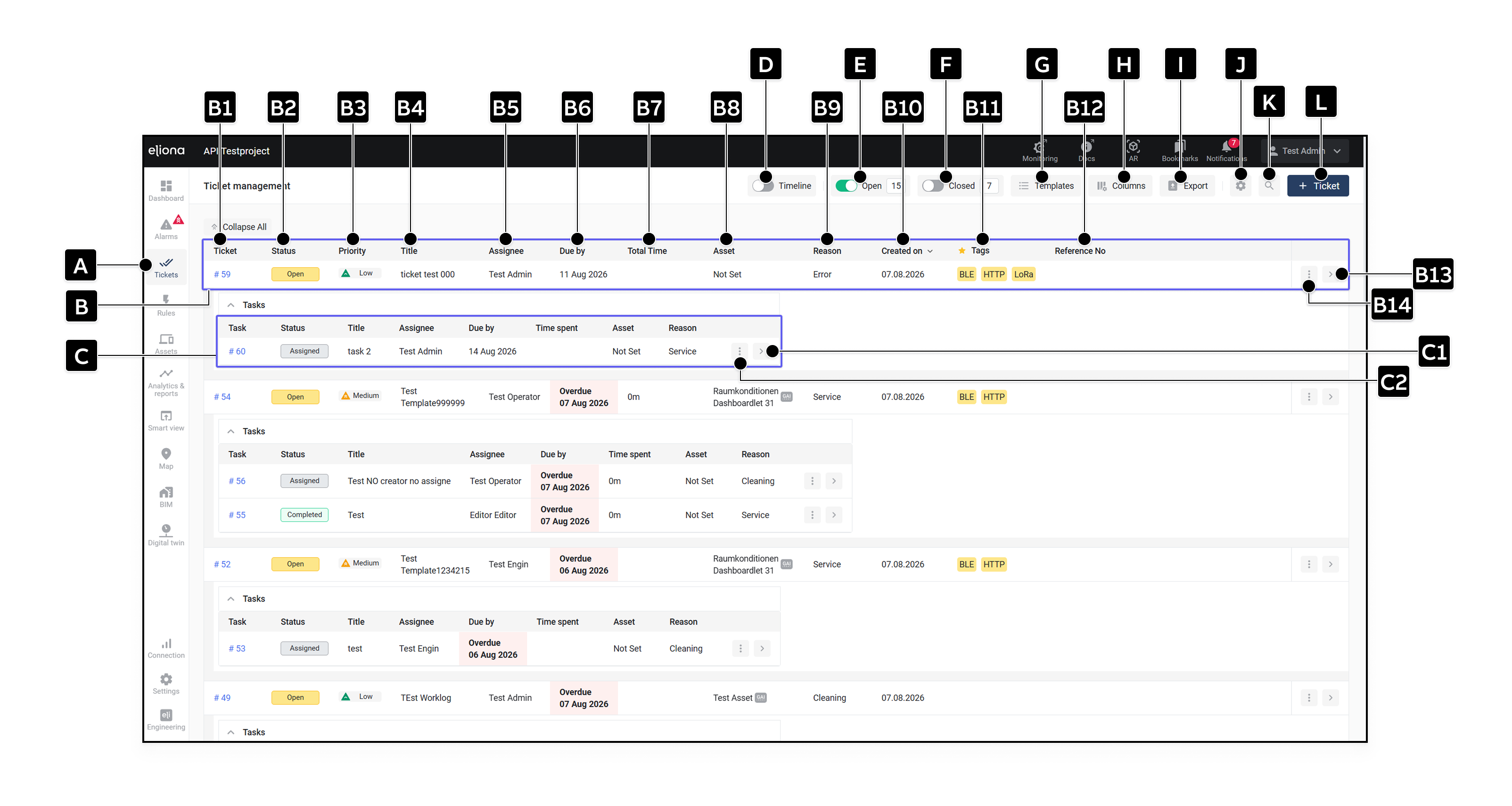
<div align="left"><figure><img src="https://156899794-files.gitbook.io/~/files/v0/b/gitbook-x-prod.appspot.com/o/spaces%2FNyvwhz1kEMXcHf4HLuZ8%2Fuploads%2Fgit-blob-33cc6c5dc9420b8b1bb1895c68ef7347b53831e7%2FTicket%20managemant.png?alt=media" alt="Überarbeitete Ticketverwaltung"><figcaption><p>The revised ticket management</p></figcaption></figure></div>

The ticket overview can now be adapted more flexibly to the respective workflow. In addition to the ticket columns, the columns of the underlying tasks can also be selected and arranged in the desired order. In the overview, only tags from favorite categories are shown, keeping the list clear even when many tags are assigned.

The export takes the current filters into account and includes additional information such as due periods, ticket descriptions, task creation dates, and manually adjusted working times. Tickets can also be assigned a freely definable reference number in order to link them, for example, with external orders or processes.

{% content-ref url="/pages/d60773e53a548978613495e8568c83a9b3f8eeb5" %}
[tickets](/collection/english-v14/documentation/tickets.md)
{% endcontent-ref %}

### **Improved collaboration and clearer permissions**

Tasks can now be accepted, completed, or canceled not only by the assigned user, but also by their creator. Users with the permission **Ticket Manage** can also manage task statuses and delete their own tickets. This makes it possible to organize substitutes and jointly handled work orders more flexibly.

The ticket and task details have been restructured. Navigation, actions, comments, and the work log are therefore easier to access. The forms have also been revised with clearer labels, placeholders, and hints for optional fields.

{% content-ref url="/pages/08e3b1a210623f29b4478afbd5edbf90ea8de020" %}
[Rights for tickets and tasks](/collection/english-v14/documentation/tickets/rechte-fuer-tickets-und-tasks.md)
{% endcontent-ref %}

### **More improvements**

* The detection of overdue tickets and tasks has been improved.
* Recorded and manually adjusted working times are updated and checked more reliably.
* The creation of tasks and the associated permission check have been stabilized.
* Labels and translations in the ticket area have been revised in German, French, Italian, and English.

## 20260409 – Changelog \[v14.2.5] <a href="#id-20260226-changelog-v14.2.2" id="id-20260226-changelog-v14.2.2"></a>

* Alarm statistics: Fix for reliable forwarding for the default time range to alarm history from the frequency and duration table.

## 20260330 – Changelog \[v14.2.4] <a href="#id-20260226-changelog-v14.2.2" id="id-20260226-changelog-v14.2.2"></a>

* Alarm statistics: Fix for reliable forwarding to alarm history from the frequency and duration table.
* Alarm statistics: Translation of the alarm text column in the frequency and duration table.

## 20260307 – Changelog \[v14.2.3] <a href="#id-20260226-changelog-v14.2.2" id="id-20260226-changelog-v14.2.2"></a>

* Note: No functional changes, only adjustment of the container registry/build pipeline.

## 20260226 – Changelog \[v14.2.2] <a href="#id-20260226-changelog-v14.2.2" id="id-20260226-changelog-v14.2.2"></a>

* In alarm history, the keyword search has been extended to include the asset name.
* In alarm statistics, “Alarm Message” and “Priority” were added to the alarm frequency table; in addition, an incorrect redirect from statistics to history was fixed.
* Overall, the sorting of the tag list was corrected according to the configured category order.
* In Engineering, a permission issue was fixed in which users in the list could incorrectly gain access to the “Engineering” navigation item.
* In the API, the update of CalculationRules was fixed
* In the database, the rebuild of the escalation matrix during escalation target updates was fixed; in addition, a new MQTT ACL is automatically created when an MQTT account is created.
* Note (security / backward compatibility): The legacy endpoints `/xovis/*` and `/niagara/*` are automatically redirected to the protected endpoints under `/apps/<app>/api/...` .

The following bug fixes were made in this version:

## 20251216-Changelog \[v14.2.1]

### **Digital Twin – Public and user-specific Digital Twins**

The new public and user-specific [-> Digital Twins](/collection/english-v14/documentation/digitaler-zwilling.md) are here. Similar to familiar [→ Public Dashboards can](/collection/english-v14/documentation/dashboard/globale-dashboards.md) Digital Twins now be provided either project-wide or used individually per user. This allows Digital Twins to be managed centrally while still being flexibly adapted to different user needs.

When creating a Digital Twin, a distinction can be made between two variants:

* **User:** The Digital Twin is only visible to the respective user.
* **Project:** The Digital Twin is visible to all users in the project.

Only the creator can edit or delete public Digital Twins.\
Digital Twins can still be specifically copied to other users, and the visibility status can also be changed retrospectively.

### **Further changes and fixes:**

* The [Image-](/collection/english-v14/documentation/widgets/vordefinierte-widgets/bild.md) and the [Iframe-](/collection/english-v14/documentation/widgets/vordefinierte-widgets/iframe.md)Widget were revised and visually improved.
* The size of downloaded analysis images has been improved.
* A bug in alarm counting in charts and in the reporter was fixed.
* The performance of alarm SSE events was improved.
* The [-> Sankey diagram](/collection/english-v14/documentation/widgets/vordefinierte-widgets/sankey-diagramm.md) now supports the display of [CUSUM data](/collection/english-v14/academy/aggregationen-in-eliona.md#kumulativzahler-cumulative-counter).

## 20250818– Changelog \[v14.2.0]

We are pleased to **Eliona v14.2.0** present – an update with new features, optimized interfaces, and targeted improvements in the areas of *Script Engine*, *Dashboard*, *Asset Management*, *escalation management*, *Analytics* and *Audit Trail*.\
With this version, script creation becomes more convenient, the configuration of views more flexible, and the handling of escalations as well as the tracking of changes in the system even more transparent.

[→ Link to the full changelog v14.2.0](https://deploy.eliona.io/helm/changelogs/v14.2.txt)

### **Autocomplete and view switching in the Script Engine**

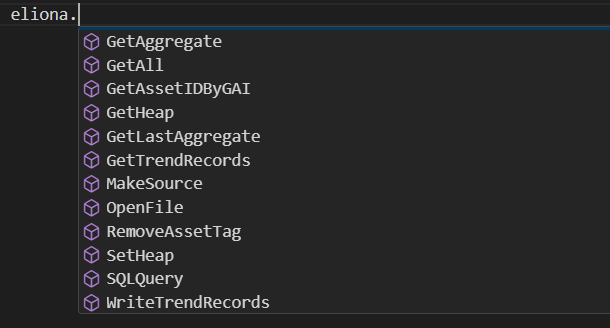
The *Script Engine* now supports rudimentary autocomplete for Python scripts. During input, suitable functions, methods, and variables are automatically suggested, which makes development easier and reduces typos.

<div align="left"><figure><img src="https://content.gitbook.com/content/Nyvwhz1kEMXcHf4HLuZ8/blobs/dmVDmnWUSl3Vv6L35Kqi/image.png" alt="" width="305"><figcaption></figcaption></figure></div>

In addition, a toggle option between the general view (*General View*) and the pure code view (*Code View*) has been integrated – ideal for switching between a clear display and a focused programming mode as needed.

<div align="left"><figure><img src="https://content.gitbook.com/content/Nyvwhz1kEMXcHf4HLuZ8/blobs/U968GPviKLeFZoK6iydC/forecast%20app%20(5).png" alt="" width="163"><figcaption></figcaption></figure></div>

{% content-ref url="/pages/22d3868e275c5107ec0cd6df53a069bfd12708a3" %}
[Configure scripts](/collection/english-v14/documentation/engineering/skript-engine/skripte-konfigurieren.md)
{% endcontent-ref %}

### **Reporter download in the link widget**

In the *Link Widget* a report can now be selected as the download target. When a user clicks the link, the stored report is automatically downloaded – quickly and directly from the dashboard, without detours.

<div align="left"><figure><img src="https://content.gitbook.com/content/Nyvwhz1kEMXcHf4HLuZ8/blobs/GFoWLQKksKhtlvFwDCBL/CHangelog.png" alt=""><figcaption></figcaption></figure></div>

{% content-ref url="/pages/4d9a7aede8de0c5602693e490fcf48561990bd66" %}
[Links](/collection/english-v14/documentation/widgets/vordefinierte-widgets/links.md)
{% endcontent-ref %}

### Column configuration and advanced status options for assets

In the *Asset Management* a flexible column configuration is now available, with which the displayed information can be adapted individually. In addition, unmonitored status boxes can be hidden to make the view clearer.

{% content-ref url="/pages/3e77762dc49311586d659dc628a0022299f06eec" %}
[Assets](/collection/english-v14/documentation/assets.md)
{% endcontent-ref %}

### Expanded escalation configuration and new layout

<div align="left"><figure><img src="https://content.gitbook.com/content/Nyvwhz1kEMXcHf4HLuZ8/blobs/Ga9DQdBXaXnJwPOgDjOz/CHangelog%20(1).png" alt="" width="563"><figcaption></figcaption></figure></div>

The escalation management has been extensively revised and now offers both a new, clearer layout and additional filter options. With the new configuration option, alarms can be combined in a targeted way to make notifications more efficient. Alarms with certain tags – for example *High Prio* – can be excluded from the combination, so that they continue to be escalated individually. Thresholds can also be defined, for example that with 100 incoming alarms within 10 seconds, only a single escalation message is sent instead of 100 individual notifications. This significantly reduces notification floods and ensures a clearer overview in alarm processing.

{% content-ref url="/pages/e6e1b849067aba2b868e1a38313521a652c84a2c" %}
[Group escalations](/collection/english-v14/documentation/alarme-regeln-und-eskalationen/eskalationen/eskalationen-gruppieren.md)
{% endcontent-ref %}

### **Use reporting period in Analytics**

<div align="left"><figure><img src="https://content.gitbook.com/content/Nyvwhz1kEMXcHf4HLuZ8/blobs/AcVfX6zbIZAHyaP91LJv/CHangelog%20(2).png" alt="" width="271"><figcaption></figcaption></figure></div>

For embedded analyses in reports, the period defined in the report can now be adopted directly. Previously, the period stored in the analysis itself was always used. This new option provides more flexibility and consistency, as analyses automatically take the context of the report into account.

### **Expanded Audit Trail**

The *Audit Trail* has been extended with several entities that were previously missing, so that changes and activities can now be tracked even more completely. Events are now also recorded for:

* project roles
* system roles
* tags
* scripts
* escalations
* asset type attributes
* asset types
* wayfinding buildings
* projects

This now logs everything completely, making a seamless history and even more precise tracking of all system changes possible.

{% content-ref url="/pages/f5220317cebe05f4004dc13a757cb3c7b4e4eb32" %}
[Audit Trail](/collection/english-v14/documentation/einstellungen/audit-trail.md)
{% endcontent-ref %}

## 20250624 – Changelog \[v14.1.0]

We are pleased to *Eliona v14.1.0* present – an update with numerous improvements in the areas of analysis, security, and system stability. Aggregated data can now be used throughout the system, for example in the *Digital Twin* and in rule chains. With the new method *Time Weighted Average* more accurate evaluations over time periods are possible. Two-factor authentication (TOTP) significantly increases access security, and optimized event handling ensures reliable processing of all events – even in the event of temporary disruptions. In addition, evaluations can now be shared and used project-wide as global analytics and reports – just like the familiar *Public Dashboards*.

[→ Link to the full changelog v14.1.0](https://deploy.eliona.io/helm/changelogs/v14.1.txt)

### Use aggregated data everywhere – now also in the Digital Twin

In the *Digital Twin* as well as in the *floor* aggregated values can now be used. This extension allows the visualization of historical and aggregated data directly in the building context. Aggregations such as average, minimum, or maximum are available – ideal for analyzing states over time periods.

![](https://content.gitbook.com/content/Nyvwhz1kEMXcHf4HLuZ8/blobs/Kl1zbwHJFvq90tQQrKCd/Digitaler%20Zwilling%20Link.png)

[→ Use aggregations in the Digital Twin](/collection/english-v14/documentation/digitaler-zwilling.md#einen-wert-verknupfen)

### Two-factor authentication with TOTP

Security has been further strengthened: With the new TOTP mechanism (Time-based One-Time Password), an additional authentication step can now be activated. This option significantly increases access security to sensitive project data.

The setup is done directly in the **user settings** of your own profile. Once you are logged in, you can activate two-factor authentication there and connect a TOTP-compatible authentication device (e.g. Google Authenticator or Authy).

{% content-ref url="/pages/a4e23a0a95a8e12ef004f189c027784d5aee156f" %}
[Set up 2FA in Eliona](/collection/english-v14/academy/2fa-in-eliona-einrichten.md)
{% endcontent-ref %}

### Global analytics and reports

The new *global analyses and reports* are here! As with the familiar [→ *Public Dashboards* ](#public-dashboards)you can now also provide your evaluations project-wide. This allows dashboards, charts, and reports to be managed centrally and made visible to everyone involved in the project.

When creating an analysis or a report, a distinction can be made between “User” and “Project”:

* **User**: The analysis is visible only to you personally.
* **Project**: The analysis is visible to all users in the project and is marked with a **blue dot** .

Only the creator can edit or delete global analytics.\
Analyses can still be copied specifically to other users, and the visibility status can also be edited afterwards.

{% hint style="info" %}
If an analysis is to be used in the *analysis widget* we recommend using a **global analysis** . This is the only way to ensure that all users with access to the dashboard can also see the analysis.
{% endhint %}

[→ *Use analysis widget*: *Display analysis directly in dashboards*](/collection/english-v14/documentation/widgets/vordefinierte-widgets/analyse.md)

{% content-ref url="/pages/321e1153562898651ddd5486b491a2e3660a960c" %}
[Global Analytics and Reports](/collection/english-v14/documentation/analytics-and-reports/globale-analytics-und-reports.md)
{% endcontent-ref %}

### Time comparison in Analytics – New Offset function

With the new *Offset*option in Analytics, time periods can now be compared directly with each other – for example, today with the previous day or current data with previous-year values. This makes it even easier to analyze trends, seasonal fluctuations, or operational behavior.

The option is available directly in the configuration of analyses and significantly expands comparison options.

[→ *Use Offset function in Analytics*](/collection/english-v14/documentation/analytics-and-reports/analytics-nutzen.md#offset-funktion-in-analytics-verwenden)

### Rules with aggregations

Rules can now be created based on aggregated attributes (average, minimum, maximum). This makes it possible to define conditions that are based not on individual values, but on time series evaluations – ideal for monitoring that reacts to trends rather than individual events.

<figure><img src="https://content.gitbook.com/content/Nyvwhz1kEMXcHf4HLuZ8/blobs/aJw7H78voek4OQBVpmn9/Digitaler%20Zwilling%20Link%20(1).png" alt=""><figcaption></figcaption></figure>

[→ Create rule with aggregation](/collection/english-v14/documentation/alarme-regeln-und-eskalationen/regeln/eine-regel-erstellen.md#details)

### New aggregation method: Time Weighted Average (TWA)

With the new aggregation method *Time Weighted Average* (time-weighted average) values can be calculated more realistically over time periods – especially when values do not change constantly.

In contrast to the normal *Average*, in which all values are weighted equally, TWA takes into account **how long a certain value was active**. A value that remains constant for most of the period is therefore given more weight in the average than outliers that occur only briefly.

**Example:**\
If the value “1” is written at the beginning of an hour and the value “60” is written once shortly before the end of the hour, the classic *Average* (1 + 60) / 2 = **30,5**.\
TWA, on the other hand, takes into account that the “1” was active for almost the entire hour – the result is then realistically around **2**.

This method is particularly useful for:

* Slowly changing sensor values
* Energy or temperature trends with sudden peaks
* Context-sensitive measurement data where the duration of a state is decisive

[→ *Use TWA aggregation in Eliona*](/collection/english-v14/academy/aggregationen-in-eliona.md#zeitgewichteter-durchschnitt-time-weighted-average-twa)

### Redesign of the attribute display in the asset

The attribute sidebar in the asset has been revised into a dialog. The new layout offers a better overview, clearer separation of information, and easier navigation through the attribute details.

### **More reliable event processing in the frontend**

Event processing in the *Eliona*-frontend has been further optimized to work reliably even under difficult network conditions. Unstable connections, browser tabs in the background, or local limitations previously caused events in the client not to be displayed immediately in all cases.

With the new architecture, Eliona automatically detects when the **browser** is no longer receiving events and automatically restarts local processing. In addition, fallback polling is used to reliably deliver missed or delayed events to the client – without manual reloading of the page.

***

## 20250515 – Changelog \[v14.0.5]

The following bug fixes were made in this version:

* A bug in the alarms where asset attributes were passed through to the alarm messages was fixed.
* A problem when saving escalation targets was fixed in escalations.
* Elements on the home page are now hidden if a user does not have the corresponding permissions.
* In the rule chains, a problem in the alarm node was resolved that could occur with assets without subtype input attributes.

## 20250425 – Changelog \[v14.0.4]

This hotfix fixed an error in the rule chain component “Day Schedule” that caused schedules within rule chains to not be executed correctly.

## 20250424 – Changelog \[v14.0.3]

In this version, several smaller bug fixes and optimizations were made:

* In alarm statistics, the tag filter was expanded and now supports logical AND and OR combinations for more precise analysis.
* A problem in the Smart Assist menu where the progress element would crash if the heap provider was missing was fixed.
* In the Analytics component, unnecessary reloading of alarm data was suppressed to improve performance.
* A bug when exporting asset data was corrected, so the data export now works reliably again.
* When using Smart View via a ShortURL, the user is now correctly logged out when their session has expired.
* The updating of aggregated data in the Smart Assist menu was improved.

## 20250423 – Changelog \[v14.0.2]

This hotfix fixed a bug in rule management where pausing or starting multiple rules at different levels at the same time did not work correctly.

## 20250422 – Changelog \[v14.0.1]

This hotfix integrated a more stable server file hoster for the Monaco editor to avoid loading problems and ensure reliable display of the editor.

## **20250326 - Changelog\[v14.0.0]**

We are pleased to introduce Eliona v14.0.0! This version brings [**TimescaleDB**](#einfuhrung-von-timescale-automatische-aggregationen-ohne-manuelle-konfiguration) for automatic aggregations without manual configuration, extended [**rule chains**](#erweiterte-regelketten-mehr-moglichkeiten-fur-automatisierungen) with new building blocks and improved management of [**asset characteristics**](#asset-charakteristiken-uberarbeitet-vereinfachte-verwaltung-mit-templates).

With the new [**analysis widget**](#neues-analyse-widget-direkte-einbindung-von-analysen-in-dashboards-und-smart-views) analyses can be integrated directly into dashboards and Smart Views, while [**Job Diagnostics**](#job-diagnostics-fur-eskalationen-detaillierte-nachverfolgung-von-notifications) enable detailed tracking of escalations. The [**trending configuration**](#neue-trending-konfiguration-fur-attribute) for attributes improves the storage of historical data, and new [**system settings**](#erweiterte-systemeinstellungen-verbesserte-speicherverwaltung) provide more control over storage and processing options.

In addition, [**Twig templates**](#twig-templates-in-eliona-flexible-nachrichtenerstellung) for flexible message creation were integrated, the [**Smart Assist menu**](#uberarbeitung-des-smart-assist-menus) was revised and a [**broker configuration page**](#neue-konfigurationsseite-fur-den-eliona-broker) for secure management of MQTT connections was added. [External alarms](#alarme-regeln-aus-externen-quellen-jetzt-klar-erkennbar) and rules are now clearly recognizable, and [obsolete structures](#legacy-strukturen-bereinigt) were removed to make Eliona future-proof.

[→ Link to the full changelog v14.0](https://deploy.eliona.io/helm/changelogs/v14.0.txt)

### Introduction of Timescale – Automatic aggregations without manual configuration

With this version, Eliona introduces **TimescaleDB** Timescale, a powerful time-series database specifically optimized for processing large amounts of time-dependent data. This provides **automatic aggregations in real time** without having to configure them individually for each attribute.

<figure><img src="https://content.gitbook.com/content/Nyvwhz1kEMXcHf4HLuZ8/blobs/FEZWhOKClwOQ9Dx34fX6/Offset%20(2).png" alt="" width="375"><figcaption></figcaption></figure>

The introduction of Timescale significantly improves performance and enables efficient processing of large volumes of data. Aggregations are now calculated dynamically and are immediately available in dashboards, Smart Views, Analytics, and rule chains. Manual configuration is no longer necessary, which means the **Asset Editor** and all **Pipeline Settings** were removed.

With this change, the use of aggregated values becomes much easier, as calculations are now performed directly in the system and no additional settings are required. Further information on using the new aggregations is available in the corresponding documentation:

{% content-ref url="/pages/0def57698128881e162e5f36480bced52dbf1ec8" %}
[Aggregations in Eliona](/collection/english-v14/academy/aggregationen-in-eliona.md)
{% endcontent-ref %}

### **Advanced rule chains – more options for automations**

The **Rule Chain Engine** has been extensively expanded:

* New **building blocks**, e.g. **Script node**, to run scripts from the **Script Engine** to execute.
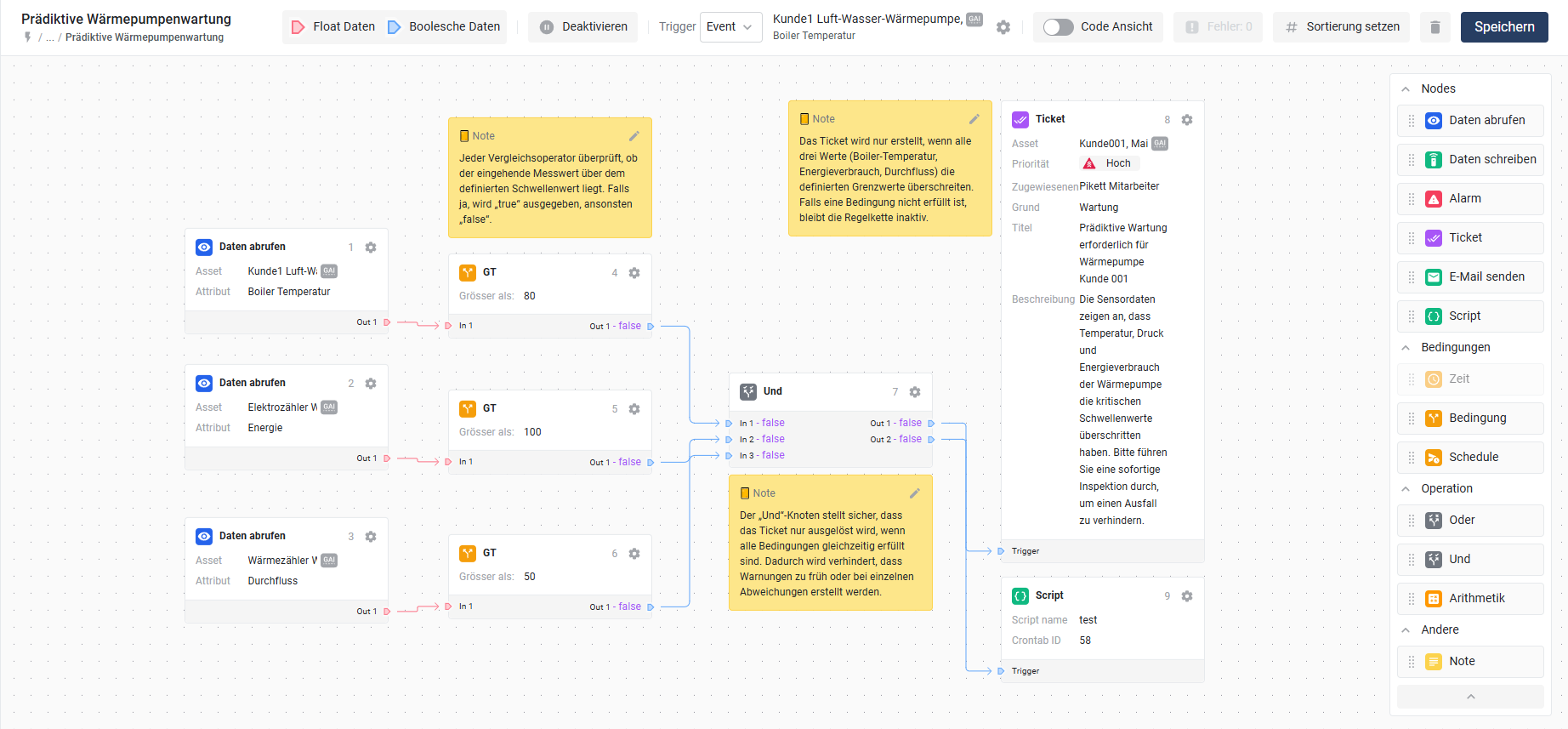
* **Notes** can now be added within the rule chain.
* **Live data display** within the rule chain to see current values directly.\
  These extensions make rule chains more powerful and enable a **even more flexible automation**.

<figure><img src="https://content.gitbook.com/content/Nyvwhz1kEMXcHf4HLuZ8/blobs/P2V9OYTgMsa8meeQoN4Z/image.png" alt=""><figcaption></figcaption></figure>

### New analytics widget – direct embedding of analyses in dashboards and Smart Views

The new **analysis widget** allows existing analyses to be displayed directly in dashboards and Smart Views. It takes over the full configuration of the selected analysis and allows flexible adjustment of the time range without changing the original data.

<figure><img src="https://content.gitbook.com/content/Nyvwhz1kEMXcHf4HLuZ8/blobs/Mtz1o217ky7rY3yUywk3/Analytic%20Widget%20(5).png" alt=""><figcaption></figcaption></figure>

{% content-ref url="/pages/6927cd5de563fc4f60c823400cdc1ba9e98759c9" %}
[Analysis](/collection/english-v14/documentation/widgets/vordefinierte-widgets/analyse.md)
{% endcontent-ref %}

### Job Diagnostics for escalations – detailed tracking of notifications

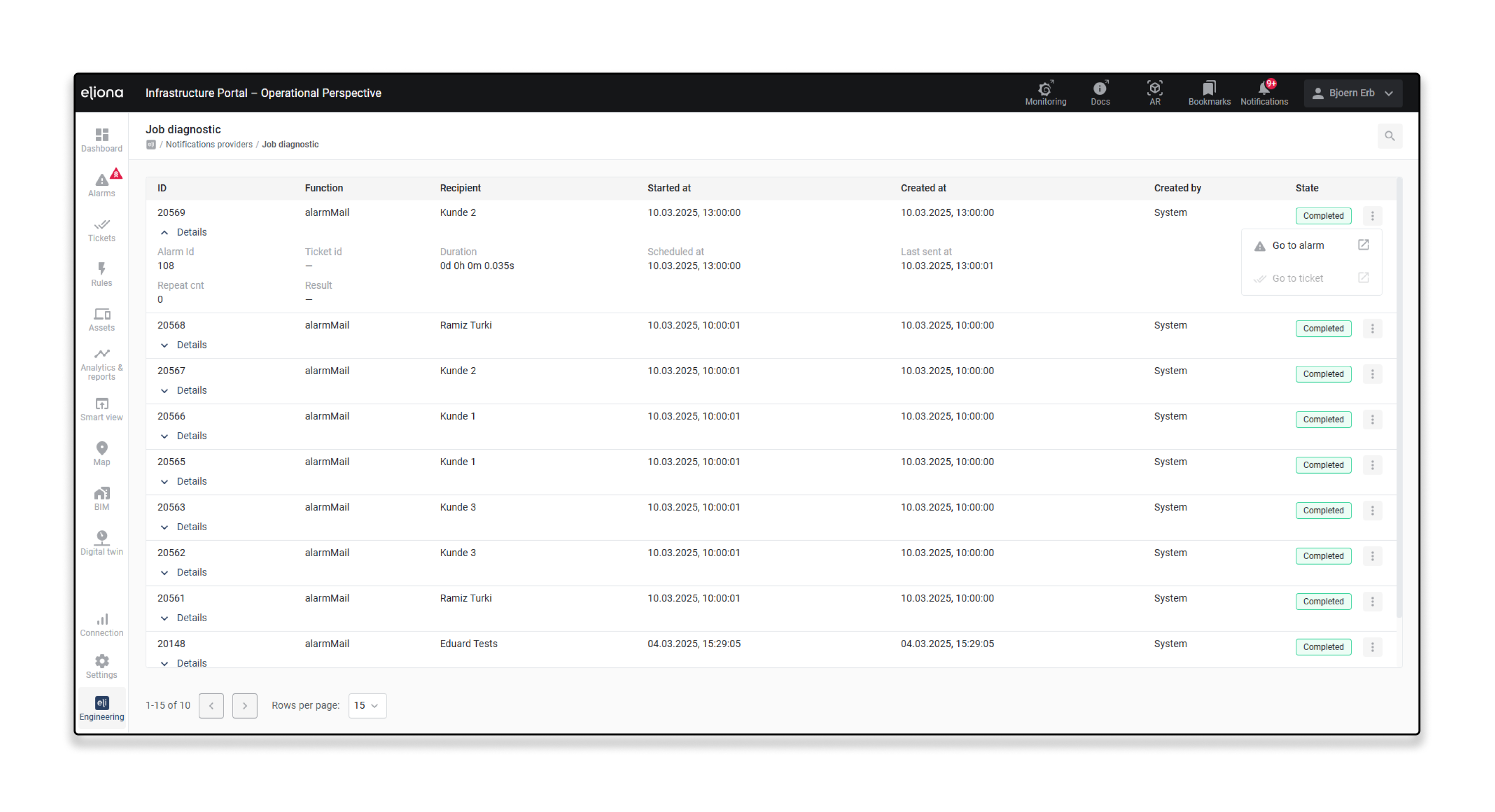
The new **Job Diagnostics**-page enables detailed analysis and monitoring of escalated notifications. It shows which notifications were triggered, through which providers they were escalated, and to which recipients they were sent. It also provides insight into the status, history, and possible delivery issues.

This function helps admins monitor the delivery process, trace escalation chains, and identify problems early. Via the **Job Diagnostics** you can navigate directly to the associated alarm or ticket.

<figure><img src="https://content.gitbook.com/content/Nyvwhz1kEMXcHf4HLuZ8/blobs/ZSdhZghvXKXunYAMPDTw/Job%20Dagnostics.png" alt=""><figcaption></figcaption></figure>

{% content-ref url="/pages/c723128bb4b5cb13fae369e3d52e7edd03e37167" %}
[Job diagnostics](/collection/english-v14/documentation/alarme-regeln-und-eskalationen/eskalationen/notification-provider/job-diagnostic.md)
{% endcontent-ref %}

### **Reworking asset characteristics – simplified management with templates**

The configuration of asset characteristics was repetitive and confusing and had some bugs. With the new version, the bugs have been fixed and predefined **asset characteristic templates** can now be created and transferred to asset templates with just a few clicks. This makes administration easier and significantly reduces manual effort.

<figure><img src="https://content.gitbook.com/content/Nyvwhz1kEMXcHf4HLuZ8/blobs/wHEeaaLPWtqZEjw9mOTd/Offset%20(4).png" alt="" width="563"><figcaption></figcaption></figure>

{% content-ref url="/pages/79b0ab8d11308fa5374c0a6e9a222f0709c58655" %}
[Create a new asset characteristic template](/collection/english-v14/documentation/assets/asset-modellierung-templates-erstellen/ein-neues-asset-charakteristik-template-erstellen.md)
{% endcontent-ref %}

### **Pause or start multiple rules at the same time**

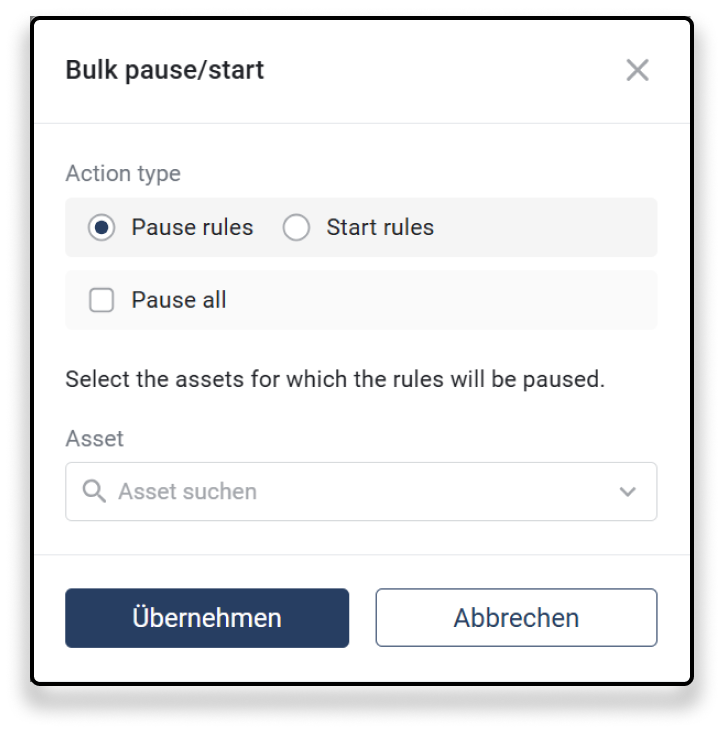
In rule management, multiple rules can now be paused or started at the same time. This makes it easier to control automated processes and enables efficient management of rule chains. [-> Pause or start multiple rules at once](#mehrere-regeln-gleichzeitig-pausieren-oder-starten)

<figure><img src="https://content.gitbook.com/content/Nyvwhz1kEMXcHf4HLuZ8/blobs/NgcmfkSgASbGcXZvNXNz/Bulk%20pausing%20rules.png" alt="" width="362"><figcaption></figcaption></figure>

### **Alarms visible in analysis charts & floor widget**

Alarms can now be visualized directly in analysis charts and displayed in the floor widget. This improves clarity and makes it easier to evaluate alarm events in the context of data analysis and building visualization. [-> Display alarms in the analysis](/collection/english-v14/documentation/analytics-and-reports/analytics-nutzen.md#alarme-in-der-analysis-anzeigen)

<figure><img src="https://content.gitbook.com/content/Nyvwhz1kEMXcHf4HLuZ8/blobs/oWGOrWnJIc1haSJVUm0K/Alarm%20in%20analytic%20(1).png" alt="" width="563"><figcaption></figcaption></figure>

### **Revision of the booking widget**

In the booking widget, all existing bookings can now be displayed and managed when selecting an asset. This provides a better overview and more efficient management of booking times.

<figure><img src="https://content.gitbook.com/content/Nyvwhz1kEMXcHf4HLuZ8/blobs/74I2krjVbbNGFb5TWtJs/MQTT%20broker%20(3).png" alt="" width="360"><figcaption></figcaption></figure>

{% content-ref url="/pages/a5de30c8da9c29ac8736417ea5a670c5b474cef8" %}
[Booking](/collection/english-v14/documentation/widgets/vordefinierte-widgets/buchung.md)
{% endcontent-ref %}

### **Twig templates in Eliona – flexible message creation**

Eliona now supports **Twig.js** for the dynamic creation of message templates. This enables flexible customization of **alarm, ticket, and email templates** with conditional statements, loops, and variables. These can also be used for **yAxis and legend templates** to customize chart labels.

{% content-ref url="/pages/8894b3c86580a6b6b9cdac807e96502026afb725" %}
[Twig templating in Eliona](/collection/english-v14/academy/twig-templating-in-eliona.md)
{% endcontent-ref %}

### **New trending configuration for attributes**

In the **Asset Template** can now define whether historical data should be stored for attributes. There are two options:

<div align="left"><figure><img src="https://content.gitbook.com/content/Nyvwhz1kEMXcHf4HLuZ8/blobs/ip0O4xTiRy6ukL8aboIc/image.png" alt="" width="563"><figcaption></figcaption></figure></div>

* **On Change:** Values are only stored when they change.
* **Always:** Every incoming value is stored.\
  This setting enables more efficient management of **trend data** and reduces unnecessary storage.

{% content-ref url="/pages/0f2ce7ea5f2d76c610ea31d0b49825a8533707e9" %}
[Create a new template](/collection/english-v14/documentation/assets/asset-modellierung-templates-erstellen/ein-neues-template-erstellen.md)
{% endcontent-ref %}

### **Advanced system settings – improved storage management**

With this version, additional options for managing storage times and data processing have been introduced:

* **Storage time log & storage time trend** – Enables more precise control over retention periods for logs and trend data.
* **Smart Batch Mode** – Optimizes the storage and processing of large volumes of data.
* **Cold Storage & storage time from** – Automatic archiving of older trend data to reduce storage space.

These new settings improve the efficiency of data management and enable more flexible control over storage strategies.

{% content-ref url="/pages/6c1ae376f41b690d1ba72e137a02dfccb369896c" %}
[System](/collection/english-v14/documentation/einstellungen/system.md)
{% endcontent-ref %}

### **Revision of the Smart Assist menu**

The Smart Assist menu has been revised to simplify the configuration of user permissions for Smart Views and slider groups. Users can now be assigned to specific views and their order adjusted via drag and drop.

<figure><img src="https://content.gitbook.com/content/Nyvwhz1kEMXcHf4HLuZ8/blobs/ajy040pCaZVk9PhUPeYO/MQTT%20broker%20(4).png" alt="" width="563"><figcaption></figcaption></figure>

{% content-ref url="/pages/39e229bc08a50da974adfd392fec0aa81ab22b1a" %}
[Smart Assist](/collection/english-v14/documentation/smart-views/smart-assist.md)
{% endcontent-ref %}

### **Improvement of the PL/PgSQL Script Engine**

The Script Engine now supports the full PL/PgSQL syntax, including the use of variables within a **DO .........** block. This allows complex SQL scripts with **DECLARE**-statements and structured processes to be executed directly in Eliona.

{% content-ref url="/pages/ae3006d00437c0fb64d1c95e25af17ef0e3a554d" %}
[Write PL/PgSQL scripts](/collection/english-v14/documentation/engineering/skript-engine/pl-pgsql-skripte-schreiben.md)
{% endcontent-ref %}

### **New configuration page for the Eliona Broker**

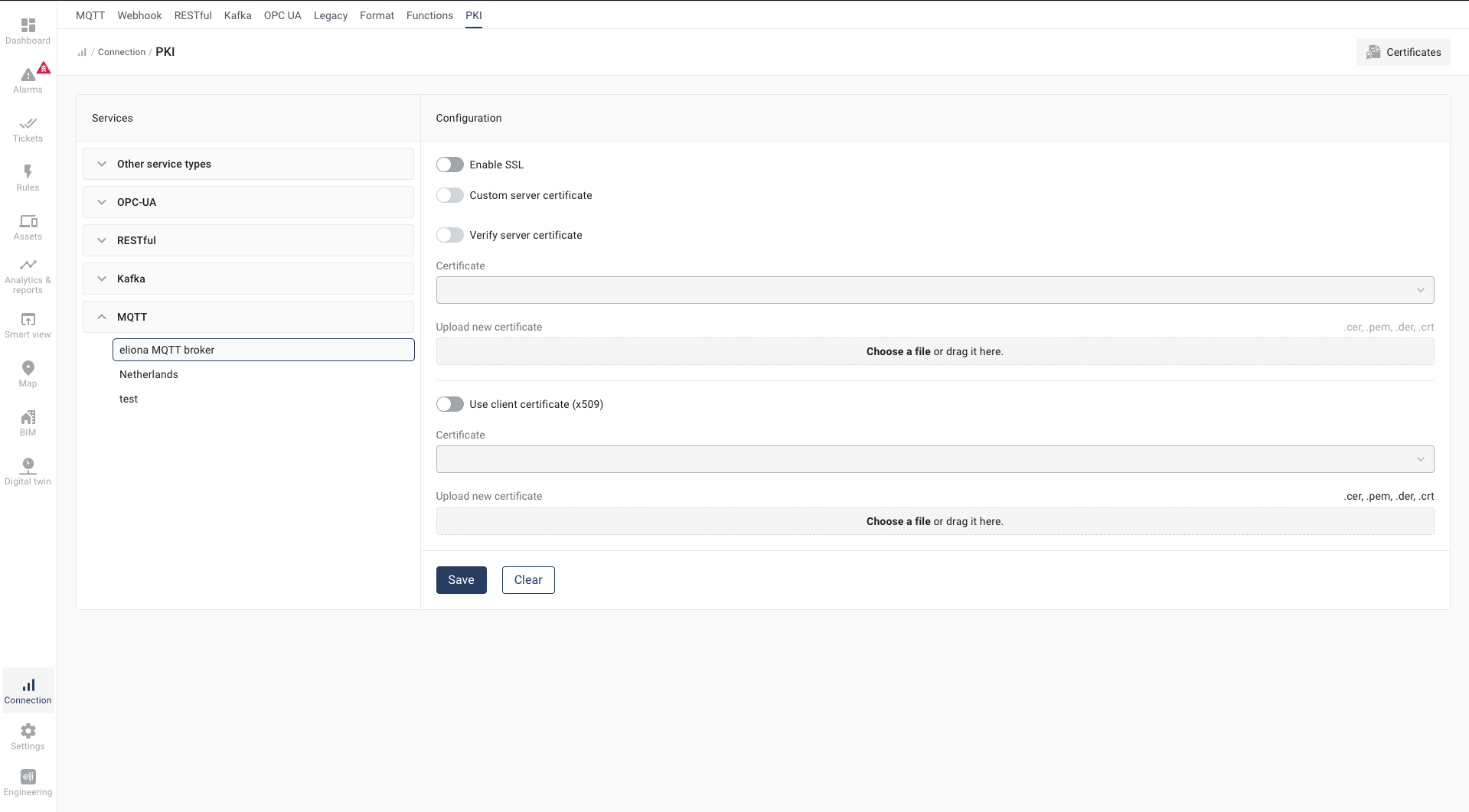
A dedicated **Eliona Broker**-configuration page has been added. Users can there **manage SSL certificates** and **set up user accounts for the broker**, to improve security and access management for MQTT connections.

{% content-ref url="/pages/0d6a954f1cab2dd1664d6e867dc9aa610409fff6" %}
[Eliona Broker](/collection/english-v14/connectivity-as-a-service/gerate-mit-abb-buildingpro-verbinden/gerate-per-mqtt-verbinden/eliona-broker.md)
{% endcontent-ref %}

### **Advanced link options in the Smart Assist menu**

The **Links widget** has been expanded and now allows linking links with **Smart Views**. When clicking a link, a predefined Smart View can be opened directly, making navigation within Eliona even more intuitive.

{% content-ref url="/pages/4d9a7aede8de0c5602693e490fcf48561990bd66" %}
[Links](/collection/english-v14/documentation/widgets/vordefinierte-widgets/links.md)
{% endcontent-ref %}

### **Alarms/rules from external sources now clearly identifiable**

Alarms that come from **external systems** are now clearly marked in the alarm overview. This makes it immediately apparent whether an alarm was triggered by an **internal rule** or an **external source** . [-> External rules](/collection/english-v14/documentation/alarme-regeln-und-eskalationen/regeln.md#externe-regeln) <img src="https://content.gitbook.com/content/Nyvwhz1kEMXcHf4HLuZ8/blobs/86RtiMxMAEvPe95wiKAu/Frame%201863%201.png" alt="" data-size="line">

### **New filter option for alarm analyses**

The **Alarm statistics** has been expanded with a **tag filter** . This allows alarms to be analyzed specifically by certain tags, enabling even more detailed evaluation.

{% content-ref url="/pages/02df6c9b9a00d7231757f9eac9ffd6ccf392e5e5" %}
[Alarm statistics](/collection/english-v14/documentation/alarme-regeln-und-eskalationen/alarme/alarmstatistik.md)
{% endcontent-ref %}

### **Legacy structures cleaned up**

The old legacy linking point has been removed. This eliminates outdated structures and configuration options to make the platform more efficient and future-proof.

***

## **20250313 - Changelog\[v13.2.4 - v13.2.58]**

Several security vulnerabilities were fixed in these versions to improve the system's stability and security.

## **20241210 - Changelog\[v13.2.3]**

In ticket details, the names of attachments are now displayed. We have also fixed the following issues:

* The "Task Priority" column was removed from the task list.
* Attachments can now be added without a comment.
* UI inconsistencies in ticket templates have been resolved.
* A bug in the display of relative time in comments was fixed.

## **20241203 - Changelog\[v13.2.2]**

We fixed a bug where the project was not displayed correctly when authentication was performed via SSO. With this adjustment, the initial project authentication was moved to the backend to improve performance and security.

## 20241024 - Changelo&#x67;**\[v13.2.1]**

We fixed a problem where the loading time in asset details was noticeably increased when the *Device Simulator App* was not installed. With this fix, the page now loads significantly faster.

## 20241017 - Changelog\[v13.2.0]

We are pleased to present the latest version of Eliona, which is equipped with numerous new features and optimizations. The most important new features include the **rule chains**, which make it possible to create automated processes based on events or time triggers, as well as the **custom start page**, which can be adapted for each project.

In addition to these highlights, the update offers other exciting improvements such as the **report table widget**, a revised **input widget** as well as extended functions for **data input and editing**, which make your daily work in Eliona even more efficient.

[-> Link to full changelog v13.2](https://deploy.eliona.io/helm/changelogs/v13.2.txt)

### Migration from ADFS to SAML SSO

With this version, we recommend migrating the ADFS app to **SAML SSO** to take advantage of modern authentication. Detailed instructions can be found in the [->SAML SSO documentation](/collection/english-v14/apps/apps/saml-sso.md)[.](/collection/english-v14/apps/apps/saml-sso.md)

### **rule chains**

With this version, we introduce **rule chains** as a new feature. Rule chains make it possible to create automated processes based on events or cyclical triggers. This provides flexible control options for a wide variety of applications, from monitoring to process optimization.

<figure><img src="https://content.gitbook.com/content/Nyvwhz1kEMXcHf4HLuZ8/blobs/dMyONJaJLmBtReqhFscW/image%20(7).png" alt=""><figcaption></figcaption></figure>

**Important functions**:

* **Event-based and cyclical triggers**: Define when a rule is triggered – based on a data event or at fixed intervals.
* **Automated actions**: Trigger alarms, create tickets, or send emails based on defined conditions.
* **Integration of conditions and operations**: Use comparisons, delays, and logical operators (AND/OR) to implement complex decision logic.

{% content-ref url="/pages/b8b0d247ff2ff86850ef111fa57a07018d6927e3" %}
[rule chains](/collection/english-v14/documentation/alarme-regeln-und-eskalationen/regelketten.md)
{% endcontent-ref %}

### **Homepage**

With this version, you can now define a **custom start page** for each project. This page is shown first after login or when opening the project and provides a quick overview of important information and widgets. The homepage contains a **project overview** with the created elements, direct access to the **project settings**, a **map** with the project location as well as a **weather widget**, which displays the current weather and forecast for the location.

In addition, via the project settings you can activate the homepage and add new **elements to the homepage** and configure existing elements to tailor the page to your specific requirements.

<figure><img src="https://content.gitbook.com/content/Nyvwhz1kEMXcHf4HLuZ8/blobs/V54bh8rva5HY2z5gRfXr/Projects%20(1).jpg" alt=""><figcaption></figcaption></figure>

{% content-ref url="/pages/22b6e6df472e42603697cfb862757281cb18a17b" %}
[Home page](/collection/english-v14/documentation/systeme-und-projekte/startseite.md)
{% endcontent-ref %}

### **report table widget**

With this version, **report table widget** was introduced, which makes it possible to display data from various assets in tabular form. You can aggregate data over defined periods and calculate totals or averages. The widget offers a flexible structure that allows columns to be configured individually and content such as text, date or numerical data to be displayed. It is particularly well suited for detailed analyses of operating hours, consumption values, or other important metrics.

<figure><img src="https://content.gitbook.com/content/Nyvwhz1kEMXcHf4HLuZ8/blobs/41YRA8jMS8gBRFKtbek6/Report%20Table%20(4).png" alt="" width="563"><figcaption></figcaption></figure>

{% content-ref url="/pages/f499651f68f90c1885c7ab885c8465172561ddf3" %}
[Report table](/collection/english-v14/documentation/widgets/vordefinierte-widgets/reporttabelle.md)
{% endcontent-ref %}

### **Enhanced data entry and editing functions**

With this version, the functionality for data entry and editing has been significantly expanded. You can now easily add new data entries for attributes of an asset and save them directly in the system. Each entry is stamped with a current timestamp to optimize data tracking. Existing historical data can also be edited via a simple pencil icon. This makes it easier to correct faulty or inaccurate data.

Another new feature is **bulk editing of data**. This allows all records within a defined period to be set to a new value. This is especially helpful when devices have supplied incorrect data during a certain period, as you can now correct it efficiently and quickly.

These functions significantly simplify and speed up data entry and maintenance, resulting in more precise and flexible data management.

{% content-ref url="/pages/a8265b90f2c48124808df5cbebb2da460828fdbc" %}
[Asset data](/collection/english-v14/documentation/assets/asset-daten.md)
{% endcontent-ref %}

### **History function for calculations**

With this version, the **history**-function has been introduced, which makes it possible to access historical values of attributes. You can now use previous values of an attribute in calculations to analyze trends or track changes over time. The syntax allows specific past values to be retrieved by using a negative value for the parameter `back_step` for example `-1` for the last value or `-2` for the second-to-last.

This new function offers a more flexible and detailed analysis of data over time and makes it easier to create complex calculation chains.

{% content-ref url="/pages/4d26cefc5e906124d2bc600bec44dba25af66506" %}
[Calculate values: The calculator](/collection/english-v14/documentation/weitere-funktionen/attribut-funktionen/werte-berechnen-der-calculator.md)
{% endcontent-ref %}

### **Redesign of the input widget**

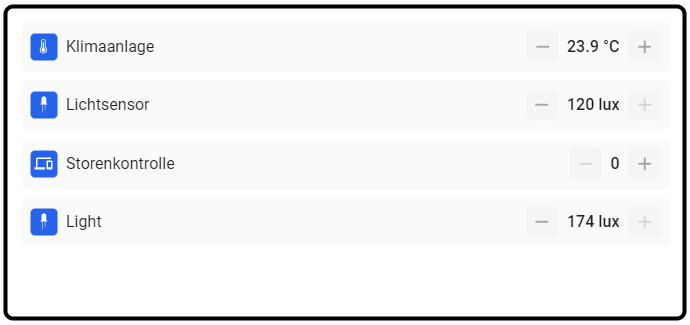
The **input widget** has been completely redesigned and now offers a much more modern design as well as improved usability. The new version is visually more appealing and significantly more intuitive to use, making interaction and data entry much easier.

Two new functions were also introduced:

* **Enable icons**: The icons of the associated attributes can now be displayed directly to improve clarity.
* **Divide vertically**: With this option, input fields can be arranged not only one below the other, but also next to each other, creating a more flexible and compact display.

These improvements offer more flexibility and make working with the input widget more efficient and user-friendly.

<div align="left"><figure><img src="https://content.gitbook.com/content/Nyvwhz1kEMXcHf4HLuZ8/blobs/SZNGOi9mxb5oCu71nwaf/image.png" alt="" width="518"><figcaption></figcaption></figure></div>

{% content-ref url="/pages/e512c07ca4fe646f348dcc6b01c1151733b8c0f4" %}
[Inputs & switches](/collection/english-v14/documentation/widgets/benutzerdefinierte-widgets/module/eingaben-and-schalter.md)
{% endcontent-ref %}

### Revision of the floor widget

The **Floor widget** has been fundamentally redesigned and now offers significantly improved functions that make it more efficient and user-friendly. With the new button **“Add current polygons/POIs”** all objects placed on a floor, such as polygons or points of interest, can be transferred to the widget with a single click. This eliminates the need to add each object manually, saving valuable time during setup.

<div align="left"><figure><img src="https://content.gitbook.com/content/Nyvwhz1kEMXcHf4HLuZ8/blobs/cRE7Fpqc4YxnOvN2V6gw/image.png" alt="" width="267"><figcaption></figcaption></figure></div>

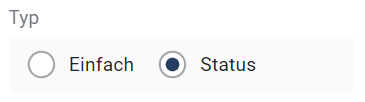
In addition, the ability to switch between two view modes was introduced: **“Simple”** and the **“Status” view**. The simple view offers a clear overview of all placed objects, while the status view allows you to keep track of the current state of these objects. This is particularly useful in situations where continuous monitoring is required.

<div align="left"><figure><img src="https://content.gitbook.com/content/Nyvwhz1kEMXcHf4HLuZ8/blobs/j77RUzAGHt0jCyC8aitS/image.png" alt="" width="274"><figcaption></figcaption></figure></div>

These new functions make it much easier to manage floor objects, which both increases efficiency and enhances flexibility when using the widget.

{% content-ref url="/pages/3c77339c39eab3b645622388787453af76e575bf" %}
[Floor](/collection/english-v14/documentation/widgets/vordefinierte-widgets/stockwerk.md)
{% endcontent-ref %}

### **Onboarding**

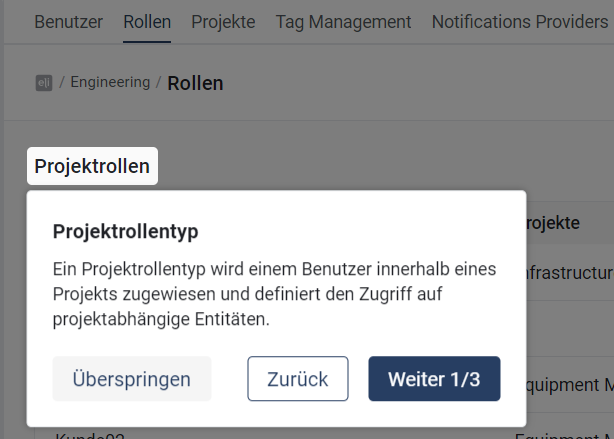
With this version, **onboarding feature** has been introduced in Eliona. This new feature provides an interactive guide that introduces users to the functions of various Eliona pages when they access them for the first time.

<div align="left"><figure><img src="https://content.gitbook.com/content/Nyvwhz1kEMXcHf4HLuZ8/blobs/NjfWfz6suwyviCnbkk9Q/image.png" alt="" width="307"><figcaption></figcaption></figure></div>

{% content-ref url="/pages/074d3c968e6c7d41a9ef76434c0e4355565eb37f" %}
[Welcome to ABB BuildingPro: An interactive introduction](/collection/english-v14/getting-started/willkommen-in-abb-buildingpro-eine-interaktive-einfuhrung.md)
{% endcontent-ref %}

### **Data retention period and audit log**

With this version, it is now possible to set the **retention period** for data to up to **60 months** . Upon request, the retention period can even be set to **unlimited** In addition, an **audit log limit** has been introduced to manage access to log data.

{% content-ref url="/pages/6c1ae376f41b690d1ba72e137a02dfccb369896c" %}
[System](/collection/english-v14/documentation/einstellungen/system.md)
{% endcontent-ref %}

### **GAI in asset selectors**

From now on, **GAI (Global Asset ID)** is displayed in all asset selectors. It is also possible to search for assets specifically by GAI, which makes identifying and selecting assets much easier.

## 20240920 - Changelog \[v13.1.6]

In this hotfix, we fixed a bug that caused users without permission to **users in other lists** to be unable to select the default ticket recipient when creating a ticket.

## 20240905 - Changelog \[v13.1.5]

In this update, we made several improvements and bug fixes in the areas of **navigation**, **Digital Twin** and **tickets** made:

### **General**

The **Default navigation path** is now **role-dependent**. If a role does not have access to dashboards, the dashboard is no longer loaded automatically as the default view. Instead, the **next available sidebar path** is selected that the role has access to.

### **Digital Twin**

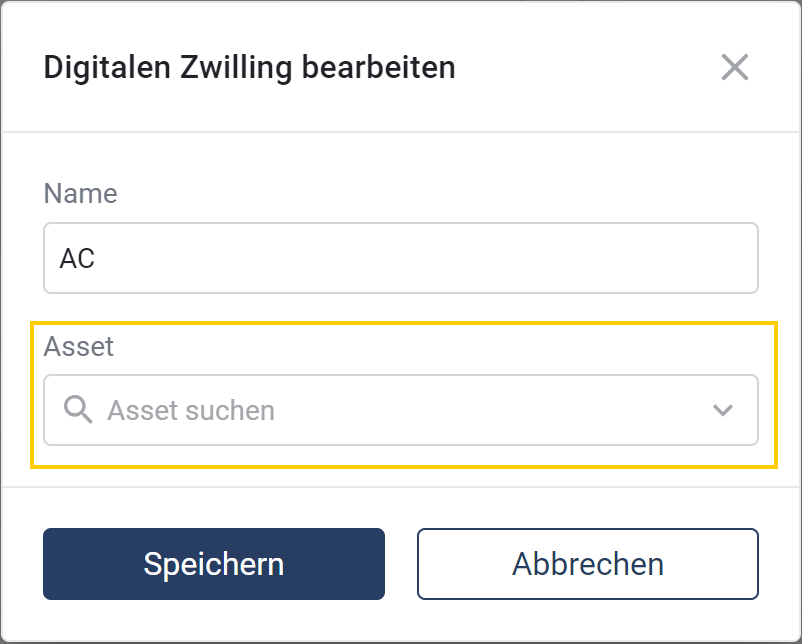
It is now possible to change the **asset after creating the digital twin** to be changed.\
To do this, next to the digital twin click on <img src="https://content.gitbook.com/content/Nyvwhz1kEMXcHf4HLuZ8/blobs/ZzNKRz2aMlE78rYHmaD8/image.png" alt="" data-size="line"> and then on<img src="https://content.gitbook.com/content/Nyvwhz1kEMXcHf4HLuZ8/blobs/WKYAHn7jnEdmRUJ89pkp/image.png" alt="" data-size="line"> Alternatively, the corresponding window can be opened directly in the Digital Twin itself via <img src="https://content.gitbook.com/content/Nyvwhz1kEMXcHf4HLuZ8/blobs/lossGqKiQtZRtx0pC48E/image.png" alt="" data-size="line"> . In this window, the desired asset can then be specified.
<div align="center"><figure><img src="https://content.gitbook.com/content/Nyvwhz1kEMXcHf4HLuZ8/blobs/LwbHm5qjOpKNiq3Ih5z8/Screenshot%202024-09-05%20133033.png" alt="" width="375"><figcaption></figcaption></figure></div>

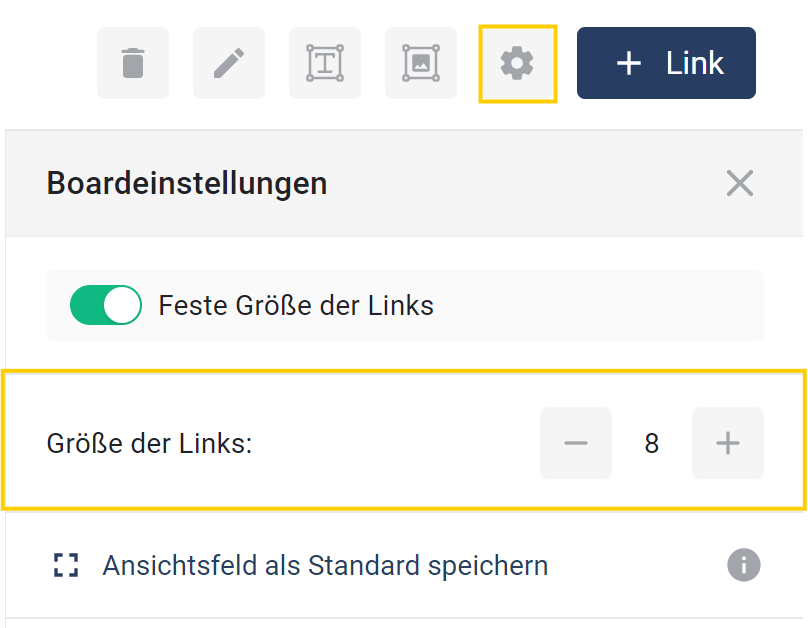
The **Size of links** can now be adjusted.\
To do this, in the Digital Twin under the **gear icon** <img src="https://content.gitbook.com/content/Nyvwhz1kEMXcHf4HLuZ8/blobs/JWUDVkfnwrQMN2EJuZPJ/image.png" alt="" data-size="line"> there is a new option **"Link size"**, in which the relative size of all links can be defined.
<div align="center"><figure><img src="https://content.gitbook.com/content/Nyvwhz1kEMXcHf4HLuZ8/blobs/FSW4YSsUUgU6szJ4HLXY/Screenshot%202024-09-05%20134225.png" alt="" width="375"><figcaption></figcaption></figure></div>

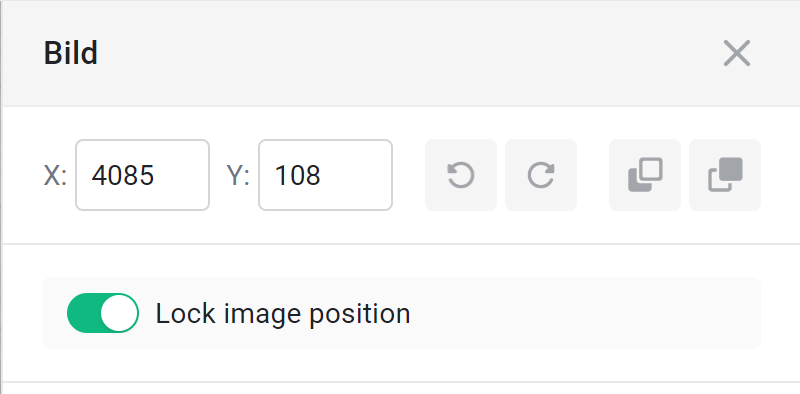
The **Image function** in the Digital Twin has been expanded with some useful options. From now on, images can be conveniently dragged from your folder directly to the desired location in the Digital Twin via **drag and drop** . Once an image is selected, it can now be **rotated** <img src="https://content.gitbook.com/content/Nyvwhz1kEMXcHf4HLuZ8/blobs/psKi98SJ66zp4y56tM4A/image.png" alt="" data-size="line"><img src="https://content.gitbook.com/content/Nyvwhz1kEMXcHf4HLuZ8/blobs/pLJbfuLT1ZVwO9YVA6tN/image.png" alt="" data-size="line"> or its **arrangement** of images changed by moving the image **in front of** <img src="https://content.gitbook.com/content/Nyvwhz1kEMXcHf4HLuZ8/blobs/zznxnc07qpQqP9duTfby/image.png" alt="" data-size="line"> or **behind** <img src="https://content.gitbook.com/content/Nyvwhz1kEMXcHf4HLuZ8/blobs/t2vVAN8zbsRPYnHZo0Ex/image.png" alt="" data-size="line"> other images.

A particularly useful new option is <img src="https://content.gitbook.com/content/Nyvwhz1kEMXcHf4HLuZ8/blobs/2Ro3HT2xHrSWQhhuAUzr/image.png" alt="" data-size="line">, which can be used to fix the position of an image. When this option is activated, the image can no longer be moved accidentally – instead, only the view moves when you drag the image. This keeps the image position unchanged and unwanted shifts are a thing of the past.


<figure><img src="https://content.gitbook.com/content/Nyvwhz1kEMXcHf4HLuZ8/blobs/9vwdCWg7AkTkIFTUsXHW/image.png" alt="" width="375"><figcaption></figcaption></figure>

It is now also possible to **selected elements** with the **Del-** or **Delete key** delete. In addition, **selected elements** by pressing the **Esc key** can be deselected again.

### **tickets**

At the **tickets** some **display issues** were fixed, which previously led to visual errors. Under certain circumstances, it was not possible to **tasks** create, which has now been fixed. Tasks can now be created again without any problems.

In the **permissions** for tickets, there are now additional **settings** in the **project roles**. **ticket list view** and the **ticket details** are now managed separately. For the **ticket details** and **tasks** there are now the options to distinguish between **Manage**, **Write** and **Read** to enable more differentiated permission assignment.<br>

<figure><img src="https://content.gitbook.com/content/Nyvwhz1kEMXcHf4HLuZ8/blobs/7dtJvLnPCWFTNIdLpJWQ/image.png" alt=""><figcaption></figcaption></figure>

## 20240808 - Changelog \[v13.1.4]

In this hotfix, we fixed a bug that caused the tooltip in the dashboard to appear in the wrong place when multiple trends were present.

## 20240801 - Changelog \[v13.1.3]

In this hotfix, we fixed performance issues that occurred with large datasets in dashboards, analytics, and Smart Views. These optimizations ensure that large datasets no longer cause problems.

## 20240719 - Changelog \[v13.1.2]

In this hotfix, we fixed a bug that prevented asset characteristics from being added in the asset template.

***

## 20240718 - Changelog \[v13.1.1]

In this hotfix, we solved several issues:

1. The transition from the old Digital Twin to the new Digital Twin design no longer causes any difficulties.
2. When clicking a link, the data overview is now shown by default instead of the configuration view.
3. Old images are now scaled correctly.
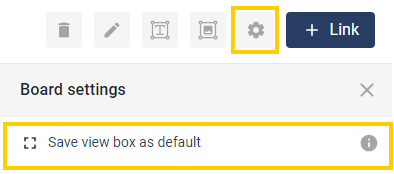
4. It is now possible to set the view when opening the Digital Twin by clicking the gear icon and selecting "Save view as default."

<figure><img src="https://content.gitbook.com/content/Nyvwhz1kEMXcHf4HLuZ8/blobs/vkeTshCauwahfnMxdhmz/save_as_default.png" alt=""><figcaption></figcaption></figure>

In addition, we fixed a bug that displayed the wrong placeholder in the input widget.

***

## 20240710 - Changelog \[v13.1.0]

We are pleased to present the latest update of Eliona, version 13.1.0. This version brings a wide range of new features and improvements that further optimize your user experience and make your workflows even more efficient. From the new wayfinding feature, which allows flexible navigation through your system, to the ability to customize email subject lines for escalated emails, and extensive improvements in the Digital Twin – Eliona v13.1.0 offers numerous extensions and enhancements tailored specifically to your needs. Read on to learn more about the exciting new features this version brings.

### Full changelog

<details>

<summary>Changelog v13.1</summary>

\##\[v13.1.0] - 10.07.24

**### Added**

Dashboard/Smart view -> SBB widget ([✓ \[Discovery\] Create react appin Eliona](https://app.asana.com/0/1200252355215223/1206904986524061/f))\[@sti]

Dashboard/Smart view -> Alarm widget -> Detailed Alarm List ([✓ 🔵 Detailed alarm list in Widgets](https://app.asana.com/0/1200252355215223/1206055204586537/f))\[@sti]

Dashboard/Smart view -> Heatmap Tracking widget -> ([✓ \[FE\] Heatmap Tracking Element](https://app.asana.com/0/1200252355215223/1206713603771616/f))\[@nl]

Asset Details Form -> Associated ID -> new input style for id\`s (<https://app.asana.com/0/1200252355215223/1207169605955829/f>) \[@sti]

Sidebar -> Alarm Icon -> now showing different color depending on highest prio ([✓ \[FE\] - Alarm-Icon menuitem](https://app.asana.com/0/1200252355215223/1206938387815576/f)) \[@sti]

**Wayfinding -> Users can select starting building & starting point (**[**✓ \[FE\] Link to Wayfinding View** ](https://app.asana.com/0/1200252355215223/1207370026137796/f)**)\[@nl]**

Smartview -> add smartassist /sa link ([✓ FE - Link to "/sa", real Smart Assist](https://app.asana.com/0/portfolio/1199554442331824/workload/1207160155225062)) \[@rtu]

**Engineering -> Notification Provider -> Added subject field (**[**✓ 👁️ \[FE\] OMSswiss -> escalation subject message**](https://app.asana.com/0/1200252355215223/1207355385048172/f) **) \[@jp]**

**Asset Details -> asset categories (SB-\[ADC]) \[@jp]**

**Asset Details -> added asset rating (asset\_rating) \[@lw]**

**### Changed**

Map -> Clicking on a list item no longer opens the asset page. Highlights the position of the assert, instead ([✓ \[FE\] Polygon highlighting when selected](https://app.asana.com/0/1200252355215223/1207370336841290/f))\[@nl]

Map -> Hides asset info drawer when search is opened and vice versa ([✓ 🔵 V12 - Storey Search](https://app.asana.com/0/1182566401713025/1207343569253346/f))\[@nl]

General -> Disable selecting an attribute for disabled asset type attributes ([✓ \[FE/BE\] - Disabled asset type attributes, should be disabled in dashboard/analytics selects... ](https://app.asana.com/0/portfolio/1199554442331824/workload/1207370336841293))\[@rtu]

Connection -> OPCUA set enable to default true in subscriptions \[@lwa]

Weather widget -> Updated design, color scheme support \[@nl] ([✓ \[FE, REDESIGN\] Weather Widget](https://app.asana.com/0/1200252355215223/1207371310735759/f))

Login -> encrypt pw to prevent clear text in request ([✓ \[FE\] - Blowfish algo for the frontend ](https://app.asana.com/0/portfolio/1199554442331824/workload/1207370934758896)) \[@rtu]

**Tickets -> enhanced tickets wth templates and default user (digital\_ticketing) \[@lw]**

**Digital Twin -> reworked DT to us Infinity board & general design improvements (dt\_update) \[@lw]**

**### Fixed**

Engineering -> Asset modelingOpen asset type details after creation (BR-2804) \[@rtu]

Map -> Storey config -> Added scrollbar to the form on small screens ([✓ Storey configuration not scrollable](https://app.asana.com/0/1187198351569417/1207419472179128/f))\[@nl]

Widgets -> Alarm Widget -> added missing tags mode select to element ([✓ Alarm Widget filter by tagMode (and/or)](https://app.asana.com/0/portfolio/1199554442331824/workload/1207416263476113)) \[@rtu]

Settings -> Audit Trail -> added missing connection and app audit trail event types [✓ Audit Trail event types missing in FE](https://app.asana.com/0/1187198351569417/1207470514484119)) \[@rtu]

Asset -> Details -> fix removing geographical and functional references ([✓ Setting parent asset to empty](https://app.asana.com/0/portfolio/1199554442331824/workload/1207479477973053)) \[@rtu]

Map -> fixed counting of alarms on the displayed area ([✓ UBS - Alarm summary counts pois hidden behind the sidebar](https://app.asana.com/0/1187198351569417/1207415320822560/f))\[@nl]

Analytics & Reports -> fix chart series color conflcts when using multiple charts ([✓ V13 - Analytics Color](https://app.asana.com/0/portfolio/1199554442331824/workload/1207571717345415)) \[@rtu]

Analytics & Reports -> save analytics charts in "last unsaved analytics" (BR-2865) \[@rtu]

Widgets -> TIme widget -> the widget displays outdated time ([✓ Time Widget not working (time shows always time when smart view was openend)](https://app.asana.com/0/1187198351569417/1207548759269773/f))\[@nl]

Smartview -> Iframe -> added minHeight config field ([✓ Smart View Iframe in Phone view too small/no way to put in pixel hight](https://app.asana.com/0/portfolio/1199554442331824/workload/1207666291694433)) \[@rtu]

Asset -> Asset Links -> remove capitalizes lowecase text transformation ([✓ \[Assets\] Word "Niagara" in the link name starts with a lowercase letter](https://app.asana.com/0/portfolio/1199554442331824/workload/1207573651627594)) \[@rtu]

</details>

### **Wayfinding start from the building**

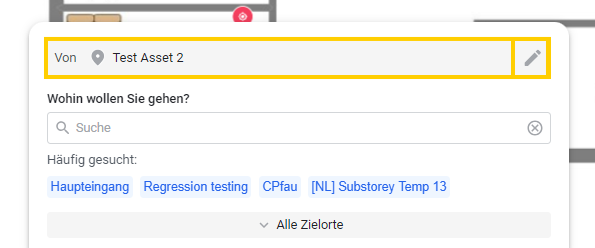
With the new wayfinding feature, users can now start directly from the **building view** or from a **specific building**. This improvement makes it possible to flexibly choose the starting point for directions and offers user-friendly, intuitive navigation through your facility.

#### Building view

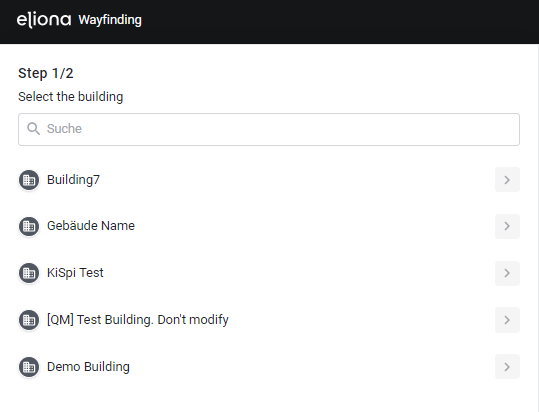
To get to the building view, simply enter your URL followed by **/wayfinding** for example: "<https://your.url.i&#x6F;**/wayfinding>\*\*". You can use this URL in your application to direct the user to the **building view** to. In this view, the user can select or search for a building from which they want to start.

<figure><img src="https://content.gitbook.com/content/Nyvwhz1kEMXcHf4HLuZ8/blobs/OHZEK8Eqhob4xXKJZrE5/image.png" alt=""><figcaption></figcaption></figure>

#### Floor view

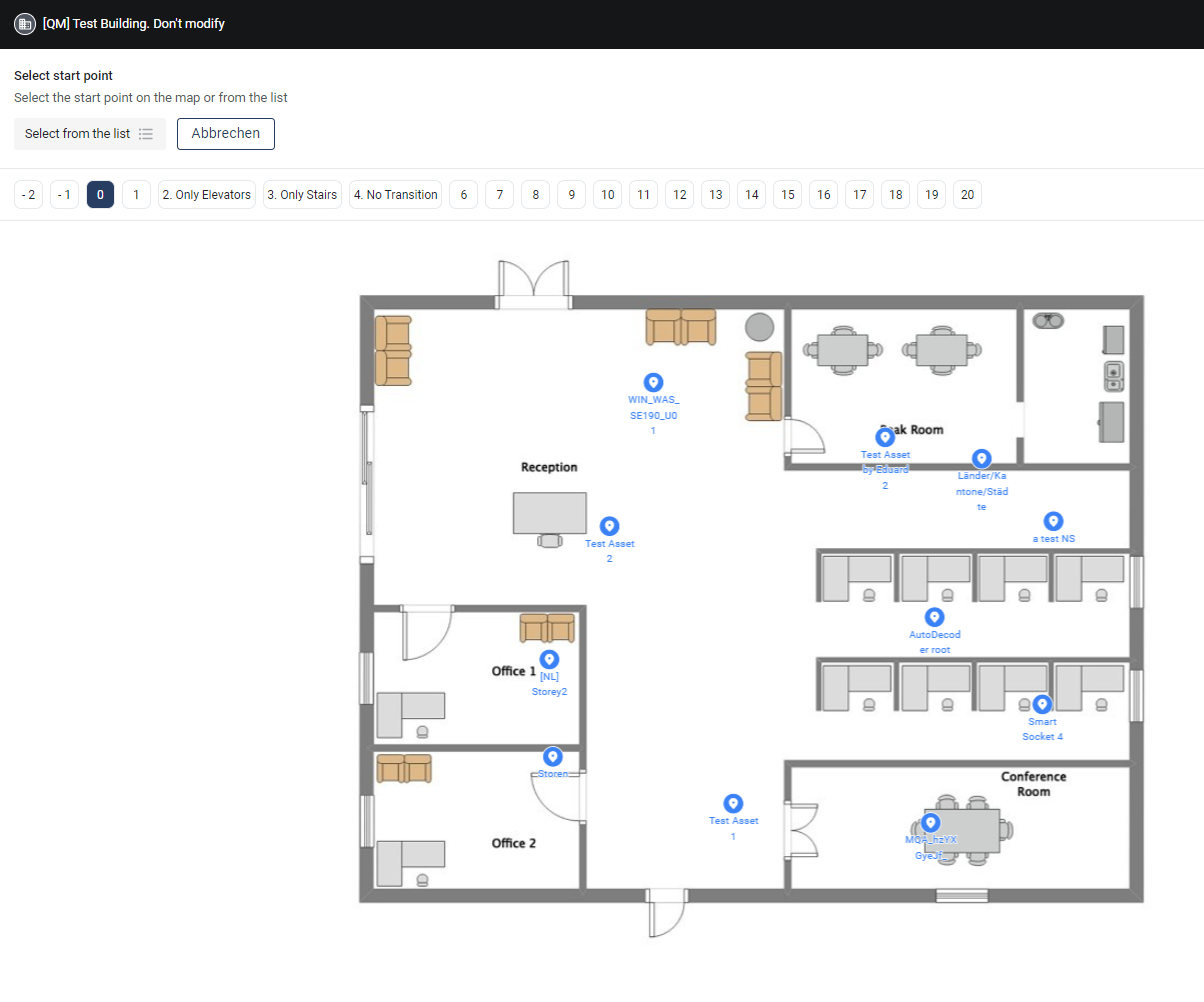
To have a user start directly in a specific building, use the URL **/wayfinding?buildingId={id}**, where {id} is the **ID of the building** is. The user is then redirected to the floor view. In this view, they can choose their **starting point within the floors** or search using the expandable search bar.

<figure><img src="https://content.gitbook.com/content/Nyvwhz1kEMXcHf4HLuZ8/blobs/YqqLiRzv584vW3aDyLXa/image.png" alt=""><figcaption></figcaption></figure>

Once a starting point has been selected, everything works as usual, with the only difference that the **starting point can be changed at any time**.

<figure><img src="https://content.gitbook.com/content/Nyvwhz1kEMXcHf4HLuZ8/blobs/rWMG98tC2jVyu8jLMdTF/StartWayfinding.png" alt=""><figcaption></figcaption></figure>

### Customize email subject for escalated emails

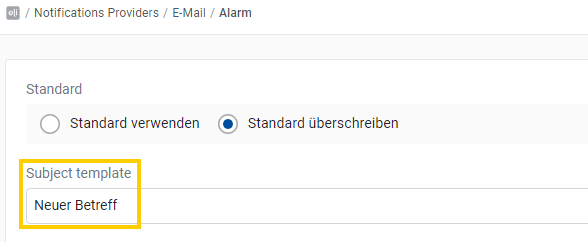
We are pleased to introduce a new feature: from now on, it is possible to customize the subject of escalated emails individually. You can do this in just a few simple steps:

1. **Navigate to Engineering > Notifications Providers > E-mail.**
2. **Edit the desired email template.**
3. **Select the "Override default" option.**
4. **Enter the desired subject in the "Subject template" field.**

<figure><img src="https://content.gitbook.com/content/Nyvwhz1kEMXcHf4HLuZ8/blobs/ASWYIh8ubyX0utEEt6Af/Betreff.png" alt=""><figcaption></figcaption></figure>

With this new feature, you can ensure that the subject lines of your escalated emails precisely meet your requirements and make your communication even more efficient.

### New features in the Digital Twin

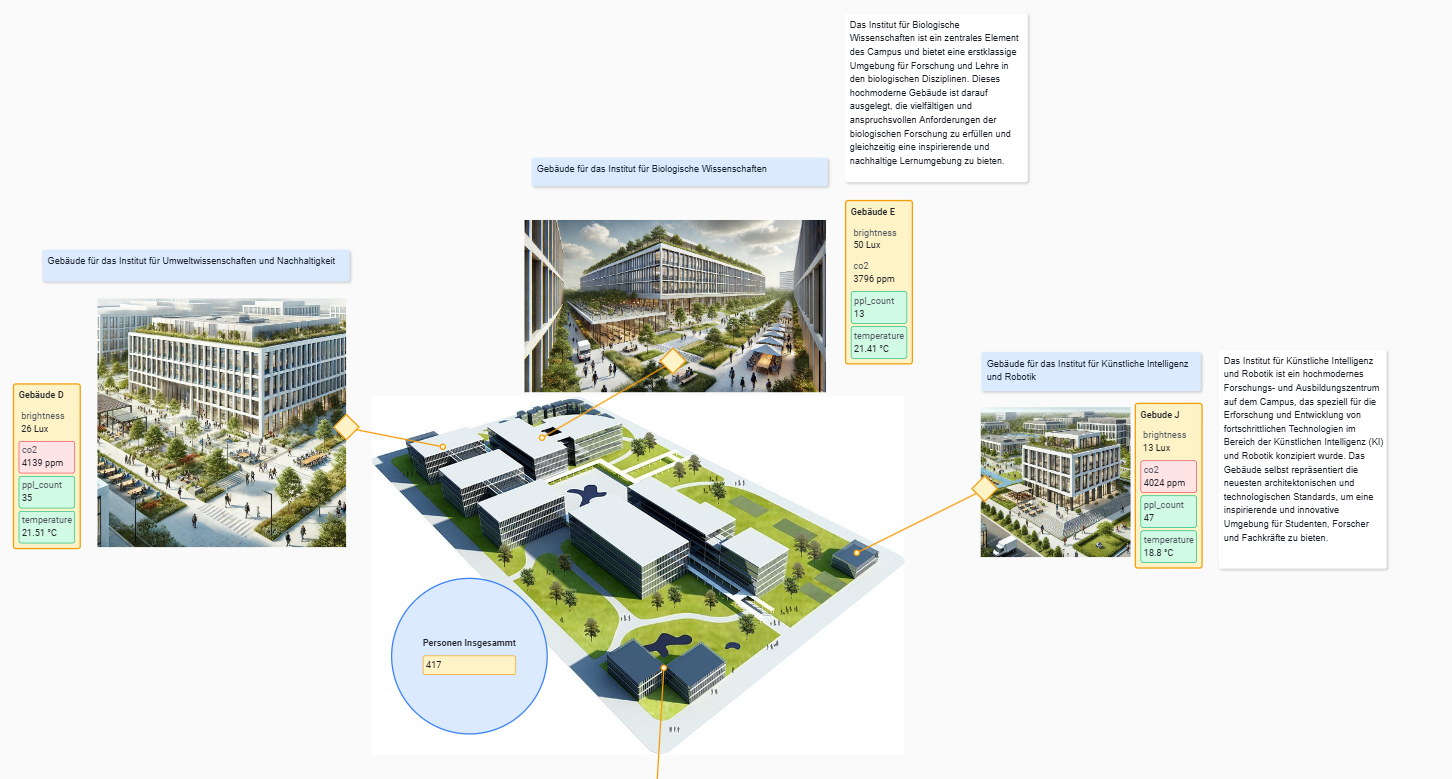
The Digital Twin has been extensively revised and now offers a variety of new functions and improvements. It is now possible to **add unlimited images** to be added. In addition, **text fields** can be added in any color and freely scaled. The links also offer some cool new features.

<figure><img src="https://content.gitbook.com/content/Nyvwhz1kEMXcHf4HLuZ8/blobs/UwZCR6IB6rzar9UApn9j/image.png" alt=""><figcaption></figcaption></figure>

<figure><img src="https://content.gitbook.com/content/Nyvwhz1kEMXcHf4HLuZ8/blobs/4nxsuMKTfs3tDwFEKcX2/image.png" alt=""><figcaption></figcaption></figure>

#### Linking

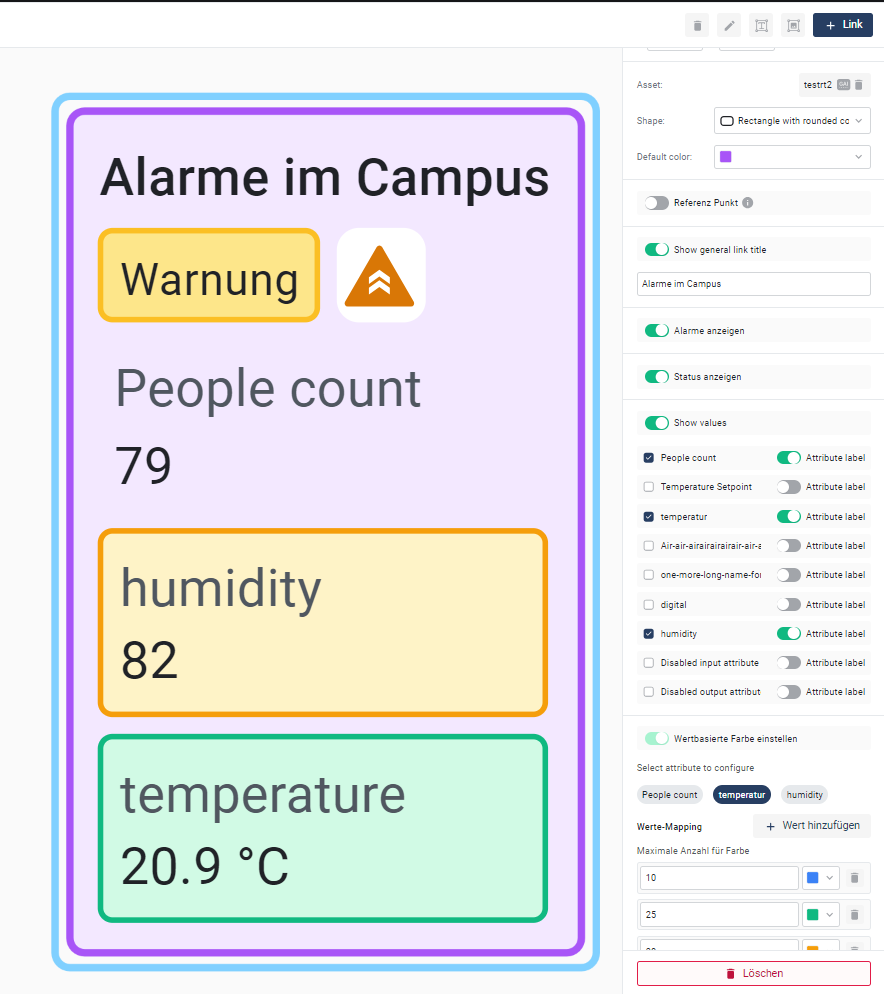
Links now have several options. The **shape** can be selected, a reference point defined, and a **title added** be added. In addition, the **values of all attributes** can be displayed in a link. The **color of the link can be adjusted depending on the value** of an attribute. Simply click the attribute highlighted in gray and add colors in the value mapping.

<figure><img src="https://content.gitbook.com/content/Nyvwhz1kEMXcHf4HLuZ8/blobs/DKltIWMz7vQEAx3pxZy3/image.png" alt=""><figcaption></figcaption></figure>

These new features offer you more flexibility and enable a more precise and attractive representation of your digital twin.

### **Asset characteristics**

It is now possible to add detailed information to an asset.

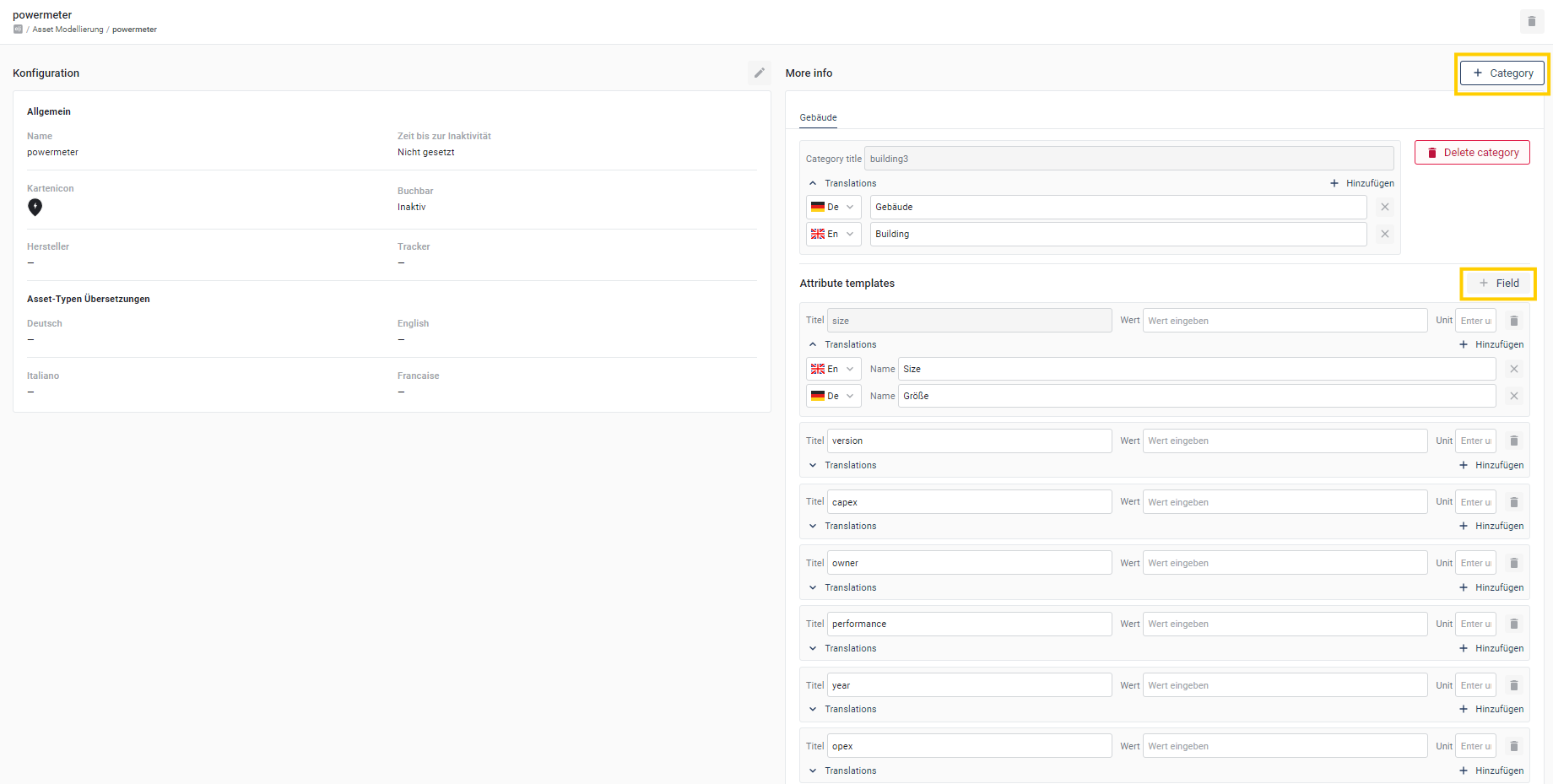
When editing an asset type, a new window is now available in which comprehensive information can be added for each asset. This information can be divided into different **categories** subdivided, and for each category you can **create multiple fields with name, value, and unit** be created. Of course, you can also **translations** be stored for the added information.

<figure><img src="https://content.gitbook.com/content/Nyvwhz1kEMXcHf4HLuZ8/blobs/E5kSZhzGzFXiUsLCtl0m/kategorien%201.png" alt=""><figcaption></figcaption></figure>

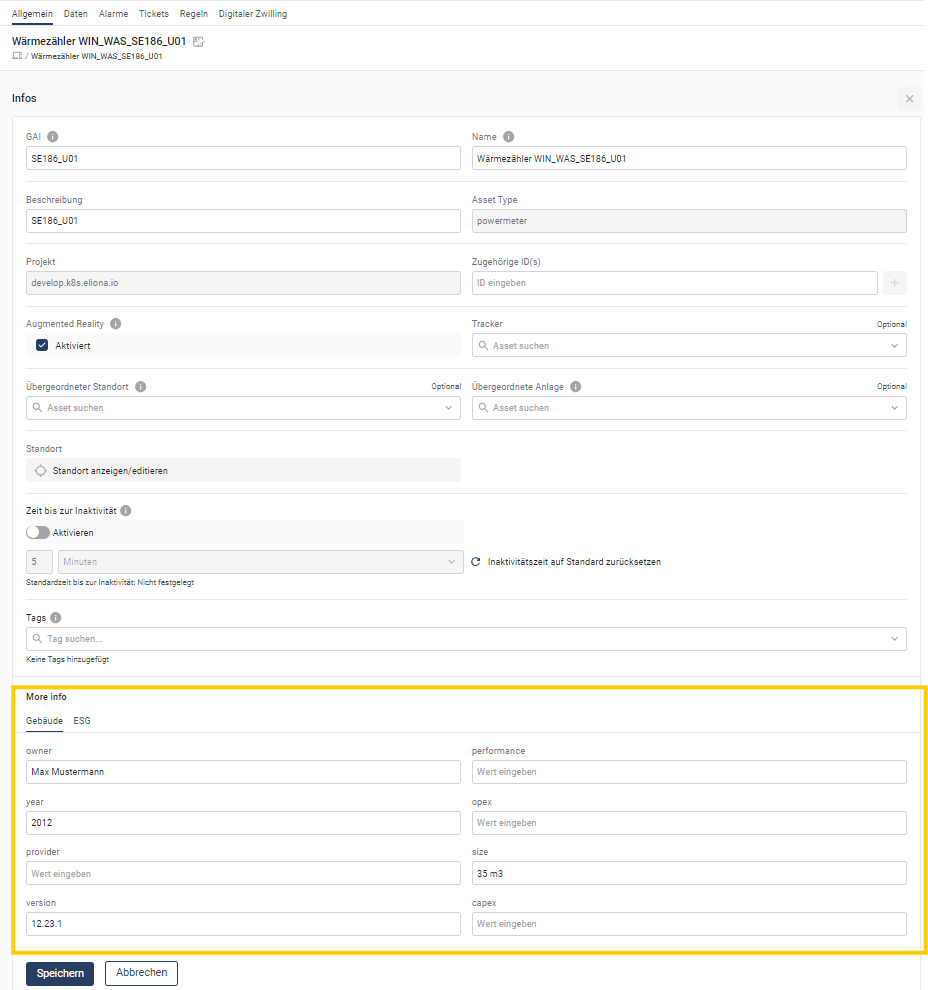
Now, for each asset in the asset details, **individual values** can be entered, enabling more precise and extensive documentation and contributing to better management and use.

<figure><img src="https://content.gitbook.com/content/Nyvwhz1kEMXcHf4HLuZ8/blobs/0YoLX0eJGroKt8qK65Qb/assetinfo.png" alt=""><figcaption></figcaption></figure>

These can then be expanded via "More Info".

<figure><img src="https://content.gitbook.com/content/Nyvwhz1kEMXcHf4HLuZ8/blobs/sUxrTsTAvwcFruIJjmI3/image.png" alt=""><figcaption></figcaption></figure>

### **Asset Rating**

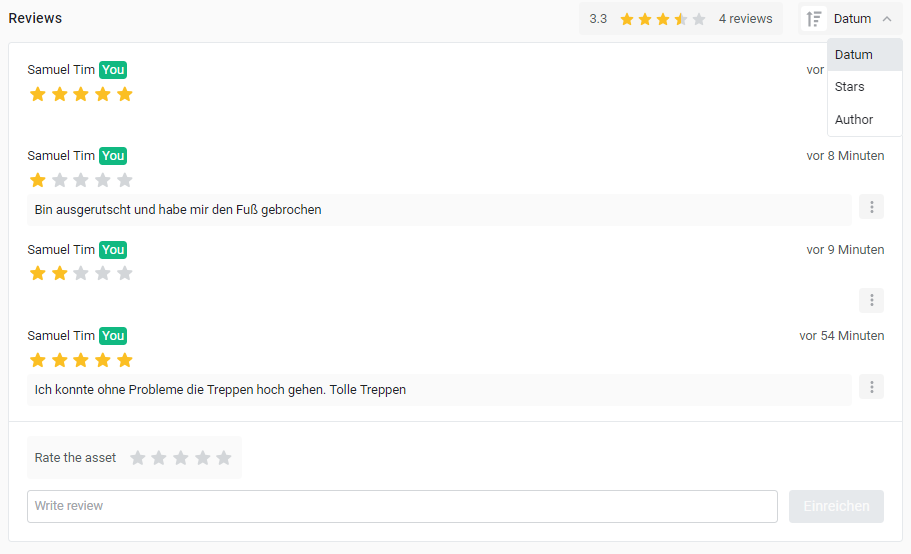
With the new **Asset rating** you can now rate your assets based on a **star rating system** This makes it easier to assess the quality and condition of your assets and provides a quick overview of their performance and usefulness over time.

<figure><img src="https://content.gitbook.com/content/Nyvwhz1kEMXcHf4HLuZ8/blobs/fgVF41JQX5nORTpfRbrd/image.png" alt=""><figcaption></figcaption></figure>

The asset rating is now available in the asset details. You can give your assets 1 to 5 stars and add a rating text. These ratings can be edited or deleted by their author at any time. The ratings can be sorted by date, author, or star rating to get a quick overview.

### Improved tickets with template and default user

Our ticket system has been expanded and now offers numerous new functions that simplify handling, speed it up, and at the same time provide more information.

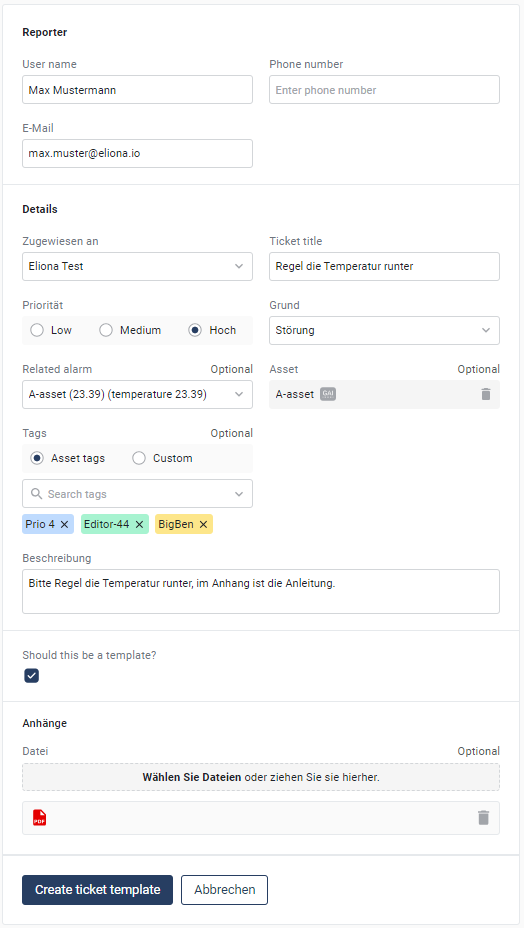
From now on, **a reporter is automatically** filled in for each ticket, which significantly speeds up the creation process. In addition, **three priority levels** are available, allowing better classification and urgency levels for tickets.

For improved clarity, **tags** can be added. In addition, there is the possibility to **mark tickets as templates** which makes creating recurring tickets easier.

<figure><img src="https://content.gitbook.com/content/Nyvwhz1kEMXcHf4HLuZ8/blobs/MJ4VOlAW9YG61PIocl9R/image.png" alt="" width="393"><figcaption></figcaption></figure>

The templates are visible when the filter **"Templates"** is enabled in the ticket overview. When clicking a template, a **pre-filled ticket**opens directly, which makes creating recurring tickets easier.

<figure><img src="https://content.gitbook.com/content/Nyvwhz1kEMXcHf4HLuZ8/blobs/GGkCymWfjjabr464T61k/image.png" alt=""><figcaption></figcaption></figure>

Another practical function is setting a **default recipient**. This can be configured in the ticket overview by clicking the **gear** This will automatically set this recipient when creating all tickets, enabling faster and more convenient ticket creation.

<figure><img src="https://content.gitbook.com/content/Nyvwhz1kEMXcHf4HLuZ8/blobs/3G1Gd1MS31UORt7wa6v1/Ticket.png" alt=""><figcaption></figcaption></figure>

## 20240507 - Changelog \[v13.0.0]

We are pleased to present the latest version of Eliona:

Eliona v13.0. This version brings a variety of significant updates and new features that will substantially improve and expand your user experience. From improved tracking functions to extensive wayfinding options to a new booking system, this version offers everything you need to take your facility management and smart building solutions to the next level. Read on to learn more about the exciting new features and improvements that Eliona v13.0 has in store for you.

### Full changelog

<details>

<summary>Changelog v13.0</summary>

\# Changelog

All notable changes to this project will be documented in this file.\
\##\[X.X.X] - TBD\
\
Dashboard/Smart view -> SBB widget ([SB-08710](https://app.asana.com/0/1200252355215223/1206904986524061/f))\[@sti]\
Dashboard/Smart view -> Alarm widget -> Detailed Alarm List ([SB-08721](https://app.asana.com/0/1200252355215223/1206055204586537/f))\[@sti]\
Asset Details Form -> Associated ID -> new input style for id\`s ([SB-08961](https://app.asana.com/0/1200252355215223/1207169605955829/f)) \[@sti]\
Sidebar -> Alarm Icon -> now showing different color depending on highest prio ([SB-08973](https://app.asana.com/0/1200252355215223/1206938387815576/f)) \[@sti]\
\
\
\##\[v13.0.0] - 16.05.24\
**### Added**\
Map -> Tracking feature with storey/room configurations, tracking widget and dynamic asset tree ([SB-08494](https://app.asana.com/0/1200252355215223/1206713482911294/f))\[@nl] \*\*\
Engineering -> Wayfinding -> Wayfinding editor, view and elements creates (SB-08989) \[@nl] \*\*\
Engineering -> Bulk Import -> Bulk import feature (SB-08990) \[@lw] \*\*\
Map/Storey -> Booking -> Booking feature with configurations and elements (SB-08991) \[@jp] \*\*\
User -> Notification Settings -> user specific notification settings (SB-08992) \[@lw] \*\*\
Connection > Added Modbus section ([SB-07300](https://app.asana.com/0/portfolio/1199554442331824/workload/1205755518393744)) \[@lwa] \*\*\
\- Dashboard -> Public (Global) dashboards -> feature with Public dashboards folder ([SB-08283](https://app.asana.com/0/1200252355215223/1206442272144245/f)) \[@jp] \*\*\
Settings -> Api keys -> added Api key expired Frontend info ([SB-08365](https://app.asana.com/0/portfolio/1199554442331824/workload/1205844913992583)) \[@rtu]\
Scripts -> added default function to python scripts \[@lwa]<br>

**### Changed**\
\
\- Audit trail, Script engine -> store sorting config in URL ([SB-08426](https://app.asana.com/0/1200252355215223/1206579113932464/f)) \[@nl]\
\- General -> Storey & Bim redirects -> unified across whole platform ([SB-08965](https://app.asana.com/0/portfolio/1199554442331824/workload/1207171019673790)) \[@rtu]\
\- Apps -> Updated visual representation for versions ([BR-2624](https://app.asana.com/0/1187198351569417/1206896340722163/f))\[@lwa]\
\- Engineering -> Tag Management -> Remove custom flag from tags ([SB-08693](https://app.asana.com/0/portfolio/1199554442331824/workload/1206832856885856)) \[@rtu]

\
**#### Fixed 🐞**\
\- Dashboard -> Trend Element -> fixed, guideline ([BR-2533](https://app.asana.com/0/portfolio/1199554442331824/workload/1206677739889403)) \[@rtu] \*\*\
\- Dashboard -> Custom widget -> table and trend element preview ([BR-2591](https://app.asana.com/0/1187198351569417/1206808231772682/f) [BR-2590](https://app.asana.com/0/1187198351569417/1206807625187469/f)) \[@nl]\
\- BIM details-> Sidebar -> fixed displaying "Tracker" list item ([BR-2587](https://app.asana.com/0/1187198351569417/1206795548002131/f))\[@nl]\
\- Connection -> Fixed redirect errors in the restful section ([BR-2593](https://app.asana.com/0/1187198351569417/1206808953568816/f))\[@lwa]\
\- Connection -> Fixed that not created connection would test status ([BR-2592](https://app.asana.com/0/1187198351569417/1206808716071331/f))\[@lwa]\
\- Asset -> Data - > show aggregation data for average on change mode ([BR-2597](https://app.asana.com/0/portfolio/1199554442331824/workload/1206830213335903)) \[@rtu]\
\- General -> Asset attribute select -> show seperate options for average on change and cusum modes ([BR-2602](https://app.asana.com/0/1187198351569417/1206840261685318)) \[@rtu]\
\- Reporter -> Text Element -> pipelines requirement options now check actual pipeline configuration not asset type config ([BR-2605](https://app.asana.com/0/1187198351569417/1206842982206762)) \[@rtu]\
\- Seetings -> Apps -> Remove required fields from adding niagara controller dialog ([BR-2580](https://app.asana.com/0/1187198351569417/1206776141023041)) \[@rtu]\
\- General -> Asset/Attribute Select -> Remove no existing min & max options from sum& cusum aggregation selects ([BR-2605](https://app.asana.com/0/portfolio/1199554442331824/workload/1206842982206762)) \[@rtu]\
\- Engineering -> Asset Editor -> fix bulk asset import ([BR-2619](https://app.asana.com/0/portfolio/1199554442331824/workload/1206888522576446)) \[@rtu]\
\- General -> Asset Status -> show unmoniroted asset if allowed inctivity is disabled ([BR-2440](https://app.asana.com/0/portfolio/1199554442331824/workload/1206446221783781)) \[@rtu]\
\- General -> Experts -> Mark tags where user doesn't have access to for Expert users ([SB-08367](https://app.asana.com/0/portfolio/1199554442331824/workload/1206580909208644)) \[@rtu]\
\- Smart view -> Input Widget -> transparent background buttons ([BR-2636](https://app.asana.com/0/1187198351569417/1206430901344036/f)) \[@sti]\
\- Digital twin -> Link Asset -> All Assets are linkable now ([BR-2635](https://app.asana.com/0/1187198351569417/1206917468535292/f))\[@sti]\
\- Settings -> Apps -> InQuery-Parameters aren't submitted ([BR-2643](https://app.asana.com/0/portfolio/1199554442331824/workload/1206977527219147)) \[@rtu]\
-Dashboard -> Storey widget -> Tooltip fixed ([BR-2532](https://app.asana.com/0/1187198351569417/1206676561646395/f))\[@sti]\
-Dashboard -> Storey widget -> preview image -> fixed image location([BR-2499](https://app.asana.com/0/1187198351569417/1206611750829297/f))\[@sti]\
-Dashboard->Heatmap widget -> preview storey -> now showing storey instead of map ([BR-2499](https://app.asana.com/0/1187198351569417/1206611750829297/f))\[@sti]\
-Settings -> Apps -> apps grid now fit when having different window sizes ([BR-2650](https://app.asana.com/0/1187198351569417/1206999597587058/f))\[@sti]\
\- Login -> Fixed that version wasn't always up to date ([BR-2598](https://app.asana.com/0/1187198351569417/1206830754547357/f))\[@lwa]\
\- Assets -> Details -> Atributes -> fixed changing attribute values and displaying them right ([BR-2632](https://app.asana.com/0/1187198351569417/1206921886605937/f)) \[@sti]\
-Assets -> Details -> Atributes -> calculator -> calculator now showing default from template ([BR-2628](https://app.asana.com/0/1187198351569417/1206906001111932/f)) \[@sti]\
-Alarms -> asset type definition -> disabled changing subtype ([BR-2294)](https://app.asana.com/0/1187198351569417/1206064779554772/f) \[@sti]\
-Map -> Markers -> circle Markers are now on top of building Markers ([BR-2670](https://app.asana.com/0/1187198351569417/1207054890235484/f)) \[@sti]\
-Analytics -> Settings -> enhanve legend templating variables with aggregation props ([BR-2677](https://app.asana.com/0/portfolio/1199554442331824/workload/1207086400445912)) \[@rtu]\
\- Smart view -> fixed property that caused wrong color ([BR-2682](https://app.asana.com/0/1187198351569417/1207088122108649/f)) \[@lwa]\
\- api keys -> fixed wrong date format ([BR-2680](https://app.asana.com/0/1187198351569417/1207087102839792/f)) \[@lwa]\
-Smart View -> dynamic text -> font now correctly displayed ([BR-2684](https://app.asana.com/0/1187198351569417/1207110797258505/f)) \[@sti]\
-Smart View -> comfort -> text stays inside the box for bigger font sizes ([BR-2684](https://app.asana.com/0/1187198351569417/1207110797258505/f)) \[@sti]\
-Smart View -> image-> preview of image gets deleted when image gets deleted ([BR-2684](https://app.asana.com/0/1187198351569417/1207110797258505/f)) \[@sti]\
\- Connection -> Mqtt connections now can be disabled on the detailed page ([BR-2688](https://app.asana.com/0/1187198351569417/1207111890387378/f)) \[@lwa]\
\- Appstore -> updated ui so its more intuitive to see if a new version is available ([BR-2624](https://app.asana.com/0/1187198351569417/1206896340722163/f)) \[@lwa]\
-Smart View -> Input -> Switch -> Switch now showing On/Off above the switch ([BR-2703](https://app.asana.com/0/1187198351569417/1207156693733571/f)) \[@sti]\
-Map -> Storey -> Poi can now be placed on polygon ([BR-2709](https://app.asana.com/0/1187198351569417/1207160070505599/f)) \[@sti]\
-Assets -> Details -> Atributes -> Filter can be saved/deleted now and it shows the saved configuration [(BR-2631)](https://app.asana.com/0/1187198351569417/1206921718715250/f) \[@sti]\
-Assets -> Details -> Atributes -> Units can be changed without error [(BR-2663](https://app.asana.com/0/1187198351569417/1207035232245285/f)) \[@sti]\
-Engineering -> Asset Moddeling -> Attribute Templates -> Virtual activated saving only possible when formular is filled in ([BR-2673](https://app.asana.com/0/1187198351569417/1207064731067058/f)) \[@sti]\
-Smartview -> Smartaview inputs are disabled for smartview user ([BR-2712](https://app.asana.com/0/portfolio/1199554442331824/workload/1207178714585122)) \[@rtu]\
-Login page -> Remember me checkbox is removed ([BR-2138](https://app.asana.com/0/1200252355215223/1206621400368363/f)) \[@jp]\
-Smartview -> Tickets changable text styles/Trend underline now possible/Sankey bold now working/general form inconsistencies fixed ([BR-2724](https://app.asana.com/0/1187198351569417/1207220960917233/f)) \[@sti]\
-Tickets -> Comments -> when adding a comment it instantly shows your name above the comment now. ([BR-2711](https://app.asana.com/0/1187198351569417/1207178258646554/f)) \[@sti]\
-Engineering -> My Profile -> fix not showing user default location ([BR-2755](https://dev.azure.com/eliona/core/_git/frontend/pullrequest/6452)) \[@rtu]\
-Settings -> Audit trail -> Remove archived users from performed by filter ([BR-2756](https://dev.azure.com/eliona/core/_git/frontend/pullrequest/6453)) \[@rtu]

<br>

</details>

### Tracking

We are pleased to introduce some exciting news in the area of tracking. With the latest version, it is now possible to use the **Localino app, trackers and anchors** to create them and display their locations as well as **movements live** on the floors. This functionality is supported by a new tracking widget that even makes it possible to divide floors into individual rooms.

#### Asset modeling

In asset modeling, the new item **"Tracker"** has been added. When enabled, the created assets are registered as **trackers in the system**. This makes it possible to add additional, arbitrary attributes to a tracker to make your data even more precise and comprehensive.

<figure><img src="https://content.gitbook.com/content/Nyvwhz1kEMXcHf4HLuZ8/blobs/2hrn77xAXIV1jctH1ovO/Screenshot%202024-05-13%20142926.png" alt=""><figcaption></figcaption></figure>

#### Configure asset info

You now have the option to select a **tracker**. If a tracker is selected, this asset is **marked with a blue dot** and can no longer be moved in the geographical asset structure. From now on, the **real location** of the asset determines where it can be found in the geographical structure. This allows you to see where the tag is located simply by looking at the asset structure.

![](https://content.gitbook.com/content/Nyvwhz1kEMXcHf4HLuZ8/blobs/BwomNFXKRQcOJhioKEYu/image.png) ![](https://content.gitbook.com/content/Nyvwhz1kEMXcHf4HLuZ8/blobs/sY6Nu6FrWU0rGF5L8Wy1/image.png)

#### Configure floor

In the floor, there is now the new option "Configure floor". Here, the **anchors selected** and the height of the anchors can be adjusted so that they match the real conditions.![](https://content.gitbook.com/content/Nyvwhz1kEMXcHf4HLuZ8/blobs/GG4ZTkBoU7XSqe5UndlO/image.png)

After clicking on **"Next"** a rectangle with the relative positions of the anchors is displayed. This rectangle can be freely resized and rotated so that the positions of the anchors in the **real world** match the positions on the **digital floor**.

{% embed url="<https://drive.google.com/file/d/15FbR4qRRvTXsOvzm_sT2xdjzFi35hoxA/view?usp=sharing>" %}

#### Set up rooms

If needed, rooms can now also be set up. This makes it possible to precisely record in which room the tag is located. This information is reflected both in the asset structure and in the tracking widget. To define a room, draw a polygon in the floor as usual and activate the option **"Set polygon as room boundaries"**. The room is now set up. ![](https://content.gitbook.com/content/Nyvwhz1kEMXcHf4HLuZ8/blobs/voR2Qm6Ux8nrEGngdbKd/image.png)

#### Tracking widget

The new tracking configurations of course also include a tracking widget that is available for both **Dashboards** as well as for the **Smart View** is available. Select a floor, and all trackers on that floor will be displayed. At the top of the widget there is a search bar that you can use to search for trackers specifically. When a tracker is selected, **the widget follows this**. If the tracker changes room or floor, this is immediately visible in the widget.

<figure><img src="https://content.gitbook.com/content/Nyvwhz1kEMXcHf4HLuZ8/blobs/J328qxNGojsXfBgflyCm/image.png" alt=""><figcaption></figcaption></figure>

### Wayfinding

One of the major new additions is wayfinding. Here it is possible, **routes across floors** to configure and thus guide customers and employees along the **fastest route** to their destination without getting lost and without accompaniment. To map your facility, there is the new "Wayfinding" option under "Engineering".

#### Add building

To create a building with floors, click the "+ Building" button. You can then assign names to your building and its floors and select the corresponding assets.

![](https://content.gitbook.com/content/Nyvwhz1kEMXcHf4HLuZ8/blobs/oKD7iC3jOiRYRMEa8lou/image.png)

<figure><img src="https://content.gitbook.com/content/Nyvwhz1kEMXcHf4HLuZ8/blobs/f6tNr7hJgqh63nSFbqEQ/image.png" alt=""><figcaption></figcaption></figure>

After saving, the individual floors can be configured. Simply expand the building and click the arrow for the desired floor.

<figure><img src="https://content.gitbook.com/content/Nyvwhz1kEMXcHf4HLuZ8/blobs/sV6VAZwPhI95BryFO1iZ/Screenshot%202024-05-13%20111948.png" alt=""><figcaption></figcaption></figure>

#### Configure floor

To equip the floor with routes now, any image of the floor can be uploaded. Now you can **add starting/ending locations, paths, elevators and stairs via drag & drop** be added. To link these, small **blue dots** appear around the selected points. If you drag them and release on another point or line, they will be linked.

{% embed url="<https://drive.google.com/file/d/1vqnOYgZTRqoe2y2biGEbFNEoWzPLbnbm/view?usp=sharing>" %}

#### Elevators and stairs

To connect the floors with each other, stairs and elevators can be placed. These can be assigned to a group. This means elevators and stairs in a group **are linked across floors,** and the fastest route via an elevator to another floor can be found.

![](https://content.gitbook.com/content/Nyvwhz1kEMXcHf4HLuZ8/blobs/ltEIkH58XVmfhSKqqUbt/image.png)

#### QR code

To use the configured wayfinding building, a QR code is generated for each starting point, which can simply be downloaded by selecting the point and clicking the QR code icon.

<figure><img src="https://content.gitbook.com/content/Nyvwhz1kEMXcHf4HLuZ8/blobs/mxHZna3EIpdpVhZHuGJ7/Screenshot%202024-05-13%20132416.png" alt=""><figcaption></figcaption></figure>

#### Wayfinding view

When the QR code is scanned, you land in the Wayfinding view, where the starting point is the scanned asset. Here you can enter your destination in a search bar and then start on the fastest route to the destination.

In the **Smart View** there is of course also a wayfinding component. Here the starting asset can be selected and, if desired, the possible destinations can also be defined.

{% embed url="<https://drive.google.com/file/d/1_K-p8PX2b-VoW4_bw62yK_J-xnERrnGw/view?usp=sharing>" %}

### **Booking**

A new booking system is now available and significantly improves facility management and scheduling. It is now possible to create bookable assets via our "Booking" app and book them in the new **"Booking widget"** to book.

#### Modeling

In asset modeling, it is now possible to activate the **"Bookable"**. This automatically creates two new attributes that are necessary for the booking function.

<div data-full-width="false"><figure><img src="https://content.gitbook.com/content/Nyvwhz1kEMXcHf4HLuZ8/blobs/rtilYCZnrYXYimLl7l0M/Screenshot%202024-05-10%20090058.jpg" alt=""><figcaption></figcaption></figure></div>

#### Make floor bookable

With the now created bookable assets, it is now possible to activate the option **"Asset can be booked"** to activate. This means the asset can now be booked in the Booking widget.

<figure><img src="https://content.gitbook.com/content/Nyvwhz1kEMXcHf4HLuZ8/blobs/LAmZzUMjafAmzO73Wo8m/Screenshot%202024-05-10%20092140.png" alt=""><figcaption></figcaption></figure>

#### **Booking widget**

Now it is possible in the Booking widget via **"Quick Booking"** or **"Advanced Booking"** to book the desired time slots very precisely. Of course, this feature is also available in Smart Views.

{% embed url="<https://drive.google.com/file/d/1h_L7pb6U6LtHbQJIT5rQZseu4L6D1uSn/view?usp=sharing>" %}

### **Bulk import**

It is now possible to import all desired data at once using a file. Assets, rules, tags, projects, roles and types can be imported.

#### Importing

For bulk import, we have added a new option in "Engineering". Here, the JSON file with the data can be uploaded very easily.

<figure><img src="https://content.gitbook.com/content/Nyvwhz1kEMXcHf4HLuZ8/blobs/OPu9G2U5q7yTGlNfb05o/Screenshot%202024-05-10%20121247.png" alt=""><figcaption></figcaption></figure>

If **errors** are in the file, they will of course be displayed and can be **corrected** in the app.

<figure><img src="https://content.gitbook.com/content/Nyvwhz1kEMXcHf4HLuZ8/blobs/d0eWbVkSaCUSOkeC5EsW/Screenshot%202024-05-10%20121545.png" alt=""><figcaption></figcaption></figure>

The data is then clearly displayed in a table. With **"Overwrite already imported data"** already existing data can be overwritten and with **"Highlight duplicated assets"** duplicate data are highlighted. With a **double click** you can now edit individual data points as desired. After you have checked the boxes to decide which data should be imported, click **"Test Import"**&#x74;o receive feedback on whether the import will be successful. Finally, simply click "Import" and your data will be imported.

{% embed url="<https://drive.google.com/file/d/1VP0Da4daofHHv0aOBQBrzHk7X1tHXFkj/view?usp=sharing>" %}

### **Public Dashboards**

The long-awaited Public Dashboards are here. Now you can make your dashboards permanently visible to all participants in the project, eliminating the need for constant copying.

When creating a dashboard, you can now choose between **"User"** and **"Project"** be distinguished. If you select "User", you are dealing with the usual dashboards. If you select "Project", this dashboard is visible to everyone in the project. Public dashboards are marked with a **blue dot** marked. Only you can edit and delete your created "Public Dashboard".![](https://content.gitbook.com/content/Nyvwhz1kEMXcHf4HLuZ8/blobs/pZ0tHPkqjkemxKk61l32/image.png)

### tags

With the expert role, it is possible to add or remove all tags from an asset. For better clarity, tags to which the expert does not have access are now marked with a **red dot** Moreover, the expert is always warned when he removes all tags to which he has rights and thereby loses the rights to the asset.

<figure><img src="https://content.gitbook.com/content/Nyvwhz1kEMXcHf4HLuZ8/blobs/x5BrmedVkr8i0bQnBAGq/image.png" alt=""><figcaption></figcaption></figure>

### Analytics

In the settings of an analytics, there is now a new field **"Series label format"**. Variables for aggregated values can be used in this field to customize the displayed value. {{unit}}, {{attribute}}, {{aggregatedDataField}}, {{aggregatedDataRaster}} and {{aggregatedDataType}} are available variables to customize the label as desired.

<figure><img src="https://content.gitbook.com/content/Nyvwhz1kEMXcHf4HLuZ8/blobs/ZovFMspjv6HoruAQLSDY/Screenshot%202024-05-13%20091047.png" alt=""><figcaption></figcaption></figure>

### Digital twin

For the digital twin, it was previously only possible to link assets that were sub-assets. With the new version, it is now possible to link all **assets in a digital twin**.

### floor

It is now possible without any problems to **place points on polygons** .

### Login

We fixed a bug that caused the displayed version not always to be the latest. Now the **correct version** is always displayed.

In addition, because it was more of a burden, the **"Remember me" box** has been removed. We will now remember you by default when you log in.

### Calculator

The calculator in the attribute form of an asset now takes over and displays the **default calculation** entered in "Asset Modeling".

In addition, there are no more problems with calculations with **more than 7 variables**. All your calculations now work with any number of variables.

### Data

If the aggregation of an attribute is set to **"average on change"** , this data can now be seen in an asset's data. All you need to do is click the **small clock** .<img src="https://content.gitbook.com/content/Nyvwhz1kEMXcHf4HLuZ8/blobs/cKwMSC3s2sc8vSfByjCK/Screenshot%202024-05-10%20165218.png" alt="" data-size="original">

### **Modbus Connection**

Modbus is a tried-and-tested communication protocol. You can now connect your Modbus devices to Eliona under **Connection -> Modbus** .

### **API keys with expiration information**

For better management, API keys now show the **expiration date** and a display when a key has expired.


<figure><img src="https://content.gitbook.com/content/Nyvwhz1kEMXcHf4HLuZ8/blobs/UlhcFJ4i81wlSogqTXxL/image.png" alt=""><figcaption></figcaption></figure>

### Notification settings

There is now the possibility to personalize notifications. In your **profile under "Notification settings"** you can select in great detail which notifications you want to receive.

<figure><img src="https://content.gitbook.com/content/Nyvwhz1kEMXcHf4HLuZ8/blobs/0S6klXJkLjN1kOETCSxl/Screenshot%202024-05-14%20095523.png" alt=""><figcaption></figcaption></figure>

***

## 20240304 - Changelog \[v.12.1]

We are pleased to present the latest version of Eliona: Eliona v12.1.

In this release, we fixed many smaller bugs. We present the most important changes to you here in detail. You can find a complete list of all changes further below.

### [↗ Widget "Floor"](/collection/english-v14/documentation/widgets/vordefinierte-widgets/stockwerk.md):

We fixed a bug that caused the "Zoom in / Zoom out" buttons to cover the "More options" menu item.

### [↗ Digital Twin](/collection/english-v14/documentation/digitaler-zwilling.md):

We fixed a bug that could prevent images from being uploaded to the Digital Twin

### [↗ Slider](/collection/english-v14/documentation/smart-views/slider-gruppen.md):

We fixed a bug that could cause trends not to be displayed in the slider.

### [↗ Map](/collection/english-v14/documentation/karte-und-stockwerk/karte.md)

We fixed a bug that caused no alarm indicators to be displayed over the map icons in the sidebar of the "Map" menu when an alarm was present.

### [↗ Alarms](/collection/english-v14/documentation/alarme-regeln-und-eskalationen/alarme.md)

We fixed a bug that caused the "Heatmap" field in the alarm statistics to be displayed incorrectly.

### [↗ Roles](/collection/english-v14/documentation/rollen.md)

The predefined role "Leicom" has been removed.

### [↗ Script Engine](/collection/english-v14/documentation/engineering/skript-engine.md)

We closed a security vulnerability related to the script engine

### [↗ Escalations](/collection/english-v14/documentation/alarme-regeln-und-eskalationen/eskalationen.md)

If alarms were to be escalated by email and a custom template was used for the email, the email could fail to be delivered if the template used was faulty.

This behavior has been changed. From now on, such emails will also be sent if a faulty template is present. In this case, the default template will be used instead.

### Full changelog

<details>

<summary>Changelog v12.1</summary>

**Database**\
\## \[v12.1.0] - 2024-03-04

\- hardcoded role "leicom" no longer exists \[@al]\
\- privileges divided into owner and user of the database objects \[@al]\
\- heap tuples created together with asset \[@les]\
\- fix for replication and publication of tables \[@al]

\## \[v12.0.2] - 2024-02-09 (intermediate for v12.1.0)

\- fixed security issues with customer scripts (app role) \[@al]\
\- fixed policy for assets that allows all projects to which the user is assigned \[@al]\
\- better performance for heap notify trigger \[@al]\
\- the pipeline trigger is only activated if "his" flag is set \[@al]

\## \[v12.0.1] - 2024-02-28

\- hotfix for "api" privilege to audit.heap \[@al]\
\- trigger for tags changed to increase performance \[@al]

**Frontend**\
\## \[v12.0.1] - 2024-03-04

\### Changed\
opcua -> improved section, added namespaces, better connection status feedback and improved variable naming (SB-08156) \[@lwa]

\#### **Fixed** ![:marienkäfer\_1:](https://a.slack-edge.com/production-standard-emoji-assets/14.0/apple-medium/1f41e.png)

\- Digital Twin -> fixed, image uploading BR-2452 \[@nl] \*\*\
\- Digital Twin -> fixed, initial placement of the image on small screens BR-2524 \[@nl]\
\- Connection/Engineering/Settings -> fixed, opening sections in new tabs BR-2453\[@nl]\
\- Alarm Notifications -> fixed, notifications remain after logout BR-2437\[@nl]\
\- Widget details -> Value tiles -> fixed attribute name displayed in the preview BR-2445 \[@nl]\
\- Slider -> fixed showing asset data in slider views BR-2459 \[@rtu] \*\*\
\- Apps -> fixed that payload would only contain name BR-2356 \[@lw]\
\- Filters -> fixed that filter info wouldn't get sent to the server \[@lw]\
\- Apps -> fixed that not initialized apps but installed apps couldn't be uninstalled (BR-2356) \[@lwa]\
\- Widgets -> Input widget -> Fixed: attribute value changing doesn't work when one of the attributes in the widget configuration is removed (BR-2458) \[@nl]\
\- Map -> Missing alarm icons in sidebar / assets tree (BR-2461) \[@nl] \*\*\
\- Escalation -> Can't add "Slack" target (BR-2465) \[@nl]\
\- Dashboard -> Value tiles -> fix value tiles description (BR-2467) \[@rtu]\
\- Dashboard/Smartview -> Calendar -> fix underlapped tooltip (BR-2462) \[@rtu]\
\- Password reset -> Fixed (BR-2468)\[@nl]\
\- Smartview -> fix chart range for aggregated bar values (BR-2489) \[@rtu]\
\- Engineering -> Notification Providers -> Email -> fix initial auth configuration (BR-2471) \[@rtu]\
\- Bookmarks -> Can't select a user to add a bookmark to them \[BR-2500]\(@nl)\
\- Dashboard -> Storey widget -> Map controls cover widget context menu button (BR-2497)\[@nl] \*\
\- Map -> Storey -> Updates the attribute values of selected assets only (BR-2498)\[@nl]\
\- Dashboards -> Breadcrumbs -> fix folder navigation to dashboard list (BR-2503) \[@rtu]\
\- My Profile -> Password reset -> fix dialog behaviour on closing the dialog (BR-2509) \[@rtu]\
\- Alarms -> Alarm Statistics -> Use selected date range for the heatmap (BR-2506) \[@rtu] \*\
\- Rules -> Rule Details -> fix cancel button behaviour to navigate back in history (BR-2507) \[@rtu]\
\- Asset -> exclude subtype output from validity check and time to inactivity (BR-2496) \[@rtu]\
\- Asset -> Details add link from asset type to asset modeling (BR-2493) \[@rtu]\
\- Tag Management -> Users -> adding tags to users depends on project tag access or expert mode (BR-2516) \[@rtu]\
\- General -> Datapoint select -> fix select options for avg-on-change ag options \[BR-2531] (@rtu)

**Escalation**\
\## \[v12.0.2] - 2024-02-26

\- hotfix for checking the HTML validity in the mail template \[@al]

\## \[v12.0.1] - 2024-02-06

\- hotfix for handling the default HTML template \[@al]

**Jobsync**\
\## \[v12.0.1] - 2024-02-09

\- Fixed a deadlock occurring during kafka broker failure

**URL bridge**\
\## \[v12.0.1] - 2024-02-13

\- Fixed bug causing jobs to fail when proxy is not defined

**Webhook**\
\## \[v12.0.1] - 2024-02-13

\- Modified auth sequence

**ADFS**\
\## \[v12.0.3] - 2023-02-22

\- customizable error page in case of failed login \[@csa]\
\- database code without hardcoded "leicom" user \[@al]

\## \[v12.0.1] - 2023-02-12- enable attribute mapping for permissions and language \[@csa]\
\- restart if config changes \[@csa]

**Equinix**\
\## \[v11.1.1] - 2023-12-01

\### **Added** ![:rakete:](https://a.slack-edge.com/production-standard-emoji-assets/14.0/apple-medium/1f680.png)\
\- Map all Equinix status strings to numbers \[@csa]\
\- Add attribute mapping for numbers \[@csa]\
\- Importer over APIv2 instead of DB connection \[@csa]### Fixed\
\- IBX Assets API endpoint \[@csa]

**Niagara**\
V12.0.1\
\[fix] access config update

**Webpusher**\
\## \[v12.0.1] - 2024-05-02

\- Schema creation enforced \[@les]\
\- Fixed user\_id extraction from events \[@les]

**Xovis**\
\## \[v12.1.0] - 2023-02-12\
\- remove user leicom from db init \[@al]

\## \[v12.0.1] - 2023-02-12\
\- upsert data over APIv2 \[@csa]

</details>

## 20240130 - Changelog \[v12.0.0]

We are pleased to present the latest version of Eliona.

Eliona v12.0.0 is a big step forward and introduces important new features, such as the App Store. But many small improvements also ensure that your work with Eliona becomes as intuitive as never before.

The first thing you will notice in this version is the new design: We have modernized the look and feel of Eliona and made it even more user-friendly.

But that is by no means all. Many new features are waiting for you to try them out! In this entry, we present the most important changes in detail. You can find a complete list of all changes at the end of this entry.

### [↗ Connections](/collection/english-v14/connectivity-as-a-service/gerate-mit-abb-buildingpro-verbinden.md): MQTT Publishing

With Eliona v12.0.0, it is now possible to publish MQTT messages. This integrates Eliona even more deeply into your infrastructure and makes it even more flexible to use.

### App Store

With the Eliona Marketplace, we offer a curated range of dozens of apps. Apps are tailored specifically to individual use cases and expert systems and independently integrate incoming data from third-party sources into Eliona.

Apps are far more than ordinary integrations: An installed app automatically creates all required assets and contains individual dashboards. These enable users to interact smoothly with external systems in an overarching application.

Apps make Eliona an open, modular platform that bundles a wide variety of complex expert systems in a single, familiar environment with optimized usability and well-thought-out application concepts.

So that the right app can be found for truly every conceivable scenario, Eliona makes all necessary information openly and free of charge available via GitHub. With little effort, you can create your own apps and adapt Eliona to the specific requirements of your infrastructure.

[↗ Learn more about apps](/collection/english-v14/apps/apps.md)

### [↗ Tags](/collection/english-v14/documentation/tags.md): Categories

The tags functionality has been significantly expanded. From now on, it is possible to organize tags into categories. Categories can be marked as favorites and arranged in sequences. These categories can be used to control which tags appear in the alarm overview.

↗ Learn more about tags

### [↗ Alarms](/collection/english-v14/documentation/alarme-regeln-und-eskalationen/alarme.md): Redesigned interface

The alarm overview has been revised and the following changes have been made:

#### Visual notifications

When an alarm is triggered, visual notifications are now displayed in addition to the notification sound. This notification remains on the screen until it is dismissed. This introduces additional redundancy, because existing alarms are immediately visible even if the notification sound was missed.

#### New columns "GAI" and "Value"

From now on, the GAI of the affected asset and the value can be seen in the alarm overview.

#### Columns can be arranged, shown and hidden individually

{% embed url="<https://drive.google.com/file/d/1jYzURlF-enwVfXIBqCrFkfQvu2FGVyT0/view?usp=share_link>" %}

Using the "Columns" button, the columns in the alarm overview can now be arranged as desired. Columns can also be shown and hidden.

#### Column "Message"

{% embed url="<https://drive.google.com/file/d/1x6tp4RQvftg1JoXyUJecZMB3ZZ_nS9B3/view?usp=share_link>" %}

The "Message" column now displays more content. The content of this column is not truncated. If there is more content than can be displayed, the message can be scrolled.

#### Column "Tags"

In the alarm overview, only tags that are in categories will now be displayed. The order in which the tags are displayed depends on their position in the sequence.

You can still see all tags if you activate the "Detailed view".

### [↗ Navigation](/collection/english-v14/preface/bedienelemente.md): Various changes

Some improvements have been made to navigation in Eliona:

#### Breadcrumbs

A "breadcrumb" element now appears in the context bar. This element allows you to immediately see your exact position in Eliona and quickly navigate to higher-level menus.

#### Filters are retained when changing pages

{% embed url="<https://drive.google.com/file/d/1yAFSk4MOxd2xFnRT4yRaJfYr5Ua4dmRT/view?usp=sharing>" %}

If you search a list, e.g. the assets overview, using filters, your set filters will now be retained when you select an entry and then go back to the overview.

#### The Eliona internal "Back" button has been removed

In order for the above-mentioned retention of filters to work, the browser's "Back" button must be used. Therefore, we have removed the Eliona internal "Back" button.

#### Mute is now displayed

<div data-full-width="true"><figure><img src="https://content.gitbook.com/content/Nyvwhz1kEMXcHf4HLuZ8/blobs/R4ehamsHtEky6E5rQspM/Docs_Benachrichtigung%20-%20Stummschaltung.png" alt=""><figcaption></figcaption></figure></div>

If you mute notifications in Eliona, this is now shown in the corresponding icon.

### [↗ Rules](/collection/english-v14/documentation/alarme-regeln-und-eskalationen/regeln.md): Asset Validity

We have added a new type of rule: *Asset Validity*. With this type of rule, you can be notified when the status of an asset changes.

[↗ Learn more about the asset status](/collection/english-v14/documentation/assets/asset-status-aktive-inaktive-nicht-uberwachte-assets.md)

### [↗ Roles](/collection/english-v14/documentation/rollen.md): Users in other lists

We have created a new option in the project roles: *See users in other lists*. Previously, users who did not have access to the "Users" option in your system role could not see user names in various places in Eliona, e.g. in tickets. With this option, users can now see the names of other users even if they do not have access to the "Users" menu.

### Calculator: values from other assets

From now on, values from another asset can be included in the calculator.

### Fixed bugs

#### Automatic logout on dynamic pages

Previously, users received no new data on dynamic pages, e.g. the alarm overview, after 8 hours. This was not directly apparent to users because they were not logged out and could therefore lead to misunderstandings.

The behavior has been changed: users are now automatically logged out after 10 hours.

#### Inconsistencies in the licenses

A bug that caused inconsistencies in the display of license costs has been fixed.

#### Connections: Crashes with MQTT, OPC UA and Kafka

A bug has been fixed that could cause Eliona to crash under certain conditions when the connection methods "MQTT", "OPC UA" and "Kafka" were called.

#### Widgets: Incorrect display in "Trend with bars"

The "Trend with bars" widget could display incorrect content under certain conditions. This bug has been fixed.

#### Widgets: Automatic update in the "iFrame" widget disabled

The "iFrame" widget refreshed every 5 minutes by default. Changes made in this widget were lost after these 5 minutes. This behavior has been changed, automatic refresh is now disabled.

#### Assets: Incorrect display of images

If images were uploaded via macOS or iOS and assigned to assets, it could happen that these images were displayed misaligned. This bug has been fixed.

## 20240112 – Changelog \[v11.1.8]

### \[v11.1.8]

* fixed notification issues

### \[v11.1.7]

* fixed ACL issues
* hotfix kafka partinioner, alarm prios

### \[v11.1.6]

* added filter to calculator (pre-release)
* hotfix delete listener

### \[v11.1.5]

* hotfix for valid flag
* hotfix alarm rules insertion

### \[v11.1.4]

* fixed privileges for schema "public"
* fixed upsert\_heap\_direct() for calculator
* Dashboard -> Widget -> Value variant Tiles -> show configured element descriptions
* hotfix output subtype

## 20231130 – Changelog \[v11.1.3]

We are pleased to present eliona v11.1.3 to you. With this hotfix, we have made Eliona a little better again and eliminated various bugs.

We would like to present the most important changes in detail here.

> You can find the full changelog at the end of this post.

### We have fixed the following bugs:

* It could crash if an asset attribute was selected in the calculator for which no translation existed. We have fixed this bug.
* If an asset attribute was selected in the calculator for which no translation existed, the attribute class was displayed instead of the original attribute name (without translation). We have fixed this bug. From now on, the original, untranslated attribute name is displayed in such cases.
* If asset attributes were displayed in a sidebar for which no translation existed, the attribute class was displayed instead of the original attribute name (without translation). We have fixed this bug. From now on, the original, untranslated attribute name is displayed in such cases.
* We have ensured that bar charts in widgets are displayed correctly again.

### We have introduced the following new features:

* Data retrieved via apiv2 can now be used in the calculator.

### Complete changelog \[English]

<details>

<summary>Changelog v11.1.3</summary>

### \[v11.1.3] - 2023-11-27

#### Fixed 🐞

* Asset -> Details -> Prevent attribute calculator crash and show attribute name as fallback (BR-2208) \[@rtu]
* General -> Detailed Sidebar -> Show attribute name, not type, as fallback (BR-2259) \[@rtu]
* Widget/Smart Assist -> Trend Element -> Fix bar chart trends in bar variant (SB-07610/BR-2086) \[@rtu] Heap events with "source", older reporter patch amended, Azure setup cleaned up Database

### \[v11.1.3] - 2023-11-23

#### Changed

Heap events with "source", older reporter patch amended, Azure setup cleaned up \[@al] Apiv2

### \[v11.1.1] - 2023-11-28

#### Changed

Integrate Kafka for PUT /data \[@ag] Alarm Check

### \[v11.1.2] - 2023-11-24

Fixed a bug causing alarm rules not to be updated in some cases \[@les]

</details>

### Report bugs

You can report bugs to us at any time using the following form:

{% embed url="<https://form.asana.com/?d=4655289679314&k=WtF5jUfVMiI3mLVGdN3FTg&origin=embed>" %}

## 20231107 – Changelog \[v11.1.2]

In this hotfix, we fixed a bug that could lead to a crash when the "Niagara" app is configured.

## 20231106 – Changelog \[v11.1.1]

In this hotfix, we fixed a bug that could lead to incorrect display in the asset list.

## 20231027 – Changelog \[v11.1.0]

We are pleased to present the latest version of Eliona to you. Version 11.1.0 was mainly used to make optimizations to ACL - our comprehensive new system for managing user permissions.

In addition, we have made many small but fine improvements and introduced new features that will make using Eliona even more pleasant for you.

We would like to introduce some of the changes we made in this release in a little more detail:

### New features

#### [-> Notifications](/collection/english-v14/documentation/benachrichtigungen.md):

Notifications for alarms can now be delivered with sound.

#### [-> ACL](#acl)

We have made Eliona's internal logic with regard to ACL more transparent for users. Since the introduction of ACL, it may happen that users want to interact with assets for which they do not have permission, e.g. because there is no access to a parent asset. In these cases, the corresponding menu options are shown grayed out. If an attempt is still made to interact with an asset to which there is no access, an information message is displayed that clearly explains to the user why a desired action cannot be performed.

### Changes

#### [-> Alarms](/collection/english-v14/documentation/alarme-regeln-und-eskalationen/alarme.md)

The Alarms menu now opens in a compact view by default. This responds to one of the many requests expressed by users. The detailed view remains available of course. As usual, you can switch back and forth between the two views using a toggle. As long as you are logged in, eliona remembers the last selected state.

#### [-> Analytics](/collection/english-v14/documentation/analytics-and-reports.md)

We have made Analytics even more detailed. From now on, in Analytics you can now also define times for the time range at the start and end dates.

#### [-> Assets](/collection/english-v14/documentation/assets.md)

We have further optimized the asset creation process. From now on, you can assign tags directly when creating an asset.

#### Script Engine

The script engine is moving from settings to the “Engineering” menu

### Fixed bugs

* Negative values could not be entered in Value Mapping. This bug has been fixed. From now on, it is possible to specify negative values in Value Mapping.
* Users could accidentally remove permissions from an asset for themselves by deleting the tags of that asset. This has been fixed.
* [-> Floors](/collection/english-v14/documentation/karte-und-stockwerk/stockwerk.md): A bug was fixed that made it impossible to upload new floor plans.
* Widgets: A bug was fixed that caused incorrect display of alarms in the widget title bar.

This was just a small overview of the improvements we have made for you. The full changelog, including all fixed bugs, can be found below.

<details>

<summary>Full changelog [v11.1.0]</summary>

## **Changed**

* Settings -> Scripts -> Moved to the Engineering section (SB-06945) \[@nl]
* Alarms -> Compact view, changed to detailed view and inverted behaviour (SB-07251)\[@rtu]
* Analytics -> changed custom date range to support time ranges (SB-07185) \[@rtu]
* Smartview -> Updated browser title BR-2120 \[@nl]
* Asset -> List -> widen tag column width (SB-07184 ) \[@rtu]

## Added

* Users -> Add User dialog -> Error message when creating user with existing email of archived user (BR-1989) \[@rtu]
* Assets -> Add asset dialog -> Add new field with role tags selector, the same as on the detailed page of the asset (SB-06951) \[@jp]
* Apps -> Xovis -> Enhance configuration with advances and new optional fields (SB-06656) \[@rtu]
* Assets -> added tooltips that explain ACL restrictions BR-2050 \[@nl]
* General -> Go To Alarms shows all alarms including child asset alarms (SB-07238) \[@rtu]
* General -> Sound notifications about new alarms SB-07239 \[@nl]
* Settings -> Audit trail -> Enhance Audit trail with connection points (SB-07376) \[@rtu]

## Fixed

* Rules -> List -> Filter list by keyword (BR-2003) \[@rtu]
* My Profile -> My Profile page isn't available for users without Eliona.Users permissions (BR-2023) \[@nl]
* Engineering -> Escalation -> Add Target Dialog -> Impossible to close "Data isn't saved" warning dialog (BR-2018) \[@nl]
* Assets -> Archives asset's children only from the active tree (BR-2031) \[@nl]
* Tickets -> List -> showing archived references for main assets (BR-2027) \[@rtu]
* Apps -> Generic App Frontend -> prevent crash when app json config missed ref params (BR-1845) \[@rtu]
* Widgets -> General Header -> show highest prio of primary asset alarms and use colorblind friendly icons (BR-2033) \[@rtu]
* Widgets -> Link & Storey -> fix weird behaviours when using elements in custom widgets (BR-1954) \[@rtu]
* Widget -> Ticket -> Fix ticket count (BR-2043) \[@rtu]
* General -> Asset Attributes -> remove capitalizing of asset attributes (BR-2020) \[@rtu]
* General -> Folder Tables -> fix crashing of page when sorting for entries that don't have a name (BR-2036) \[@rtu]
* Digital Twin -> show go to alarms link & update changing output values in sidebar (BR-2037,BR-2038) \[@rtu]
* Widget -> Input -> Select -> fixed inability to set new value if value is null
* Assets -> possibility to archive assets in func tree if it's forbidden in the loc tree and vice versa BR-2050 \[@nl]
* Alarms -> Go to Rules doesn't work correctly BR-2088 \[@nl]
* Engineering -> Asset Modeling -> Attribute config -> Value mapping accepts negative numbers BR-2085 \[@nl]
* Engineering -> Notification Providers -> Templates -> disable save button for empty templates (BR-2102) \[@rtu]
* Analytics & Reports -> Reports -> fix date time input validation (BR-2057) \[@rtu]
* Digital Twin -> Links -> allow configuring attributes of all subtypes (BR-2043) \[@rtu]
* Tickets -> List -> fix toolbar filter count for open & closed tickets (BR-2080 ) \[rtu]
* Tickets -> Detail -> fix sorting of tasks by their asset name (BR-2083) \[@rtu]
* Assets management, Tags management -> a user can't save an asset with a list of tags that will forbid the user access to this asset BR-2059 @nl
* Widgets -> Trend -> prevent tooltip from overlapping charts BR-2096 \[@nl]
* Smartview -> Storey widget -> Label of the archived asset isn't displayed in the widget form BR-2119 \[@nl]
* Assets -> Asset Data -> Useless comma removed from the table BR-2121 \[@nl]
* General -> Dashboard/Smartview Table element -> show datapoint description in variant "multiple" (BR-2066) \[@rtu]
* Map -> Placement -> Storey -> layout image updating doesn't work properly BR-2129 \[@nl]
* Assets -> Create/Edit asset -> The form saves asset changes even if there is a conflict error caused by associated ids BR-2100 \[@nl]
* Alarms -> Statistic -> change weekly alarm chart to support 8 days (BR-1928) \[@rtu]

</details>

## 20230925 - Changelog \[v11.0.0]

<details>

<summary>Overview</summary>

**Added** 🚀

* Roles -> ACL function for managing individual roles
* PKI/SSL -> page for managing certificates added
* General -> archived references to assets and users on all entities

**Fixed bugs** ![:marienkäfer\_1:](https://a.slack-edge.com/production-standard-emoji-assets/14.0/apple-medium/1f41e.png)

* Settings -> Apps -> missing error snackbar added in Generic App Frontend
* General -> redirect after login fixed to preserve search parameters
* Storey -> bug fix for Polygon and Pio Value Mapping colors
* Map -> Asset Detail -> "Go to Storey" link fixed
* App Topbar -> Project Logo -> issue with blinking images fixed
* Project Details -> Project Logo -> issue fixed where the image was not displayed
* Widgets -> Input Widget -> It is no longer possible to select attributes without the "Output" subtype in the "Setpoint" field of the Input Widget form
* Settings -> System -> the eliona logo is now used as the default system logo

</details>

We are pleased to present the latest version of eliona!

With this version we are introducing a remarkable new feature – The **Access Control List (ACL)**

ACL revolutionizes the assignment of access rights in eliona.

ACL allows administrators and system owners to adjust users' rights in detail. It is now possible to grant or deny users read and write access to every function of eliona. Parts of eliona can even be completely hidden from certain users. This enables distraction-free work and maximum discretion.

At the same time, ACL makes it possible to manage user groups.

Apart from ACL, there are also the following other innovations:

* [SSL](#ssl)
* [References to archived assets](#verweise-auf-archivierte-entitaeten)

### ACL

<figure><img src="https://content.gitbook.com/content/Nyvwhz1kEMXcHf4HLuZ8/blobs/ASFpITQEpbm2SfJpJcSf/A7A74911-AC09-459C-884A-96FA8993E53A.png" alt=""><figcaption><p>Insight into a role</p></figcaption></figure>

#### How does ACL work?

Access rights are controlled via so-called “roles”. You create a role and configure read permissions and write permissions in that role. You then assign this role to one or more users. Users with this role may then only perform actions that the role allows them to. By assigning a role to multiple users, you can quickly and easily create user groups in this way.

#### Read permission and write permission

For each individual role, you can define read permissions and write permissions.

**Read permission**

If a read permission has been granted, users can see entries and menu items, but cannot change them.

If no read permission has been granted, users CANNOT see entries.

By not granting read permissions, you can completely hide individual menu items from users.

**Write permission**

If a write permission has been granted, a user can enter values, delete objects and create new ones.

#### System roles vs project roles

There are 2 types of roles: project roles and system roles. It is important to understand the difference between project roles and system roles.

**system roles**

The settings in system roles control permissions for options that apply across the entire system. The options controlled by this role remain the same in all projects.

**project roles**

Project roles apply per project and control project-specific permissions, e.g. access to certain assets.

#### User groups

One advantage of our role-based rights system is the ability to create user groups. All members of this user group then have the same rights.

Simply assign a role to multiple users to equip several users with the same rights.

In our [documentation](/collection/english-v14/documentation/rollen.md) we have described in detail how you can use this feature!

### Private Access Key

We have added a dedicated page where you can manage certificates.

<figure><img src="https://content.gitbook.com/content/Nyvwhz1kEMXcHf4HLuZ8/blobs/wfxSry6qyNvpLWhlUeaW/PKI%20.png" alt=""><figcaption><p>Distribute certificates</p></figcaption></figure>

You can find the page under *Connection -> PKI -> Certificates*

### References to archived entities

We have changed how eliona displays references to archived entities (e.g. assets or users).

Previously, eliona behaved as follows: If, for example, a ticket referred to an archived entity (e.g. an asset or a user), the name of the archived entity was not displayed.

<figure><img src="https://content.gitbook.com/content/Nyvwhz1kEMXcHf4HLuZ8/blobs/7tz03dQK7wSY0vseuDZ5/D8903D32-BC73-4184-8350-8B452AEBFC2A.png" alt=""><figcaption><p>Previously, references to deleted entities were displayed like this.</p></figcaption></figure>

From now on, eliona displays the names of archived entities. In addition, archived entities are identified as such by a symbol.

<figure><img src="https://content.gitbook.com/content/Nyvwhz1kEMXcHf4HLuZ8/blobs/52tlP5MHJsMCQdbRgI1J/EB0F10F3-EE73-4E51-AFF2-07949F4DF7D5.png" alt=""><figcaption><p>From now on, archived entities are displayed with names</p></figcaption></figure>

Don't forget that you can reactivate archived entities at any time!


---

# Agent Instructions
This documentation is published with GitBook. GitBook is the documentation platform designed so that both humans and AI agents can read, navigate, and reason over technical content effectively. Learn more at gitbook.com.

## Querying This Documentation
If you need additional information that is not directly available in this page, you can query the documentation by asking a question.

Perform an HTTP GET request on the following URL with the `ask` and `goal` query parameters:

```
GET https://docs.buildings.ability.abb/collection/english-v14/new-features/changelog-aktuelle-version-v14.2.5.md?ask=<question>&goal=<user_goal>
```

`ask` is the immediate question: it should be specific, self-contained, and written in natural language.
`goal` is what the user is ultimately trying to achieve, the reason they need the answer. Sharing it helps GitBook give you a better, more relevant answer. A goal is most helpful when it describes the outcome the user wants rather than restating the question. For example, with `ask=how do I create an API token`, a goal like `automate deployments from our CI pipeline` lets GitBook tailor the answer to that use case.

The response will contain a direct answer to the question and relevant excerpts and sources from the documentation.

Use this mechanism when the answer is not explicitly present in the current page, you need clarification or additional context, or you want to retrieve related documentation sections.