> For the complete documentation index, see [llms.txt](https://docs.buildings.ability.abb/collection/llms.txt). Markdown versions of documentation pages are available by appending `.md` to page URLs; this page is available as [Markdown](https://docs.buildings.ability.abb/collection/for-developers/app-sdk.md).
# App SDK
## App SDK
Apps enable BuildingPro Suites to be individually extended with new functions and to control any other systems and integrate their key figures. A large number of pre-fabricated apps are already available for this purpose and can be used as needed. With the BuildingPro Suites App SDK, a tool exists with which new and custom apps can be developed, thereby expanding the range of available integrations and functions.
### Overview
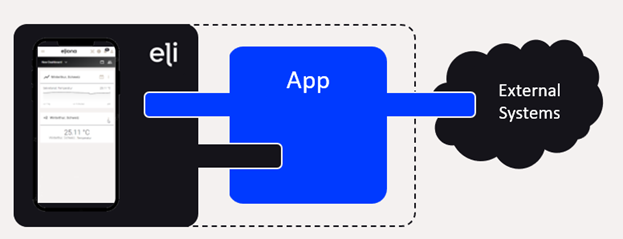
For the development of apps with the BuildingPro Suites App SDK, certain requirements and framework conditions must be observed. On the one hand, it is necessary to use defined interfaces, and on the other hand, to provide defined interfaces. This is the only way an app can be used smoothly in an BuildingPro Suites environment. In addition, technical prerequisites must be met. These primarily serve to ensure a uniform configuration of the app and compatibility across all apps.
The central point of contact for the BuildingPro Suites App SDK and all necessary resources for app development can be found on GitHub.
{% embed url="" %}
BuildingPro Suites on GitHub
{% endembed %}
### Interface
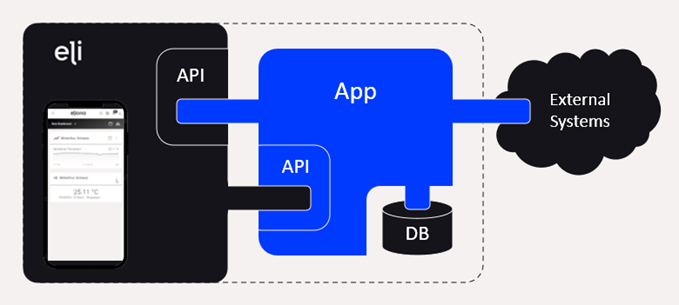
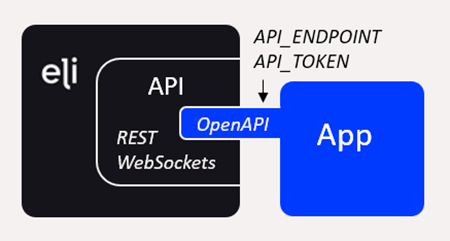
Access to the BuildingPro Suites core system is exclusively via the BuildingPro Suites API. For custom data, for example, for configuration, a database must be used for permanent persistence. This data, as well as possible functions of the app, can only be accessed externally via a custom API.
### REST API
To enable apps to access functions and data of the BuildingPro Suites core system, BuildingPro Suites provides an extensive REST API and WebSockets. The accessibility of this API must be configurable via the environment variables API\_ENDPOINT and API\_TOKEN.
Pre-fabricated libraries can be used to access the REST API and WebSockets, which already take all the necessary prerequisites into account.
{% embed url="" %}
BuildingPro Suites-Client
{% endembed %}
{% embed url="" %}
Client
{% endembed %}
For development, a mock can be used that allows access via the API without using a full BuildingPro Suites environment.
{% embed url="" %}
BuildingPro Suites Mock
{% endembed %}
### Database
Apps typically require their own data. This includes, for example:
* Configuration data (general settings, timeouts, poll intervals, etc.)
* Data for accessing external systems (passwords, API endpoints, etc.)
* Mapping between BuildingPro Suites objects and external units (assets, devices, etc.)
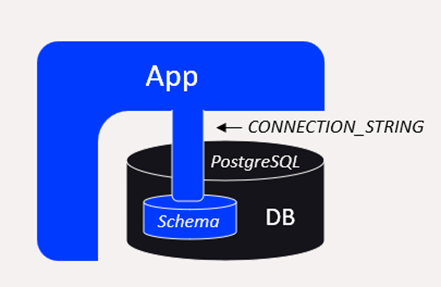
This data must be permanently persisted by the app in a database. This database must be configurable via the environment variable CONNECTION\_STRING. Within the database, this data must be stored in an app-specific schema, typically with the name of the app. To ensure overarching compatibility of all apps, database access must work smoothly and completely with a PostgreSQL DMBS.
Pre-fabricated libraries can be used to access the database, which already take all the necessary prerequisites into account.
{% embed url="" %}
For development, a mock can be used that allows access to a suitable database without using a full BuildingPro Suites environment.
{% embed url="" %}
BuildingPro Suites Mock
{% endembed %}
### App API
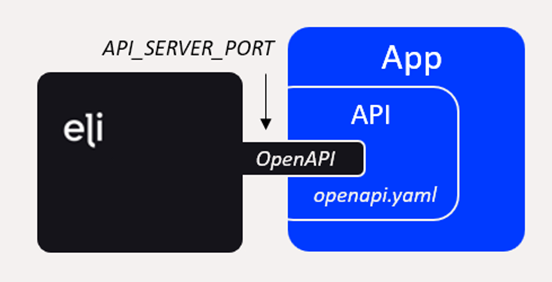
If an app offers or requires separate functions or its own data, these must be able to be called or modified externally via a custom API. This makes it possible, among other things, for BuildingPro Suites to provide its own configuration interfaces for the app.
The definition of this interface must be defined via an OpenAPI description file with the name *openapi.yaml*. This is intended to ensure a uniform and precise description of the interface. The accessibility of the API must be adjustable via the environment variable API\_SERVER\_PORT (default value 3000).
The API must be available together with the app's function. This means that when an app is started, the API must also be started at the same time.
### App Lifecycle
A created app goes through a lifecycle within an BuildingPro Suites environment.
1. Activation
2. Installation
3. Initialization
4. Further development
5. Uninstallation
For an app to be available or usable for an BuildingPro Suites environment, the app must be activated. To do this, the administrator must register the app under its name. This includes the ability to version the app within BuildingPro Suites and to generate and announce the token necessary for access to the BuildingPro Suites API.
Installation ensures that a runnable version of the app is available. This is usually a Docker image that contains and starts the necessary components of the app.
The initialization of the app takes place during the app's first start within an BuildingPro Suites environment. During this process, the app's start is registered in BuildingPro Suites, and the app itself can, if required, create its database schema and necessary database objects and fill them with initial values.
After the app's first start, several further developments can modify the app and require a migration of existing structures or data. For this, patches can be registered in an BuildingPro Suites environment and the necessary steps can be carried out.
If an app is no longer needed, it can be removed from an BuildingPro Suites environment. This means that the app is stopped and the runnable version is removed.
#### Installation
For an app to be installed, it must be available as a Docker image to be able to be ultimately integrated and started modularly in an BuildingPro Suites environment. Accordingly, every app needs a suitable Dockerfile through which an image with a runnable version of the app can be created. The image must then start all the necessary components of the app (functional, App-API, etc.).
#### Initialization
The app's initialization must be registered by the app in BuildingPro Suites. This informs the BuildingPro Suites environment that the app is set up and available. A prerequisite is that the app has been activated in BuildingPro Suites beforehand. The following tasks are typical during initialization:
* Registration via BuildingPro Suites API
* Creation of a database schema for the app
* Creation of database objects
* Creation of standard data
Pre-fabricated libraries can be used for initialization, which already take all the necessary prerequisites into account.
{% embed url="" %}
App-Handling
{% endembed %}
#### Further Development and Migration
For newer versions of an app, these must be registered in BuildingPro Suites. This also serves to detect which version has been installed so far and thus whether and which migration steps may need to be performed.
Pre-fabricated libraries can be used for migration, which already take all the necessary prerequisites into account.
{% embed url="" %}
App-Handling
{% endembed %}
### App Best Practices
#### Continuous Asset Creation (CAC)
Continuous Asset Creation (CAC) enables apps to automatically detect new devices and sensors and create assets in BuildingPro Suites, including the mapping between them. Hierarchical relationships and existing designations can be taken into account, while the user decides how to use the automatically created assets in BuildingPro Suites. CAC also supports the deletion of assets and enables the creation of templates for dashboards that appropriately display the automatically generated assets.
### App SDK Summary of Requirements
The technical and systemic requirements for an app with the BuildingPro Suites App SDK can be summarized as follows:
* The development of apps takes place in Go
* Use of Git version control
* App must be registered and an access token must be created
* For access, use the BuildingPro Suites API via access token
* For persistence, use a custom database schema
* Database objects and access must be compatible with PostgreSQL
* Data access and functions from external sources only via a custom API
The app must support at least the following environment variables:
* `API_ENDPOINT`: Endpoint of the BuildingPro Suites API
* `API_TOKEN`: Access token to the BuildingPro Suites API
* `CONNECTION_STRING`: Database for storing custom data (PostgreSQL)
* `API_SERVER_PORT`: Accessibility of the app's custom API
The following files are expected:
* `Dockerfile`: Creates a runnable image
* `openapi.yaml`: Definition and documentation of the app's custom API
### App SDK Resource Overview
Several resources and libraries are available for the development of BuildingPro Suites apps. These are located in the BuildingPro Suites profile on GitHub.
* BuildingPro Suites on GitHub:
The following resources are to be mentioned in particular:
* BuildingPro Suites-API:
* BuildingPro Suites-API Documentation:
* BuildingPro Suites Mock:
* Template for new apps:
* Go-Client for BuildingPro Suites:
* Go-Client for API:
* Utilities for Go:
---
# Agent Instructions
This documentation is published with GitBook. GitBook is the documentation platform designed so that both humans and AI agents can read, navigate, and reason over technical content effectively. Learn more at gitbook.com.
## Querying This Documentation
If you need additional information that is not directly available in this page, you can query the documentation dynamically by asking a question.
Perform an HTTP GET request on the current page URL with the `ask` query parameter, and the optional `goal` query parameter:
```
GET https://docs.buildings.ability.abb/collection/for-developers/app-sdk.md?ask=&goal=
```
`ask` is the immediate question: it should be specific, self-contained, and written in natural language.
`goal` is optional and describes the broader end goal you are ultimately trying to accomplish on behalf of the user. GitBook uses it to tailor the answer towards what is most useful for that goal.
The response will contain a direct answer to the question and relevant excerpts and sources from the documentation.
Use this mechanism when the answer is not explicitly present in the current page, you need clarification or additional context, or you want to retrieve related documentation sections.