> For the complete documentation index, see [llms.txt](https://docs.buildings.ability.abb/collection/llms.txt). Markdown versions of documentation pages are available by appending `.md` to page URLs; this page is available as [Markdown](https://docs.buildings.ability.abb/collection/for-developers/engineering.md).
# Engineering
Aligning BuildingPro Suites with the requirements and needs of customers and the tenant environment is of crucial importance. A variety of methods and tools are available for this BuildingPro Suites engineering, covering all application areas.
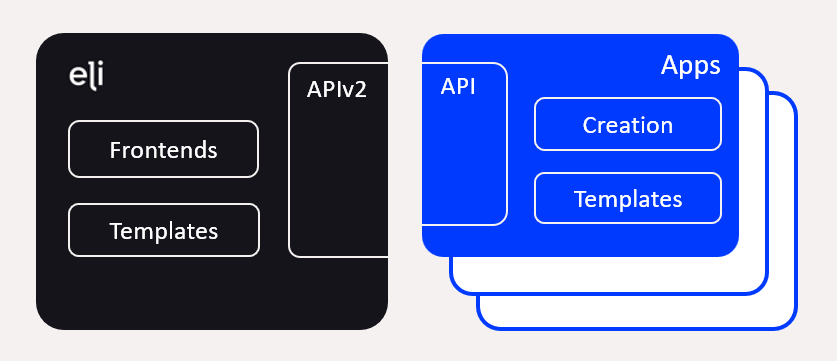
The following figure provides an overview of the methods and tools for BuildingPro Suites engineering.
Specifically, the following methods and tools are available:
* **Frontends**: User interfaces for configuration and mass data processing
* **Templates**: Use of pre-built configuration data
* **API**: Extensive API interfaces
* **Creation**: Automatic creation of configuration data
## Frontends
BuildingPro Suites offers an extensive and user-friendly interface that allows for a wide range of individual configurations. This interface also integrates the use of API interfaces for [**Apps** ](/collection/mandatory-base/platform-core/connect-hub/edge-app-marketplace-for-plug-ins-and-extentions/apps.md)and **APIv2**. This enables configuration and analysis of BuildingPro Suites using pre-built JSON data. The creation and configuration of large quantities of data are thus possible in a structured and defined format.
## Templates
Templates serve to simplify the creation of pre-built configuration data.
[Apps ](/collection/mandatory-base/platform-core/connect-hub/edge-app-marketplace-for-plug-ins-and-extentions/apps.md)offer the ability to create specific dashboards for any user via **Dashboard Templates**. The assets of the apps are displayed appropriately in typical dashboards and can then be individually customized.
BuildingPro Suites offers the ability to automatically transfer rules to a large number of assets using **Rule Chain Templates**, thereby eliminating the need to create identical rules.
## API Interfaces
With the **APIv2**, BuildingPro Suites offers an extensive interface for querying and creating master and transaction data. The interface is JSON-based and can be used programmatically or ad hoc.
**Apps** also offer API interfaces to automate all app-specific configurations and query app data.
## Creation
As needed, apps automatically create master and transaction data in BuildingPro Suites. Using [**Continuous Asset Creation**](/collection/for-developers/app-sdk.md#continuous-asset-creation-cac), apps take on a large part of the configuration for device-specific apps. Assets are automatically created in BuildingPro Suites and linked to the respective devices.
---
# Agent Instructions
This documentation is published with GitBook. GitBook is the documentation platform designed so that both humans and AI agents can read, navigate, and reason over technical content effectively. Learn more at gitbook.com.
## Querying This Documentation
If you need additional information that is not directly available in this page, you can query the documentation dynamically by asking a question.
Perform an HTTP GET request on the current page URL with the `ask` query parameter, and the optional `goal` query parameter:
```
GET https://docs.buildings.ability.abb/collection/for-developers/engineering.md?ask=&goal=
```
`ask` is the immediate question: it should be specific, self-contained, and written in natural language.
`goal` is optional and describes the broader end goal you are ultimately trying to accomplish on behalf of the user. GitBook uses it to tailor the answer towards what is most useful for that goal.
The response will contain a direct answer to the question and relevant excerpts and sources from the documentation.
Use this mechanism when the answer is not explicitly present in the current page, you need clarification or additional context, or you want to retrieve related documentation sections.