> For the complete documentation index, see [llms.txt](https://docs.buildings.ability.abb/collection/llms.txt). Markdown versions of documentation pages are available by appending `.md` to page URLs; this page is available as [Markdown](https://docs.buildings.ability.abb/collection/german-14.2-freezed/dokumentation/assets/assets-archivieren.md).
# Assets archivieren
In eliona können Assets nicht endgültig gelöscht werden. Assets werden stattdessen archiviert.
Archivierte Assets verschwinden zwar, aber bleiben aber im Hintergrund im System vorhanden. Deshalb können archivierte Assets wiederhergestellt werden.
Archivierte Assets kosten kein Infravolt.
## Warum können Assets nicht gelöscht werden?
Wenn Assets endgültig gelöscht werden könnten, wäre es nicht möglich, abgeschlossene Tickets und Tasks nachzuvollziehen, wenn diese sich auf das gelöschte Asset beziehen.
## Was passiert wenn man ein Asset archiviert?
Wenn Sie ein Asset archivieren passieren folgende Dinge:
* Das Asset erscheint nicht mehr in der Asset-Liste
* Das Asset wird nicht mehr gefunden, wenn mit der Suchfunktion danach gesucht wird
* Das Asset erscheint im Asset-Archiv
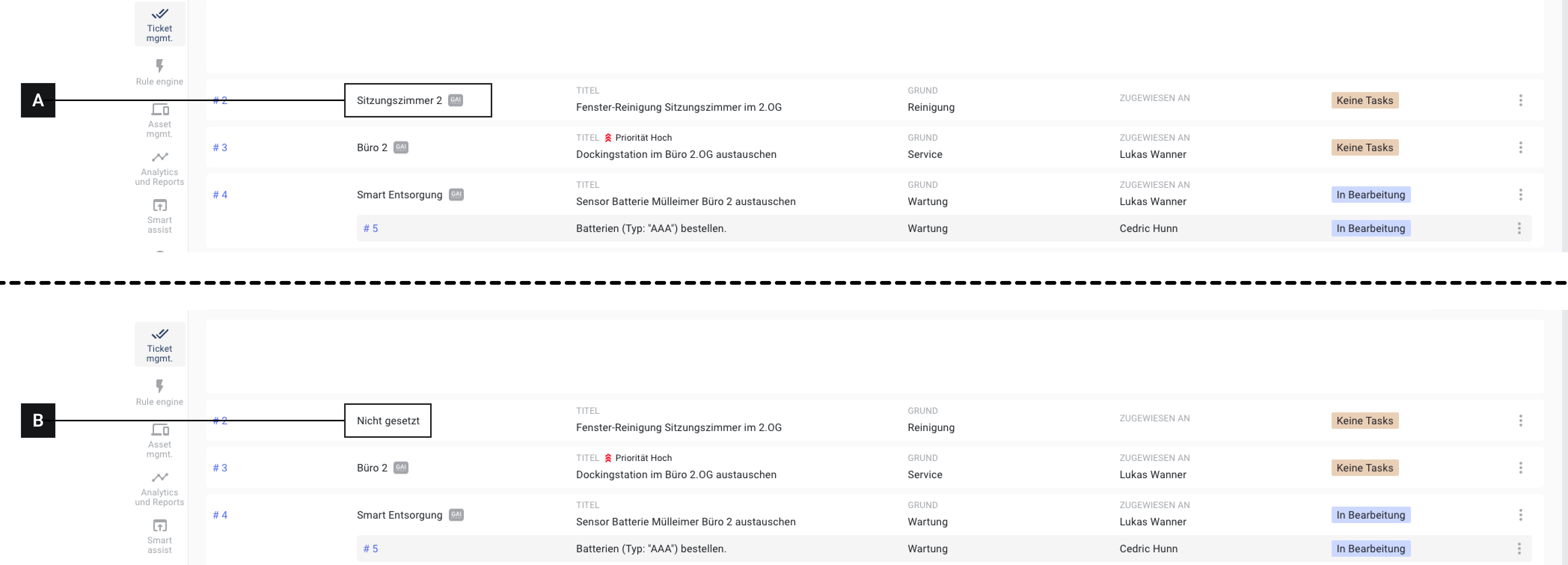
* Tickets und Tasks, die sich auf das Asset beziehen bleiben erhalten, auch wenn die Tickets und Tasks bereits abgeschlossen sind. Der Name bzw. die GAI des archivierten Assets sind nicht sichtbar.
Vergleich: Das selbe Ticket bevor (A) und nachdem (B) das entsprechende Asset gelöscht wurde.
## Ein Asset archivieren
{% @supademo/embed url="" demoId="clm95pez541fov519o2ylufu4" fullWidth="true" %}
## Archivierte Assets finden und durchsuchen
Archivierte Assets werden im Asset-Archiv gesammelt und können dort eingesehen und durchsucht werden.
{% @supademo/embed url="" demoId="cAqLRFazho\_jmZyKo9R16" fullWidth="true" %}
## Archivierte Assets wiederherstellen
Archivierte Assets können aus dem Asset-Archiv heraus wiederhergestellt werden.
{% @supademo/embed url="" demoId="0iPydeJovg8aEJ-MW-mcg" fullWidth="true" %}
---
# Agent Instructions
This documentation is published with GitBook. GitBook is the documentation platform designed so that both humans and AI agents can read, navigate, and reason over technical content effectively. Learn more at gitbook.com.
## Querying This Documentation
If you need additional information that is not directly available in this page, you can query the documentation dynamically by asking a question.
Perform an HTTP GET request on the current page URL with the `ask` query parameter, and the optional `goal` query parameter:
```
GET https://docs.buildings.ability.abb/collection/german-14.2-freezed/dokumentation/assets/assets-archivieren.md?ask=&goal=
```
`ask` is the immediate question: it should be specific, self-contained, and written in natural language.
`goal` is optional and describes the broader end goal you are ultimately trying to accomplish on behalf of the user. GitBook uses it to tailor the answer towards what is most useful for that goal.
The response will contain a direct answer to the question and relevant excerpts and sources from the documentation.
Use this mechanism when the answer is not explicitly present in the current page, you need clarification or additional context, or you want to retrieve related documentation sections.