> For the complete documentation index, see [llms.txt](https://docs.buildings.ability.abb/collection/llms.txt). Markdown versions of documentation pages are available by appending `.md` to page URLs; this page is available as [Markdown](https://docs.buildings.ability.abb/collection/german-14.2-freezed/dokumentation/dashboard.md).

# Dashboard

## Was ist ein Dashboard?

Das Dashboard ist das erste was Sie sehen, wenn Sie sich in eliona einloggen.

Dashboards sind Grafische Oberflächen, auf denen Sie Werte sehen, Einstellungen vornehmen und Zusammenhänge erkennen können.

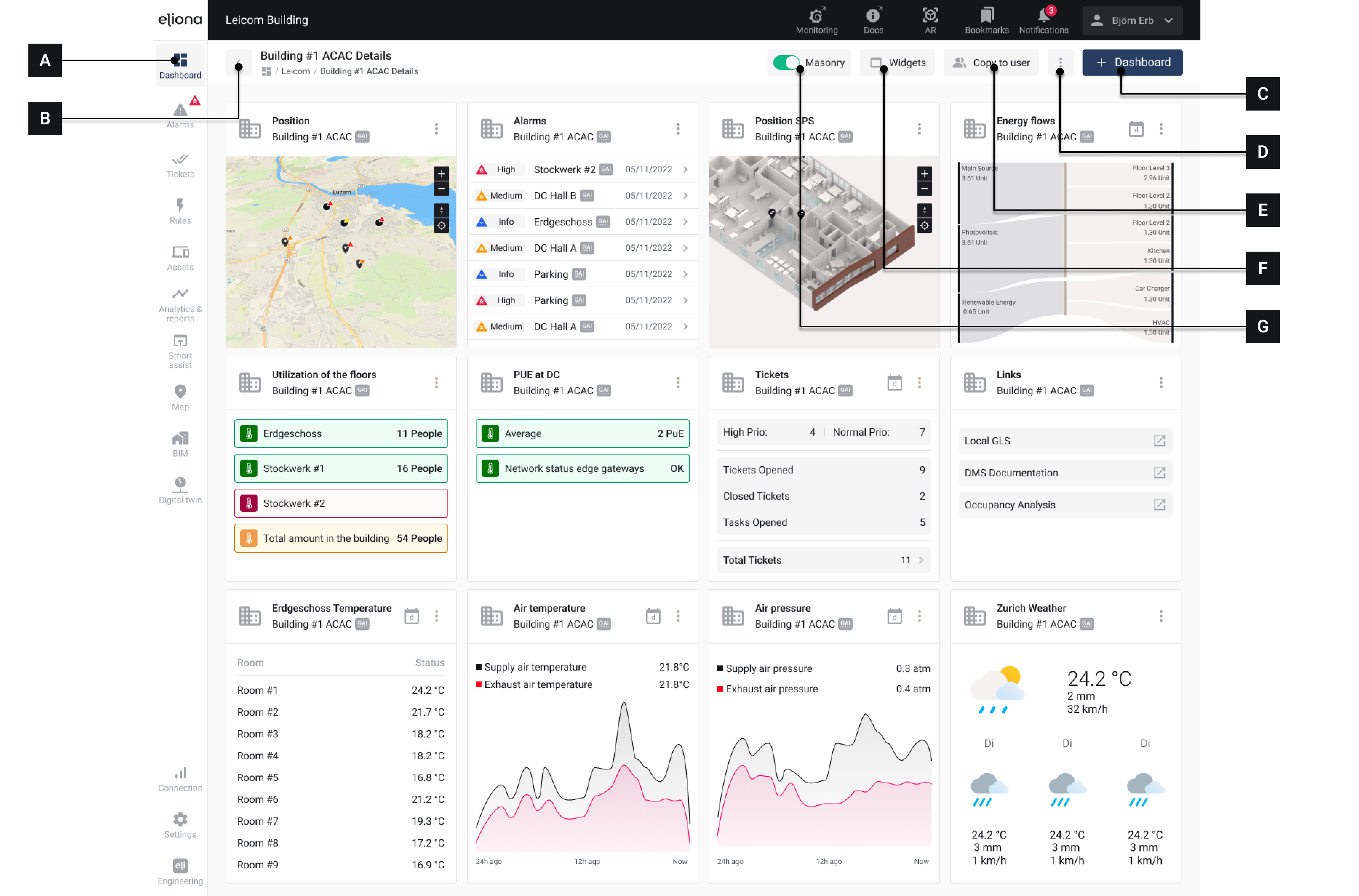
<div data-full-width="true"><figure><img src="https://content.gitbook.com/content/Nyvwhz1kEMXcHf4HLuZ8/blobs/HlAdMw72D050aIfFCFy0/0E7BC01C-A571-4648-A056-A7670B45E64B.png" alt=""><figcaption><p>Ein Dashboard mit verschiedenen Widgets</p></figcaption></figure></div>

<table><thead><tr><th width="81.33333333333331"></th><th width="294"></th><th></th></tr></thead><tbody><tr><td><strong>[A]</strong></td><td>Menüpunkt "Dashboards"</td><td>Hier klicken, um das aktuelle Dashboard zu öffnen</td></tr><tr><td><strong>[B]</strong></td><td>Zur Dashboard-Sammlung</td><td>Klicken, um alle verfügbaren Dashboards anzuzeigen</td></tr><tr><td><strong>[C]</strong></td><td>Button "Neues Dashboard erstellen"</td><td>Neues Dashboard erstellen</td></tr><tr><td><strong>[D]</strong></td><td>Optionen</td><td><p>Verfügbare Auswahl:</p><ul><li>Kopieren</li><li>Name bearbeiten</li><li>Zu Lesezeichen hinzufügen</li><li>Entfernen</li></ul></td></tr><tr><td><strong>[E]</strong></td><td>An Nutzer kopieren</td><td>Aktuelles Dashboard an einen Nutzer kopieren</td></tr><tr><td><strong>[F]</strong></td><td>Widgets</td><td>Verfügbare <a href="https://docs.buildings.ability.abb/collection/german-14.2-freezed/dokumentation/widgets.md">-> Widgets</a> anzeigen</td></tr><tr><td><strong>[G]</strong></td><td>Masonry Switch</td><td><a href="https://docs.buildings.ability.abb/collection/german-14.2-freezed/dokumentation/dashboard/layout-von-dashboards-anpassen.md#masonry">-> Masonry-Layout</a> aktivieren</td></tr></tbody></table>

Dashboards bestehen aus sogenannten [-> Widgets](https://docs.buildings.ability.abb/collection/german-14.2-freezed/dokumentation/widgets.md). Sie können sich ein Dashboard aus verschiedenen Widgets individuell "zusammenbauen".

Sie können jederzeit zum Dashboard zurückkehren, indem Sie auf den **Menüpunkt** **Dashboard \[A]** in der Seitenleiste klicken.

### Mehrere Dashboards

Sie können beliebig viele Dashboards erstellen und zwischen diesen Dashboards wechseln.

Sie sind nicht an ein einzelnes Dashboard gebunden.

{% hint style="info" %}
**Beispiel**\
Sie erstellen ein Dashboard, auf welchem die aktuellen Zustände aller Jalousien in Ihrem Gebäude angezeigt werden.

In einem anderen Dashboards lassen Sie sich Raumtemperaturen und den Status von vorhandenen Klimaanlagen anzeigen.

In einem weiteren Dashboard überwachen Sie die Energieflüsse in der Infrastruktur.
{% endhint %}

Sie können [-> Dashboards an andere Nutzer kopieren](https://docs.buildings.ability.abb/collection/german-14.2-freezed/dokumentation/dashboard/dashboards-an-benutzer-kopieren.md). So müssen Sie einmal erstellte Dashboards nicht für jeden Nutzer neu anlegen.


---

# Agent Instructions
This documentation is published with GitBook. GitBook is the documentation platform designed so that both humans and AI agents can read, navigate, and reason over technical content effectively. Learn more at gitbook.com.

## Querying This Documentation
If you need additional information that is not directly available in this page, you can query the documentation by asking a question.

Perform an HTTP GET request on the following URL with the `ask` and `goal` query parameters:

```
GET https://docs.buildings.ability.abb/collection/german-14.2-freezed/dokumentation/dashboard.md?ask=<question>&goal=<user_goal>
```

`ask` is the immediate question: it should be specific, self-contained, and written in natural language.
`goal` is what the user is ultimately trying to achieve, the reason they need the answer. Sharing it helps GitBook give you a better, more relevant answer. A goal is most helpful when it describes the outcome the user wants rather than restating the question. For example, with `ask=how do I create an API token`, a goal like `automate deployments from our CI pipeline` lets GitBook tailor the answer to that use case.

The response will contain a direct answer to the question and relevant excerpts and sources from the documentation.

Use this mechanism when the answer is not explicitly present in the current page, you need clarification or additional context, or you want to retrieve related documentation sections.
