
Tasks eines Tickets
Tasks eines Tickets
| Element | Titel | Beschreibung |
|---|---|---|
| [F] | Zurück | Kehrt zur Ticketliste zurück. |
| [G] | Spalten | Legt sichtbare Spalten und Reihenfolge fest. |
| [H] | Filter | Filtert die Taskliste. |
| [I] | Task erstellen | Öffnet das Taskformular. |
| [J] | Timeline | Zeigt Aktivitäten nach Benutzer und Kalenderwoche. |
| [J2] | Woche wechseln | Wechselt zur vorherigen oder nächsten Kalenderwoche. |
| [J3] | Ereignis | Zeigt beim Darüberfahren mit dem Mauszeiger die Details einer Aktivität. |
| [K] | Taskliste | Zeigt die Tasks des Tickets. |
| [K1] | Tasknummer | Eindeutige Nummer des Tasks. |
| [K2] | Status | Aktueller Status des Tasks. |
| [K3] | Titel | Titel des Tasks. |
| [K4] | Assignee | Person, der der Task zugewiesen ist. |
| [K5] | Fälligkeit | Fälligkeitsdatum oder Zeitraum des Tasks. |
| [K6] | Zeitaufwand | Für den Task erfasste Arbeitszeit. |
| [K7] | Asset | Zugeordnetes Asset. |
| [K8] | Grund | Grund des Tasks. |
| [K9] | Weitere Optionen | Öffnet zusätzliche Aktionen für den Task. |
| [L] | Öffnen | Öffnet die Task-Details. |
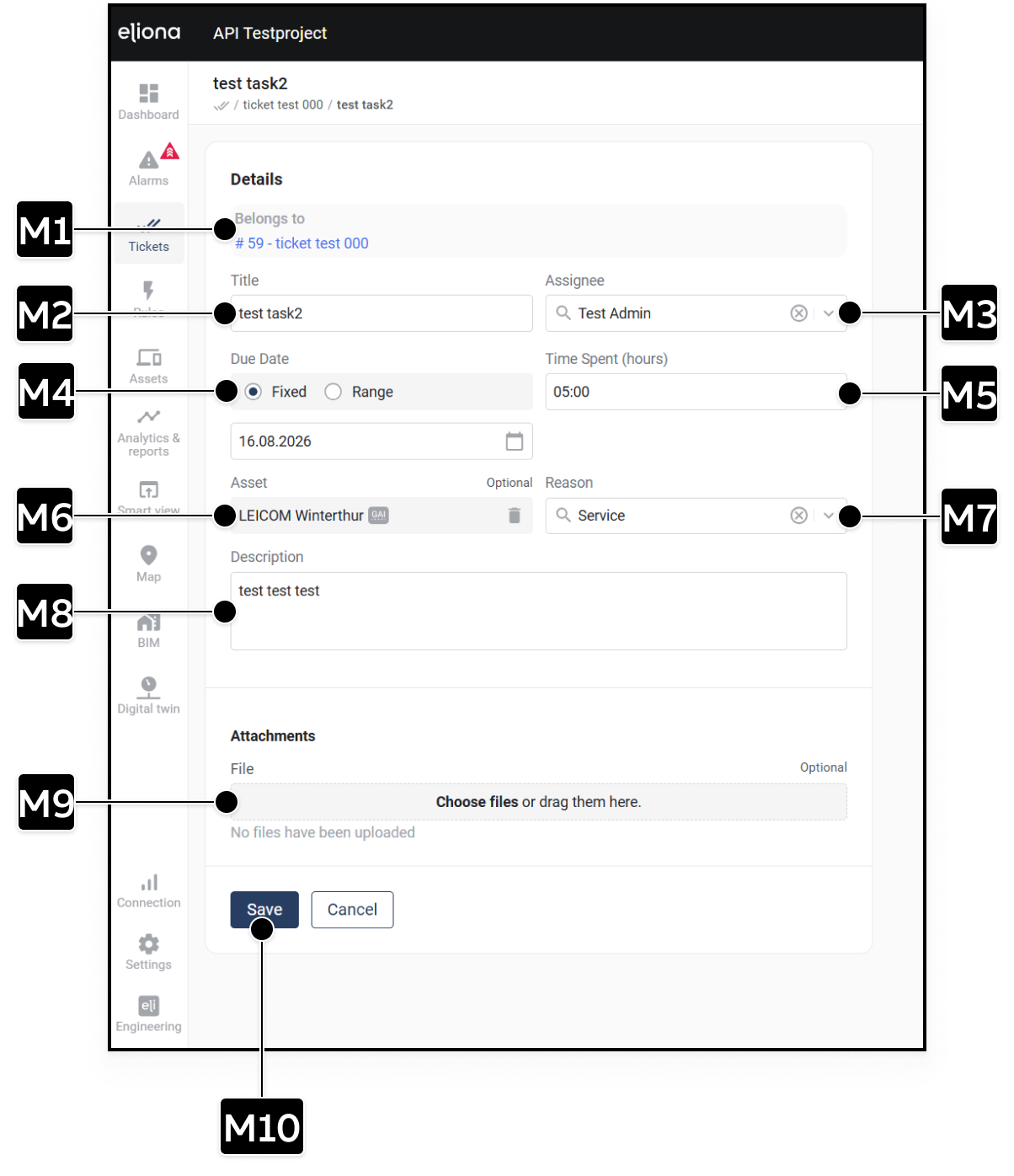
Task erstellen oder bearbeiten
| Element | Titel | Beschreibung |
|---|---|---|
| [M1] | Gehört zu | Übergeordnetes Ticket. |
| [M2] | Titel | Titel des Tasks. |
| [M3] | Assignee | Person, die den Task bearbeitet. |
| [M4] | Fälligkeit | Festes Datum oder Zeitraum. |
| [M5] | Zeitaufwand | Arbeitszeit in Stunden und Minuten. Dieses Feld erscheint beim Bearbeiten, nicht bei der Neuanlage eines Tasks. |
| [M6] | Asset | Zugeordnetes Asset. Optional. |
| [M7] | Grund | Grund oder Kategorie des Tasks. |
| [M8] | Beschreibung | Beschreibung des Arbeitsschritts. |
| [M9] | Anhänge | Dateien auswählen oder in den Bereich ziehen. Optional. |
| [M10] | Speichern | Erstellt den Task oder speichert die Änderungen. |