> For the complete documentation index, see [llms.txt](https://docs.buildings.ability.abb/collection/llms.txt). Markdown versions of documentation pages are available by appending `.md` to page URLs; this page is available as [Markdown](https://docs.buildings.ability.abb/collection/german-14.2-freezed/dokumentation/weitere-funktionen/attribut-funktionen/geratesimulator.md).
# Gerätesimulator
{% hint style="warning" %}
Achtung: Um dem Gerätesimulator benutzen zu können muss die [-> Device Simulator App](https://docs.buildings.ability.abb/collection/german-14.2-freezed/apps/apps/device-simulator.md) installiert sein.
{% endhint %}
Der **Gerätesimulator** in *Eliona* ermöglicht es, Datenströme zu simulieren, um Dashboards, Regeln und andere Funktionen zu testen, bevor reale Geräte eingebunden werden. Er eignet sich ideal zur Validierung von Konfigurationen, zum Prototyping neuer Features und zur Analyse verschiedener Szenarien. Zudem unterstützt er bei Schulungen und Fehlersuchen, indem er realistische Betriebszustände nachbildet – ganz ohne physische Hardware.
## Gerätesimulator **Konfigurieren**
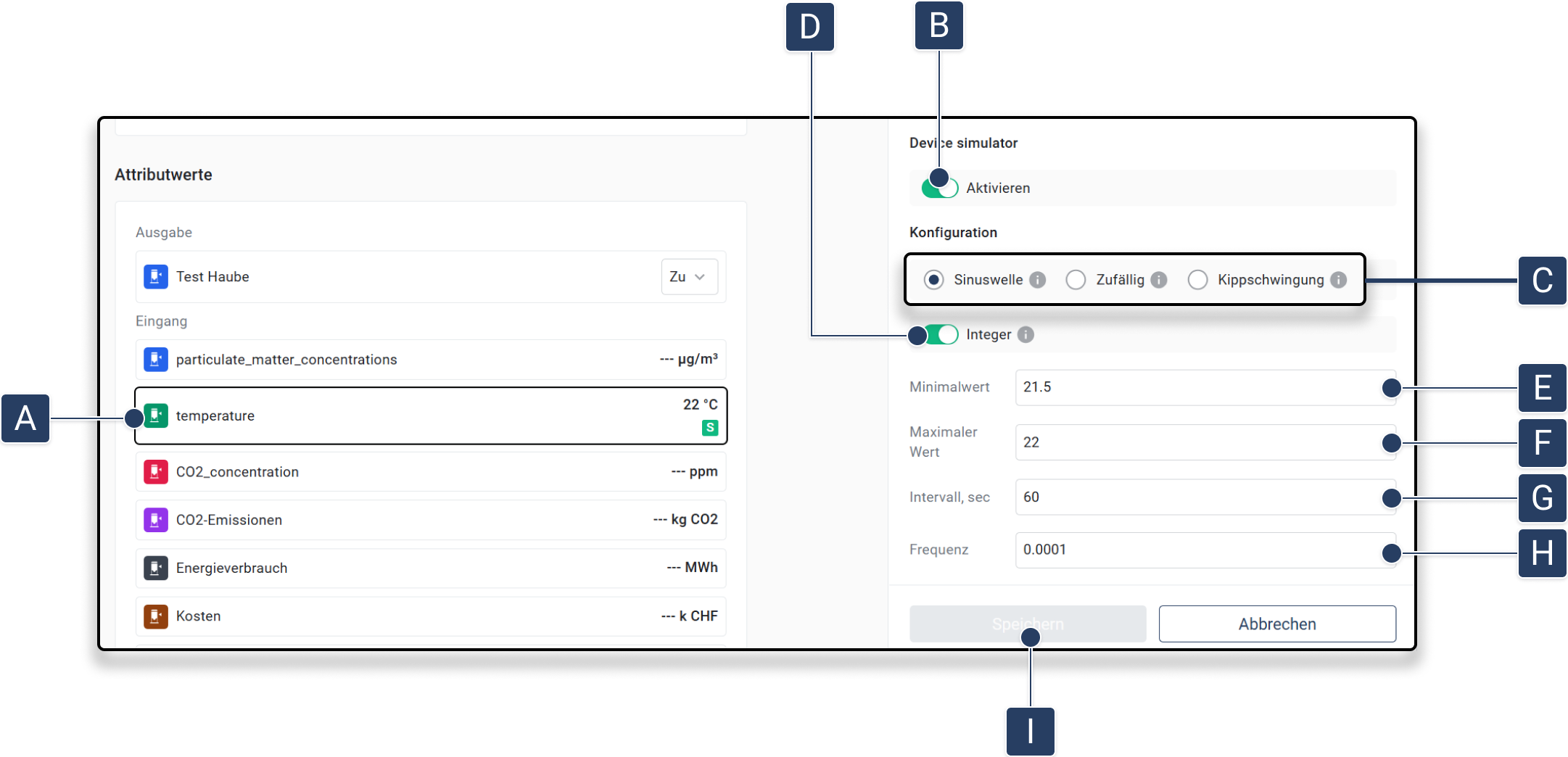
1. **Navigieren Sie zum gewünschten Attribut eines Assets:**\
Öffnen Sie ein Asset und wählen Sie ein Attribut aus der Liste der **Attributwerte** aus. Klicken Sie dazu auf das Attribut **\[A]**.
2. **Simulator aktivieren:**\
Schalten Sie den Gerätesimulator mit dem Schalter **Aktivieren \[B]** ein.
3. **Simulationstyp auswählen:**\
Wählen Sie den gewünschten Typ der Simulation **\[C]**:
▷ **Sinuswelle:** Glatte, zyklische Daten.
▷ **Zufällig:** Unvorhersehbare Werte.
▷ **Kippschwingung:** Linearer Anstieg, gefolgt von abruptem Abfall.\
Diese Optionen finden Sie unter **Konfiguration** .
4. **Ganzzahl:** Gibt an, ob der generierte Wert eine Ganzzahl oder ein Float sein soll **\[D]**.
5. **Parameter definieren:**\
Legen Sie die Parameter der Simulation fest:
▷ **Minimalwert:** Der niedrigste generierte Wert **\[E]**.
▷ **Maximalwert:** Der höchste generierte Wert **\[F]**.
▷ **Intervall (Sekunden):** Intervall in Sekunden für die Datengenerierung. (Abtastrate) (Wie oft sollen die neuen Daten generiert werden?) **\[G]**.
▷ **Frequenz (Hz):** Frequenz in Hz für Wellenfunktionen. (Wie oft sollte die Funktion den ursprünglichen Wert pro Sekunde erreichen?) (typischerweise weniger als 1) (Darf nicht höher sein als 1/(2\*Intervall\_Sekunden), um Aliasing/Nyquist-Frequenz zu vermeiden) **\[H]**.
6. **Einstellungen speichern:**\
Klicken Sie auf **Speichern**, um die Konfiguration zu übernehmen **\[I]**.\
▷ Die Simulation wird mit den gewählten Parametern aktiviert.
{% hint style="info" %}
Simulierte Attribute werden mit einem Markiert.
{% endhint %}
## **Zusätzliche Verwaltungsmöglichkeiten**
Für fortgeschrittene Konfigurationen und API-basierte Generatoren kann die **Device Simulator App** verwendet werden.\
[-> Device Simulator App Dokumentation](https://docs.buildings.ability.abb/collection/german-14.2-freezed/apps/apps/device-simulator.md)
---
# Agent Instructions
This documentation is published with GitBook. GitBook is the documentation platform designed so that both humans and AI agents can read, navigate, and reason over technical content effectively. Learn more at gitbook.com.
## Querying This Documentation
If you need additional information that is not directly available in this page, you can query the documentation by asking a question.
Perform an HTTP GET request on the following URL with the `ask` and `goal` query parameters:
```
GET https://docs.buildings.ability.abb/collection/german-14.2-freezed/dokumentation/weitere-funktionen/attribut-funktionen/geratesimulator.md?ask=&goal=
```
`ask` is the immediate question: it should be specific, self-contained, and written in natural language.
`goal` is what the user is ultimately trying to achieve, the reason they need the answer. Sharing it helps GitBook give you a better, more relevant answer. A goal is most helpful when it describes the outcome the user wants rather than restating the question. For example, with `ask=how do I create an API token`, a goal like `automate deployments from our CI pipeline` lets GitBook tailor the answer to that use case.
The response will contain a direct answer to the question and relevant excerpts and sources from the documentation.
Use this mechanism when the answer is not explicitly present in the current page, you need clarification or additional context, or you want to retrieve related documentation sections.
 Markiert.
{% endhint %}
## **Zusätzliche Verwaltungsmöglichkeiten**
Für fortgeschrittene Konfigurationen und API-basierte Generatoren kann die **Device Simulator App** verwendet werden.\
[-> Device Simulator App Dokumentation](https://docs.buildings.ability.abb/collection/german-14.2-freezed/apps/apps/device-simulator.md)
---
# Agent Instructions
This documentation is published with GitBook. GitBook is the documentation platform designed so that both humans and AI agents can read, navigate, and reason over technical content effectively. Learn more at gitbook.com.
## Querying This Documentation
If you need additional information that is not directly available in this page, you can query the documentation by asking a question.
Perform an HTTP GET request on the following URL with the `ask` and `goal` query parameters:
```
GET https://docs.buildings.ability.abb/collection/german-14.2-freezed/dokumentation/weitere-funktionen/attribut-funktionen/geratesimulator.md?ask=