> For the complete documentation index, see [llms.txt](https://docs.buildings.ability.abb/collection/llms.txt). Markdown versions of documentation pages are available by appending `.md` to page URLs; this page is available as [Markdown](https://docs.buildings.ability.abb/collection/german-14.2-freezed/dokumentation/widgets/benutzerdefinierte-widgets/module/radar.md).
# Radar
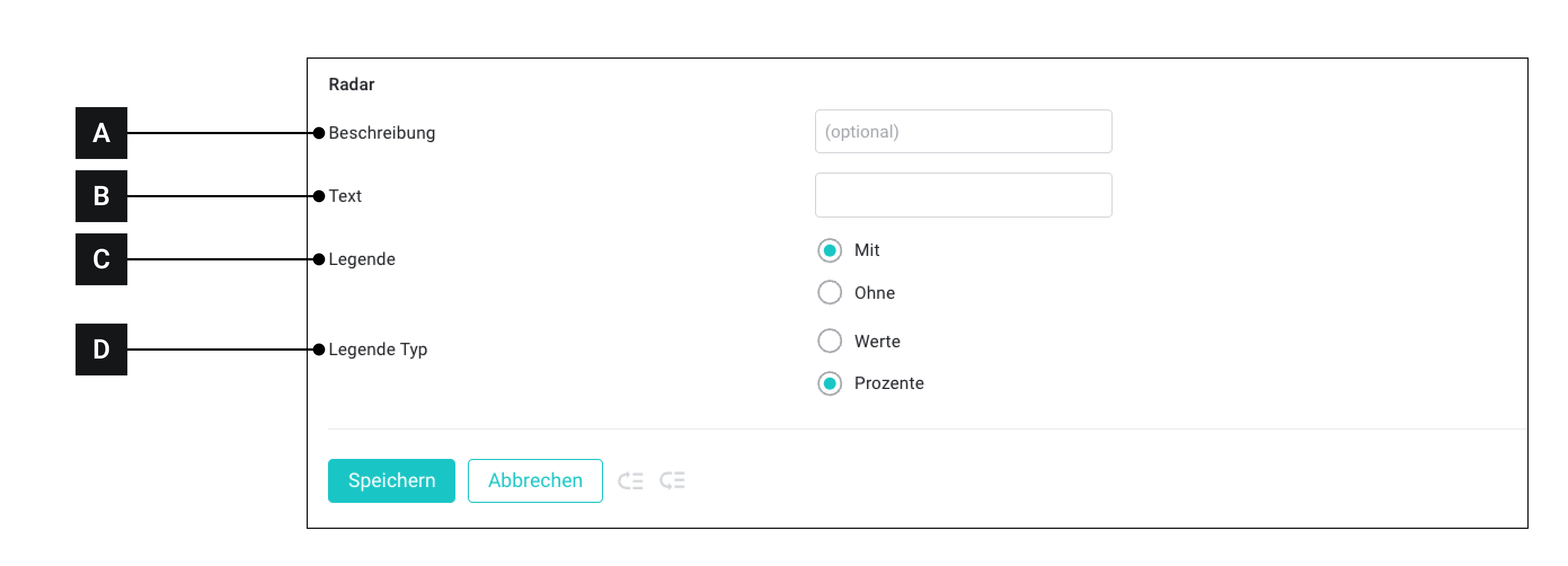
Über das Modul "Radar" können Sie ein Radar-Diagramme in ein Widget einbinden.
Radar-Diagramme zeigen Variablen auf 3 oder mehreren Achsen an. Radar-Diagramme sind sehr gut geeignet, um viele verschiedene Werte zu vergleichen und Ähnlichkeiten, Unterschiede aber auch Ausreisser darstellen zu können.
[A]
Beschreibung
Dieser Text wird angezeigt , wenn das Benutzerdefinierte Widget später mit Assets verbunden wird
[B]
Text
Freitext
[C]
Total
Mit: Zeigt eine Legende an
Ohne: Zeigt keine Legende an
[E]
Legende
Werte: Zeigt die Werte in der Legende als Wert an
Ohne: Zeigt die Werte in der Legende als Prozent an
{% hint style="info" %}
Wie dieses Modul in der Praxis genutzt wird erfahren Sie [->hier](/collection/german-14.2-freezed/dokumentation/widgets/benutzerdefinierte-widgets/module/radar.md)
{% endhint %}
---
# Agent Instructions
This documentation is published with GitBook. GitBook is the documentation platform designed so that both humans and AI agents can read, navigate, and reason over technical content effectively. Learn more at gitbook.com.
## Querying This Documentation
If you need additional information that is not directly available in this page, you can query the documentation dynamically by asking a question.
Perform an HTTP GET request on the current page URL with the `ask` query parameter, and the optional `goal` query parameter:
```
GET https://docs.buildings.ability.abb/collection/german-14.2-freezed/dokumentation/widgets/benutzerdefinierte-widgets/module/radar.md?ask=&goal=
```
`ask` is the immediate question: it should be specific, self-contained, and written in natural language.
`goal` is optional and describes the broader end goal you are ultimately trying to accomplish on behalf of the user. GitBook uses it to tailor the answer towards what is most useful for that goal.
The response will contain a direct answer to the question and relevant excerpts and sources from the documentation.
Use this mechanism when the answer is not explicitly present in the current page, you need clarification or additional context, or you want to retrieve related documentation sections.