# Einfache Anzeige

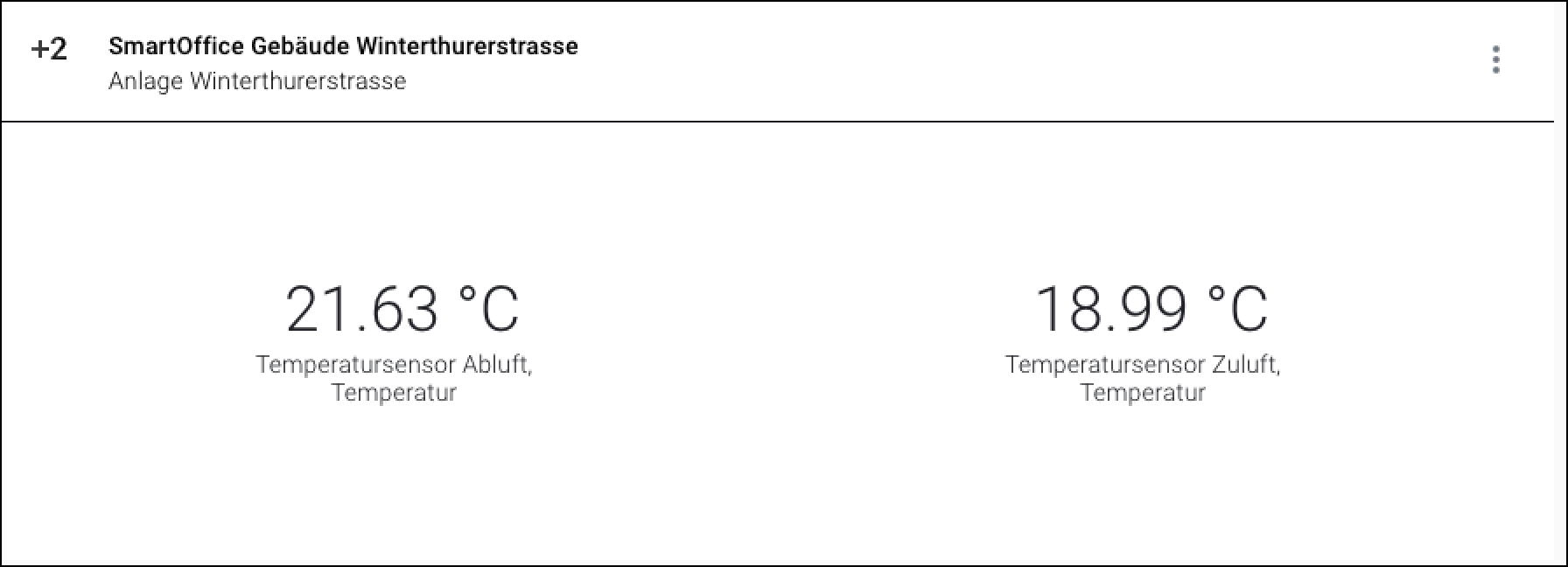
Das Widget "Einfache Anzeige" zeigt einen Wert für ein oder mehrere Assets an.

<div data-full-width="true"><figure><img src="https://content.gitbook.com/content/Nyvwhz1kEMXcHf4HLuZ8/blobs/p11LWb5zVgYDNzdK4Gsl/5426E1F4-C06B-42FD-B775-C920F8EECA73.png" alt=""><figcaption><p>Das Widget "Einfache Anzeige" mit 2 verbundenen Assets</p></figcaption></figure></div>

## Übersicht

<div data-full-width="true"><figure><img src="https://content.gitbook.com/content/Nyvwhz1kEMXcHf4HLuZ8/blobs/p2gXfVgZeO0TKaIkOeKr/D3F9B453-476E-4282-9CE0-987DACB36848.png" alt=""><figcaption></figcaption></figure></div>

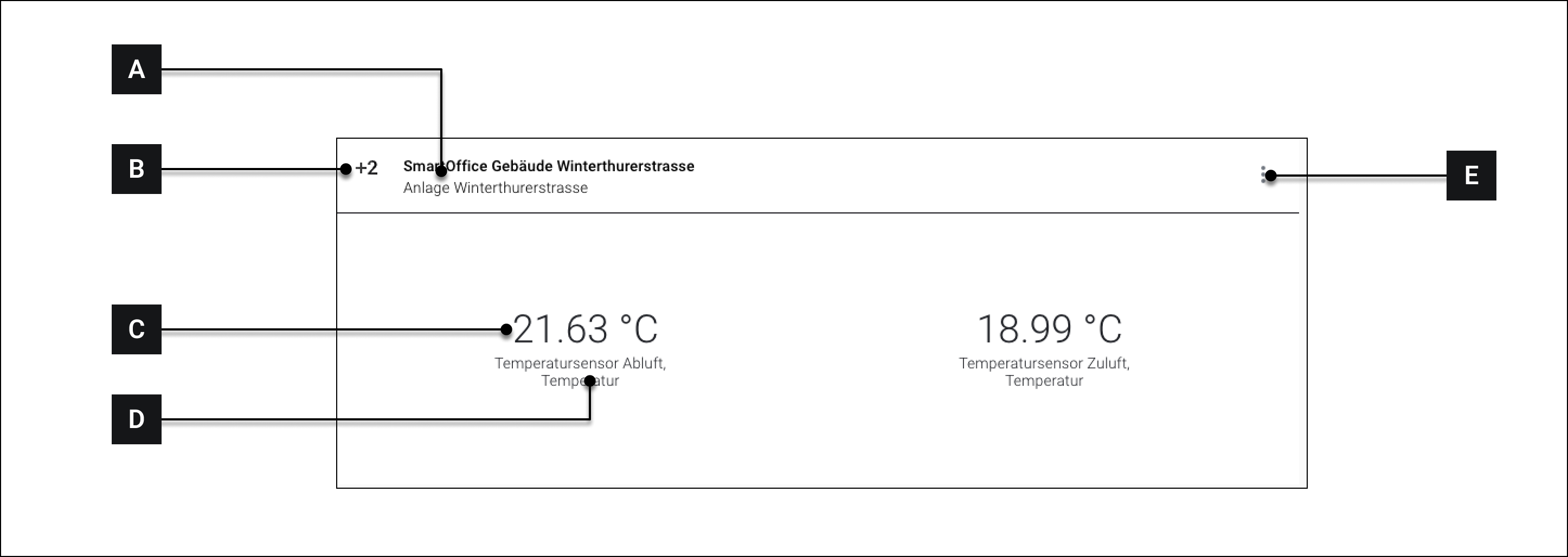
<table><thead><tr><th width="102.33333333333331"></th><th></th><th></th></tr></thead><tbody><tr><td><strong>[A]</strong></td><td>Titel</td><td>Titel des Widgets. Wird von der Auswahl des "Primären Assets" beeinflusst</td></tr><tr><td><strong>[B]</strong></td><td>Icon</td><td>Icon des WIdgets</td></tr><tr><td><strong>[C]</strong></td><td>Wert</td><td>Wert des ausgewählten Attributs</td></tr><tr><td><strong>[D]</strong></td><td>Name des Attributs</td><td>Kann unter <strong>[H]</strong> festgelegt werden</td></tr><tr><td><strong>[E]</strong></td><td>Mehr Optionen</td><td>Siehe -> Über Widgets navigieren</td></tr></tbody></table>

## Konfiguration

<div data-full-width="true"><figure><img src="https://content.gitbook.com/content/Nyvwhz1kEMXcHf4HLuZ8/blobs/q7H6IYboDao81WAr1O3O/8CD574B4-F9D1-43D3-B36E-1762D1B346E0.png" alt=""><figcaption></figcaption></figure></div>

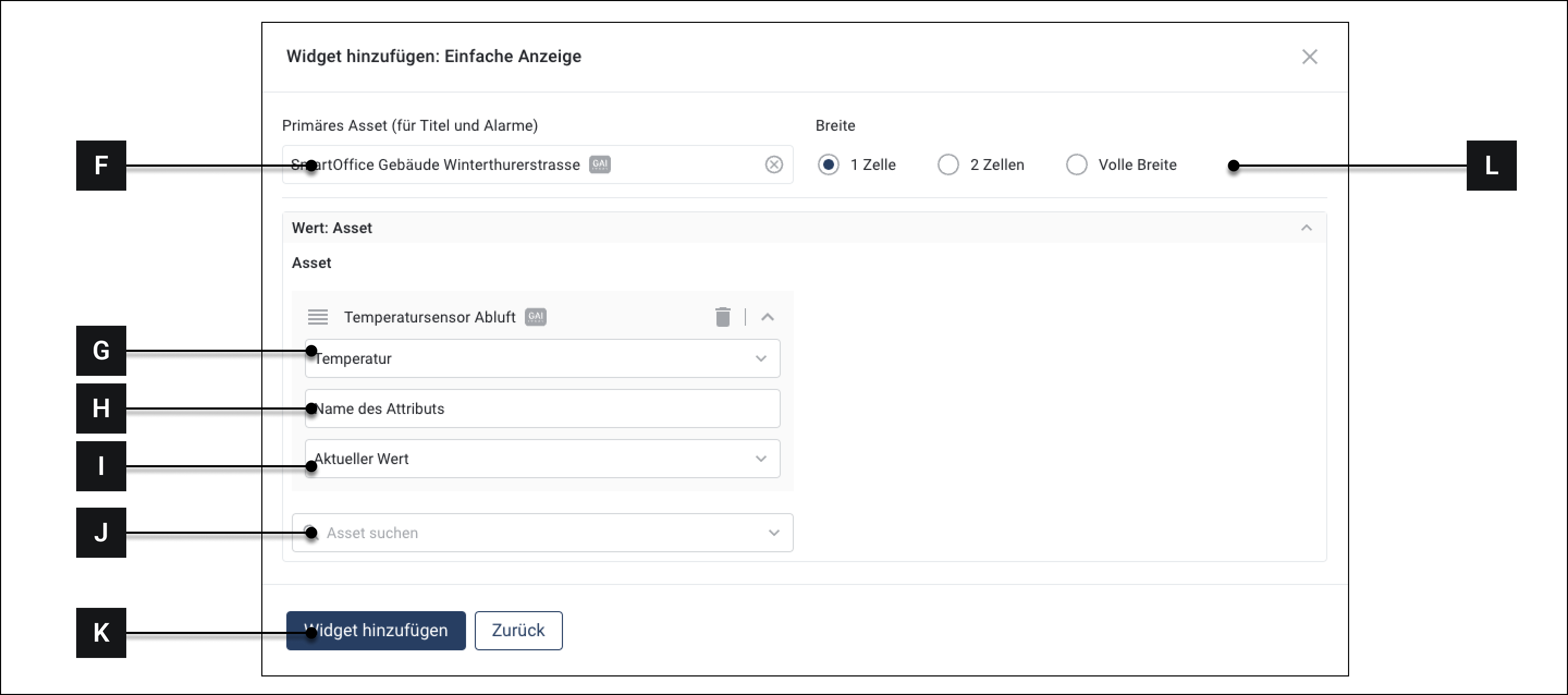
<table><thead><tr><th width="121.33333333333331"></th><th></th><th></th></tr></thead><tbody><tr><td><strong>[F]</strong></td><td>Primäres Asset</td><td>Primäres Asset auswählen. Diese Auswahl bestimmt, welcher Titel <strong>[A]</strong> im Widget erscheint</td></tr><tr><td><strong>[G]</strong></td><td>Attribut</td><td>Das Attribut dessen Wert im Widget angezeigt wird</td></tr><tr><td><strong>[H]</strong></td><td>Name des Attributs</td><td>Wird im Widget angezeigt <strong>[D]</strong></td></tr><tr><td><strong>[I]</strong></td><td>Aktueller Wert/Aggregierter Wert</td><td>Wählen Sie aus, ob der aktuelle Wert oder ein aggregierter Wert angezeigt werden soll.</td></tr><tr><td><strong>[J]</strong></td><td>Weitere Assets hinzufügen</td><td>Weitere Assets hinzufügen</td></tr><tr><td><strong>[K]</strong></td><td>Widget hinzufügen</td><td>Eingaben speichern und Widget hinzufügen</td></tr><tr><td><strong>[L]</strong></td><td>Breite</td><td>Auswählen, wie viel Raum auf dem Dashboard das Widget einnehmen soll.</td></tr></tbody></table>