> For the complete documentation index, see [llms.txt](https://docs.buildings.ability.abb/collection/llms.txt). Markdown versions of documentation pages are available by appending `.md` to page URLs; this page is available as [Markdown](https://docs.buildings.ability.abb/collection/german/fur-entwickler/engineering.md).
# Engineering
Die Ausrichtung von BuildingPro Suites an den Anforderungen und Bedürfnissen der Kunden und der Mandantenumgebung ist von entscheidender Bedeutung. Für dieses BuildingPro-Suites-Engineering stehen eine Vielzahl von Methoden und Werkzeugen zur Verfügung, die alle Anwendungsbereiche abdecken.
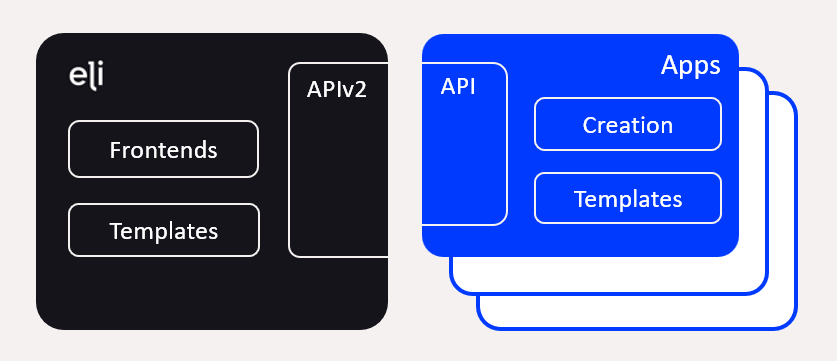
Die folgende Abbildung gibt einen Überblick über die Methoden und Werkzeuge für das BuildingPro-Suites-Engineering.
Insbesondere stehen folgende Methoden und Werkzeuge zur Verfügung:
* **Frontends**: Benutzeroberflächen für Konfiguration und Massendatenverarbeitung
* **Vorlagen**: Verwendung vorgefertigter Konfigurationsdaten
* **API**: Umfangreiche API-Schnittstellen
* **Erstellung**: Automatische Erstellung von Konfigurationsdaten
## Frontends
BuildingPro Suites bietet eine umfangreiche und benutzerfreundliche Oberfläche, die eine Vielzahl individueller Konfigurationen ermöglicht. Diese Oberfläche integriert zudem die Nutzung von API-Schnittstellen für [**Apps** ](/collection/german/verpflichtende-basis/platform-core/connect-hub/edge-app-marketplace-for-plug-ins-and-extentions/apps.md)als auch **APIv2**. Dadurch sind Konfiguration und Analyse von BuildingPro Suites mithilfe vorgefertigter JSON-Daten möglich. Die Erstellung und Konfiguration großer Datenmengen sind somit in einem strukturierten und definierten Format möglich.
## Vorlagen
Vorlagen dienen dazu, die Erstellung vorgefertigter Konfigurationsdaten zu vereinfachen.
[Apps ](/collection/german/verpflichtende-basis/platform-core/connect-hub/edge-app-marketplace-for-plug-ins-and-extentions/apps.md)bieten die Möglichkeit, für jeden Benutzer spezifische Dashboards über **Dashboard-Vorlagen**. Die Assets der Apps werden in typischen Dashboards angemessen dargestellt und können dann individuell angepasst werden.
BuildingPro Suites bietet die Möglichkeit, Regeln mithilfe von **Rule-Chain-Vorlagen**, wodurch das Erstellen identischer Regeln entfällt.
## API-Schnittstellen
Mit der **APIv2**, bietet BuildingPro Suites eine umfangreiche Schnittstelle zum Abfragen und Erstellen von Stamm- und Transaktionsdaten. Die Schnittstelle basiert auf JSON und kann programmgesteuert oder ad hoc verwendet werden.
**Apps** bieten ebenfalls API-Schnittstellen, um alle appspezifischen Konfigurationen zu automatisieren und App-Daten abzufragen.
## Erstellung
Bei Bedarf erstellen Apps in BuildingPro Suites automatisch Stamm- und Transaktionsdaten. Mithilfe von [**Kontinuierliche Asset-Erstellung**](/collection/german/fur-entwickler/app-sdk.md#continuous-asset-creation-cac), übernehmen Apps einen großen Teil der Konfiguration für gerätespezifische Apps. Assets werden in BuildingPro Suites automatisch erstellt und den jeweiligen Geräten zugeordnet.
---
# Agent Instructions
This documentation is published with GitBook. GitBook is the documentation platform designed so that both humans and AI agents can read, navigate, and reason over technical content effectively. Learn more at gitbook.com.
## Querying This Documentation
If you need additional information that is not directly available in this page, you can query the documentation dynamically by asking a question.
Perform an HTTP GET request on the current page URL with the `ask` query parameter, and the optional `goal` query parameter:
```
GET https://docs.buildings.ability.abb/collection/german/fur-entwickler/engineering.md?ask=&goal=
```
`ask` is the immediate question: it should be specific, self-contained, and written in natural language.
`goal` is optional and describes the broader end goal you are ultimately trying to accomplish on behalf of the user. GitBook uses it to tailor the answer towards what is most useful for that goal.
The response will contain a direct answer to the question and relevant excerpts and sources from the documentation.
Use this mechanism when the answer is not explicitly present in the current page, you need clarification or additional context, or you want to retrieve related documentation sections.