> For the complete documentation index, see [llms.txt](https://docs.buildings.ability.abb/collection/llms.txt). Markdown versions of documentation pages are available by appending `.md` to page URLs; this page is available as [Markdown](https://docs.buildings.ability.abb/collection/german/plattform/live-cockpit/widgets/custom-widgets/modules/trend.md).

# Trend

Mit dem Modul „Trend“ können Sie Trends in einem Widget anzeigen. Das Modul bietet Ihnen umfangreiche Optionen zur Konfiguration von Trends.

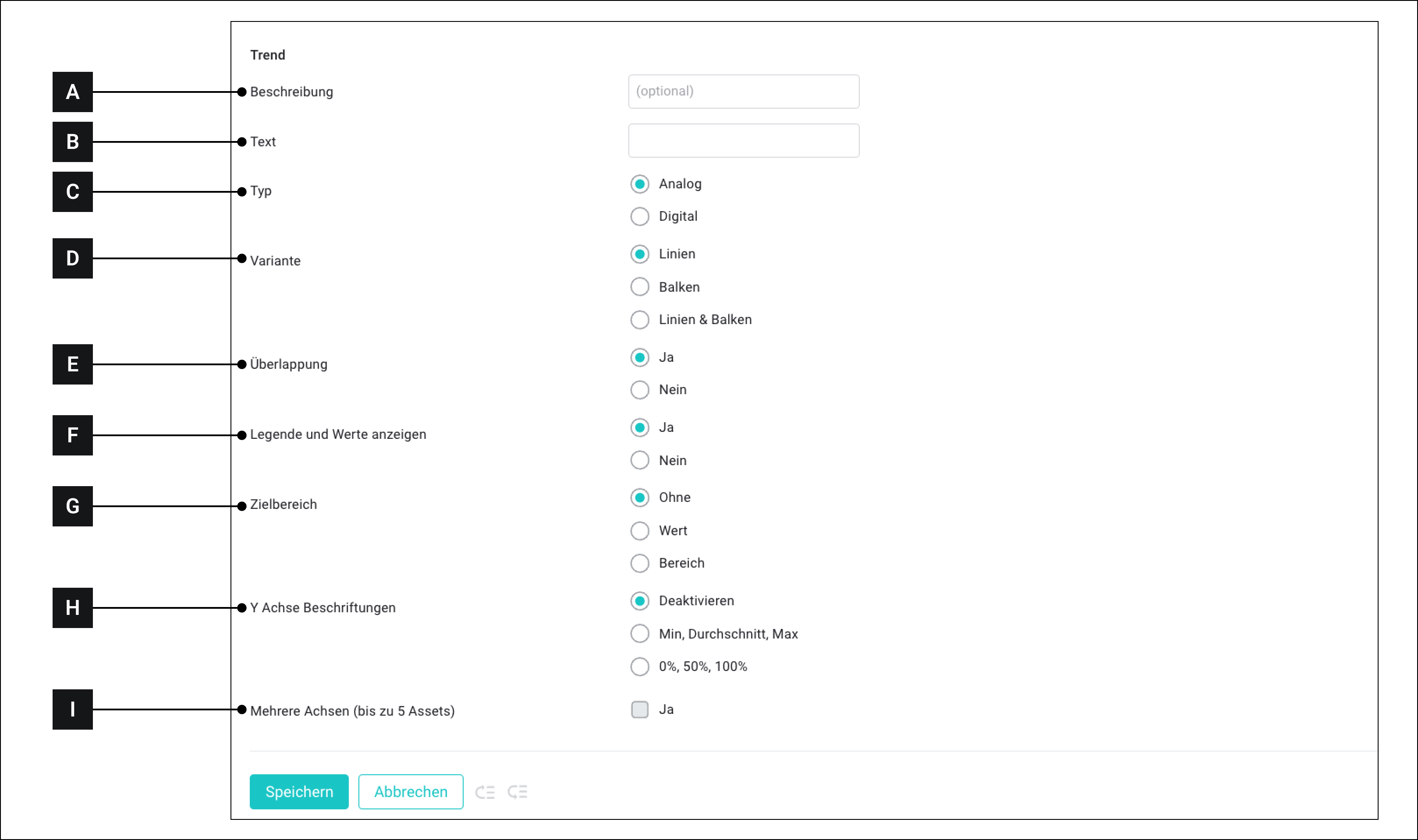
<figure><img src="https://3489494878-files.gitbook.io/~/files/v0/b/gitbook-x-prod.appspot.com/o/spaces%2F9GvUpaatBiReR43XFSMg%2Fuploads%2F27VZ210mHwX4TQccdbbc%2FDC3160C3-89EF-458C-9218-075C84D0A0E7.png?alt=media&#x26;token=ccd1d301-7453-4c7e-8d1b-ec9fc3c95aac" alt=""><figcaption><p>Die Konfigurationsoptionen für das Modul „Trend“</p></figcaption></figure>

<table data-full-width="true"><thead><tr><th width="71.13329060872394"></th><th width="125.20001220703125"></th><th></th></tr></thead><tbody><tr><td><strong>[A]</strong></td><td>Beschreibung</td><td>Dieser Text wird angezeigt, wenn das benutzerdefinierte Widget später mit Assets verbunden wird.</td></tr><tr><td><strong>[B]</strong></td><td>Text</td><td>Freitext</td></tr><tr><td><strong>[C]</strong></td><td>Typ</td><td><ul><li><strong>Digital:</strong> Wählen Sie den Typ „Digital“, wenn Sie die Historie eines Assets verfolgen möchten, das Werte zwischen 0 und 1 sendet, z. B. einen Kontaktsensor.</li><li><strong>Analog:</strong> Wählen Sie den Typ „Analog“, wenn Sie die Historie eines Assets verfolgen möchten, das andere Werte als 0 und 1 sendet, insbesondere Gleitkommazahlen.<br>Dazu gehören die meisten Assets, die andere Status als „Ein“ und „Aus“ haben, z. B. Temperatursensoren.</li></ul></td></tr><tr><td><strong>[D]</strong></td><td>Variante</td><td>Wählen Sie, ob die Daten als Liniendiagramm, Balkendiagramm oder beides angezeigt werden sollen.</td></tr><tr><td><strong>[E]</strong></td><td>Überlagerung</td><td><p>Mögliche Optionen:</p><ul><li><strong>Ja</strong>: alle Parameter werden in einer Zeile angezeigt.</li><li><strong>Nein</strong>: Jeder Parameter wird in einer separaten Zeile angezeigt</li></ul></td></tr><tr><td><strong>[F]</strong></td><td>Legende und Werte</td><td><p>Mögliche Optionen:</p><ul><li><strong>Ja</strong>: Jeder Parameter wird ausdrücklich mit seinem Namen und einem numerischen Wert angezeigt.</li><li><strong>Nein</strong>: Weder der Wert noch der Titel wird angezeigt.</li></ul><p>Ob der aktuelle Wert oder der aggregierte Wert für einen Parameter angezeigt wird, kann ausgewählt werden, wenn ein Asset mit dem Widget verbunden wird.</p></td></tr><tr><td><strong>[G]</strong></td><td>Zielbereich</td><td>Die Informationen für den Zielbereich können eingegeben werden, wenn das benutzerdefinierte Widget später mit Assets verbunden wird.</td></tr><tr><td><strong>[H]</strong></td><td>Y-Achsenbeschriftung</td><td>Gibt an, ob auf der Y-Achse eine Beschriftung angezeigt werden soll.</td></tr><tr><td><strong>[i]</strong></td><td>Mehrere Achsen</td><td><p>Sollte nur aktiviert werden, wenn:</p><ul><li>„Überlagerung“ auf „Ja“ gesetzt ist</li><li>„Y-Achsenbeschriftung“ auf „Min, Durchschnitt, Max“ gesetzt ist</li></ul></td></tr></tbody></table>


---

# Agent Instructions
This documentation is published with GitBook. GitBook is the documentation platform designed so that both humans and AI agents can read, navigate, and reason over technical content effectively. Learn more at gitbook.com.

## Querying This Documentation
If you need additional information that is not directly available in this page, you can query the documentation dynamically by asking a question.

Perform an HTTP GET request on the current page URL with the `ask` query parameter, and the optional `goal` query parameter:

```
GET https://docs.buildings.ability.abb/collection/german/plattform/live-cockpit/widgets/custom-widgets/modules/trend.md?ask=<question>&goal=<endgoal>
```

`ask` is the immediate question: it should be specific, self-contained, and written in natural language.
`goal` is optional and describes the broader end goal you are ultimately trying to accomplish on behalf of the user. GitBook uses it to tailor the answer towards what is most useful for that goal.

The response will contain a direct answer to the question and relevant excerpts and sources from the documentation.

Use this mechanism when the answer is not explicitly present in the current page, you need clarification or additional context, or you want to retrieve related documentation sections.
