> For the complete documentation index, see [llms.txt](https://docs.buildings.ability.abb/collection/llms.txt). Markdown versions of documentation pages are available by appending `.md` to page URLs; this page is available as [Markdown](https://docs.buildings.ability.abb/collection/german/plattform/platform-core/baseline-and-factors/heating-and-cooling-days/configure-heating-and-cooling-days-for-an-asset.md).

# Heiz- und Kühltage für ein Asset konfigurieren

Konfigurieren Sie Heizgradtage, Kühlgradtage oder beides für ein einzelnes Asset. Das Asset muss zu einer Site mit konfigurierter Standortangabe gehören, damit Wetterdaten für die Berechnung abgerufen werden können. Heizgradtage und Kühlgradtage können auf jeden Asset-Typ angewendet werden.

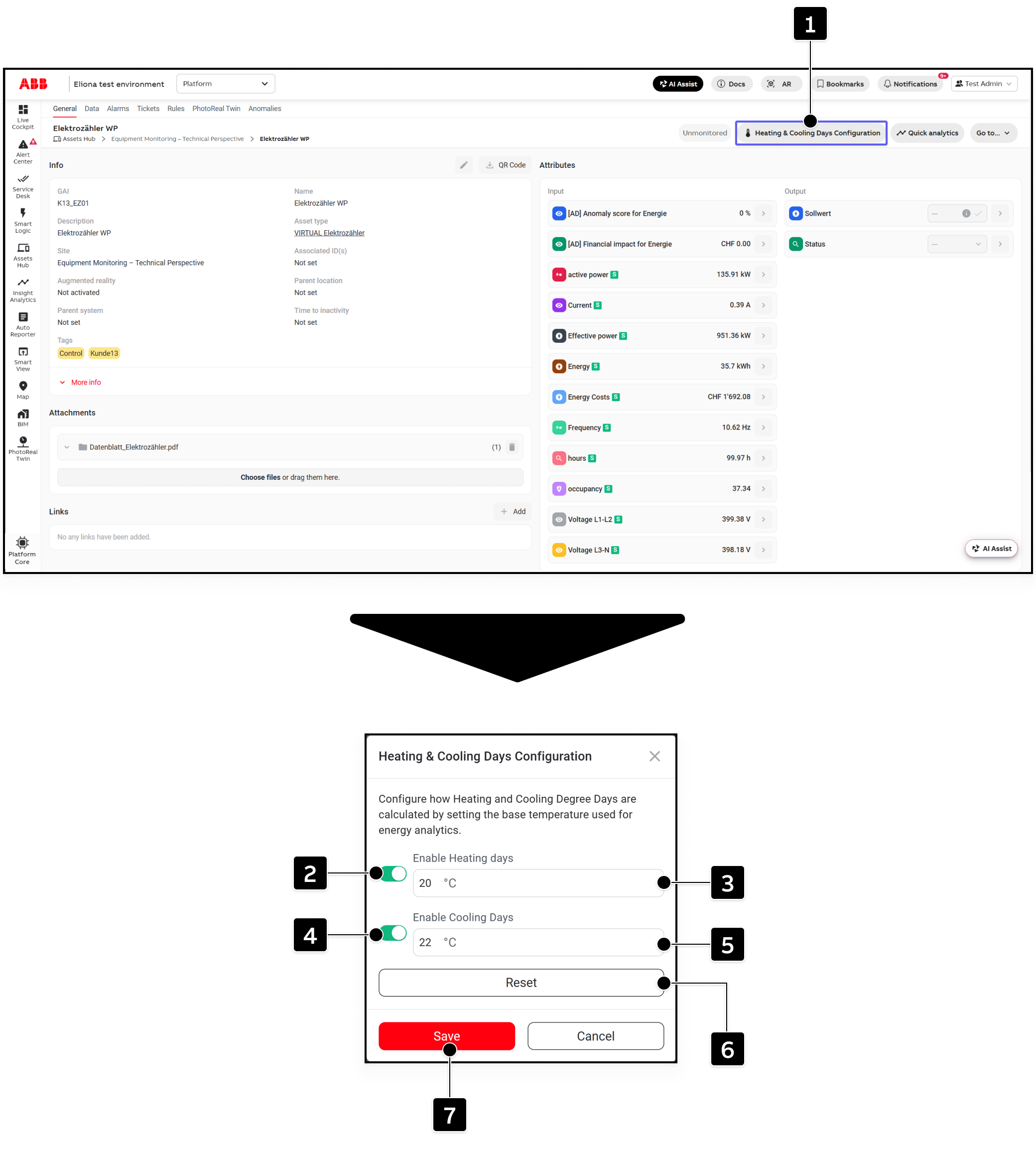
Öffnen Sie das erforderliche Asset in [Asset-Details](/collection/german/verpflichtende-basis/assets/asset-details.md). Klicken Sie dann auf *Konfiguration der Heiz- und Kühlgradtage* **\[1]**.

<figure><img src="https://2215908449-files.gitbook.io/~/files/v0/b/gitbook-x-prod.appspot.com/o/spaces%2FOqGnkz52o2zVUsEGEZGk%2Fuploads%2Fgit-blob-5ac7d42227ba56c76ae5ee2cad484024b4e96b9c%2FOpen%20and%20configure%20Heating%20and%20coolind%20days%20Asset%20configuration.png?alt=media" alt="Asset Details with the Heating and Cooling Days Configuration button and configuration dialog marked"><figcaption></figcaption></figure>

## Konfigurationssteuerungen

<table data-header-hidden data-search="false"><thead><tr><th width="55.5199580078125">Kennzeichnung</th><th width="185">Steuerelement</th><th>Beschreibung</th></tr></thead><tbody><tr><td><strong>[1]</strong></td><td><strong>Konfiguration der Heiz- und Kühlgradtage</strong></td><td>Öffnet den Konfigurationsdialog für das ausgewählte Asset.</td></tr><tr><td><strong>[2]</strong></td><td><strong>Heizgradtage aktivieren</strong></td><td>Aktiviert das Attribut Heizgradtage für den Asset-Typ. Die Basistemperatur wird zunächst aus dem Mandantenstandard übernommen.</td></tr><tr><td><strong>[3]</strong></td><td><strong>Basistemperatur für Heizgradtage</strong></td><td>Legt eine assetspezifische Basistemperatur für Heizgradtage fest.</td></tr><tr><td><strong>[4]</strong></td><td><strong>Kühlgradtage aktivieren</strong></td><td>Aktiviert das Attribut Kühlgradtage für den Asset-Typ. Die Basistemperatur wird zunächst aus dem Mandantenstandard übernommen.</td></tr><tr><td><strong>[5]</strong></td><td><strong>Basistemperatur für Kühlgradtage</strong></td><td>Legt eine assetspezifische Basistemperatur für Kühlgradtage fest.</td></tr><tr><td><strong>[6]</strong></td><td><strong>Zurücksetzen</strong></td><td>Stellt die Mandanten-Standardeinstellungen wieder her und deaktiviert Heizgradtage und Kühlgradtage für dieses Asset.</td></tr><tr><td><strong>[7]</strong></td><td><strong>Speichern</strong></td><td>Speichert die Asset-Konfiguration.</td></tr></tbody></table>

## Das Asset konfigurieren

1. Heizgradtage aktivieren mit **\[2]** und ändern Sie bei Bedarf die vorausgefüllte Basistemperatur unter **\[3]**.
2. Kühlgradtage aktivieren mit **\[4]** und ändern Sie bei Bedarf die vorausgefüllte Basistemperatur unter **\[5]**.
3. Klicken Sie auf **\[7]** um die Konfiguration zu speichern.

Klicken Sie auf **\[6]** wenn Sie die assetspezifische Konfiguration entfernen, zu den Mandanten-Standardeinstellungen zurückkehren und beide Optionen deaktivieren möchten.

{% hint style="info" %}
Der für eine Berechnung verwendete Wert ist die assetspezifische Basistemperatur, wenn sie konfiguriert ist. Andernfalls wird der Mandantenstandard verwendet.
{% endhint %}

## Die erstellten Attribute überprüfen

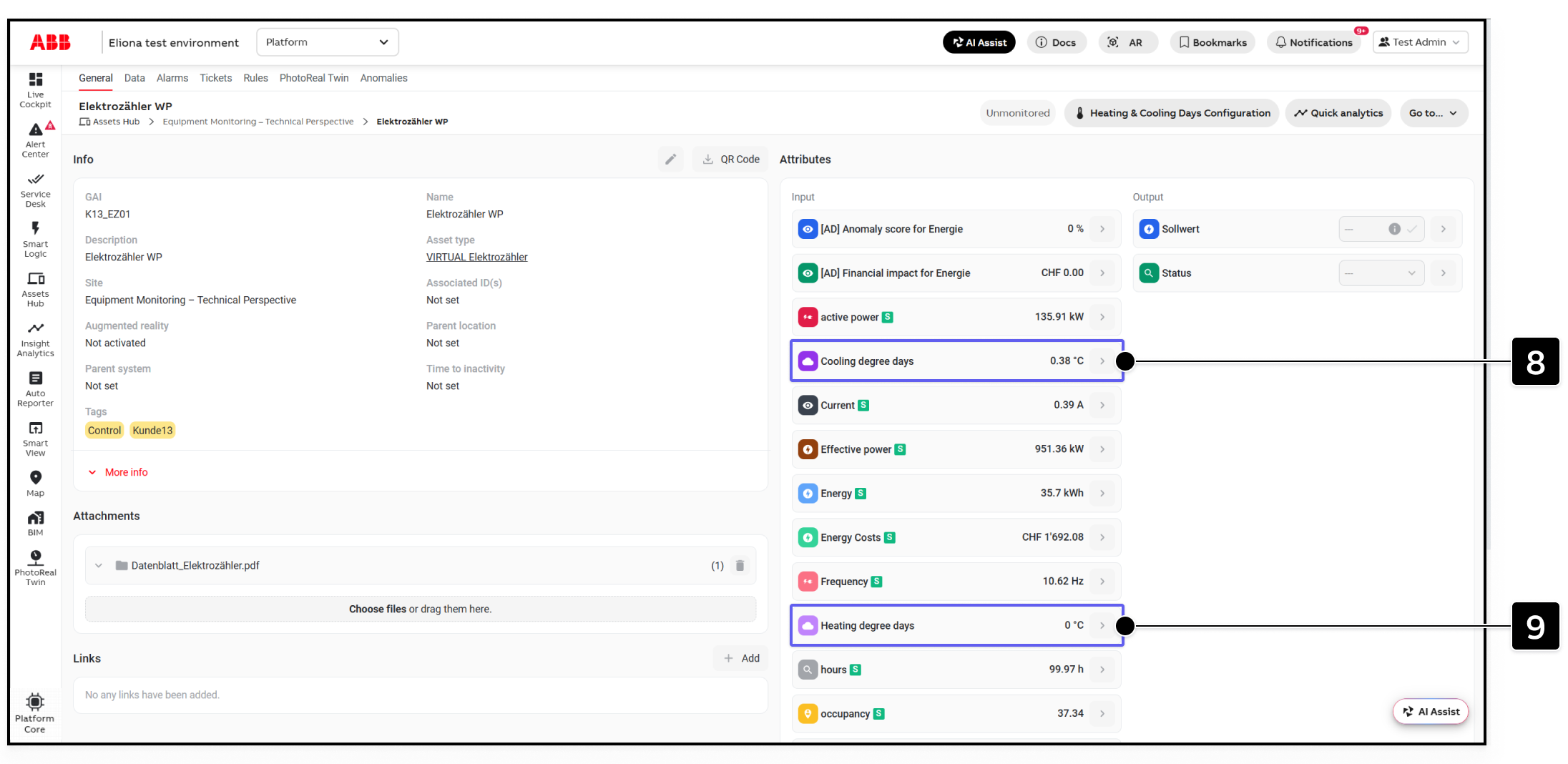
Warten Sie nach dem Speichern einige Sekunden und aktualisieren Sie die Seite „Asset-Details“. Die aktivierten Attribute werden auf dem Asset-Typ erstellt und erscheinen auf dem ausgewählten Asset.

<figure><img src="https://2215908449-files.gitbook.io/~/files/v0/b/gitbook-x-prod.appspot.com/o/spaces%2FOqGnkz52o2zVUsEGEZGk%2Fuploads%2Fgit-blob-db4de9a42057fbad68707e7d6f531e0aa45eccfd%2FAttributes%20Heating%20and%20coolind%20days%20Asset%20details.png?alt=media" alt="Asset Details with the Cooling degree days and Heating degree days attributes marked"><figcaption></figcaption></figure>

<table data-header-hidden data-search="false"><thead><tr><th width="55.5199580078125">Kennzeichnung</th><th width="185">Attribut</th><th>Beschreibung</th></tr></thead><tbody><tr><td><strong>[8]</strong></td><td><strong>Kühlgradtage</strong></td><td>Stündlicher Wert der Kühlgradtage für das Asset.</td></tr><tr><td><strong>[9]</strong></td><td><strong>Heizgradtage</strong></td><td>Stündlicher Wert der Heizgradtage für das Asset.</td></tr></tbody></table>

Der Dienst schreibt einmal pro Stunde einen neuen Wert in jedes aktivierte Attribut. Da die Attribute auf dem Asset-Typ erstellt werden, können sie auch auf anderen Assets mit demselben Asset-Typ erscheinen. Diese Attribute können auf anderen Assets leer bleiben, bis Heizgradtage oder Kühlgradtage für das einzelne Asset konfiguriert und berechnet werden.

Die stündlichen Werte entsprechen einem Vierundzwanzigstel der täglichen Gradtagwerte. Um die Gradtagwerte für einen Tag anzuzeigen, verwenden Sie [Asset-Daten](/collection/german/verpflichtende-basis/assets/asset-data.md#display-aggregated-data), wählen Sie das relevante Attribut aus, setzen Sie das Aggregationsintervall auf **Tag**, und verwenden Sie die **Summe** Aggregation.


---

# Agent Instructions
This documentation is published with GitBook. GitBook is the documentation platform designed so that both humans and AI agents can read, navigate, and reason over technical content effectively. Learn more at gitbook.com.

## Querying This Documentation
If you need additional information that is not directly available in this page, you can query the documentation dynamically by asking a question.

Perform an HTTP GET request on the current page URL with the `ask` query parameter, and the optional `goal` query parameter:

```
GET https://docs.buildings.ability.abb/collection/german/plattform/platform-core/baseline-and-factors/heating-and-cooling-days/configure-heating-and-cooling-days-for-an-asset.md?ask=<question>&goal=<endgoal>
```

`ask` is the immediate question: it should be specific, self-contained, and written in natural language.
`goal` is optional and describes the broader end goal you are ultimately trying to accomplish on behalf of the user. GitBook uses it to tailor the answer towards what is most useful for that goal.

The response will contain a direct answer to the question and relevant excerpts and sources from the documentation.

Use this mechanism when the answer is not explicitly present in the current page, you need clarification or additional context, or you want to retrieve related documentation sections.