> For the complete documentation index, see [llms.txt](https://docs.buildings.ability.abb/collection/llms.txt). Markdown versions of documentation pages are available by appending `.md` to page URLs; this page is available as [Markdown](https://docs.buildings.ability.abb/collection/mandatory-base/assets/attribute-functions/filters.md).
# Filters
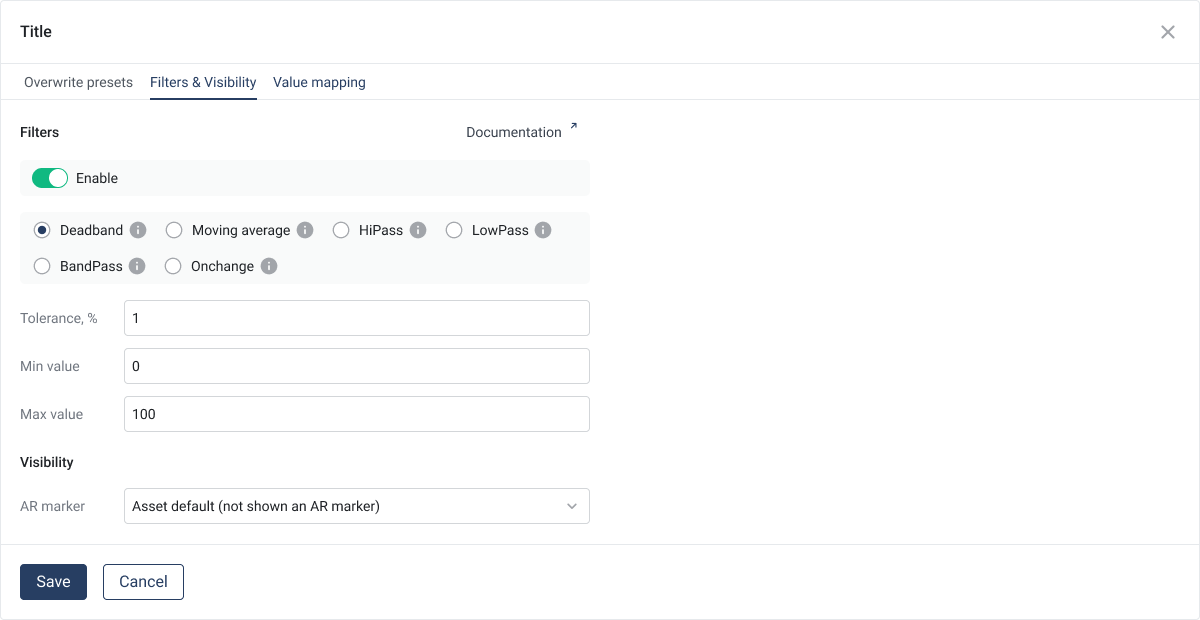
The filter service offers a comprehensive selection of filters that can be applied to incoming data. These filters are designed to increase the quality and relevance of the stored data by only allowing significant changes and important information to pass through. Data is only stored in the database if it has passed the filter, which means that the filter is only applied to the value after the calculation.
This ensures that only relevant data points are recorded, which increases the efficiency of data processing and storage.
{% hint style="info" %}
Filters are applied to the value AFTER the calculation!
{% endhint %}
## Supported Filter Types
## **1. Deadband Filter**
The **deadband filter** only saves values if the value after the calculation differs significantly from the previous one. The change is defined by the following formula:
**Formula:**
$$\text{Epsilon} = \frac{\text{Tolerance}}{2} \cdot \left(\frac{\text{Max} - \text{Min}}{100}\right)$$
A new value is only saved if the absolute difference to the previous value is greater than or equal to **Epsilon**:
$$∣\text{New value}−\text{Previous value}∣ ≥ \text{Epsilon}$$
**Example:**
* **Tolerance:** 5 %
* **Maximum value:** 100 °C
* **Minimum value:** 0 °C
* **Epsilon:**
$$\text{Epsilon} = \frac{5}{2} \cdot \left(\frac{100 - 0}{100}\right) = 2.5$$
* **Incoming values:** 20 °C → 21.5 °C → 23 °C → 24.4 °C → 26 °C
* **Result:**
* 20 °C is saved (first value).
* 21.5 °C is not saved because the change |21.5 - 20| = 1.5 **< 2.5** is not sufficient.
* 23 °C is saved because |23 - 20| = 3 **≥ 2.5**
* 24.4 °C is not saved because |24.4 - 23| = 1.4 **< 2.5**
* 26 °C is saved because |26 - 23| = 3.0 **≥ 2.5**
***
## **2. Moving Average Filter**
The **moving average filter** does not save the original values, but the average of a defined number of consecutive values (window size).
**How it works:**
* The filter collects values within a defined window.
* After the window size is reached, the average of the values is calculated and saved.
* The window is then shifted by one value, and the process repeats itself.
**Example:**
* **Window size:** 3 values
* **Incoming values:** 12 V → 15 V → 18 V → 21 V → 24 V
**Calculations:**
Average of the first 3 values (12 V, 15 V, 18 V):
$$\frac{15 + 18 + 21}{3} = 18 , \text{V}$$
Average of the next 3 values (18 V, 21 V, 24 V):
$$\frac{18 + 21 + 24}{3} = 21 , \text{V}$$
**Saved values:** 15 V, 18 V, 21 V.
***
## **3. Hi-pass Filter**
The Hi-pass filter only saves values that are **strictly higher** than a defined limit. This is ideal for monitoring threshold exceedances.
**Example:**
* **Limit:** 50 kW
* **Incoming values:** 45 kW → 52 kW → 48 kW → 55 kW
* **Saved values:** 52 kW, 55 kW
***
## **4. Low-pass Filter**
The Low-pass filter only saves values that are **strictly lower** than a defined limit. This filter is useful for analyzing low values or adhering to upper limits.
**Example:**
* **Limit:** 30 ppm
* **Incoming values:** 25 ppm → 35 ppm → 20 ppm → 30 ppm
* **Saved values:** 25 ppm, 20 ppm
***
## **5. Band-pass Filter**
The Band-pass filter only saves values that are **within a defined range** (band). The band is determined by a Hi- and a Low-limit.
**Example:**
* **Band:** 10 to 20 V
* **Incoming values:** 9 V → 15 V → 25 V → 18 V
* **Saved values:** 15 V, 18 V
***
## **6. OnChange Filter**
The OnChange filter only saves values when they are **not equal to the previous value**. This excludes redundant values and only records changes.
**Example:**
* **Incoming values:** 100 l/h → 100 l/h → 105 l/h → 105 l/h → 110 l/h
* **Saved values:** 100 l/h, 105 l/h, 110 l/h
---
# Agent Instructions
This documentation is published with GitBook. GitBook is the documentation platform designed so that both humans and AI agents can read, navigate, and reason over technical content effectively. Learn more at gitbook.com.
## Querying This Documentation
If you need additional information that is not directly available in this page, you can query the documentation dynamically by asking a question.
Perform an HTTP GET request on the current page URL with the `ask` query parameter, and the optional `goal` query parameter:
```
GET https://docs.buildings.ability.abb/collection/mandatory-base/assets/attribute-functions/filters.md?ask=&goal=
```
`ask` is the immediate question: it should be specific, self-contained, and written in natural language.
`goal` is optional and describes the broader end goal you are ultimately trying to accomplish on behalf of the user. GitBook uses it to tailor the answer towards what is most useful for that goal.
The response will contain a direct answer to the question and relevant excerpts and sources from the documentation.
Use this mechanism when the answer is not explicitly present in the current page, you need clarification or additional context, or you want to retrieve related documentation sections.