# Ratings

Ratings of assets are a valuable tool for continuously monitoring and documenting the quality and condition of individual assets. They allow users to share their experiences and observations, which helps to improve the usage efficiency of the assets. By collecting feedback in the form of star ratings and comments, trends can be identified, common problems can be spotted, and measures for optimization can be taken. These ratings not only provide transparent insight into the performance and reliability of the assets but also promote the continuous improvement of asset management within the entire system.

***

<figure><img src="https://3489494878-files.gitbook.io/~/files/v0/b/gitbook-x-prod.appspot.com/o/spaces%2F9GvUpaatBiReR43XFSMg%2Fuploads%2FUUsr8QwgRqTqEEOOA5Cj%2FBewertungen.png?alt=media&#x26;token=e541d20d-c5f3-4434-b78b-fa5fa0e7b7b3" alt=""><figcaption></figcaption></figure>

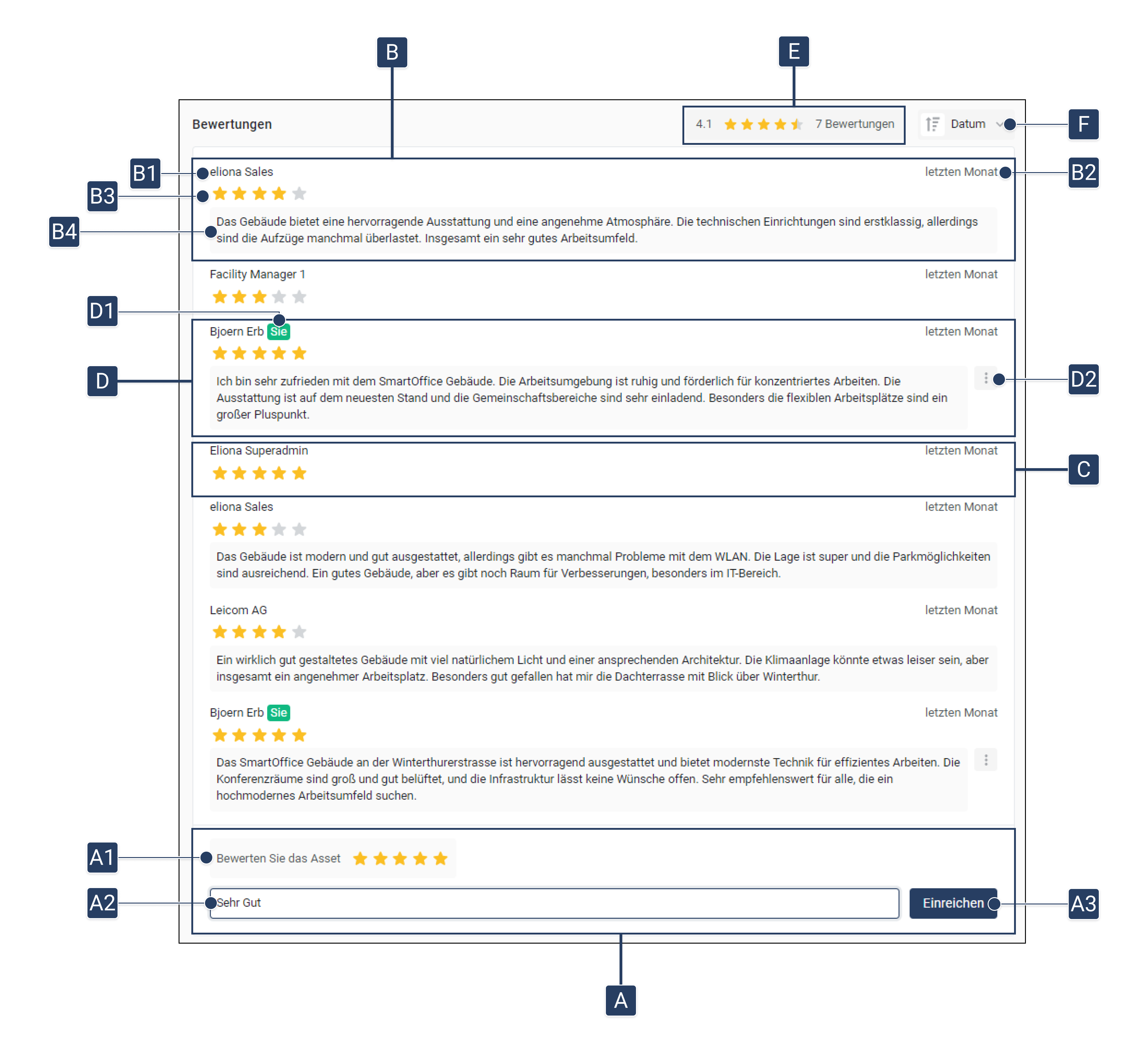
<table data-full-width="true"><thead><tr><th width="76.20001220703125"></th><th width="258.79998779296875"></th><th></th></tr></thead><tbody><tr><td><strong>[A]</strong></td><td>Rate asset</td><td>Here you can submit a rating for the asset.</td></tr><tr><td><strong>[A1]</strong></td><td>Star rating</td><td>Choose how many stars you want to give the asset.</td></tr><tr><td><strong>[A2]</strong></td><td>Add a comment</td><td>Optional: Add a comment to your rating.</td></tr><tr><td><strong>[A3]</strong></td><td>Submit rating</td><td>Submit your rating.</td></tr><tr><td><strong>[B]</strong></td><td>Ratings with comments</td><td>See the ratings of other users, including their comments.</td></tr><tr><td><strong>[B1]</strong></td><td>Name of the sender</td><td>The name of the person who wrote the rating.</td></tr><tr><td><strong>[B2]</strong></td><td>Time of rating</td><td>Indicates when the rating was written.</td></tr><tr><td><strong>[B3]</strong></td><td>Stars given</td><td>The number of stars given in the rating.</td></tr><tr><td><strong>[B4]</strong></td><td>Comment</td><td>The comment belonging to the star rating.</td></tr><tr><td><strong>[C]</strong></td><td>Rating without comment</td><td>A star rating without an additional comment.</td></tr><tr><td><strong>[D]</strong></td><td>Your own rating</td><td>Here you can see your own rating.</td></tr><tr><td><strong>[D1]</strong></td><td>Labeling of your rating</td><td>Your ratings are marked with a green "You."</td></tr><tr><td><strong>[D2]</strong></td><td>Options for your own rating</td><td>You can subsequently <strong>edit</strong> or <strong>delete</strong> your rating.</td></tr><tr><td><strong>[E]</strong></td><td>Overall rating of the asset</td><td>Shows the average star rating of the asset, both numerically and in star form, as well as the number of ratings submitted.</td></tr><tr><td><strong>[F]</strong></td><td>Sort ratings</td><td>Sort the ratings by date, stars, or author.</td></tr></tbody></table>

## Write a Rating

In the Asset Details, you have the option to write ratings for each asset.

1. Open the [-> Asset Details](https://docs.buildings.ability.abb/collection/mandatory-base/assets/asset-details).
2. Scroll down to the ratings on the right side. ▷ You will see **"Rate the asset"** and a text field. **\[A]**
3. In **\[A1]**, select how many **stars** you want to give the asset.
4. Optional: Add a **comment** to your rating in **\[A2]**.
5. Click on **"Submit" \[A3]**

   ▷ Your rating has been successfully submitted.


---

# Agent Instructions: Querying This Documentation

If you need additional information that is not directly available in this page, you can query the documentation dynamically by asking a question.

Perform an HTTP GET request on the current page URL with the `ask` query parameter:

```
GET https://docs.buildings.ability.abb/collection/mandatory-base/assets/ratings.md?ask=<question>
```

The question should be specific, self-contained, and written in natural language.
The response will contain a direct answer to the question and relevant excerpts and sources from the documentation.

Use this mechanism when the answer is not explicitly present in the current page, you need clarification or additional context, or you want to retrieve related documentation sections.