> For the complete documentation index, see [llms.txt](https://docs.buildings.ability.abb/collection/llms.txt). Markdown versions of documentation pages are available by appending `.md` to page URLs; this page is available as [Markdown](https://docs.buildings.ability.abb/collection/mandatory-base/platform-core/connect-hub/connectivity-as-a-service.md).
# Connectivity as a Service
Connect Devices to BuildingPro Suites
## About This Chapter
This chapter describes how to connect external devices to BuildingPro Suites and display data from these devices in BuildingPro Suites.
## Procedure
### Overview
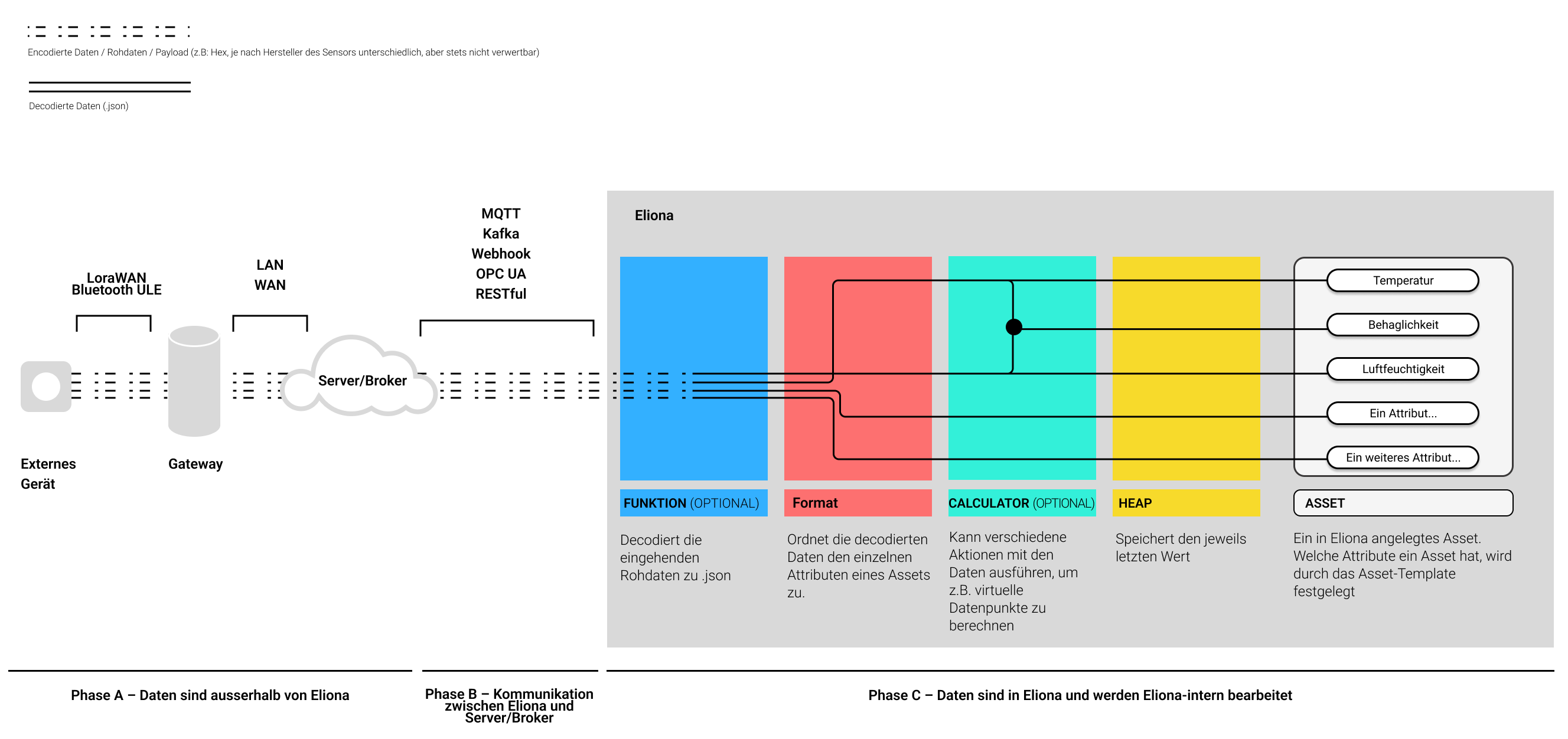
The first step is to establish a communication link between BuildingPro Suites and the devices to be connected. In Fig. 1, this is Phase "B".
In the second step, the incoming raw data usually has to be decoded. This is because external devices send their data (payload) encoded or in another unusable format.
In the third step, the decoded data values are finally assigned to the individual [↗ attributes](/collection/mandatory-base/assets/attribute-functions.md) of an asset via formats.
The last two steps occur in Phase C.
### Details
Fig. 1 shows the schematic data flow from an external device to BuildingPro Suites.
Fig. 1 – Data flow from external devices to BuildingPro Suites.
#### Phase A
Phase A takes place entirely outside of BuildingPro Suites. In Phase A, raw data from individual devices is provided and sent to a server or broker. An example of such a server is [↗ TTN \[External Link\]](https://www.thethingsnetwork.org/)
The details, e.g., which transmission format is used, vary greatly depending on the manufacturer and device. Phase A is not a part of BuildingPro Suites and is not explained in more detail in this documentation. Consult the documentation of the external devices or servers to learn more about this topic.
{% hint style="info" %}
For the further steps in this document, it is assumed that you have access to correctly configured external devices and/or access to a server.
{% endhint %}
#### Phase B
In Phase B, the actual connection of BuildingPro Suites and the device data takes place. In this phase, a data connection is established between BuildingPro Suites and the external devices.
BuildingPro Suites accepts the following interfaces:
* [↗ MQTT](/collection/mandatory-base/platform-core/connect-hub/connectivity-as-a-service/connect-devices-via-mqtt.md)
* [↗ Webhook](/collection/mandatory-base/platform-core/connect-hub/connectivity-as-a-service/connect-devices-via-webhook.md)
* [↗ RESTful](/collection/mandatory-base/platform-core/connect-hub/connectivity-as-a-service/connect-devices-via-restful/configure-restful-connection.md)
* Kafka
* [↗ OPC UA](/collection/mandatory-base/platform-core/connect-hub/connectivity-as-a-service/connect-devices-via-opc-ua.md)
Click on a link to jump directly to the instructions that describe how to establish a data connection via the corresponding interface.
#### Phase C
In Phase C, the data is processed and made usable within BuildingPro Suites.
* The data sent by the external devices and received in BuildingPro Suites is in most cases not easily readable. Depending on the manufacturer, this raw data is encoded or is in a format that cannot be used further. Therefore, this raw data is decoded with **↗ functions** and converted into a human-readable .json format.
* The decoded data is assigned to the individual attributes of an asset via **↗ formats**.
## Prerequisites
The following prerequisites must be met to connect external devices:
#### Correctly Configured External Devices and Servers
The devices to be connected must be configured correctly and send data properly.
Servers and brokers must be configured correctly.
#### Existing Access Data for Servers, Brokers, and Other Services
The access data for servers and brokers must be known.
#### Asset Templates
It is assumed that you have created correct asset templates. The asset template must have the necessary asset attributes
#### Assets
Assets must be created based on the asset template.
---
# Agent Instructions
This documentation is published with GitBook. GitBook is the documentation platform designed so that both humans and AI agents can read, navigate, and reason over technical content effectively. Learn more at gitbook.com.
## Querying This Documentation
If you need additional information that is not directly available in this page, you can query the documentation dynamically by asking a question.
Perform an HTTP GET request on the current page URL with the `ask` query parameter, and the optional `goal` query parameter:
```
GET https://docs.buildings.ability.abb/collection/mandatory-base/platform-core/connect-hub/connectivity-as-a-service.md?ask=&goal=
```
`ask` is the immediate question: it should be specific, self-contained, and written in natural language.
`goal` is optional and describes the broader end goal you are ultimately trying to accomplish on behalf of the user. GitBook uses it to tailor the answer towards what is most useful for that goal.
The response will contain a direct answer to the question and relevant excerpts and sources from the documentation.
Use this mechanism when the answer is not explicitly present in the current page, you need clarification or additional context, or you want to retrieve related documentation sections.