> For the complete documentation index, see [llms.txt](https://docs.buildings.ability.abb/collection/llms.txt). Markdown versions of documentation pages are available by appending `.md` to page URLs; this page is available as [Markdown](https://docs.buildings.ability.abb/collection/platform/platform-core/baseline-and-factors/forecast-engine/create-a-new-forecast.md).

# Create a New Forecast

Create a forecast to generate a continually updated forecast attribute from a selected source attribute and optional contextual features.

Before you begin, [open the *Forecast Engine*](/collection/platform/platform-core/baseline-and-factors/forecast-engine/open-the-forecast-engine.md) and click on *Add Forecast*.

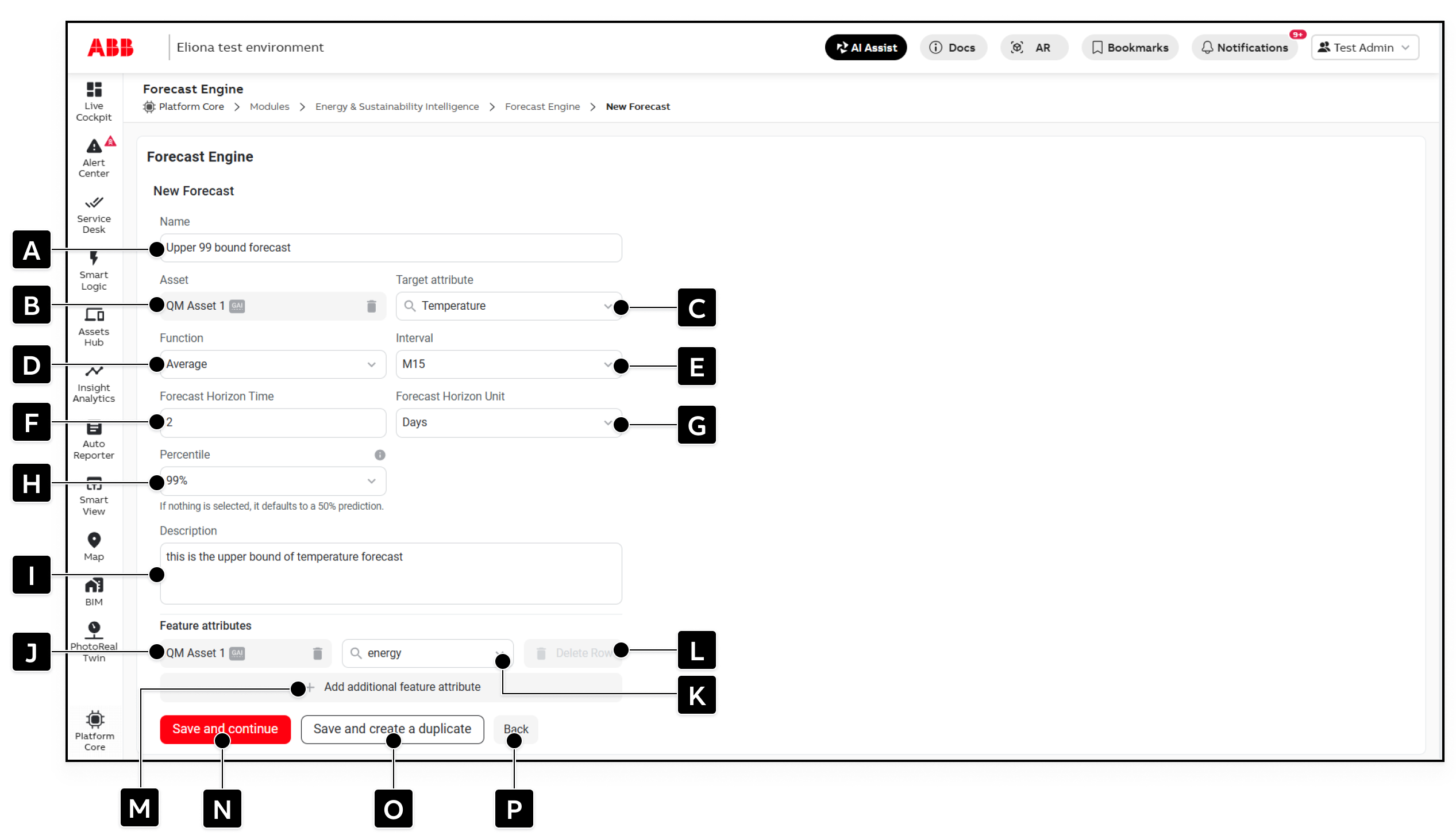
<figure><img src="https://2013058394-files.gitbook.io/~/files/v0/b/gitbook-x-prod.appspot.com/o/spaces%2FOqGnkz52o2zVUsEGEZGk%2Fuploads%2Fgit-blob-466563cf69b972152fe33cc8d41c746fa39565de%2Fnew%20forecast.png?alt=media" alt="The New Forecast page with configuration fields A through P marked"><figcaption></figcaption></figure>

## Configuration Fields

<table data-header-hidden data-search="false"><thead><tr><th width="55.51995849609375">Marking</th><th width="118.36004638671875">Field</th><th>Description</th></tr></thead><tbody><tr><td><strong>[A]</strong></td><td><strong>Name</strong></td><td>Name of the forecast. This is also the displayed name of the forecast attribute created on the selected asset.</td></tr><tr><td><strong>[B]</strong></td><td><strong>Asset</strong></td><td>Asset that contains the target data and on which the forecast attribute is created.</td></tr><tr><td><strong>[C]</strong></td><td><strong>Target attribute</strong></td><td>Source attribute containing the time series to forecast.</td></tr><tr><td><strong>[D]</strong></td><td><strong>Function</strong></td><td>Aggregation applied to the source data before forecasting. Available functions include <strong>Average</strong>, <strong>Time-weighted average</strong>, <strong>Sum</strong>, <strong>Counter</strong>, <strong>CUSUM counter</strong>, <strong>Minimum</strong>, and <strong>Maximum</strong>.</td></tr><tr><td><strong>[E]</strong></td><td><strong>Interval</strong></td><td>Time interval over which source values are aggregated.</td></tr><tr><td><strong>[F]</strong></td><td><strong>Forecast Horizon Time</strong></td><td>Number of horizon units to forecast into the future.</td></tr><tr><td><strong>[G]</strong></td><td><strong>Forecast Horizon Unit</strong></td><td>Unit used for the forecast horizon. Together, <strong>[F]</strong> and <strong>[G]</strong> define how far ahead the forecast is calculated.</td></tr><tr><td><strong>[H]</strong></td><td><strong>Percentile</strong></td><td>Probability percentile calculated by this forecast. If no percentile is selected, the forecast defaults to 50%.</td></tr><tr><td><strong>[I]</strong></td><td><strong>Description</strong></td><td>Optional description of the forecast and its purpose.</td></tr><tr><td><strong>[J]</strong></td><td><strong>Feature asset</strong></td><td>Asset containing a feature attribute used as additional forecasting context.</td></tr><tr><td><strong>[K]</strong></td><td><strong>Feature attribute</strong></td><td>Attribute whose data can improve the forecast by describing a factor related to the target.</td></tr><tr><td><strong>[L]</strong></td><td><strong>Delete Row</strong></td><td>Removes the corresponding feature attribute row.</td></tr><tr><td><strong>[M]</strong></td><td><strong>Add additional feature attribute</strong></td><td>Adds another feature attribute row.</td></tr><tr><td><strong>[N]</strong></td><td><strong>Save and continue</strong></td><td>Saves the forecast and returns to the forecast list.</td></tr><tr><td><strong>[O]</strong></td><td><strong>Save and create a duplicate</strong></td><td>Saves the forecast and opens a copy as the basis for another forecast.</td></tr><tr><td><strong>[P]</strong></td><td><strong>Back</strong></td><td>Returns to the forecast list without saving the current changes.</td></tr></tbody></table>

## Configure the Forecast

1. Enter a unique forecast name under **\[A]**.\
   ◈ The system uses this name as the displayed name of the generated attribute.
2. Select the asset under **\[B]** and the target attribute under **\[C]**.
3. Select the aggregation function under **\[D]** and its interval under **\[E]**.\
   ◈ For example, **Average** with an interval of 15 minutes forecasts values based on 15-minute averages.
4. Enter the horizon length under **\[F]** and select its unit under **\[G]**.\
   ◈ A value of `1` with the unit **Days** forecasts one day into the future.
5. Select the percentile under **\[H]**.
6. If required, enter a description under **\[I]**.
7. If relevant contextual data is available, select a feature asset under **\[J]** and a feature attribute under **\[K]**.
8. To include more context, click on **\[M]** and configure another feature row.\
   ◈ To remove a row, click on **\[L]**.
9. Complete the configuration with one of the following actions:
   * Click on **\[N]** to save and return to the list.
   * Click on **\[O]** to save and create a duplicate.
   * Click on **\[P]** to return to the list without saving.

{% hint style="warning" %}
After saving, wait a few seconds and then refresh the page so that the generated forecast attribute becomes visible in the platform and on the asset.
{% endhint %}

## Understand Percentiles

A percentile forecast expresses uncertainty as a probability-based estimate rather than treating the future as one exact outcome.

* **10%**: Lower estimate; 10% of modeled outcomes are expected at or below this value.
* **50%**: Median estimate; half of modeled outcomes are expected below and half above this value.
* **90%**: Upper estimate; 90% of modeled outcomes are expected at or below this value.

Configuring several forecasts for the same target with different percentiles provides an operating range. Comparing a lower, median, and upper estimate can reveal possible spikes, show their likelihood, and provide a fuller view of expected healthy operation.

{% hint style="info" %}
A percentile is not a certainty. For example, a 95th-percentile forecast indicates that approximately 95% of modeled outcomes are expected at or below that value and approximately 5% above it.
{% endhint %}

## Select Useful Feature Attributes

Feature attributes provide context that may improve forecast accuracy. When forecasting energy consumption, useful features can include:

* outside temperature
* people count or occupancy
* equipment operating mode
* temperature setpoint
* another control value that influences demand

Choose features that are available for the relevant period and have a meaningful relationship with the target. Adding unrelated features does not necessarily improve accuracy.

After saving, the *Forecast Engine* creates the forecast attribute and updates it on each forecast iteration. The value written is the predicted value at the end of the configured horizon; the complete future trend is recalculated as new data arrives.


---

# Agent Instructions
This documentation is published with GitBook. GitBook is the documentation platform designed so that both humans and AI agents can read, navigate, and reason over technical content effectively. Learn more at gitbook.com.

## Querying This Documentation
If you need additional information that is not directly available in this page, you can query the documentation dynamically by asking a question.

Perform an HTTP GET request on the current page URL with the `ask` query parameter, and the optional `goal` query parameter:

```
GET https://docs.buildings.ability.abb/collection/platform/platform-core/baseline-and-factors/forecast-engine/create-a-new-forecast.md?ask=<question>&goal=<endgoal>
```

`ask` is the immediate question: it should be specific, self-contained, and written in natural language.
`goal` is optional and describes the broader end goal you are ultimately trying to accomplish on behalf of the user. GitBook uses it to tailor the answer towards what is most useful for that goal.

The response will contain a direct answer to the question and relevant excerpts and sources from the documentation.

Use this mechanism when the answer is not explicitly present in the current page, you need clarification or additional context, or you want to retrieve related documentation sections.