Configure Tenant Defaults
The tenant configuration defines the default base temperatures available for assets. An asset-specific base temperature overrides the tenant default for that asset.
Before you begin, open Heating and Cooling Days.

Configuration Fields
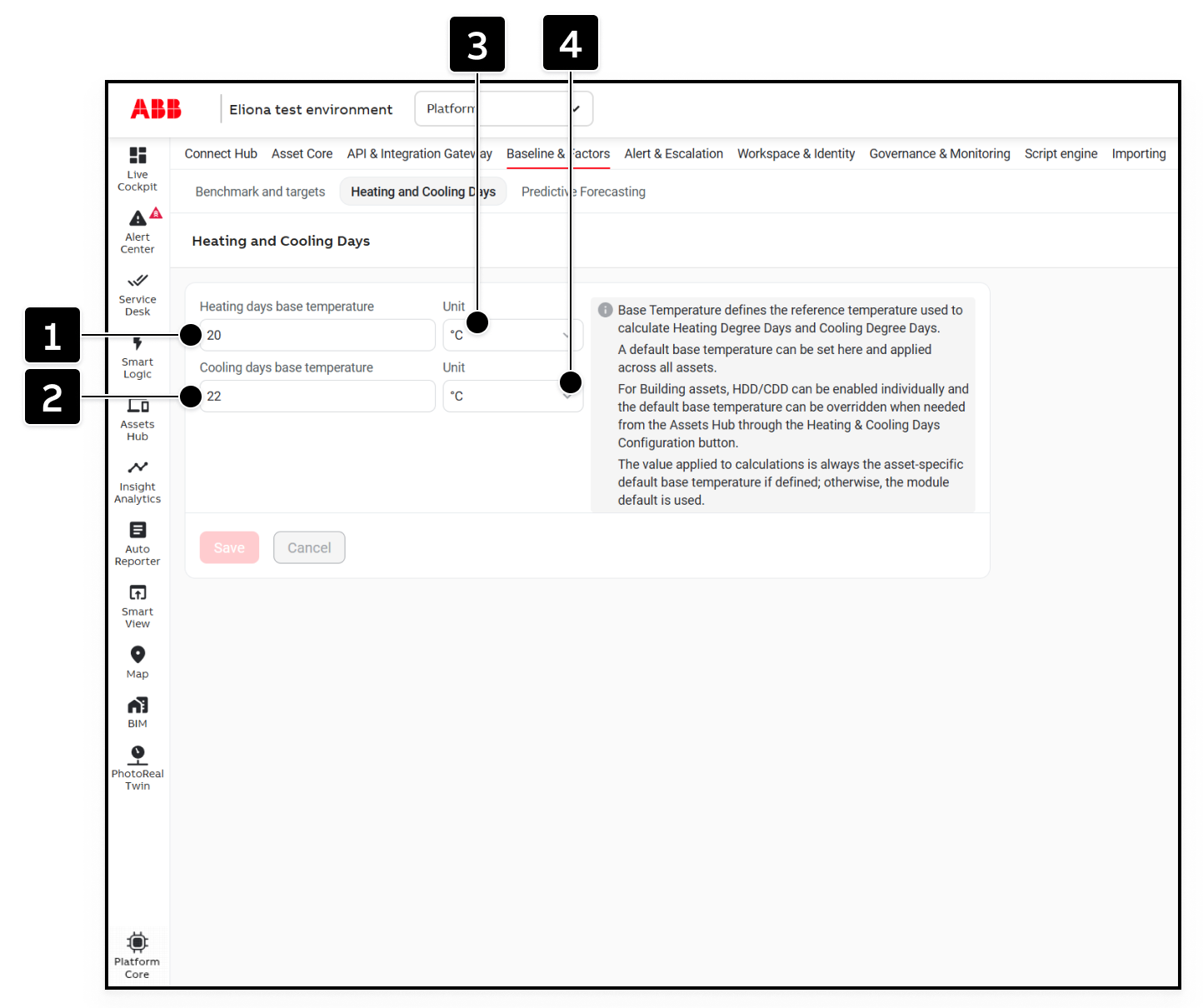
[1]
Heating days base temperature
Default reference temperature used to calculate Heating Degree Days.
[2]
Cooling days base temperature
Default reference temperature used to calculate Cooling Degree Days.
[3]
Heating days unit
Unit for the heating base temperature: °C or °F.
[4]
Cooling days unit
Unit for the cooling base temperature: °C or °F.
Configure Default Base Temperatures
Enter the default Heating Days base temperature under [1] and select its unit under [3].
Enter the default Cooling Days base temperature under [2] and select its unit under [4].
Click on Save.
These values are presets. When Heating Days or Cooling Days is enabled for an asset, its base temperature is initially filled from the tenant configuration. You can then retain the default or enter an asset-specific value.
Last updated