> For the complete documentation index, see [llms.txt](https://docs.buildings.ability.abb/collection/llms.txt). Markdown versions of documentation pages are available by appending `.md` to page URLs; this page is available as [Markdown](https://docs.buildings.ability.abb/collection/german-14.2-freezed/dokumentation/tickets/ticket-details.md).

# Ticket-Details

Die Ticket-Details bündeln Stammdaten, Statusaktionen, Kommentare, Tasks und das Arbeitsprotokoll.

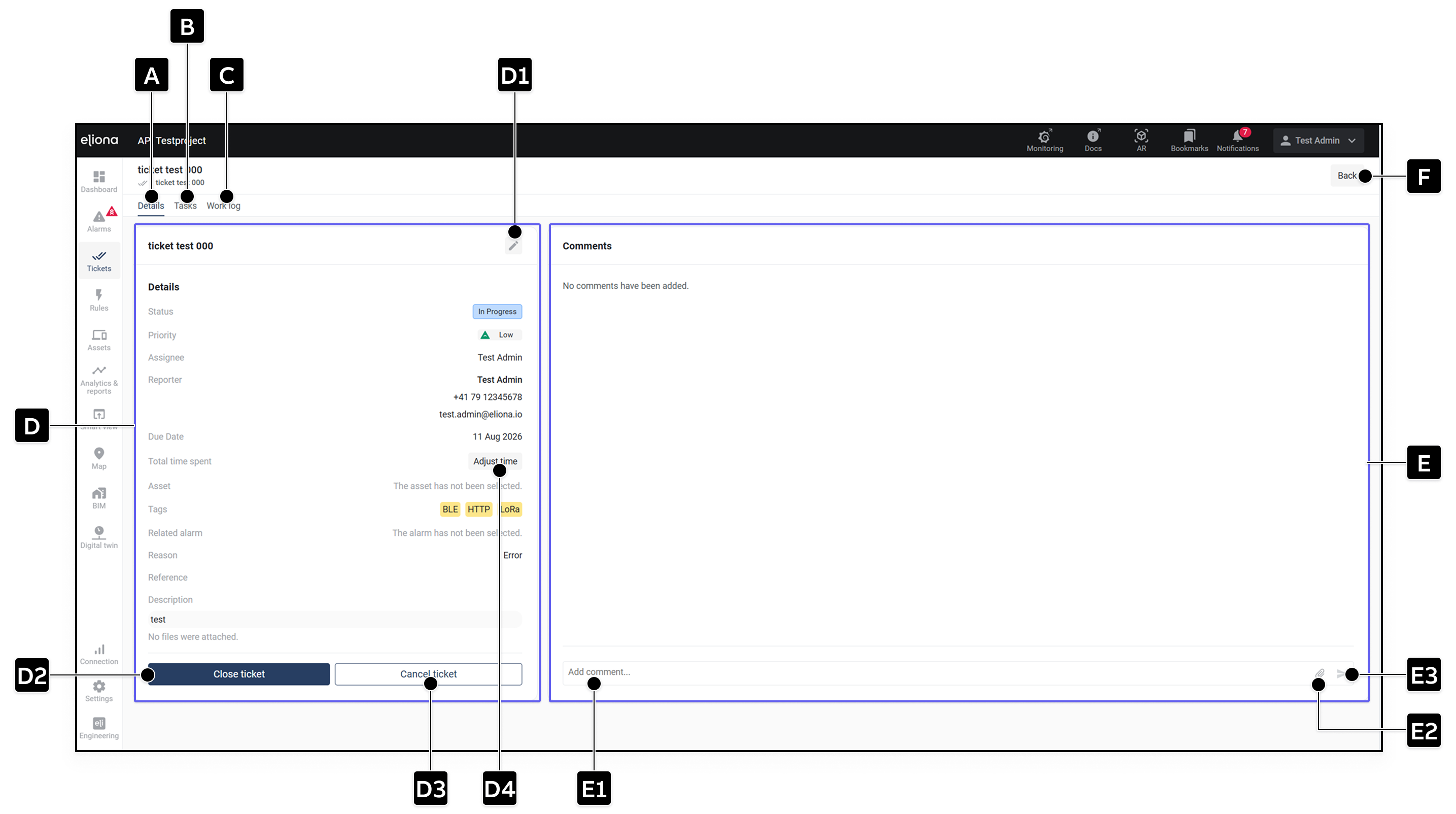
<div data-full-width="true"><figure><img src="https://1159464874-files.gitbook.io/~/files/v0/b/gitbook-x-prod.appspot.com/o/spaces%2FNyvwhz1kEMXcHf4HLuZ8%2Fuploads%2Fgit-blob-f7dcf69cd79bf9df5031e88541bfcf18d8c224fc%2FTicket%20Details.png?alt=media" alt="Ticket-Details mit Informationen und Kommentaren"><figcaption><p>Ticket-Details</p></figcaption></figure></div>

<table data-header-hidden data-search="false"><thead><tr><th width="68.52001953125">Element</th><th width="180">Titel</th><th>Beschreibung</th></tr></thead><tbody><tr><td><strong>[A]</strong></td><td>Details</td><td>Zeigt die Ticketinformationen.</td></tr><tr><td><strong>[B]</strong></td><td>Tasks</td><td>Öffnet die <a href="/collection/german-14.2-freezed/dokumentation/tickets/tasks-erstellen.md#tasks-anzeigen">-> Taskliste</a>.</td></tr><tr><td><strong>[C]</strong></td><td>Arbeitsprotokoll</td><td>Zeigt alle protokollierten Änderungen. <a href="/collection/german-14.2-freezed/dokumentation/tickets/timeline-und-arbeitsprotokoll.md">-> Timeline und Arbeitsprotokoll</a></td></tr><tr><td><strong>[D]</strong></td><td>Ticketinformationen</td><td>Enthalten Status, Priorität, Assignee, Melder, Fälligkeit, Zeit, Asset, Tags, Alarm, Grund, Referenznummer, Beschreibung und Anhänge.</td></tr><tr><td><strong>[D1]</strong></td><td>Bearbeiten</td><td>Öffnet die <a href="/collection/german-14.2-freezed/dokumentation/tickets/ticket-konfigurieren.md">-> Ticketkonfiguration</a>.</td></tr><tr><td><strong>[D2]</strong></td><td>Ticket schliessen</td><td>Schliesst das Ticket, sobald alle Tasks abgeschlossen sind.</td></tr><tr><td><strong>[D3]</strong></td><td>Ticket abbrechen</td><td>Bricht das Ticket ab.</td></tr><tr><td><strong>[D4]</strong></td><td>Gesamtzeit</td><td>Zeigt die automatisch berechnete oder manuell angepasste Arbeitszeit des Tickets.</td></tr><tr><td><strong>[E]</strong></td><td>Kommentare</td><td>Zeigt die vorhandenen Kommentare und Anhänge.</td></tr><tr><td><strong>[E1]</strong></td><td>Kommentar hinzufügen</td><td>Eingabefeld für einen neuen Kommentar.</td></tr><tr><td><strong>[E2]</strong></td><td>Datei anhängen</td><td>Fügt dem Kommentar eine Datei hinzu.</td></tr><tr><td><strong>[E3]</strong></td><td>Senden</td><td>Veröffentlicht den Kommentar.</td></tr><tr><td><strong>[F]</strong></td><td>Zurück</td><td>Kehrt zur Ticketliste zurück.</td></tr></tbody></table>

## Arbeitszeit

Die Gesamtzeit eines Tickets wird automatisch aus den Zeitangaben aller untergeordneten Tasks berechnet:

$$\text{Gesamtzeit des Tickets} = \sum \text{Zeitaufwand aller Tasks}$$

Mit **Zeit anpassen** kann ein berechtigter Benutzer die berechnete Gesamtzeit manuell überschreiben. Danach werden berechnete und angepasste Zeit unterschieden:

* Benutzer mit Verwaltungsrechten sehen sowohl die berechnete als auch die manuell angepasste Zeit.
* Benutzer mit reinem Lesezugriff sehen nur die manuell angepasste Zeit.
* Wird die Anpassung entfernt, gilt wieder die Summe der Task-Zeiten.

Manuelle Zeitangaben werden validiert. In den Dialogen wird klar unterschieden, ob die Zeit eines Tickets oder eines Tasks angepasst wird.

{% hint style="info" %}
Ein Ticket kann nur geschlossen werden, wenn es mindestens einen Task enthält und alle Tasks abgeschlossen sind. Die verfügbaren Statusaktionen richten sich zusätzlich nach den [-> Rechten für Tickets und Tasks](/collection/german-14.2-freezed/dokumentation/tickets/rechte-fuer-tickets-und-tasks.md).
{% endhint %}


---

# Agent Instructions
This documentation is published with GitBook. GitBook is the documentation platform designed so that both humans and AI agents can read, navigate, and reason over technical content effectively. Learn more at gitbook.com.

## Querying This Documentation
If you need additional information that is not directly available in this page, you can query the documentation dynamically by asking a question.

Perform an HTTP GET request on the current page URL with the `ask` query parameter, and the optional `goal` query parameter:

```
GET https://docs.buildings.ability.abb/collection/german-14.2-freezed/dokumentation/tickets/ticket-details.md?ask=<question>&goal=<endgoal>
```

`ask` is the immediate question: it should be specific, self-contained, and written in natural language.
`goal` is optional and describes the broader end goal you are ultimately trying to accomplish on behalf of the user. GitBook uses it to tailor the answer towards what is most useful for that goal.

The response will contain a direct answer to the question and relevant excerpts and sources from the documentation.

Use this mechanism when the answer is not explicitly present in the current page, you need clarification or additional context, or you want to retrieve related documentation sections.
