> For the complete documentation index, see [llms.txt](https://docs.buildings.ability.abb/collection/llms.txt). Markdown versions of documentation pages are available by appending `.md` to page URLs; this page is available as [Markdown](https://docs.buildings.ability.abb/collection/german-14.2-freezed/dokumentation/tickets.md).

# Tickets

Tickets sind Arbeitsaufträge in Eliona. Ein Ticket kann in mehrere Tasks unterteilt werden. Tasks bilden die einzelnen Arbeitsschritte ab und erfassen die dafür aufgewendete Zeit.

{% hint style="info" %}
Ein Ticket kann erst geschlossen werden, wenn es mindestens einen Task enthält und alle zugehörigen Tasks abgeschlossen sind.
{% endhint %}

## Ticket Management öffnen

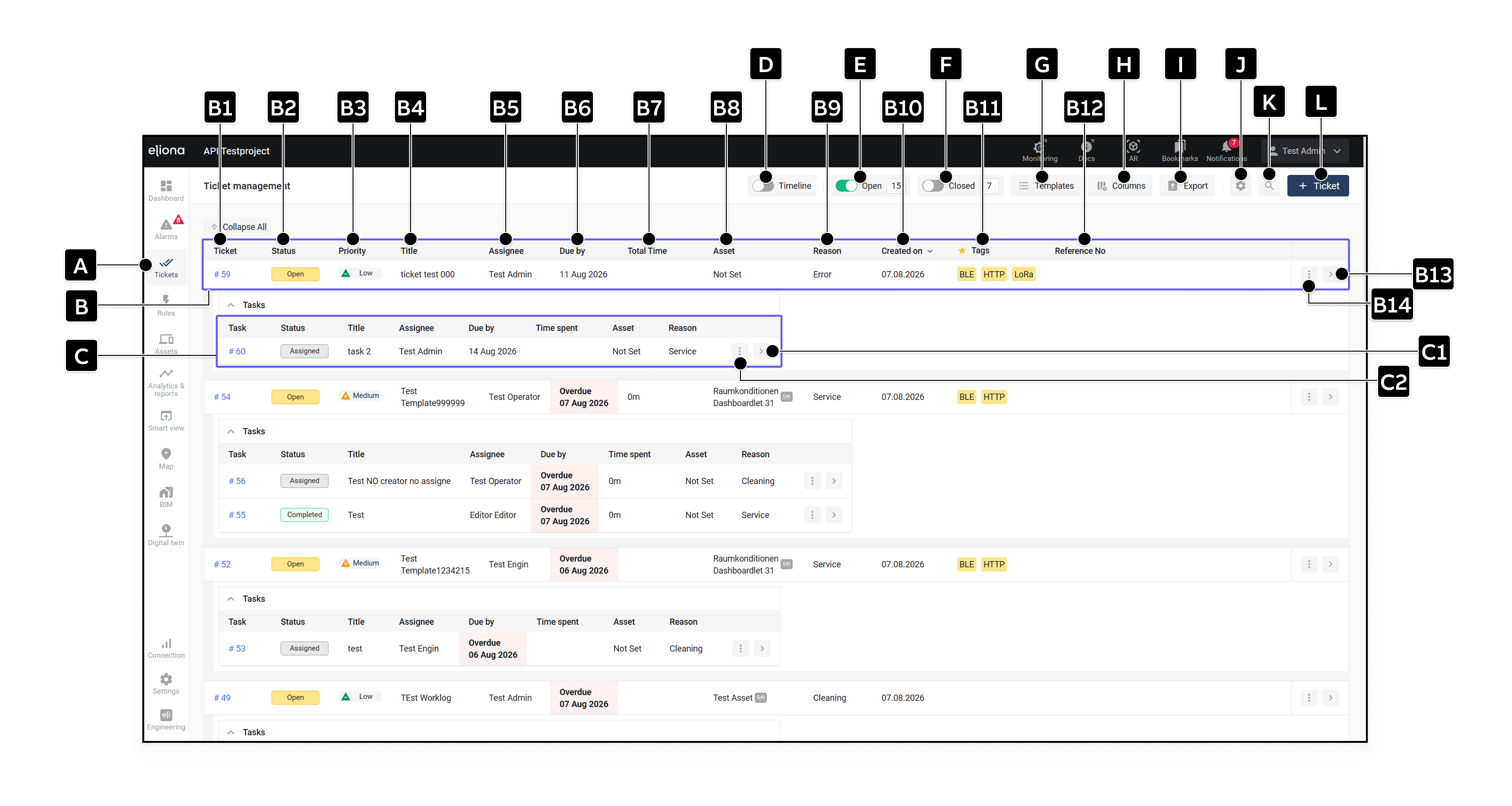
Klicken Sie in der Seitenleiste auf **Tickets \[A]**. Die Ticketliste zeigt offene und geschlossene Tickets sowie die zugehörigen Tasks.

<div data-full-width="true"><figure><img src="https://1159464874-files.gitbook.io/~/files/v0/b/gitbook-x-prod.appspot.com/o/spaces%2FNyvwhz1kEMXcHf4HLuZ8%2Fuploads%2Fgit-blob-33cc6c5dc9420b8b1bb1895c68ef7347b53831e7%2FTicket%20managemant.png?alt=media" alt="Ticket Management mit Ticketliste, Tasks und Bedienelementen"><figcaption><p>Ticket Management</p></figcaption></figure></div>

## Tickets und Tasks in der Liste

<table data-header-hidden data-search="false"><thead><tr><th width="67.87994384765625">Element</th><th width="139.03985595703125">Titel</th><th>Beschreibung</th></tr></thead><tbody><tr><td><strong>[B]</strong></td><td>Ticket</td><td>Eintrag für ein Ticket.</td></tr><tr><td><strong>[B1]</strong></td><td>Ticketnummer</td><td>Eindeutige Nummer des Tickets.</td></tr><tr><td><strong>[B2]</strong></td><td>Status</td><td>Aktueller Status des Tickets.</td></tr><tr><td><strong>[B3]</strong></td><td>Priorität</td><td>Priorität des Tickets.</td></tr><tr><td><strong>[B4]</strong></td><td>Titel</td><td>Titel des Tickets.</td></tr><tr><td><strong>[B5]</strong></td><td>Assignee</td><td>Person, der das Ticket zugewiesen ist.</td></tr><tr><td><strong>[B6]</strong></td><td>Fällig am</td><td>Fälligkeitsdatum oder Zeitraum. Überfällige offene Tickets werden rot als <strong>Überfällig</strong> gekennzeichnet. Der Vergleich erfolgt nach ganzen Kalendertagen; abgeschlossene oder abgebrochene Tickets gelten nicht als überfällig.</td></tr><tr><td><strong>[B7]</strong></td><td>Gesamtzeit</td><td>Summe der in allen untergeordneten Tasks erfassten Zeiten. Eine manuell angepasste Gesamtzeit kann diese Anzeige überschreiben. <a href="/collection/german-14.2-freezed/dokumentation/tickets/ticket-details.md#arbeitszeit">-> Mehr zur Zeitberechnung</a></td></tr><tr><td><strong>[B8]</strong></td><td>Asset</td><td>Zugeordnetes Asset.</td></tr><tr><td><strong>[B9]</strong></td><td>Grund</td><td>Grund des Tickets.</td></tr><tr><td><strong>[B10]</strong></td><td>Erstellt am</td><td>Erstellungsdatum.</td></tr><tr><td><strong>[B11]</strong></td><td>Tags</td><td>In der Übersicht erscheinen nur Tags aus favorisierten Kategorien. <a href="/collection/german-14.2-freezed/dokumentation/tags.md#kategorien-als-favorit-markieren">-> Kategorien als Favorit markieren</a></td></tr><tr><td><strong>[B12]</strong></td><td>Referenznummer</td><td>Frei definierbare Referenz, zum Beispiel eine externe Auftragsnummer.</td></tr><tr><td><strong>[B13]</strong></td><td>Öffnen</td><td>Öffnet die <a href="/collection/german-14.2-freezed/dokumentation/tickets/ticket-details.md">-> Ticket-Details</a>.</td></tr><tr><td><strong>[B14]</strong></td><td>Weitere Optionen</td><td>Öffnet zusätzliche Aktionen wie <strong>Gehe zu</strong>. Berechtigte Benutzer können das Ticket hier löschen.</td></tr><tr><td><strong>[C]</strong></td><td>Task</td><td>Eintrag für einen dem Ticket zugeordneten Task.</td></tr><tr><td><strong>[C1]</strong></td><td>Öffnen</td><td>Öffnet die Task-Details.</td></tr><tr><td><strong>[C2]</strong></td><td>Weitere Optionen</td><td>Öffnet zusätzliche Aktionen für den Task.</td></tr></tbody></table>

## Ansicht und Werkzeuge

<table data-header-hidden data-search="false"><thead><tr><th width="60.84002685546875">Element</th><th width="140.48004150390625">Titel</th><th>Beschreibung</th></tr></thead><tbody><tr><td><strong>[D]</strong></td><td>Timeline</td><td>Zeigt Tickets und Tasks auf einer Zeitleiste. <a href="/collection/german-14.2-freezed/dokumentation/tickets/timeline-und-arbeitsprotokoll.md#timeline">-> Timeline verwenden</a></td></tr><tr><td><strong>[E]</strong></td><td>Offen</td><td>Blendet offene Tickets ein oder aus.</td></tr><tr><td><strong>[F]</strong></td><td>Geschlossen</td><td>Blendet geschlossene Tickets ein oder aus.</td></tr><tr><td><strong>[G]</strong></td><td>Templates</td><td>Öffnet die Vorlagenverwaltung. <a href="/collection/german-14.2-freezed/dokumentation/tickets/ticket-templates.md">-> Ticket-Templates</a></td></tr><tr><td><strong>[H]</strong></td><td>Spalten</td><td>Legt fest, welche Ticket- und verschachtelten Task-Spalten angezeigt werden und in welcher Reihenfolge.</td></tr><tr><td><strong>[I]</strong></td><td>Export</td><td>Exportiert die aktuell gefilterten Tickets und Tasks als CSV- oder XLSX-Datei. Der Export enthält unter anderem Fälligkeitszeiträume, angepasste Zeiten, Task-Erstellungsdaten und Ticketbeschreibungen.</td></tr><tr><td><strong>[J]</strong></td><td>Einstellungen</td><td>Öffnet die <a href="/collection/german-14.2-freezed/dokumentation/tickets/ticket-einstellungen.md">-> Ticket- und Task-Einstellungen</a>.</td></tr><tr><td><strong>[K]</strong></td><td>Filter</td><td>Öffnet die Filter-Seitenleiste.</td></tr><tr><td><strong>[L]</strong></td><td>Ticket erstellen</td><td>Öffnet das Formular für ein neues Ticket. <a href="/collection/german-14.2-freezed/dokumentation/tickets/tickets-erstellen.md">-> Tickets erstellen</a></td></tr></tbody></table>

Welche Aktionen verfügbar sind, hängt von der Projektrolle und der Beziehung zum Ticket oder Task ab. [-> Rechte für Tickets und Tasks](/collection/german-14.2-freezed/dokumentation/tickets/rechte-fuer-tickets-und-tasks.md)


---

# Agent Instructions
This documentation is published with GitBook. GitBook is the documentation platform designed so that both humans and AI agents can read, navigate, and reason over technical content effectively. Learn more at gitbook.com.

## Querying This Documentation
If you need additional information that is not directly available in this page, you can query the documentation dynamically by asking a question.

Perform an HTTP GET request on the current page URL with the `ask` query parameter, and the optional `goal` query parameter:

```
GET https://docs.buildings.ability.abb/collection/german-14.2-freezed/dokumentation/tickets.md?ask=<question>&goal=<endgoal>
```

`ask` is the immediate question: it should be specific, self-contained, and written in natural language.
`goal` is optional and describes the broader end goal you are ultimately trying to accomplish on behalf of the user. GitBook uses it to tailor the answer towards what is most useful for that goal.

The response will contain a direct answer to the question and relevant excerpts and sources from the documentation.

Use this mechanism when the answer is not explicitly present in the current page, you need clarification or additional context, or you want to retrieve related documentation sections.
