Ticket Management
Ticket Management
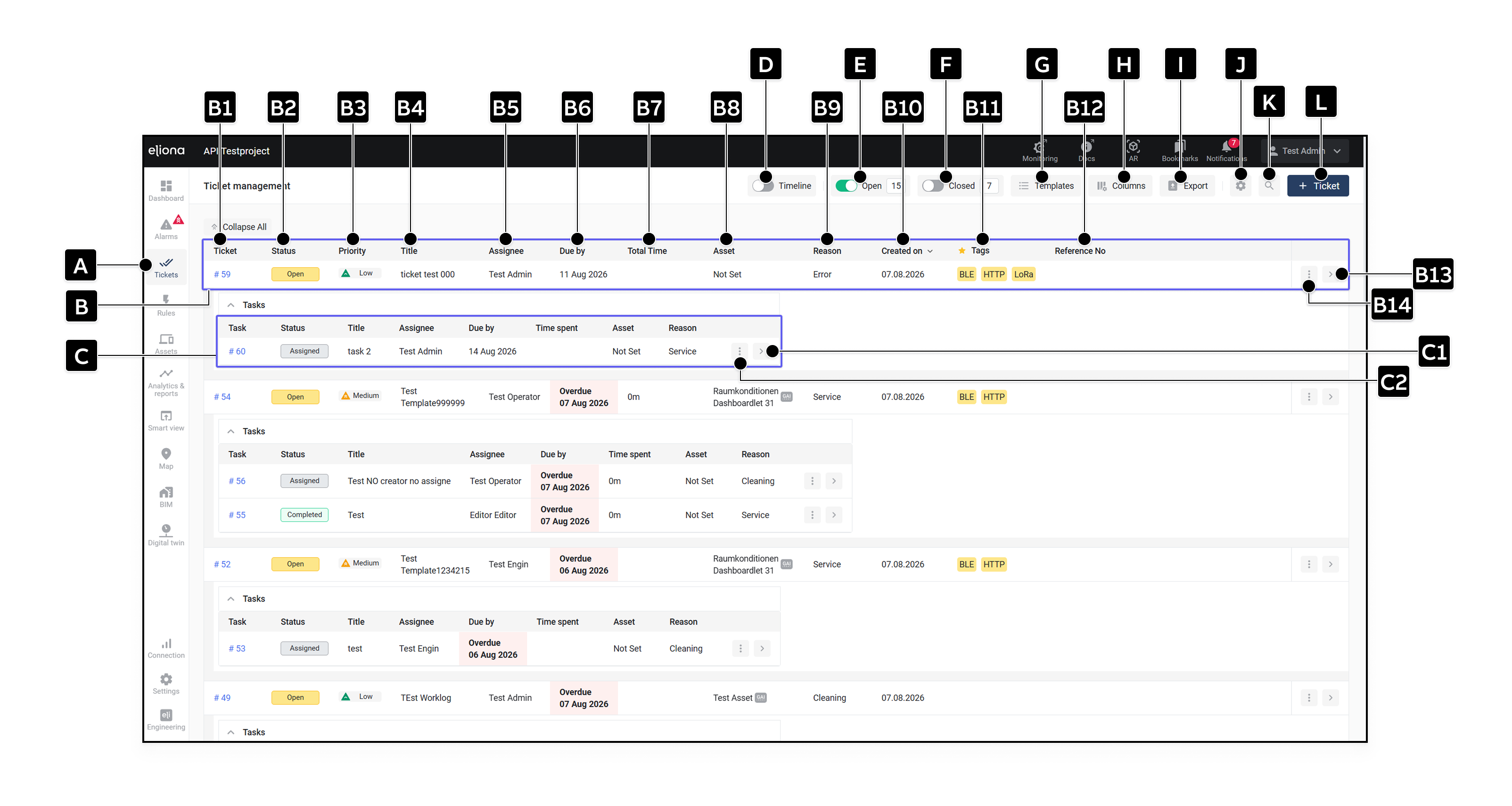
| Element | Title | Description |
|---|---|---|
| [B] | Ticket | Entry for a ticket. |
| [B1] | Ticket number | Unique number of the ticket. |
| [B2] | Status | Current status of the ticket. |
| [B3] | Priority | Priority of the ticket. |
| [B4] | Title | Title of the ticket. |
| [B5] | Assignee | Person assigned to the ticket. |
| [B6] | Due on | Due date or period. Overdue open tickets are shown in red as Overdue marked. The comparison is made by whole calendar days; completed or canceled tickets are not considered overdue. |
| [B7] | Total time | Sum of the times recorded in all subordinate tasks. A manually adjusted total time can override this display. -> More about time calculation |
| [B8] | Asset | Assigned asset. |
| [B9] | Reason | Reason for the ticket. |
| [B10] | Created on | Creation date. |
| [B11] | Tags | Only tags from favorited categories appear in the overview. -> Mark categories as favorites |
| [B12] | Reference number | Freely definable reference, for example an external order number. |
| [B13] | Open | Opens the -> Ticket details. |
| [B14] | More options | Opens additional actions such as Go to. Authorized users can delete the ticket here. |
| [C] | Task | Entry for a task assigned to the ticket. |
| [C1] | Open | Opens the task details. |
| [C2] | More options | Opens additional actions for the task. |
| Element | Title | Description |
|---|---|---|
| [D] | Timeline | Displays tickets and tasks on a timeline. -> Use timeline |
| [E] | Open | Shows or hides open tickets. |
| [F] | Closed | Shows or hides closed tickets. |
| [G] | Templates | Opens the template management. -> Ticket templates |
| [H] | Columns | Determines which ticket and nested task columns are displayed and in what order. |
| [I] | Export | Exports the currently filtered tickets and tasks as a CSV or XLSX file. The export includes, among other things, due periods, adjusted times, task creation dates, and ticket descriptions. |
| [J] | Settings | Opens the -> Ticket and task settings. |
| [K] | Filter | Opens the filter sidebar. |
| [L] | Create ticket | Opens the form for a new ticket. -> Create tickets |